Swagger-editor: Generate Server functionality is not working in the online version (https://editor.swagger.io)
| Q | A
| ----------------------------------- | -------
| Bug or feature request? | Bug
| Which Swagger/OpenAPI version? | Online
| Which Swagger-Editor version? | 2.0
| How did you install Swagger-Editor? | N/A
| Which broswer & version? | Chrome (Version 63.0.3239.84 (Official Build) (64-bit) & Firefox 57.0.2 (64-bit)
| Which operating system? | Windows
Demonstration API definition
swagger: "2.0"
info:
  description: "This is a sample server Petstore server.  You can find out more about     Swagger at [http://swagger.io](http://swagger.io) or on [irc.freenode.net, #swagger](http://swagger.io/irc/).      For this sample, you can use the api key `special-key` to test the authorization     filters."
  version: "1.0.0"
  title: "Swagger Petstore"
  termsOfService: "http://swagger.io/terms/"
  contact:
    email: "[email protected]"
  license:
    name: "Apache 2.0"
    url: "http://www.apache.org/licenses/LICENSE-2.0.html"
host: "petstore.swagger.io"
basePath: "/v2"
tags:
- name: "pet"
  description: "Everything about your Pets"
  externalDocs:
    description: "Find out more"
    url: "http://swagger.io"
- name: "store"
  description: "Access to Petstore orders"
- name: "user"
  description: "Operations about user"
  externalDocs:
    description: "Find out more about our store"
    url: "http://swagger.io"
schemes:
- "http"
paths:
  /pet:
    post:
      tags:
      - "pet"
      summary: "Add a new pet to the store"
      description: ""
      operationId: "addPet"
      consumes:
      - "application/json"
      - "application/xml"
      produces:
      - "application/xml"
      - "application/json"
      parameters:
      - in: "body"
        name: "body"
        description: "Pet object that needs to be added to the store"
        required: true
        schema:
          $ref: "#/definitions/Pet"
      responses:
        405:
          description: "Invalid input"
      security:
      - petstore_auth:
        - "write:pets"
        - "read:pets"
    put:
      tags:
      - "pet"
      summary: "Update an existing pet"
      description: ""
      operationId: "updatePet"
      consumes:
      - "application/json"
      - "application/xml"
      produces:
      - "application/xml"
      - "application/json"
      parameters:
      - in: "body"
        name: "body"
        description: "Pet object that needs to be added to the store"
        required: true
        schema:
          $ref: "#/definitions/Pet"
      responses:
        400:
          description: "Invalid ID supplied"
        404:
          description: "Pet not found"
        405:
          description: "Validation exception"
      security:
      - petstore_auth:
        - "write:pets"
        - "read:pets"
  /pet/findByStatus:
    get:
      tags:
      - "pet"
      summary: "Finds Pets by status"
      description: "Multiple status values can be provided with comma separated strings"
      operationId: "findPetsByStatus"
      produces:
      - "application/xml"
      - "application/json"
      parameters:
      - name: "status"
        in: "query"
        description: "Status values that need to be considered for filter"
        required: true
        type: "array"
        items:
          type: "string"
          enum:
          - "available"
          - "pending"
          - "sold"
          default: "available"
        collectionFormat: "multi"
      responses:
        200:
          description: "successful operation"
          schema:
            type: "array"
            items:
              $ref: "#/definitions/Pet"
        400:
          description: "Invalid status value"
      security:
      - petstore_auth:
        - "write:pets"
        - "read:pets"
  /pet/findByTags:
    get:
      tags:
      - "pet"
      summary: "Finds Pets by tags"
      description: "Muliple tags can be provided with comma separated strings. Use         tag1, tag2, tag3 for testing."
      operationId: "findPetsByTags"
      produces:
      - "application/xml"
      - "application/json"
      parameters:
      - name: "tags"
        in: "query"
        description: "Tags to filter by"
        required: true
        type: "array"
        items:
          type: "string"
        collectionFormat: "multi"
      responses:
        200:
          description: "successful operation"
          schema:
            type: "array"
            items:
              $ref: "#/definitions/Pet"
        400:
          description: "Invalid tag value"
      security:
      - petstore_auth:
        - "write:pets"
        - "read:pets"
      deprecated: true
  /pet/{petId}:
    get:
      tags:
      - "pet"
      summary: "Find pet by ID"
      description: "Returns a single pet"
      operationId: "getPetById"
      produces:
      - "application/xml"
      - "application/json"
      parameters:
      - name: "petId"
        in: "path"
        description: "ID of pet to return"
        required: true
        type: "integer"
        format: "int64"
      responses:
        200:
          description: "successful operation"
          schema:
            $ref: "#/definitions/Pet"
        400:
          description: "Invalid ID supplied"
        404:
          description: "Pet not found"
      security:
      - api_key: []
    post:
      tags:
      - "pet"
      summary: "Updates a pet in the store with form data"
      description: ""
      operationId: "updatePetWithForm"
      consumes:
      - "application/x-www-form-urlencoded"
      produces:
      - "application/xml"
      - "application/json"
      parameters:
      - name: "petId"
        in: "path"
        description: "ID of pet that needs to be updated"
        required: true
        type: "integer"
        format: "int64"
      - name: "name"
        in: "formData"
        description: "Updated name of the pet"
        required: false
        type: "string"
      - name: "status"
        in: "formData"
        description: "Updated status of the pet"
        required: false
        type: "string"
      responses:
        405:
          description: "Invalid input"
      security:
      - petstore_auth:
        - "write:pets"
        - "read:pets"
    delete:
      tags:
      - "pet"
      summary: "Deletes a pet"
      description: ""
      operationId: "deletePet"
      produces:
      - "application/xml"
      - "application/json"
      parameters:
      - name: "api_key"
        in: "header"
        required: false
        type: "string"
      - name: "petId"
        in: "path"
        description: "Pet id to delete"
        required: true
        type: "integer"
        format: "int64"
      responses:
        400:
          description: "Invalid ID supplied"
        404:
          description: "Pet not found"
      security:
      - petstore_auth:
        - "write:pets"
        - "read:pets"
  /pet/{petId}/uploadImage:
    post:
      tags:
      - "pet"
      summary: "uploads an image"
      description: ""
      operationId: "uploadFile"
      consumes:
      - "multipart/form-data"
      produces:
      - "application/json"
      parameters:
      - name: "petId"
        in: "path"
        description: "ID of pet to update"
        required: true
        type: "integer"
        format: "int64"
      - name: "additionalMetadata"
        in: "formData"
        description: "Additional data to pass to server"
        required: false
        type: "string"
      - name: "file"
        in: "formData"
        description: "file to upload"
        required: false
        type: "file"
      responses:
        200:
          description: "successful operation"
          schema:
            $ref: "#/definitions/ApiResponse"
      security:
      - petstore_auth:
        - "write:pets"
        - "read:pets"
  /store/inventory:
    get:
      tags:
      - "store"
      summary: "Returns pet inventories by status"
      description: "Returns a map of status codes to quantities"
      operationId: "getInventory"
      produces:
      - "application/json"
      parameters: []
      responses:
        200:
          description: "successful operation"
          schema:
            type: "object"
            additionalProperties:
              type: "integer"
              format: "int32"
      security:
      - api_key: []
  /store/order:
    post:
      tags:
      - "store"
      summary: "Place an order for a pet"
      description: ""
      operationId: "placeOrder"
      produces:
      - "application/xml"
      - "application/json"
      parameters:
      - in: "body"
        name: "body"
        description: "order placed for purchasing the pet"
        required: true
        schema:
          $ref: "#/definitions/Order"
      responses:
        200:
          description: "successful operation"
          schema:
            $ref: "#/definitions/Order"
        400:
          description: "Invalid Order"
  /store/order/{orderId}:
    get:
      tags:
      - "store"
      summary: "Find purchase order by ID"
      description: "For valid response try integer IDs with value >= 1 and <= 10.         Other values will generated exceptions"
      operationId: "getOrderById"
      produces:
      - "application/xml"
      - "application/json"
      parameters:
      - name: "orderId"
        in: "path"
        description: "ID of pet that needs to be fetched"
        required: true
        type: "integer"
        maximum: 10.0
        minimum: 1.0
        format: "int64"
      responses:
        200:
          description: "successful operation"
          schema:
            $ref: "#/definitions/Order"
        400:
          description: "Invalid ID supplied"
        404:
          description: "Order not found"
    delete:
      tags:
      - "store"
      summary: "Delete purchase order by ID"
      description: "For valid response try integer IDs with positive integer value.         Negative or non-integer values will generate API errors"
      operationId: "deleteOrder"
      produces:
      - "application/xml"
      - "application/json"
      parameters:
      - name: "orderId"
        in: "path"
        description: "ID of the order that needs to be deleted"
        required: true
        type: "integer"
        minimum: 1.0
        format: "int64"
      responses:
        400:
          description: "Invalid ID supplied"
        404:
          description: "Order not found"
  /user:
    post:
      tags:
      - "user"
      summary: "Create user"
      description: "This can only be done by the logged in user."
      operationId: "createUser"
      produces:
      - "application/xml"
      - "application/json"
      parameters:
      - in: "body"
        name: "body"
        description: "Created user object"
        required: true
        schema:
          $ref: "#/definitions/User"
      responses:
        default:
          description: "successful operation"
  /user/createWithArray:
    post:
      tags:
      - "user"
      summary: "Creates list of users with given input array"
      description: ""
      operationId: "createUsersWithArrayInput"
      produces:
      - "application/xml"
      - "application/json"
      parameters:
      - in: "body"
        name: "body"
        description: "List of user object"
        required: true
        schema:
          type: "array"
          items:
            $ref: "#/definitions/User"
      responses:
        default:
          description: "successful operation"
  /user/createWithList:
    post:
      tags:
      - "user"
      summary: "Creates list of users with given input array"
      description: ""
      operationId: "createUsersWithListInput"
      produces:
      - "application/xml"
      - "application/json"
      parameters:
      - in: "body"
        name: "body"
        description: "List of user object"
        required: true
        schema:
          type: "array"
          items:
            $ref: "#/definitions/User"
      responses:
        default:
          description: "successful operation"
  /user/login:
    get:
      tags:
      - "user"
      summary: "Logs user into the system"
      description: ""
      operationId: "loginUser"
      produces:
      - "application/xml"
      - "application/json"
      parameters:
      - name: "username"
        in: "query"
        description: "The user name for login"
        required: true
        type: "string"
      - name: "password"
        in: "query"
        description: "The password for login in clear text"
        required: true
        type: "string"
      responses:
        200:
          description: "successful operation"
          schema:
            type: "string"
          headers:
            X-Rate-Limit:
              type: "integer"
              format: "int32"
              description: "calls per hour allowed by the user"
            X-Expires-After:
              type: "string"
              format: "date-time"
              description: "date in UTC when token expires"
        400:
          description: "Invalid username/password supplied"
  /user/logout:
    get:
      tags:
      - "user"
      summary: "Logs out current logged in user session"
      description: ""
      operationId: "logoutUser"
      produces:
      - "application/xml"
      - "application/json"
      parameters: []
      responses:
        default:
          description: "successful operation"
  /user/{username}:
    get:
      tags:
      - "user"
      summary: "Get user by user name"
      description: ""
      operationId: "getUserByName"
      produces:
      - "application/xml"
      - "application/json"
      parameters:
      - name: "username"
        in: "path"
        description: "The name that needs to be fetched. Use user1 for testing. "
        required: true
        type: "string"
      responses:
        200:
          description: "successful operation"
          schema:
            $ref: "#/definitions/User"
        400:
          description: "Invalid username supplied"
        404:
          description: "User not found"
    put:
      tags:
      - "user"
      summary: "Updated user"
      description: "This can only be done by the logged in user."
      operationId: "updateUser"
      produces:
      - "application/xml"
      - "application/json"
      parameters:
      - name: "username"
        in: "path"
        description: "name that need to be updated"
        required: true
        type: "string"
      - in: "body"
        name: "body"
        description: "Updated user object"
        required: true
        schema:
          $ref: "#/definitions/User"
      responses:
        400:
          description: "Invalid user supplied"
        404:
          description: "User not found"
    delete:
      tags:
      - "user"
      summary: "Delete user"
      description: "This can only be done by the logged in user."
      operationId: "deleteUser"
      produces:
      - "application/xml"
      - "application/json"
      parameters:
      - name: "username"
        in: "path"
        description: "The name that needs to be deleted"
        required: true
        type: "string"
      responses:
        400:
          description: "Invalid username supplied"
        404:
          description: "User not found"
securityDefinitions:
  petstore_auth:
    type: "oauth2"
    authorizationUrl: "http://petstore.swagger.io/oauth/dialog"
    flow: "implicit"
    scopes:
      write:pets: "modify pets in your account"
      read:pets: "read your pets"
  api_key:
    type: "apiKey"
    name: "api_key"
    in: "header"
definitions:
  Order:
    type: "object"
    properties:
      id:
        type: "integer"
        format: "int64"
      petId:
        type: "integer"
        format: "int64"
      quantity:
        type: "integer"
        format: "int32"
      shipDate:
        type: "string"
        format: "date-time"
      status:
        type: "string"
        description: "Order Status"
        enum:
        - "placed"
        - "approved"
        - "delivered"
      complete:
        type: "boolean"
        default: false
    xml:
      name: "Order"
  Category:
    type: "object"
    properties:
      id:
        type: "integer"
        format: "int64"
      name:
        type: "string"
    xml:
      name: "Category"
  User:
    type: "object"
    properties:
      id:
        type: "integer"
        format: "int64"
      username:
        type: "string"
      firstName:
        type: "string"
      lastName:
        type: "string"
      email:
        type: "string"
      password:
        type: "string"
      phone:
        type: "string"
      userStatus:
        type: "integer"
        format: "int32"
        description: "User Status"
    xml:
      name: "User"
  Tag:
    type: "object"
    properties:
      id:
        type: "integer"
        format: "int64"
      name:
        type: "string"
    xml:
      name: "Tag"
  Pet:
    type: "object"
    required:
    - "name"
    - "photoUrls"
    properties:
      id:
        type: "integer"
        format: "int64"
      category:
        $ref: "#/definitions/Category"
      name:
        type: "string"
        example: "doggie"
      photoUrls:
        type: "array"
        xml:
          name: "photoUrl"
          wrapped: true
        items:
          type: "string"
      tags:
        type: "array"
        xml:
          name: "tag"
          wrapped: true
        items:
          $ref: "#/definitions/Tag"
      status:
        type: "string"
        description: "pet status in the store"
        enum:
        - "available"
        - "pending"
        - "sold"
    xml:
      name: "Pet"
  ApiResponse:
    type: "object"
    properties:
      code:
        type: "integer"
        format: "int32"
      type:
        type: "string"
      message:
        type: "string"
externalDocs:
  description: "Find out more about Swagger"
  url: "http://swagger.io"
Expected Behavior
Expect the editor go give me a zip/tar ball to download with the generated sources like it does when I generate the client.
Current Behavior
Under Generate Server I have tried several options (Go/aspnetcore/scalatra/spring/jaxrs-*) but no sources are generated.
Context
Trying to promote adoption of Swagger in my team and the instability of the official online version when it comes to generating sources raises concerns.
 mustafamotiwala
All 15 comments
Hi @mustafamotiwala, thanks for the report.
Are you using editor.swagger.io? If so, are you accessing it over HTTP or over HTTPS?
 shockey
on 19 Dec 2017
shockey
on 19 Dec 2017
@shockey Thanks for the quick response. Yes I am using editor.swagger.io over https
mustafamotiwala
on 19 Dec 2017
Aha :) This is a duplicate of https://github.com/swagger-api/swagger-editor/issues/1474, then, so I'm going to close this in favor of that ticket!
I'm going to do my best to address the issue this week, since it's a recurring issue for folks.
shockey
on 19 Dec 2017
@shockey I didn't bother checking the console so didn't realize it was HTTPS related but that's nice. The work around for the time being is to use HTTP instead of HTTPS
mustafamotiwala
on 19 Dec 2017
@shockey
I'm still experiencing a download error, client or server, served over HTTP. Should I open a new ticket, do you want to reopen this one, am I doing something wrong?
Google Chrome | 63.0.3239.132 (Official Build) (64-bit) (cohort: Stable)
Revision | 2e6edcfee630baa3775f37cb11796b1603a64360-refs/branch-heads/3239@{#709}
OS | Windows
JavaScript | V8 6.3.292.49
topbar.jsx:179 Uncaught (in promise) TypeError: Cannot read property 'downloadFile' of undefined
at topbar.jsx:179
at
 alevinetx
on 28 Jan 2018
alevinetx
on 28 Jan 2018
@shockey @alevinetx I'm getting this too
topbar.jsx:179 Uncaught (in promise) TypeError: Cannot read property 'downloadFile' of undefined
at topbar.jsx:179
at
I'm also getting this as soon as the editor loads
TypeError: n.slice is not a function
at swagger-ui.js:1
at immutable.js:3016
at immutable.js:3016
at immutable.js:2867
at Ne.__iterate (immutable.js:2206)
at it.__iterate (immutable.js:2867)
at r.__iterateUncached (immutable.js:3015)
at U (immutable.js:604)
at r.M.__iterate (immutable.js:320)
at r.__iterateUncached (immutable.js:3015)
 manoadamro
on 29 Jan 2018
manoadamro
on 29 Jan 2018
@alevinetx @manoadamro, the downloadFile issue was fixed in https://github.com/swagger-api/swagger-editor/issues/1648 today!
shockey
on 30 Jan 2018
I can still not generate server-side code. I tried the new editor and the old editor over HTTP and HTTPS without success. The request is always failing with a 500 Internal Server Error.
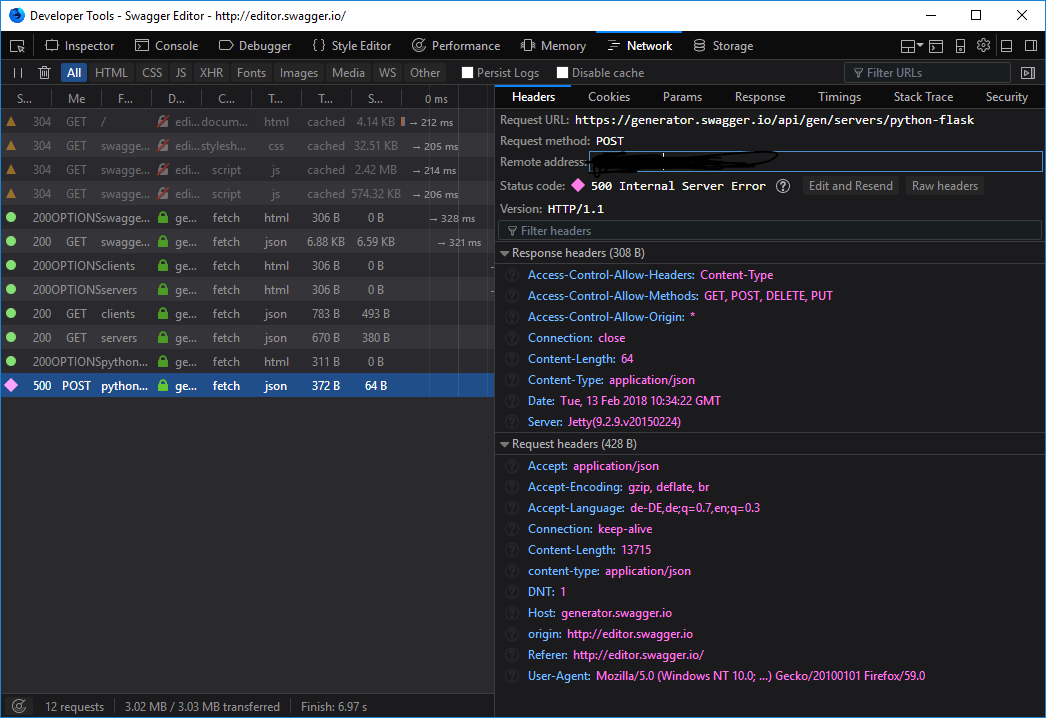
I also observe the same error for the docker version.
Any ideas?
P.S.: As workaround I'm using the Docker container swagger-codegen-cli locally and running the generator as described under Swagger Codegen CLI Docker Image.
 thinkh
on 13 Feb 2018
thinkh
on 13 Feb 2018
@thinkh apologies! the Generator service crashed last night, it should be back as of 9 hours ago 😄
shockey
on 14 Feb 2018
@shockey No worries, now it's working like charme. Thanks for taking care. 👍
thinkh
on 14 Feb 2018
Still not working here.
 gaui
on 7 Mar 2018
gaui
on 7 Mar 2018
Just tried this isn't working yet.
 codeMinter
on 13 May 2018
codeMinter
on 13 May 2018
@gurmeetb, it's working for me when I try to generate a server from the Swagger 2.0 Petstore.
Does that work for you? If it does, can you provide a Swagger definition that doesn't work, so we can look into it?
Thanks!
shockey
on 15 May 2018
It doesn't seems to work now.
 keisinm
on 31 May 2018
keisinm
on 31 May 2018
Hi everyone, I’m going to lock this thread since the original problem was identified as a duplicate long ago.
If you’re having a Generator interface issue, please file a new issue. Thanks!
shockey
on 31 May 2018
Related issues
 confuser
·
6Comments
confuser
·
6Comments
 fchebbo
·
5Comments
fchebbo
·
5Comments
 korenlev
·
4Comments
korenlev
·
4Comments
 variable
·
4Comments
variable
·
4Comments
 gnieutin
·
4Comments
gnieutin
·
4Comments
Most helpful comment
Still not working here.