Swagger-editor: JSON References resolve base path - version 3
With version 3 of the editor, it does not resolve relative references.
Version 2 seems to have it fixed.
https://github.com/swagger-api/swagger-editor/pull/1000
Version 2 of the editor has a preference panel, where the 'Pointer Resolution Base Path' can be set. How this can be done in Version 3?
  Clinic:
    $ref: './Clinic.yaml'
Could not resolve reference because of: Tried to resolve a relative URL, without having a basePath. path: './Clinic.yaml' basePath: 'undefined'
Jump to line 59
 okwei2000
All 59 comments
Can you share a full definition?
 webron
on 20 Jul 2017
webron
on 20 Jul 2017
A.yaml (The main file, it's accessible by http://myhost.com/A.yaml)
swagger: '2.0'
info:
  title: Service A
  version: 1.0.0
host: www.myhost.com
schemes:
  - https
basePath: /rest/
produces:
  - application/json
  - application/xml
paths:
  /test:
    get:
      summary: Summary
      consumes:
        - application/json
        - application/xml
      parameters:
        - name: code
          in: query
          description: The code to search for
          required: true
          type: string
      responses:
        '200':
          description: Clinics
          schema:
            $ref: './B.yaml'
B.yaml (in the same directory, http://myhost.com/B.yaml)
type: object
properties:
  name:
    type: string
I got error:
Resolver error at paths./test.get.responses.200.schema.$ref
Could not resolve reference because of: Tried to resolve a relative URL, without having a basePath. path: './B.yaml' basePath: 'undefined'
Jump to line 29
If I replace the $ref: './B.yaml' with $ref: 'http://myhost.com/B.yaml', then everything is OK.
okwei2000
on 20 Jul 2017
+1 I'm having the same issue. It would be nice to be able to set 'Pointer Resolution Base Path' in version 3.
 moon0326
on 20 Jul 2017
moon0326
on 20 Jul 2017
I don't see the behavior of this being changed soon. The editor works locally and has no knowledge of where the file is hosted.
webron
on 20 Jul 2017
@webron that's exactly the reason the 2.x release had the useful option pointerResolutionBasePath
 gunzip
on 20 Jul 2017
gunzip
on 20 Jul 2017
I understand, but in terms of priorities, it's not at the top. We'll gladly review PRs though.
webron
on 20 Jul 2017
In the mean time, is there a workaround? can I hard code the pointerResolutionBasePath somewhere in the source code?
okwei2000
on 21 Jul 2017
My workaround has been to use the docker image swaggerapi/swagger.io-editor, which allows you to revert to the 2.x interface and use the old preference settings.
EDIT: Just noticed that the link simply takes you to the hosted version on swagger.io, so if you're trying to do only local work that won't help you.
 jbinnography
on 26 Jul 2017
jbinnography
on 26 Jul 2017
Ouch! I this effectively means I can't use version 3 for big projects where things need to be organized into multiple files for clarity.
 joshmaker
on 14 Sep 2017
joshmaker
on 14 Sep 2017
@joshmaker My current workaround..
https://github.com/moon0326/swagger-ui-watcher works fine with local relative path without base path. It now supports OpenAPI as well.
moon0326
on 14 Sep 2017
thx
 GitHub30
on 10 Nov 2017
GitHub30
on 10 Nov 2017
I need to rollback but I cant find version 2.x of swagger-editor-dist.
 intotecho
on 15 Dec 2017
intotecho
on 15 Dec 2017
+1 for a resolution to this issue. It prevents using v3 of the editor for larger projects.
 andy-maier
on 6 Feb 2018
andy-maier
on 6 Feb 2018
+1 - this is kind of a big deal to me as well
 CameronGo
on 6 Feb 2018
CameronGo
on 6 Feb 2018
+1 same for me, our team is fine with the portability of the online editor, but we're still forced to use v2 editor because of this...
 arlix85
on 16 Feb 2018
arlix85
on 16 Feb 2018
Same for me, I need relative paths in documents because there's distinct enviroments hosting Swagger-editor (i.e., distinct URLs).
 giuliana-bezerra
on 21 Feb 2018
giuliana-bezerra
on 21 Feb 2018
+1 for a fix of this issue.Without references to local schema files we need to look around for another tool :(
 sprelacart
on 6 Mar 2018
sprelacart
on 6 Mar 2018
+1 - V2 only viable option for real world API development that leverages common schema definitions in separate file(s). Very disappointing.
 liam-donohoe
on 6 Mar 2018
liam-donohoe
on 6 Mar 2018
+1 would love to use it as well.
 jorgii
on 20 Mar 2018
jorgii
on 20 Mar 2018
Could you update what's the status of this PR? We externalized definitions in yams files, and couldn't reference them in any swagger-editor V 3 (the latest tried 3..5.1) using relative paths that we are able to resolve in V 2 (e.g. $ref: './external.yaml#someDef'). It's a major roadblock for us to move to V 3
 zbajbutovic
on 3 Apr 2018
zbajbutovic
on 3 Apr 2018
This is not a PR, it's a feature request. At the moment, we're not doing any active work on supporting it, but we might in the future.
webron
on 3 Apr 2018
Thanks Ron. Would you be able to prioritize it? Based on the posting it is blocking many people working on real world enterprise implementations to move to V 3.
zbajbutovic
on 3 Apr 2018
Unfortunately, given the work load that we have - I can't prioritize it at the moment. I'm sure this is not what you'd want to hear, but there is a solution we provide as a company in our commercial tool (whether free or paid versions).
This is not to say that that's the reason this is not being implemented here. The way it's implemented there is very different than what we could just migrate to the open source, otherwise we would have done it by now. We have limited resources and our to do list is (very) long - someone's going to not be happy with the results eventually. As stated above though, we'd review related PRs should anyone submit them.
webron
on 3 Apr 2018
I know it's getting a bit annoying... but +1 here as well.
 xhanka00
on 5 Apr 2018
xhanka00
on 5 Apr 2018
Not 100% sure what the complain is, the latest 3.5.2 swagger editor DO support external JSON reference. Even works with the online version, using the following URL:
http://editor.swagger.io/?url=http://localhost:8080/specs/a.yaml
The local setup is a simple NodeJS express server serving content from a folder, with CORS middleware to allow access from editor.swagger.io
We don't usually use the online editor, instead, we run a local copy hosted on the same express server. The local copy uses the swagger-editor-dist package and a custom index.html page, which adds an extra plug-in to save the changes from editor via HTTP (e.g. PUT /specs/a.yaml).
For the extra plug-in, see my reply on https://github.com/swagger-api/swagger-editor/issues/1241#issuecomment-342695807
 jemerald
on 11 Apr 2018
jemerald
on 11 Apr 2018
+1
It can be reproduced on both swagger.io editor and ui with the following Spec:
https://forge.etsi.org/rep/gitweb.cgi/NFV-SOL002-SOL003.git/blob_plain/HEAD:/src/SOL003/VNFLifecycleManagement/VNFLifecycleManagement.yaml
If I understand correctly the loader within Swagger-UI should be configured with the right value of basePath by the Editor.
Maybe this could be done using the loaded url and stripping of the latest segment?
 ghost
on 2 Jul 2018
ghost
on 2 Jul 2018
Any updates on this? This issue is around for over one year now and hasn't been approached yet.
Not being able to reference relative paths i.e. organizing the config into multiple files, is a massive drawback for me and my team.
 micbra
on 12 Sep 2018
micbra
on 12 Sep 2018
@carignani You need to open the editor with url query parameter, like this:
http://editor.swagger.io/?url=https://forge.etsi.org/rep/gitweb.cgi/NFV-SOL002-SOL003.git/blob_plain/HEAD:/src/SOL003/VNFLifecycleManagement/VNFLifecycleManagement.yaml
I have tried the above and the relative file references are loaded properly as you expand the method in swagger UI, see screenshot of the network traffic:

Note: the 404 error is caused by a bad reference in SOL002SOL003_resp.yaml line 95 (extra slash at the beginning):
$ref: "/../definitions/SOL002SOL003_def.yaml#/definitions/ProblemDetails"
+1
This should be a bug. $ref is supported in the 3.0 spec.
 SuryanathanP
on 7 Nov 2018
SuryanathanP
on 7 Nov 2018
+1
I just started describing my API with OpenAPI and I encoutered this bug. IMHO, if this worked in v2 it is a bug in v3. Please fix it. I want to use this feature. :)
 obstschale
on 5 Dec 2018
obstschale
on 5 Dec 2018
any updates?!!1
 nimaamiri92
on 4 Jan 2019
nimaamiri92
on 4 Jan 2019
I mean, this issue as far as Ive seen has been since July 2017. How after almost 2 years it's not yet fixed?
It's not like it's not a trivial issue, I mean how am I supposed to split my API into multiple files instead of having a 5000 lines file that looks like a mess?
Please, at least inform us about the current progress.
Are there any good work arounds for splitting your open api?
Edit 1
Found out that probably the problem is with OpenAPI 2.0. At least, that was where the problem showed up. Also, I was using it wrong.
You can split up your Open API 3.0 API, you just have to use it right and local swagger watcher works fine with it. (swagger-ui-watcher npm module if anyone wants a local swagger client to inspect fast your API and watch for any errors)
How to make a reference to other files?
Easy. There are two ways of referring to a yaml component.
Let's say you want to refer to a animalName parameter component located in your /src/index.yaml file, and you want to refer to it from your /v1/animals/{animal_name} path located in your /src/v1/animals/animalName/index.yaml file.
First option:
By referring to the file directly and getting everything that is contained in the file
# /src/index.yaml
paths:
    /v1/animals/:
        $ref: './v1/animals/index.yaml'
components:
    parameters:
        AnimalName:
            $ref: './components/parameters/AnimalName'

# /src/components/parameters/AnimalName.yaml
name: animal_name
in: path
required: true
description: Animal's name
schema:
    type: string

# /src/v1/animals/animalName/index.yaml
parameters:
    - $ref: '../../../../index.yaml#/components/parameters/AnimalName'
# the rest of the path variables ...
Second option:
By referring to the file and then getting the specific component from that file
# /src/index.yaml
paths:
    /v1/animals/:
        $ref: './v1/animals/index.yaml#/path'
components:
    parameters:
        AnimalName:
            $ref: './components/parameters/AnimalName#/AnimalName'

# /src/components/parameters/AnimalName.yaml
AnimalName:
    name: animal_name
    in: path
    required: true
    description: Animal's name
    schema:
        type: string

# /src/v1/animals/animalName/index.yaml
path:
    parameters:
        - $ref: '../../../../index.yaml#/components/parameters/AnimalName'
    # the rest of the path variables ...
 exapsy
on 8 Jan 2019
exapsy
on 8 Jan 2019
+1 from me as well.
This is actually related to at least a couple other issues:
- #1896
- #1709
I wrote a detailed comment about it here, before I found this thread: https://github.com/swagger-api/swagger-editor/issues/1896#issuecomment-461179149
 psobocinski
on 6 Feb 2019
psobocinski
on 6 Feb 2019
+1 for this
 Pr0TuX
on 8 Mar 2019
Pr0TuX
on 8 Mar 2019
Years fly, still not resoved ,,, it think it's a very bad bug...
 hatakawas
on 21 Mar 2019
hatakawas
on 21 Mar 2019
+1 here
 Maiky
on 21 May 2019
Maiky
on 21 May 2019
+1 for this
 prashantnirgun
on 27 Jun 2019
prashantnirgun
on 27 Jun 2019
I don't see the behavior of this being changed soon. The editor works locally and has no knowledge of where the file is hosted.
I have hosted the editor with nginx, and the $ref files are also available under same domain, so it's quite critical and now I cannot use the swagger editor any more, because I have to use the relative path to make the documents portable to other sites.
 Yelfive
on 8 Jul 2019
Yelfive
on 8 Jul 2019
@Yelfive how do you open the editor and point it to your spec?
The editor has a url query parameter allowing you to specify it. Since your spec is hosted on the same server, you just need path like this:
http://myserver/editor/?url=/spec/myspec.yaml
then in your /spec/myspec.yaml you should be able to $ref with relative path
jemerald
on 9 Jul 2019
I've created a repo to demo my setup of locally hosted swagger editor:
jemerald
on 9 Jul 2019
@jemerald
Thanks for your tips. But my question is that I have, say, two YML files, a.yml and b.yml.
and they can both be accessible via URLs:
http://mydomain.com/a.yml
http://mydomain.com/b.yml
and the editor is accessible by http://mydomain.com/editor/
By visiting http://mydomain.com/editor/?url=/a.yml I get
paths:
   /user:
     responses:
        200:
          description: sth
          application/json:
            schema:
              $ref: /b.yml
And I hope the /b.yml in a.yml could be resolved to http://mydomain.com/b.yml.
Is there a way doing that?
If I replace /b.yml with http://mydomain.com/b.yml, it will work. However, it will break if I changed the domain, say, into yourdomain.com
Yelfive
on 9 Jul 2019
@Yelfive oh, so you are actually trying to reference the entire file instead of something in the file? I've never done that before.
However, I just tried and had it working. I have updated my repo with new example. See
https://github.com/jemerald/swagger-local-editor/blob/master/specs/myapi.yaml#L35
            application/json:
              schema:
                $ref: 'pets.yaml'
https://github.com/jemerald/swagger-local-editor/blob/master/specs/pets.yaml
type: array
items:
  $ref: "pet.yaml"
https://github.com/jemerald/swagger-local-editor/blob/master/specs/pet.yaml
type: object
required:
  - id
  - name
properties:
  id:
    type: integer
    format: int64
  name:
    type: string
  tag:
    type: string
@jemerald Sorry. You are right. I probably didn't add ?url=/my/sepc.yml, and now most of them works, except for required path parameters:
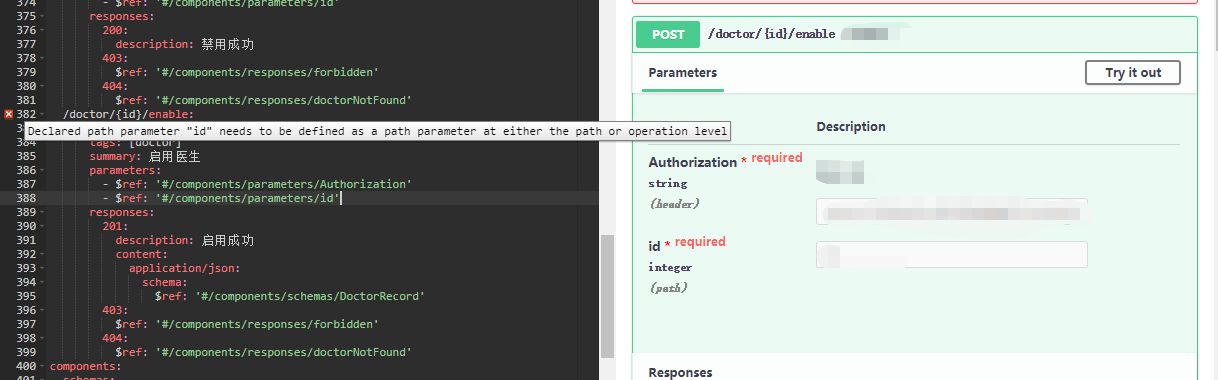
The parameter id is loaded from id.yml and it is actually loaded as can be seen from the right of the image, however, it also raises an error saying otherwise.
Here is the id.yml
name: id
in: path
required: true
schema:
  type: integer
  format: unsigned int32
P.S. I cannot find documents about how to config swagger-editor, could you tell me where I can find them?
Many thanks.
Yelfive
on 10 Jul 2019
@Yelfive yes that is a known issue and is tracked here: https://github.com/swagger-api/swagger-editor/issues/1972
Documentation wise, swagger editor is built on top of swagger-ui, you can find more documentation over there
https://github.com/swagger-api/swagger-ui
jemerald
on 11 Jul 2019
Thanks, hoping to have fix soon. BTW, Great work you've done here
Yelfive
on 12 Jul 2019
I've used swagger-cli tool as a workaround in order to bundle all files:
For ex: Given you have a main.yml file the has reference to b.yml and c.yml
npm install -g swagger-cli
swagger-cli bundle main.yml > bundle.yml
 fredericocabral
on 19 Jul 2019
fredericocabral
on 19 Jul 2019
@jemerald wrote:
I've created a repo to demo my setup of locally hosted swagger editor:
https://github.com/jemerald/swagger-local-editor
Thanks for that. It works well. Nice clean bit of code.
To get it to work with my own files, I renamed your specs directory to specs.demo and created a symbolic link named specs, but pointing at my own source directory. Worked fine. Ideally, you might provide a --specs-directory startup parameter that you could map the the /specs/* URL path. Just a thought. Cheers.
 CharlieReitzel
on 12 Aug 2019
CharlieReitzel
on 12 Aug 2019
FWIW, we'd be happy to accept a PR to re-add the functionality.
webron
on 12 Aug 2019
@jemerald wrote:
I've created a repo to demo my setup of locally hosted swagger editor:
https://github.com/jemerald/swagger-local-editorThanks for that. It works well. Nice clean bit of code.
To get it to work with my own files, I renamed your
specsdirectory tospecs.demoand created a symbolic link namedspecs, but pointing at my own source directory. Worked fine. Ideally, you might provide a--specs-directorystartup parameter that you could map the the/specs/*URL path. Just a thought. Cheers.
Good idea @CharlieReitzel , although the project is really just a demo on how to setup an local editor environment, and to demo that the editor actually do support JSON references across files (which is what the OP is about).
Feel free to adopt it for your needs. 😃
jemerald
on 20 Aug 2019
It seems that activity in the open issue has stopped. Has any progress been made on this issue to support a relative schema?
As many have mentioned, this is a significant blocker for adopting v3 of the OpenAPI specifications.
The official swagger specifications seem to allow the referencing of components from external files:

 adzeeman
on 10 Feb 2020
adzeeman
on 10 Feb 2020
I'm now successfully using swagger-ui-watcher for this. :)
 lud-hu
on 18 Feb 2020
lud-hu
on 18 Feb 2020
Hi,
I don't know if helps, but i resolved this issue by doing this changes:
- docker-compose
  swagger-editor:
    image: swaggerapi/swagger-editor
    container_name: "swagger-editor"
    ports:
       - "8081:8080"
    volumes:
      - ./docker/swagger:/usr/share/nginx/html/docs
    environment:
      URL: /docs/main.yml
- main.yml
openapi: 3.0.0
info:
  title: Server API
  description: API Documentation for Server.
  version: 1.0.0
servers:
  - url: 'http://localhost:8000/api/v1/'
    description: Local Server
  - url: 'http://staging.server.com/api/v1'
    description: Staging Server
paths:
  /login:
    $ref: 'session.yml#/login'
- session.yml
login:
  post:
    summary: Authenticate User
    description: Authenticate User
    requestBody:
      required: true
      content:
        application/json:
          schema:
            $ref: '#/components/schemas/User'
components:
  schemas:
    User:
      type: object
      properties:
        id:
          type: integer
          readOnly: true
          example: 1
        email:
          description: User Email
          type: string
          format: email
          example: [email protected]
        password:
          type: string
          writeOnly: true
          example: 1
      required:
        - email
        - password
url that i use to go directly to the main.yml: http://localhost:8081/?url=/docs/main.yml
All .yml files are inside ./docker/swagger
 saulonunesdev
on 12 Jun 2020
saulonunesdev
on 12 Jun 2020
I receive the same error when I try to reference another file:
Resolver error at paths./partner/{partnerId}.get.responses.200.content.application/json.schema.$ref
Could not resolve reference: Tried to resolve a relative URL, without having a basePath. path: 'schemas/partners/Partner.schema.json' basePath: 'undefined'
I tried everything I found on internet but could not get it working.
 eMarek
on 10 Jul 2020
eMarek
on 10 Jul 2020
@joshmaker My current workaround..
https://github.com/moon0326/swagger-ui-watcher works fine with local relative path without base path. It now supports OpenAPI as well.
This is very useful, after installation according to the README.MD, you just need to run
swagger-ui-watcher path/to/swagger/folder/swagger.yaml, then in http://127.0.0.1:8000/ there will be output.
 xmyLydia
on 11 Aug 2020
xmyLydia
on 11 Aug 2020
It's still doesn't work.
 akopchinskiy
on 9 Sep 2020
akopchinskiy
on 9 Sep 2020
I'm commenting because this is the first thing that pops up when I Google "Tried to resolve a relative URL, without having a basePath." and I think it deserves a clear summary.
There are two problems being discussed in this issue:
1) How do I resolve my base path with Swagger Editor?
2) Can I set my base path through the Swagger Editor UI?
@jemerald provided a great answer to 1 here! The answer to 2 is no, this is an open feature request.
I suggest that this issue be closed since Problem 1 has been resolved. Then someone can open up a new issue specifically re Problem 2 without all the noise surrounding Problem 1.
If I misunderstood what's going on here, let me know and I will delete/edit this comment!
 tgiardina
on 13 Sep 2020
tgiardina
on 13 Sep 2020
@tgiardina wrote:
I'm commenting because this is the first thing that pops up when I Google "Tried to resolve a relative URL, without having a basePath." and I think it deserves a clear summary.
Defintely helpful.
There are two problems being discussed in this issue:
- How do I resolve my base path with Swagger Editor?
- Can I set my base path through the Swagger Editor UI?
I'd suggest a 3rd issue: relative URLs should "just work" relative to the primary document as described here:
https://tools.ietf.org/html/rfc3986#section-5.4
It's should _not_ be necessary to host swagger-editor in a Node server to make this work. Javascript is fully capable of resolving relative URLs.
CharlieReitzel
on 13 Sep 2020
Well, thing is, there was an issue on swagger-ui, there https://github.com/swagger-api/swagger-ui/issues/2746, it was closed and locked with a simple message saying "this was fixed" but, well, it is three and a half years after the "this was fixed" message, and I spent about an hour trying to figure out how it was fixed, like, going through all the commits between the issue being created and the "it was fixed" message, in multiple swagger-* repositories, and well, it seems it is not fixed.
 mat813
on 5 Nov 2020
mat813
on 5 Nov 2020
I resolved the issue in by resolved references ($ref) in spec first before provide it to Swagger-UI. Here is the repo shows how to do it - https://github.com/chuve/swagger-multi-file-spec
Hope it will be useful someone and save time.
 chuve
on 19 Dec 2020
chuve
on 19 Dec 2020
Related issues
 SteveNewhouse
·
5Comments
SteveNewhouse
·
5Comments
 freak4pc
·
3Comments
freak4pc
·
3Comments
 confuser
·
6Comments
confuser
·
6Comments
 delim29
·
4Comments
delim29
·
4Comments
 gnieutin
·
4Comments
gnieutin
·
4Comments
Most helpful comment
Ouch! I this effectively means I can't use version 3 for big projects where things need to be organized into multiple files for clarity.