Svgr: import xx from 'path/xx.svg' Error
test: /\.svg(\?v=\d+\.\d+\.\d+)?$/,
                use: [
                    {
                        loader: '@svgr/webpack',
                        options: {
                            icon: true
                        }
                    }
                ]
import logoSvg from 'paths/logo.svg';
 XianZhengquan
All 16 comments
Hello @XianZhengquan, can you please submit a repro example?
 gregberge
on 10 Apr 2019
gregberge
on 10 Apr 2019
Thank. @neoziro Thanks.I will create a new repository on github and put the repo on it.
XianZhengquan
on 11 Apr 2019
@neoziro github
https://github.com/XianZhengquan/svgr-webpack-error
XianZhengquan
on 11 Apr 2019
It looks like a Typescript issue, help is welcome here. @theKashey maybe 🙏
gregberge
on 11 Apr 2019
What should I do?🤔🤔🤔
XianZhengquan
on 11 Apr 2019
Probably asking a Typescript user 😓
gregberge
on 11 Apr 2019
God bless!🙏🙏🙏
This has been bothering me.
XianZhengquan
on 11 Apr 2019
So - there are only two questions:
- try it has typescript-ish output
- why there is no second loader to handle TS or, to be more concrete, JSX
 theKashey
on 11 Apr 2019
theKashey
on 11 Apr 2019
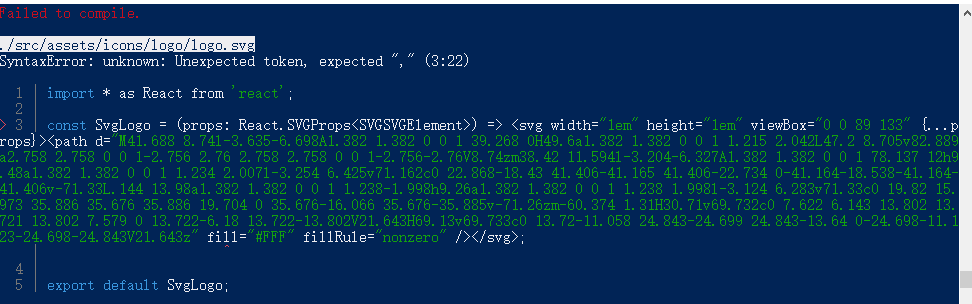
3:22 is props>:<, not a valid JS. So you need to specify a loader to handle a result "SVG".
theKashey
on 11 Apr 2019
@neoziro I don't understand🤔🤔🤔
XianZhengquan
on 11 Apr 2019
should be like
{
test: /\.svg(\?v=\d+\.\d+\.\d+)?$/,
use: [
"ts-loader", // !
{ loader: '@svgr/webpack', options: { icon: true } } // probably with `babel:false`
]
But still the question - why svgr output is in typescript.
theKashey
on 11 Apr 2019
Because there is a configuration file .svgrrc.js, the template output is typescript
XianZhengquan
on 11 Apr 2019
should be like
{ test: /\.svg(\?v=\d+\.\d+\.\d+)?$/, use: [ "ts-loader", // ! { loader: '@svgr/webpack', options: { icon: true } } // probably with `babel:false` ]But still the question - why
svgroutput is in typescript.
Can it run normally like this?
XianZhengquan
on 11 Apr 2019
So - you don't need to compile it to typescript if you are using webpack-loader - for TS it still SVG and nothing more.
It worth to use only if you are pre-compiling these images.
theKashey
on 11 Apr 2019
you need to add a svg.d.ts to your project like this:
declare module '*.svg' {
  import { FunctionComponent, SVGProps } from 'react';
  const _: FunctionComponent<SVGProps<HTMLOrSVGElement>>;
  export = _;
}
and it should work as expected (although I'm not sure if the props will actually be passed down to the SVG that is about to be inlined, if it doesn't, change SVGProps to any)
 pocesar
on 21 Apr 2019
pocesar
on 21 Apr 2019
Looks like it is solved.
gregberge
on 25 Apr 2019
Related issues
 AskAlice
·
3Comments
gregberge
·
6Comments
AskAlice
·
3Comments
gregberge
·
6Comments
 chloesun
·
6Comments
chloesun
·
6Comments
 troch
·
5Comments
troch
·
5Comments
 smashercosmo
·
3Comments
smashercosmo
·
3Comments
Most helpful comment
you need to add a
svg.d.tsto your project like this:and it should work as expected (although I'm not sure if the props will actually be passed down to the SVG that is about to be inlined, if it doesn't, change
SVGPropstoany)