Svg-sprite-loader: No spritesheet generated with nuxt.js
HI,
I have a problem to get your svg-sprite-loader run with nuxt.js
my environment is:
[email protected]
[email protected]
[email protected]
[email protected]
in the nuxt.config.js I added the rule
extend (config, ctx) {
    config.module.rules.push({
        test: /\.svg$/,
        loader: 'svg-sprite-loader',
    })

    config.module.rules.push({
        test: /\.(png|jpg|gif|svg)$/,
        loader: 'url-loader',
        exclude: /(assets\/svg)/,
        query: {
            limit: 1000, // 1KO
            name: 'img/[name].[hash:7].[ext]',
        }
    })

    config.module.rules.push({
        enforce: 'pre',
        test: /\.(js|vue)$/,
        loader: ['eslint-loader'],
        exclude: /(node_modules)/
    })
}
in my component .vue file I import the icon
<template>
    <svg>
        <use xlink:href="#fb"></use>
    </svg>
</template>
<script>
    import fb from './../assets/svg/fb.svg'
    export default {
        ...
</script>
and in the assets folder i created a svg folder and copied the fb.svg inside
i also tried this "hack" but with the same result
https://github.com/nuxt/nuxt.js/issues/1584
When I inspect the page there is no spritesheet injected into the dom
Did I miss something?
 gregorvoinov
All 7 comments
You should decide which loader should process SVGs - url-loader or svg-sprite-loader, because now webpack uses both.
 kisenka
on 2 Jan 2018
kisenka
on 2 Jan 2018
i have already tried it with the "hack" from https://github.com/nuxt/nuxt.js/issues/1584 or do you mean something other?
i also removed from "test: /.(png|jpg|gif|svg)$/," the svg "test: /.(png|jpg|gif)$/,"
gregorvoinov
on 2 Jan 2018
I need a demo then, because have no idea what nuxt.js is :)
Could you please create repo with minimal setup to demonstrate a problem (package.json, webpack config, SVG image and piece of your code). If you don't want to create a repository - you can create a gist with multiple files.
kisenka
on 2 Jan 2018
Thank you for your help ;)
I created a repo
https://github.com/gregorvoinov/svg-sprite-loader
gregorvoinov
on 2 Jan 2018
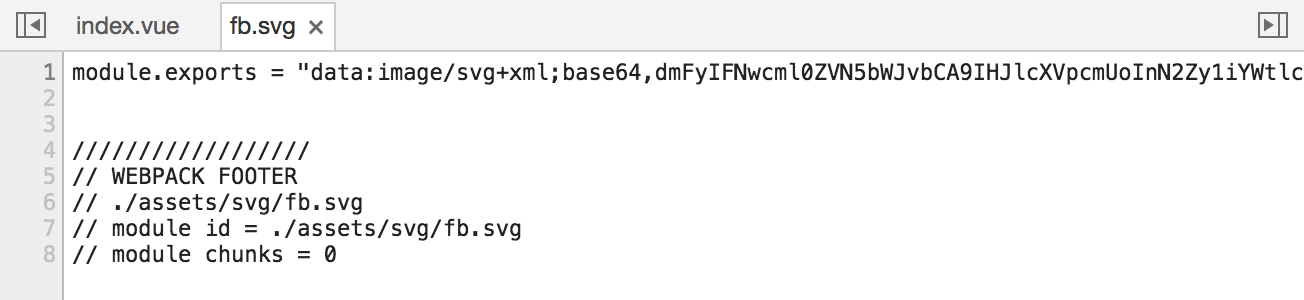
@gregorvoinov I don't see hack you mentioned above in nuxt.config.js, the SVG is still processing via url-loader:
Following is worked for me:
// get and remove file loader
      const rule = config.module.rules.find(r => r.test.toString() === '/\\.(png|jpe?g|gif|svg)$/')
      config.module.rules.splice(config.module.rules.indexOf(rule), 1)

      // add it again, but now without 'assets\/svg'
      config.module.rules.push({
        test: /\.(png|jpe?g|gif)$/,
        loader: 'url-loader',
        query: {
          limit: 1000, // 1KO
          name: 'img/[name].[hash:7].[ext]'
        }
      })

      config.module.rules.push({
        test: /\.svg$/,
        use: 'svg-sprite-loader'
      })
kisenka
on 9 Jan 2018
thanks works perfect 👍
gregorvoinov
on 11 Jan 2018
This method severely bloated my javascript bundles so I decided to create a module that inlines svgs at the top of the app.html file. Hope this helps someone. https://www.npmjs.com/package/nuxt-svg-sprite-module
 gaven
on 4 Dec 2018
gaven
on 4 Dec 2018
Related issues
 hongkongk
·
3Comments
hongkongk
·
3Comments
 zecka
·
4Comments
zecka
·
4Comments
 gzaripov
·
3Comments
gzaripov
·
3Comments
 3lvcz
·
4Comments
3lvcz
·
4Comments
 Alex-Sokolov
·
3Comments
Alex-Sokolov
·
3Comments
Most helpful comment
@gregorvoinov I don't see hack you mentioned above in nuxt.config.js, the SVG is still processing via url-loader:

Following is worked for me: