Svg-sprite-loader: [Question/Request] Get sprite string without the root svg element during SSR. Help with easier SSR sprites injection for React.
Do you want to request a feature, report a bug or ask a question?
Question/Feature-Request.
What is the current behavior?
The sprite string extracted at SSR contains root svg tag along symbols. This makes it difficult to render when no template strings is being used and instead react components are used at server side render.
What is the expected behavior?
There should be an option to extract only the inner string without the root svg tag so dangerouslySetInnerHTML can be leveraged on react svg element.
If this is a feature request, what is motivation or use case for changing the behavior?
My webpack config is broken into smaller chunks, and svg loader config is shared between server and client. This make it difficult to inject spriteModule just to achieve custom node sprite injection on SSR approach. Since my webpack is shared, server bundling fails when browser spriteModule is used. When using react, there has to be easier way to inject onto custom mount node. Option config ?
Please tell us about your environment:
- Node.js version: 8.2.1
- webpack version: 3.4.1
- svg-sprite-loader version: 3.0.7
- OS type & version: OSX sierra
 aga5tya
All 13 comments
It's possible by invoking toString() on each sprite symbol. Just change this line to:
const spriteContent = sprite.symbols.map(s => s.toString()).join('\n');
and you will get sprite string without root nodes.
 kisenka
on 1 Aug 2017
kisenka
on 1 Aug 2017
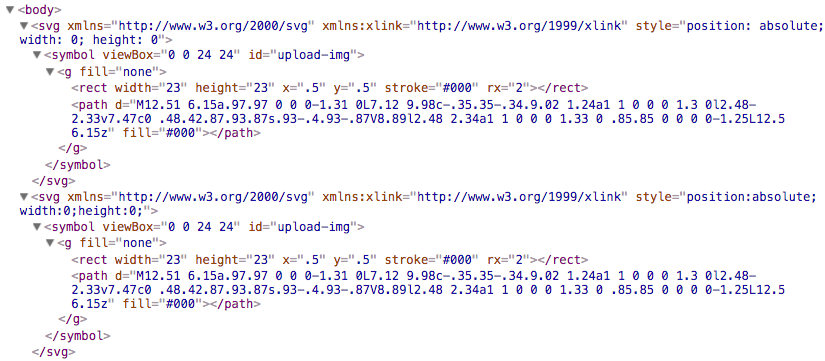
@kisenka, Thanks, that works, but now i end up with two svg nodes as below, one from server and one from client. Anyway i can render the icons on server on initial and then browser sprite runtime continues to append further to this?
Or is this already the way and i'm missing on something ?
aga5tya
on 1 Aug 2017
@aga5tya try to create your own sprite based on default:
my-super-sprite.js
import BrowserSprite from 'svg-baker-runtime/browser-sprite';

const sprite = new BrowserSprite();

// Sprite DOM node is already there, so we don't need to mount it,
// just assign existing element to sprite instance
sprite.node = document.querySelector('body svg:first-child');

export default sprite;
And setup properly webpack config to use your custom sprite:
webpack.config.js
{
  test: /\.svg$/,
    loader: 'svg-sprite-loader',
    issuer: /src\/react-components/, // this rule should be applied only for client side code
    options: {
      spriteModule: './my-super-sprite.js'
    }
}
@kisenka: I actually did try that, but couldn't get it work because of the reasons below.
1) The webpack files are pieced and uses 'webpack-config' library similar to the structure below.
https://github.com/reactql/kit/tree/master/kit/webpack.
Now the relative path always tries to resolve from the folder where my icons are placed. Absolute full path works fine tho. I think its to do with the way i'm using webpack files at server to compile.
2) But since i have same webpack file with svg loader serving both my server and client bundles, the server build fails in the custom sprite, since it needs browser stuff. I would like not to split my loader config in two parts. Any suggestions around this, it's just to keep things DRY?
Wouldn't it be good that options accept this dom query string if provided and use that as default custom node? This would help in all ssr cases. Let me know your thoughts.
aga5tya
on 1 Aug 2017
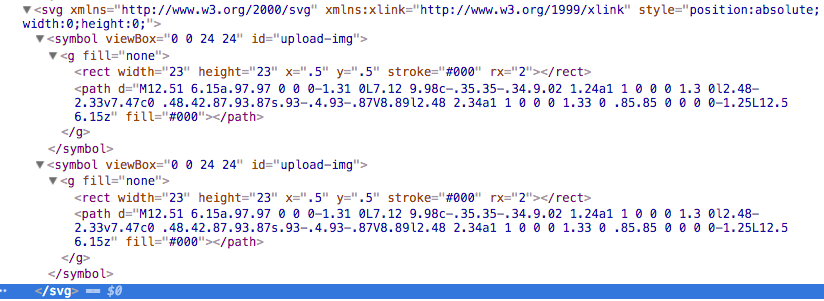
@kisenka, i did as you have suggested by hooking onto webpack config and removing the server side spriteModule config. Now now the symbol's are duplicated with same ID.
aga5tya
on 1 Aug 2017
Seems like it's a bug, because sprite should replace symbol with the same id (related test).
@aga5tya could you make a minimal demo repo where I can reproduce described behaviour and dive deep?
kisenka
on 1 Aug 2017
@kisenka, will give a repro in few hours. 👍
aga5tya
on 1 Aug 2017
@kisenka, couldn't revert any earlier, apologies.
I have pushed the repro to below
https://github.com/aga5tya/react-universally/tree/svg-sprite-test
Commit: https://github.com/aga5tya/react-universally/commit/423c0af375d9207ea775287c968e7c74c0539643
yarn install and yarn run develop will get the app on localhost: 1337, I have included a test icon, and when you examine the ssr server html response there is one symbol in svg root, client side injects the duplicate alongside. Please let me know if you need further info.
aga5tya
on 5 Aug 2017
@kisenka, I'm still unable to figure out where the issue lies, hope you got a chance to look at the repro i shared. :)
aga5tya
on 13 Aug 2017
@aga5tya thanks for pinging, I am working on it. Actually this issue is duplicate of #8
kisenka
on 13 Aug 2017
@aga5tya update svg-sprite-loader dependencies, now it's possible to attach the sprite to existing DOM element:
my-super-sprite
import BrowserSprite from 'svg-baker-runtime/browser-sprite';

const sprite = new BrowserSprite();

document.addEventListener('DOMContentLoaded', () => {
  sprite.attach( document.querySelector('body svg:first-child') );
});

export default sprite;
It will scan for <symbol> tags and reuse them. The rest SVGs added via normal way should works fine with it.
kisenka
on 16 Aug 2017
@kisenka Thank You!,, will check it once i get back from work.
aga5tya
on 16 Aug 2017
@aga5tya forget about snippet above, I've added this feature in [email protected], it should works out of the box. Please try it.
kisenka
on 16 Aug 2017
Related issues
 zecka
·
4Comments
zecka
·
4Comments
 3lvcz
·
4Comments
3lvcz
·
4Comments
 jpzwarte
·
7Comments
jpzwarte
·
7Comments
 gzaripov
·
3Comments
gzaripov
·
3Comments
 hongkongk
·
3Comments
hongkongk
·
3Comments