Svg.js: Add a possiblity to move the anchor of text instead of upper left corner
TL;DR
- implement the methods
ax(),ay()amove()which take x and y values and change the attribute of the text accordingly so thatax(5)is the same asattr('x', 5). This should be implemented for SVG.Text
Note: Implementation has to be done on the 3.0 branch
For all questions head over to our gitter chat: https://gitter.im/svgdotjs/svg.js
Original issue
The api for this would be:
text.anchor(20, 20) // moves the anchor
text.align('center') // sets the text-anchor
 Fuzzyma
All 20 comments
We also have
text.anchor(20)
Which will only move the x coordinate of the anchor.
Setting:
text.anchor(20, 50)
Will place the x-anchor at 20, and place the y-coordinate of the baseline at 50.
 saivan
on 20 Jan 2018
saivan
on 20 Jan 2018
Mh - do we need anchor when there is font({anchor: 'left'}) already?
Fuzzyma
on 8 Feb 2018
Well, yes; because it gives you the ability to move the baseline as well as we discussed?
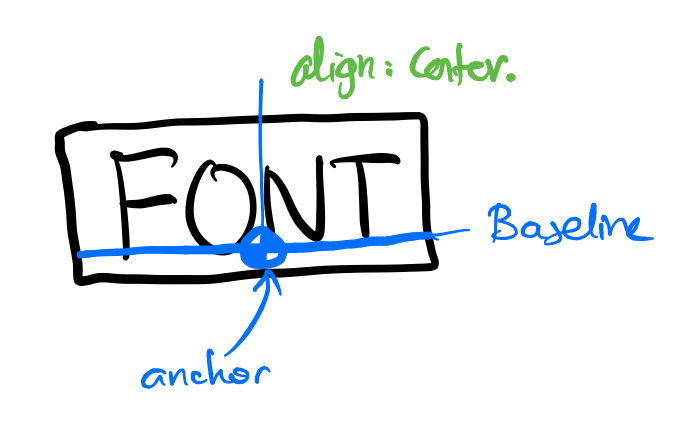
This would give you the ability to do things like these easily:
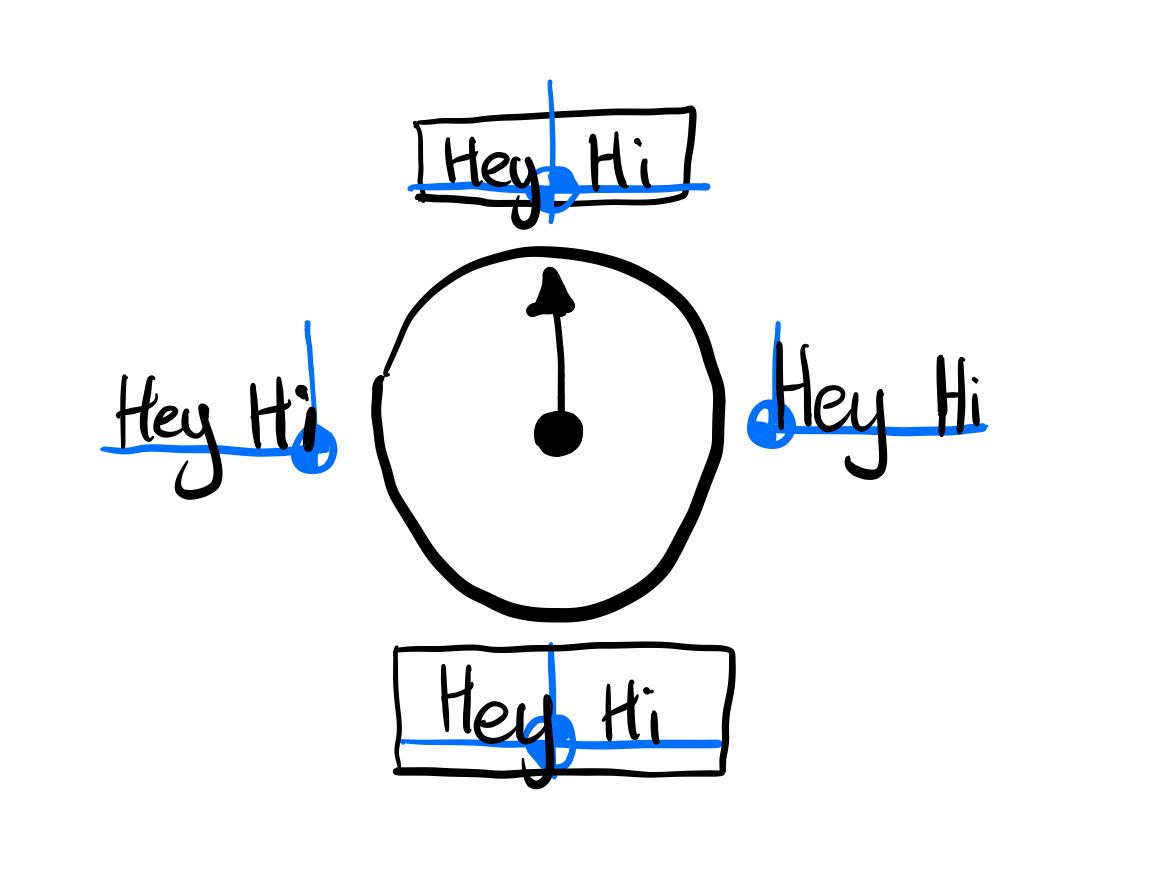
Although, if anchor exists; then maybe the api should be:
text.anchor("center")
text.insertion(30, 20)
Where insertion is the point to insert at.
saivan
on 8 Feb 2018
Althouuuuugh; there is a thirrrrrd option 😄
And after a little thought, I think I like it best!
Maybe, to achieve this, we stick to the current api;
but we extend it a little for text elements.
Since we said we could do things like:
element.transform({
    origin:  "bottom right",
    position: [30, 20],
})
For text elements, we can allow things like:
text.anchor("right").transform({
    origin:  "baseline right",
    position: [30, 20],
})
This would still allow:
text.anchor("right").transform({
    origin:  "bottom right",
    position: [30, 20],
})
Where the results would be this:
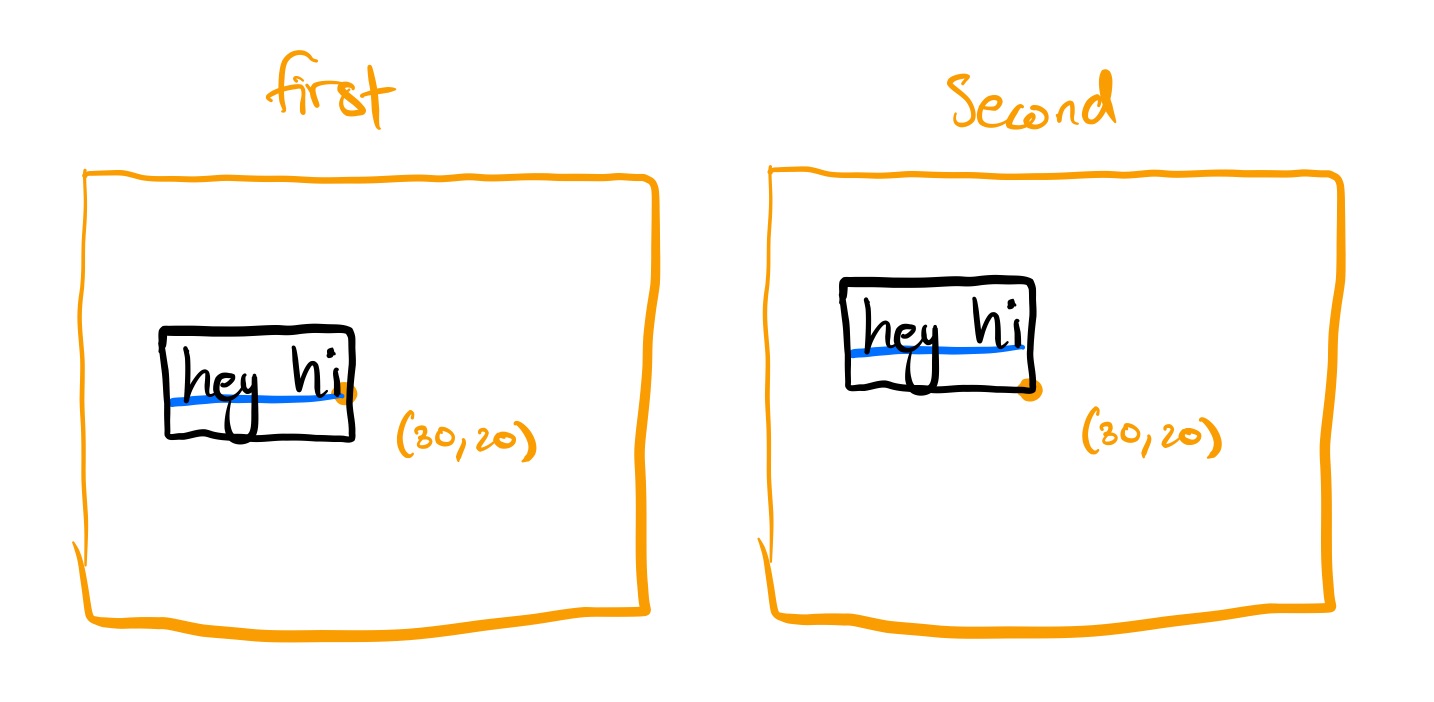
This suggestion would be my preference, because I think its the most clear,
thoughts?
saivan
on 8 Feb 2018
This is also cool, because when the user transforms the text object; they can transform around the baseline eg; they can rotate around the baseline; I'm sure this would be very useful in many situations :)
saivan
on 8 Feb 2018
Haha sorry - I miss spelled my question.
What I wanted to ask was: do we need "align" when there is font({anchor:"center"}).
You just introduced a bunch of new options in your proposal :D. I am not sure but I thought we discussed them already. Have to look through it...
Fuzzyma
on 8 Feb 2018
I seemed to overlook before, the idea that anchor already exists; which could cause confusion. I also think the anchor we proposed would duplicate the functionality of position. So merging them seems like a good plan to me.
saivan
on 8 Feb 2018
nono - the only thing that exists is el.font({anchor: 'center'}) which sets the text-anchor of the element to that value. This could shortened to el.align('center') which completely does the same. So I asked for the need of it.
The anchor method as we proposed it, just sets x and y coordinate of the text directly (instead of moving by the upper left edge). So you are moving the anchor and the baseline of the text. We agreed that this is a very good solution.
I am not sure how around fits into all these. I remember that w discussed the around method in connection with transformations which are not part of the discussion here. Can you explain that more?
Calling around(...) would certainly add state to the element which we agreed to avoid
We can discuss this in gitter or via voice call if you like
Fuzzyma
on 8 Feb 2018
Okay sorry; you're right; my syntax is wrong here, and not what we agreed upon in #786,
I showed you this when we were discussing this last time; but we agreed to add an origin to the transformations (which only work for our absolute animation syntax),
So to achieve what I was talking about, we would call:
text.anchor("right")
    .transform({
        origin: "baseline right",
        position: [30, 20],
     })
I think that would be useful because the average user probably won't care if they are changing x and y values on the text element or just applying a transform to it (it would appear identical after all).
I really do like the use of align here; I think that is really intuitive and probably what users are used to from word processing apps. But since you brought up the point that el.font({anchor: 'center'}) is used to center text, I don't think that calling the first method anchor is a good idea.
We should probably call it insertion to indicate that we are moving around the insertion point. Maybe a more clever name; but calling it anchor would just confuse people.
saivan
on 8 Feb 2018
I agree. It's really hard to name those things.
We could call it baseline, anchorpoint, position or so. But actually I like anchor the most albeit you are totally right that it could confuse people...
@wout any ideas?
//Edit: I wonder how you figure out how much you need to translate the text when baseline is specified as origin. After all you don't know how far away the upper or bottom edge is from the baseline.
Fuzzyma
on 8 Feb 2018
Well lets pretend the user wanted to do something like putting the baseline right on top of a line that runs across their whole svg. They'd love us for this :P
saivan
on 8 Feb 2018
We could call it floor. I guess we are effectively moving around the floor after all haha.
saivan
on 8 Feb 2018
So as discussed in our phone call, we are going for this api:
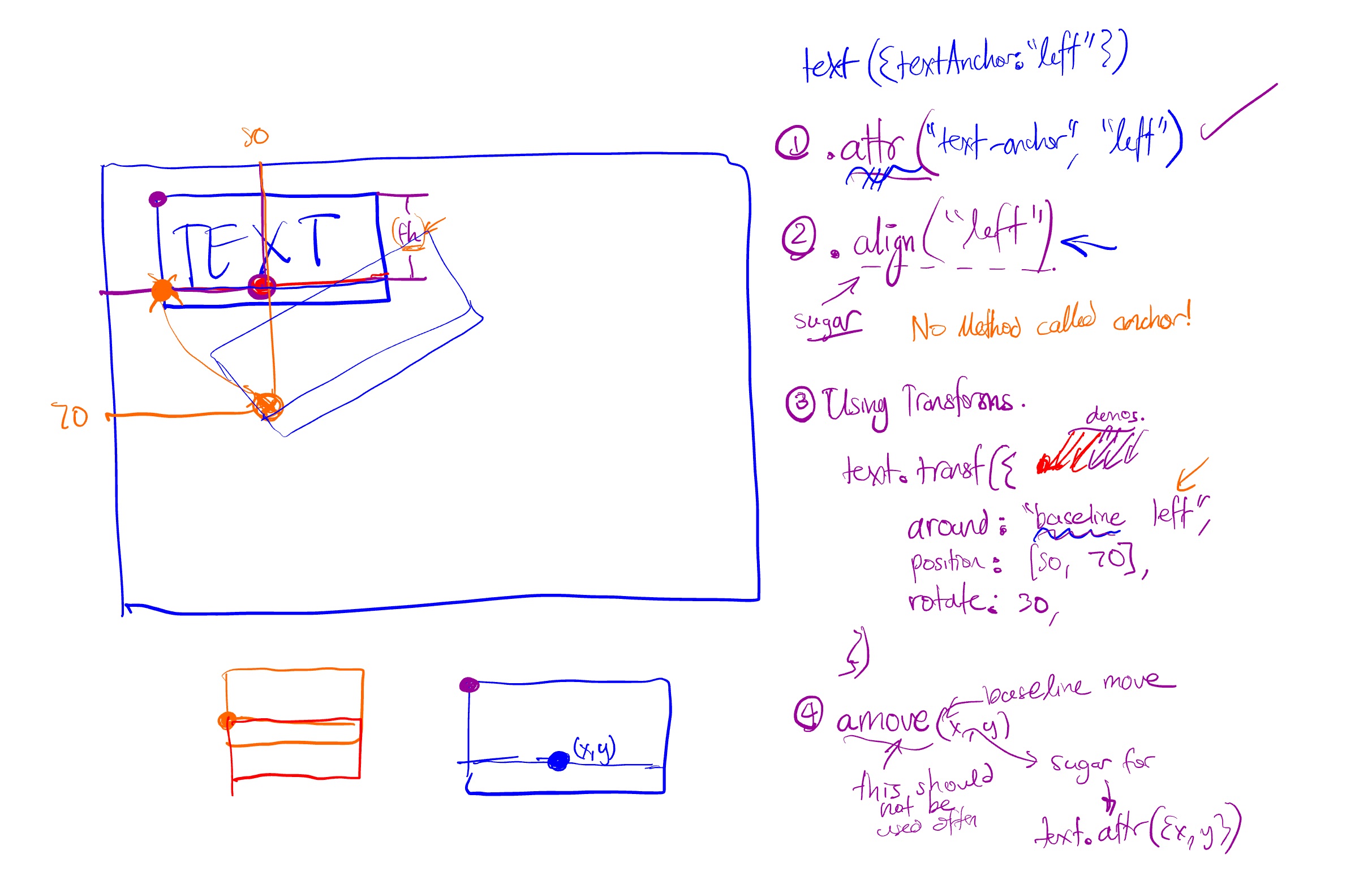
You can make text with:
text({textAnchor: "left"})

// or

text.attr("text-anchor", "left")
We will also provide some sugar here so:
text.align("left")
We will encourage our users to use transforms (in most of our demos), so that you can do:
text.transform({
     around: "baseline left",
     position: [50, 70],
     rotate: 30,
})
But we will provide some sugar to move the anchor with .amove which only works on text, so
text.align("left").amove(50, 70)
Will move the anchor, which is just sugar over:
text.attr({x: 50, y: 70})
Just to correct that one. It wouldnt be text({textAnchor: "left"}) but new SVG.Text({textAnchor: "left"} . The constructor can take the object, not the text method
Fuzzyma
on 17 Feb 2018
Oh yep, thanks for pointing that out!
saivan
on 17 Feb 2018
One request: provide an option to simply set x/y with no magic. In my case, I want to center the text both horizontally and vertically at a given point. My first attempt was to use CSS
text {
  alignment-baseline: central;
  text-anchor: middle;
}
then in JS do
draw.plain('X').move(100, 100);
but the result is:
<text ... x="100" y="108.5">X</text>
which is super annoying. Any way to disable this would be appreciated.
Currently, I am working around this by using translate() instead of move(), but a way to set x/y directly would be preferable.
Thanks!
Edit: It looks like I can use .attr({x: 100, y: 100}) to avoid the magic. Problem solved!
 MarkLodato
on 28 Feb 2018
MarkLodato
on 28 Feb 2018
Yep, if you want to set an attribute directly, always opt to use attr
saivan
on 28 Feb 2018
Also, another question. Is there a reason why you prefer using move to translate?
saivan
on 28 Feb 2018
Also, another question. Is there a reason why you prefer using move to translate?
Not a big deal, but move sets x and y directly, which makes the SVG cleaner (I'm thinking of using svgdom to write to an SVG file). Plus, translate requires me to take care if I set any other translations on the object later, e.g. through CSS.
MarkLodato
on 28 Feb 2018
Not a big deal, but move sets x and y directly, which makes the SVG cleaner
Jep thats why I use that, too. Actually this issue is about your issue. We want to introdue a helper function which does what the attr notation does atm. We are just stuck with the naming ^^
Fuzzyma
on 28 Feb 2018
Related issues
 momocow
·
4Comments
Fuzzyma
·
6Comments
momocow
·
4Comments
Fuzzyma
·
6Comments
 liho98
·
8Comments
liho98
·
8Comments
 wout
·
4Comments
wout
·
4Comments
 Pangeli70
·
7Comments
Pangeli70
·
7Comments
Most helpful comment
We could call it
floor. I guess we are effectively moving around the floor after all haha.