Svg.js: Does not seem to work in a stand-alone SVG
Having included svg.js in a stand-alone SVG and added the basic draw example code to be run off the DOMContentLoaded event, I'm getting an error in the following code:
  /* If the target is an svg element, use that element as the main wrapper.
       This allows svg.js to work with svg documents as well. */
    this.constructor
      .call(this, this.parent.nodeName == 'svg' ? this.parent : SVG.create('svg'))
Uncaught TypeError: Cannot read property 'nodeName' of null
This is using Google Chrome 32.0.1700.102 on Ubuntu and the latest version of svg.js downloaded today.
 vadi2
vadi2
All 36 comments
I didn't realize you needed to tag your root svg element with the drawing attribute, my fault. However now the SVG does not load - the page is blank - and there's no errors in the console.
            var draw = SVG('drawing');
            draw.rect(100,100).animate().fill('#f03').move(100,100);
That seems to be a bug in the latest release. I'll fix is asap.
 wout
on 3 Feb 2014
wout
on 3 Feb 2014
That's fixed now in v1.0rc3
wout
on 3 Feb 2014
Confirmed that it works, thank you.
vadi2
on 3 Feb 2014
I'm getting this on the latest version: svg.js 1.0.1-3-g6b0c1d2
 seb-thomas
on 18 Nov 2014
seb-thomas
on 18 Nov 2014
Ah, ok. Would help if I had a coffee and RTFM.
For future idiots such as myself:
<div id="your-svg-canvas"></div>
...
var canvas = SVG('your-svg-canvas');
This should be documented either here or on the website.
 DanielTate
on 22 Dec 2014
DanielTate
on 22 Dec 2014
+1. I bumped into this issue right away. This should be in the getting started page.
 Spaxe
on 16 Mar 2015
Spaxe
on 16 Mar 2015
+1 for this: "I bumped into this issue right away. This should be in the getting started page."
 imanzuk
on 17 Mar 2015
imanzuk
on 17 Mar 2015
+1, just bumped into this issue myself.
 cassidoo
on 8 Jul 2015
cassidoo
on 8 Jul 2015
I dont want to say its written in the first chapter of the readme but... its written in the first chapter of the readme!
The first argument can either be an id of the element or the selected element itself.
 Fuzzyma
on 8 Jul 2015
Fuzzyma
on 8 Jul 2015
Yeah so I had this problem as well today and I read the docs.
This issue is absolutely NOT clear in the docs and NONE of the example code show this. They all indicate that the necessary DOM structure will be created for you, i.e:
Create an SVG document
Use the SVG() function to create an SVG document within a given html element:
var draw = SVG('drawing').size(300, 300)
var rect = draw.rect(100, 100).attr({ fill: '#f06' })
The first argument can either be an id of the element or the selected element itself.
This will generate the following output:
<div id="drawing">
    <svg xmlns="http://www.w3.org/2000/svg" version="1.1" xmlns:xlink="http://www.w3.org/1999/xlink" width="300" height="300">
        <rect width="100" height="100" fill="#f06"></rect>
    </svg>
</div>
This is a simple fix to the docs and users will not get frustrated and give up on this project.
 sverrirs
on 28 Oct 2016
sverrirs
on 28 Oct 2016
I am sorry to hear that.
This is a simple fix
What exactly?
Fuzzyma
on 28 Oct 2016
Adding a section such as the one below near the top of the docs and mention something along the lines of "given this HTML" and then go on discussing the API.
<svg id="drawing">
</svg>
@sverrirs The thing is that you can declare your initial HTML/SVG in multiple ways. I think it will clutter the documentation but I'm open for suggestions.
You can have any HTML element and given the ID of that element, svg.js will create a SVG inside that element.
<div id="drawing"></div>
Or you can already have an SVG element and svg.js will absorb adopt the SVG
<svg id="drawing"></svg>
For both of the examples above you can do:
const draw = SVG("drawing").size(100, 100)
let rect = draw.rect(100, 100).attr({ fill: '#f06' })
You don't have to give an ID string you can also give a reference to either the SVG or the HTML element (the latter will be the container of your SVG).
const draw = SVG(document.querySelector('#drawing')).size(100, 100)
let rect = draw.rect(100, 100).attr({ fill: '#f06' })
If you have a suggestion that can illustrate all of the above methods, without hinting that one is preferred and without cluttering the API documentation - I'm sure we can add it to the beginning of the docs.
 dotnetCarpenter
on 4 Nov 2016
dotnetCarpenter
on 4 Nov 2016
@sverrirs @Fuzzyma What do you guys think of:
Use the SVG() function to create an SVG document within a given html element:
var draw = SVG('drawing').size(300, 300)
var rect = draw.rect(100, 100).attr({ fill: '#f06' })
The first argument can either be an id of the element or the selected element itself.
Given this HTML:
<div id="drawing"></div>
This will generate the following output:
<div id="drawing">
  <svg xmlns="http://www.w3.org/2000/svg" version="1.1" xmlns:xlink="http://www.w3.org/1999/xlink" width="300" height="300">
    <rect width="100" height="100" fill="#f06"></rect>
  </svg>
</div>
@dotnetCarpenter I like your suggestion. It is tricky, I agree, to word the documentation but I think you nailed it. The reader just has to be aware that a DOM element must exist before running the svg.js code and that example you came up with is perfect :)
sverrirs
on 4 Nov 2016
Agreed on that!
Fuzzyma
on 4 Nov 2016
The reader just has to be aware that a DOM element must exist before running the svg.js code and that example you came up with is perfect :)
Use the SVG() function to create an SVG document within a given html element:
var draw = SVG('drawing').size(300, 300)
var rect = draw.rect(100, 100).attr({ fill: '#f06' })
The first argument can either be an id of the element or the selected element itself.
Given this HTML:
<div id="drawing"></div>
This will generate the following output:
<div id="drawing">
  <svg xmlns="http://www.w3.org/2000/svg" version="1.1" xmlns:xlink="http://www.w3.org/1999/xlink" width="300" height="300">
    <rect width="100" height="100" fill="#f06"></rect>
  </svg>
</div>
Be aware that the HTML element must exist before running the svg.js code. Either by including your svg.js specific code after the DOM element or by listening for DOMContentLoaded.
I'm starting to dislike this. It also doesn't say that you can adopt a SVG using the same function. It's documented just below. I've updated the docs to:
Create an SVG document
Use the SVG() function to create an SVG document within a given html element:
var draw = SVG('drawing').size(300, 300)
var rect = draw.rect(100, 100).attr({ fill: '#f06' })
The first argument can either be an id of the element or the selected element itself.
Be aware that the HTML element must exist before running the svg.js code.
Given this HTML:
<div id="drawing"></div>
This will generate the following output:
<div id="drawing">
  <svg xmlns="http://www.w3.org/2000/svg" version="1.1" xmlns:xlink="http://www.w3.org/1999/xlink" width="300" height="300">
    <rect width="100" height="100" fill="#f06"></rect>
  </svg>
</div>
I feel like all the documentation is referred to in fragments and there are no complete examples. I haven't touched HTML in a long while so it's not immediately obvious to me how it's assembled together. However, when I try, get the following:
"Type Error: Cannot read property 'nodeName' of null"
The only thing that might be an issue is some sort of import statement in the test.js to include 'SVG'?
So what fundamental concept am I missing?
 majeric
on 22 Jun 2018
majeric
on 22 Jun 2018
Can you please include your example in a jsfiddle, so that we can take a look :)
 saivan
on 22 Jun 2018
saivan
on 22 Jun 2018
My point is that the only examples are in jsfiddle which are only code fragments. It makes the assumption that you know how to use those fragments without offering a complete functioning example. A div tag unto itself does not function as an html file.
I included a zip file containing the test files I was working with it as a complete file set intended to work in a browser.
I’d just like to know what I’ve done wrong.
majeric
on 22 Jun 2018
Every fiddle insl the docs is a complete example which you can use to try around as you like. I am very proud about our documentation which is well written and explains things very well.
If this is not enough for you then there are tutorials outside and tons of stackoverflow questions with answers.
When you found a bug or have contribution ideas we can help you. But we need a simple fiddle showing the issue with as minimal code as possible so that it becomes reproduceable
Fuzzyma
on 22 Jun 2018
No, jsfiddle is not. <div id="drawing"><div> is not a complete HTML document. It's an HTML document fragment.
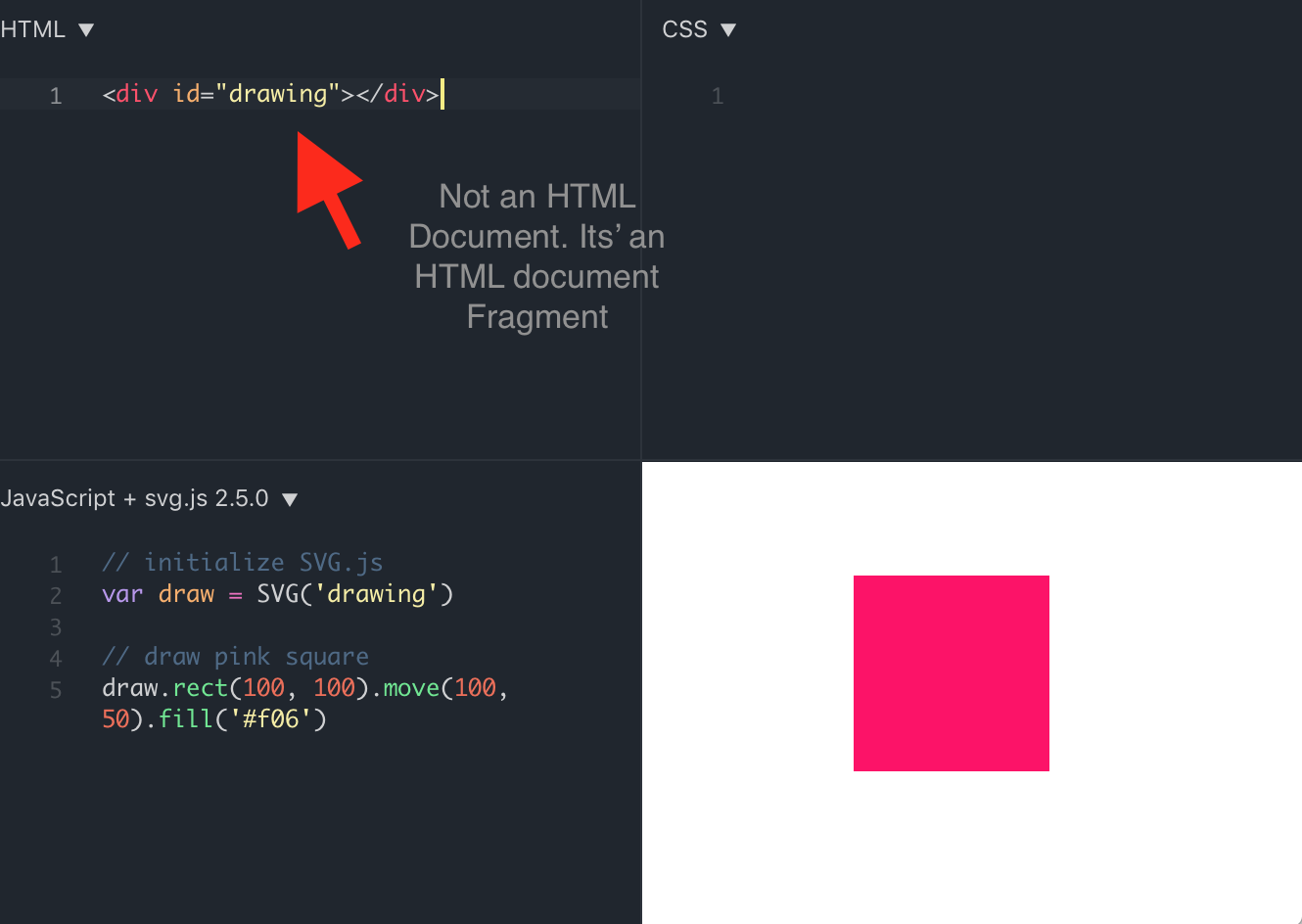
majeric
on 23 Jun 2018
Thats plain wrong. You might only be able to edit the <body> of the document (which is far more than enough) but you can see the full source by just examining the code in the preview window.
When you dont know how to create a HTML document than you should read up on that first.
Beside that there is a complete example in the docs for standalone svgs:
<?xml version="1.0" encoding="utf-8" ?>
<svg id="drawing" xmlns="http://www.w3.org/2000/svg" xmlns:xlink="http://www.w3.org/1999/xlink" version="1.1" >
  <script type="text/javascript" xlink:href="svg.min.js"></script>
  <script type="text/javascript">
    <![CDATA[
      var draw = SVG('drawing')
      draw.rect(100,100).animate().fill('#f03').move(100,100)
    ]]>
  </script>
</svg>
Do you even look at the contents of the zip file I provided?
majeric
on 23 Jun 2018
We do not check the contents of zip files posted to the repo. We made it clear that we would like a fiddle posted if you want any further help, it says so clearly in our issue guidelines. I'm sorry, but if you're willing to comply, we are more than willing to help you where we can :)
saivan
on 24 Jun 2018
You're literally missing the point. It's the fact that you only offer jsfiddle examples that means that I have no idea how your library fit in a practical context. Your exclusive use of jsfiddle is the barrier for me to understand how your library works.
I don't understand why you're being so dogmatic in your adherence to your "guidelines" when someone asks you for help. It seems unnecessarily antagonistic.
majeric
on 24 Jun 2018
I'm happy to help you, if I wasn't I wouldn't be spending time contributing to a library that you can use for free ;) We have documentation, and a pretty excellent getting started page here that details the steps you need to follow step-by-step.
Svg.js actually does most of the DOM management for you, so these document fragments you're talking about are actually valid html. All you really need to do is include svg.js as a script on your page, which means you'll need a basic html template.
We do not include basic html structure in our documentation because it would clutter the documentation so much that it would annoy most of our users. Good documentation is supposed to show users how to use the software in the least time possible, which ours does, but you're right; it does assume an understanding of html, which is a reasonable assumption for an svg library. So if you're having trouble setting that up, theres nothing wrong with that at all, and we are here to help; but as we said; those kinds of questions are better asked over at stackoverflow.
saivan
on 25 Jun 2018
Please use stackoverflow for this and brush up on your HTML + JS skills. ( sorry if this sounds rude but you just hijacked an old bug report that has nothing to do with your problem :) )
Add <script src="test.js"></script> just before </body>. You are executing test.js before the DOM elements are loaded so that's your error. It would also work if you took the full code on jsfiddle previewer as suggested.
 pjfsilva
on 25 Jun 2018
pjfsilva
on 25 Jun 2018
What brought me here was the "Uncaught TypeError: Cannot read property 'nodeName' of null" that's a direct reference to the issue in question. As new to your library and some seriously dusty html/css/js skills, I can't distinguish between what's an error relate to the library and what's an error related to generic web dev. So, forgive me for 'highjacking' the thread but it seemed relevant.
pjfsilva, load order is kind of counter intuitive to me in web scripting. Most other code has a form of import/include model that puts everything at the top. Thank you for indulging me.
Add <script src="test.js"></script> just before </body>.
^^^ This is literally all I was looking for. "Ya, you got the load order wrong. Just put your js after the div tag".
Thank you for your help.
majeric
on 25 Jun 2018
Okay, no problem; glad you found it helpful
saivan
on 25 Jun 2018
I also have been having problems with SVG not found in a stand-alone page:
HTML:
<!DOCTYPE html>
<html lang="en">
<head>
<meta charset="UTF-8">
<meta name="viewport" content="width=device-width, initial-scale=1, minimum-scale=1, maximum-scale=1, user-scalable=no, shrink-to-fit=no">
</head>
<body>
<div id="drawing"></div>
<script type="text/javascript" src="https://cdnjs.cloudflare.com/ajax/libs/svg.js/3.0.11/svg.min.js"></script>
<script src="main.js"></script>
</body>
</html>
and JavaScript:
    var draw = SVG('drawing').size(500, 50);
    var text = draw.text('I know that eggs do well to stay out of frying pans.');
    text.move(20,20).font({ fill: '#f06', family: 'Inconsolata' });
 David263
on 2 Feb 2019
David263
on 2 Feb 2019
@David263 seee my answer at #954 and https://jsfiddle.net/Fuzzy/fdxwk9sn/1/
Fuzzyma
on 2 Feb 2019
var draw = SVG('drawing').size(500, 50);
Uncaught TypeError: Cannot read property 'size' of null
SVG() returns Svg {events: {…}, node: svg, type: "svg", dom: {…}
SVG('drawing') returns null. ALWAYS
correct div in DOM is present
 addewyd
on 4 Apr 2019
addewyd
on 4 Apr 2019
@addewyd the answer is for svg.js v2.x. For 3.x use SVG('#drawing'). Please dont revive old issues. Use stackoverflow for questions!
Fuzzyma
on 4 Apr 2019
Related issues
 mtbradle-ge
·
6Comments
mtbradle-ge
·
6Comments
 Mourdraug
·
5Comments
Mourdraug
·
5Comments
 HJWAJ
·
3Comments
HJWAJ
·
3Comments
 marciosalinodias
·
4Comments
marciosalinodias
·
4Comments
 mixn
·
9Comments
mixn
·
9Comments
Most helpful comment
@David263 seee my answer at #954 and https://jsfiddle.net/Fuzzy/fdxwk9sn/1/