Svg.js: How is position of text determined
If I place a text element it seems to be placed down quite a bit and I cannot figure out a) why it does so and b) how to get the measurement I need to move it to the very top.
See this fiddle - http://jsfiddle.net/cyberwombat/Lmu56awz/339/ - why is the text ~40px down?
````
var draw = SVG('drawing').size(700, 700)
var text = draw.text('Hello world')
text.font({
family: 'Helvetica',
size: 104
})
// draw bbox
var b = text.rbox(draw)
draw.rect(b.width, b.height).move(b.x, b.y).fill('none').stroke({
width: 1
})
````

Thanks
 cyberwombat
All 11 comments
Because you changed the fontsize without changing the position.
Text in svg kinda sucks because it is placed by its baseline. svg.js _tries_ to position it by its upper left edge (like any other shape). We use bbox() to calculate the actual position and move the text so that it will be at the right place. However, when you change fontsize, it does not fit anymore. So to recalculate the position a simple move(0,0) after font would be sufficient
 Fuzzyma
on 13 Jun 2017
Fuzzyma
on 13 Jun 2017
Diving into it I see now that browsers position text quite differently. Safari correctly (or within <1px) positions text on the Y axis but Chrome ads about 7-10% of the font size which results in dramatic shifts in larger fonts.
Attached are two images - the right text is CSS places font and the left is SVG.js using text().move(0,0)
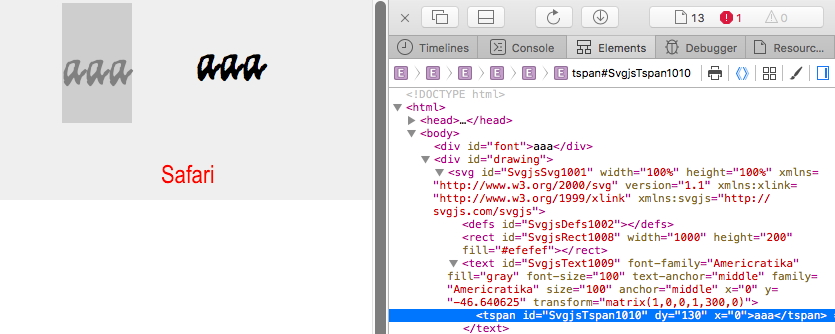

You can see that the SVG y attribute for the text element is different.
Do you know why this is? I understand that browsers are iffy but is there a fix I can use?
cyberwombat
on 11 Jul 2017
Check the bbox() method in both browsers. If they return different results for text height there is nothing we can do about it.
Fuzzyma
on 12 Jul 2017
There is a small pixel difference. - the shot is before I apply any font size (blue is safari). Then the difference gets multiplied tenfold as the font size increases.
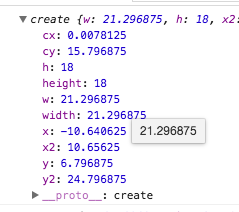

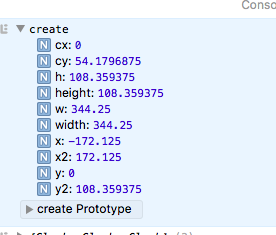
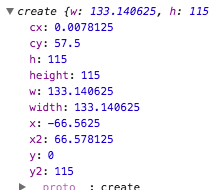
After font sizing and 0,0 move the boxes heights are quite different. Is this what is used to calculate the <text y="-40" attribute?
cyberwombat
on 12 Jul 2017
What I am seeing when I compare the svg text and the regular html/css text in chrome is that the bboxes are the same (besides the x shift). So the svg bbox after transform is correct but the rendered svg is not taking that into account correctly it seems else I assume I would get the same positioning as the css text?
cyberwombat
on 12 Jul 2017
Yes bbox is used to position the text at its upper left edge. And when browser vendors cannot decide which implementation they wanna take I cant do anything about it
Fuzzyma
on 12 Jul 2017
I understand. So what I am doing now is this. I have a premade SVG using the same font and size. I use plain JS to get the bbox which tells me how offset Y is and I then adjust my svg object accordingly. Its awkward for sure but does imply that the data is there. Not sure what the better approach is yet but sharing that in case it tickles your brain :)
Update maybe nevermind.. this trick may not be font consistent. Grrrr.
cyberwombat
on 12 Jul 2017
The formulat for positioning is like this:
newY + oldY - bbox().y
This way it moves the text to a position where bbox().y is 0 (which should be then the upper edge of the text)
Fuzzyma
on 13 Jul 2017
This can be tamed in 3.0 where text can be moved by baseline, too
Fuzzyma
on 10 Feb 2018
@Fuzzyma - you mention positioning by baseline in v3.0 - can you provide a reference to how to utilise this?
Thanks
 Adam-Langley
on 7 Mar 2018
Adam-Langley
on 7 Mar 2018
Just set y directly with attr:
text.attr('y', 50)
Related issues
 mixn
·
9Comments
mixn
·
9Comments
 Zythyr
·
4Comments
Zythyr
·
4Comments
 Salitehkat
·
4Comments
Fuzzyma
·
8Comments
Salitehkat
·
4Comments
Fuzzyma
·
8Comments
 mroloux
·
8Comments
mroloux
·
8Comments