I'm not sure if this isn't related to other issues, but I checked many of them and neither covers what I need.
I come from React and CSS-Modules, where passing down styles is really easy. Just pass down className prop, and css-modules will figure out and hash styles to avoid conflicts.
In svelte I cannot pass down classes to component through class prop, like so:
https://svelte.dev/repl/1d0b80898137445da24cf565830ce3f7?version=3.4.2
There are some solutions to pass styles, like using :global, but it's fragile: if anywhere inside child component will have class named same, it will cause problems. Sure, we can use BEM or another approach, be very careful with global styles, but I imagine it can happen automagically (like with CSS-Modules).
Another approach is to add add divs inside componetns, but consider Col component from example above. If we have:
<style>
    div {
        background: tomato;
    }
</style>

<Col>
    <div>content</div>
</Col>
content will get background, but also will have unwanted gap caused by Col padding. And quickly code will have many unwanted divs.
Why I think it matters?
I wrote hundreds of Rect components and what I learned is that Componets should be able to be styled by developer who is using it. Adding BEM layer or sth else is for me unnecessary work. And may cause conflicts. Imagine dev who use BEM. There may be rare cases when his (global) styles are named same as component's and interfere.
in conclusion
It will be great to pass down classes, not be global, but with some unique id.
PS. I found modular-css package, but it's for svelte2, and I'm not sure if it will works with passing down styles to components.
 wysher
All 96 comments
Modular CSS works fine with svelte3, we already use it in daily development.
 tivac
on 26 May 2019
tivac
on 26 May 2019
@tivac probably not the best place for this, but i tried to setup modular-css with rollup in sapper. Readme seems confusing. I tried few different approach, but without success. Do you have some example config with rollup?
wysher
on 26 May 2019
I'll see if I can put something together for you, I haven't looked at sapper in a while but I don't know of a reason why it wouldn't work.
tivac
on 26 May 2019
I think the important bit to note is that svelte does perform CSS optimizations, removing any unused class declarations.
Most simple example:
<script>
  import ChildComponent from './Child.svelte';
</script>

<style>
  .class-to-add {
    background-color: tomato;
  }
</style>

<ChildComponent class="class-to-add" />
...compiles to CSS without the class-to-add declaration, as svelte currently does not recognize the class name as being used.
I'd expect
class-to-addis bundled with all nested style declarationsclass-to-addis passed toChildComponentasclass-to-add svelte-HASH
This looks like a bug / missing feature to me. Not sure how modular-css would help me here.
 nikku
on 26 May 2019
nikku
on 26 May 2019
Nikku got the point with simpler example.
Although modular-css is some solution, I'd rather expect passing hashed classes down as a built in feature. Why? I assume that soon developers will publish more components for svelte, and any possible class conflict is problematic. Yeah, it's rare case, but it is.
Also Svelte is so great because developer do not need to worry about class names conflict, except of passing (global) classes to component (sic!).
Some React components uses Css-modules to avoid theese conflicts, but in my opinion it's an overkill for simple (and hopefully small) published libs/components.
wysher
on 27 May 2019
This should get addressed via https://github.com/sveltejs/svelte/pull/2888.
nikku
on 27 May 2019
Classes on components are currently conciously not supported.
I wonder why is that?
nikku
on 28 May 2019
There's no guaranteed single root element in a component - and the markup in a component should be up to that component anyway, not its parent.
 Conduitry
on 30 May 2019
Conduitry
on 30 May 2019
There's no guaranteed single root element in a component
Could you provide an example / markup to show where that is a problem?
and the markup in a component should be up to that component anyway, not its parent.
Agreed. And what about if you'd like to customize, lets say the margin of a component, dependent on where it is in the parent? If we look into how customizations in in component frameworks works, passing classes is exactly that.
nikku
on 30 May 2019
I was curious about this too so I've provided a work-around in case you want to try it.
./App.svelte
<Anchor hash="#/products" one=true>Products</Anchor>
<Anchor hash="#/services" one=true>Services</Anchor>
./Anchor.svelte
<script>
export let hash = "";
export let one = false;
</script>

<--                     v---here 'one' is used as a conditional class -->
<a href={hash}  class:one={one}>
  <slot/>
</a>
 tcrowe
on 3 Jun 2019
tcrowe
on 3 Jun 2019
Unfortunately this is not a workaround for the general case of overriding component look and feel provided by UI frameworks.
nikku
on 3 Jun 2019
@nikku Yeah, it's not ideal.
There's another one I just tried. Let's say we are passing in Bootstrap styles.
./App.svelte
<Anchor hash="#/products" klass="nav-item nav-link">Products</Anchor>
<Anchor hash="#/services" klass="nav-item nav-link">Services</Anchor>
./Anchor.svelte
<script>
export let hash = "";
export let klass = "";
</script>

<a href={hash}  class={klass}><slot/></a>
Using this trick from the docs: https://svelte.dev/docs#script
Then export { klass as class }; (this breaks my syntax highlighting but the code works)
tcrowe
on 3 Jun 2019
you can do both, but if you do
Ideally svelte will provide some mechanism for passing down class (or object of classes) which can be used in child component markup
wysher
on 3 Jun 2019
That is an easy one too. However, what if you'd like to define your own overrides in your parent component? And pass these to the child component? These will be happily removed aka optimized away by Svelte at the moment.
My workaround is to use your second approach + declare the styles defined in the parent component as :global(.override-style). Ugly but works.
nikku
on 3 Jun 2019
One approach that works is by doing:
<button class="some-class {$$props.class}">
I would love to be able to create some custom directive like use:parentClass where I can access $$props and the node element and abstract that logic there, but I think that is not possible.
 adrian-marcelo-gallardo
on 15 Jul 2019
adrian-marcelo-gallardo
on 15 Jul 2019
One approach that works is by doing:
<button class="some-class {$$props.class}">
Does this prevent classes defined in the parent scope from being optimized away? I believe not.
nikku
on 15 Jul 2019
@nikku you are completely right.. the approach that I mentioned was working for me as I'm using some global CSS library, but sadly it doesn't work for scoped styles.
I believe both things are needed:
- A way for the optimizer to recognize
classattributes applied toComponents - A way to tell svelte where to apply those styles assigned to parent (e.g. the
use:parentClasssuggestion on my previous comment)
adrian-marcelo-gallardo
on 16 Jul 2019
https://github.com/sveltejs/svelte/pull/2888 does exactly what you mention, in the most lean way.
nikku
on 16 Jul 2019
This is definetely something that should be considered, the same thing is trivial with css modules & react.
 AnxiousDarkly
on 7 Aug 2019
AnxiousDarkly
on 7 Aug 2019
I've run into this issue as well. To avoid using global styles, I've unfortunately resorted to the following hack. I basically add the desired class to an html element that is hidden.
<script>
  import ChildComponent from './Child.svelte';
</script>

<style>
  :global(.component-class-hack) {
    display: none !important;
  }

  .class-to-add {
    background-color: tomato;
  }
</style>

<ChildComponent class="class-to-add" />

<span class="component-class-hack class-to-add"></span>
 caschbre
on 14 Aug 2019
caschbre
on 14 Aug 2019
Just a note that I've also been trying to figure out how to pass a class to child components in Svelte and found myself here. Seems like still no resolution?
 nickyhajal
on 6 Sep 2019
nickyhajal
on 6 Sep 2019
I would love some sort of solution for this issue too.
For now, my hack is to use both {$$props.class} in the child and I what I think is a unique enough class name with :global selector in the parent's <style> like
<script>
  import ChildComponent from './Child.svelte';
</script>

<style>
  :global(.unique-class-to-add) {
    background-color: tomato;
  }
</style>

<ChildComponent class="unique-class-to-add" />
and then in the child
<div {$$props.class}>
...
</div>
 cortopy
on 8 Sep 2019
cortopy
on 8 Sep 2019
My current solution is, let all my components have just one "outer element" with a class of the component name.
<!-- ChildComponent.svelte -->
<div class="ChildComponent">...</div>
<!-- OtherComponent.svelte -->
<script>
  import ChildComponent from './ChildComponent.svelte';
</script>

<style>
  .OtherComponent :global(.ChildComponent) {
    color: red;
  }
</style>

<div class="OtherComponent">
  <ChildComponent />
</div>
This way, the style is only appied to childs of OtherComponent.
If i really need to add a class to the ChildComponent, i use this:
<!-- ChildComponent -->
<script>
  let klass = undefined;
  export { klass as class };
</script>

<div class="ChildComponent {klass}">...</div>
<!-- OtherComponent -->
<script>
  import ChildComponent from './ChildComponent.svelte';
</script>

<style>
  .OtherComponent :global(.my-class) {
    color: red;
  }
</style>

<div class="OtherComponent">
  <ChildComponent class="my-class" />
</div>
I would be happy, if this gets resolved soon. So we don't have to use the :global identifier.
+1 for https://github.com/sveltejs/svelte/pull/2888
 PatrickG
on 8 Sep 2019
PatrickG
on 8 Sep 2019
I would love some sort of solution for this issue too.
For now, my hack is to use both{$$props.class}in the parent and I what I think is a unique enough class name with:globalselector in<style>like<script> import ChildComponent from './Child.svelte'; </script> <style> :global(.unique-class-to-add) { background-color: tomato; } </style> <ChildComponent class="unique-class-to-add" />
This worked for me, but I had to use a different name for the prop or else I would get a "ParseError: Unexpected keyword 'class'" from the child component. How did you get it to work with class=""?
 NSDrowned
on 10 Sep 2019
NSDrowned
on 10 Sep 2019
@NSDrowned I've editied my comment as it had an error. The {$$props.class} directive goes in the child.
Also you can't do
<script>
export let class;
</script>
as class is a reserved word. See @PatrickG 's response to see how he brilliantly manages it
If this doesn't fix it, please post your code so that I can have a look
cortopy
on 14 Sep 2019
Another way to pass styles to a child (REPL):
In Parent:
<script>
  import Child from './Child.svelte'
  let styles = `background-color: black; color: aqua; text-align: center`
</script>

<Child {styles}/>
In Child:
<script>
  export let styles
</script>

<h1 style={styles}>Hot Salsa!</h1>
Seems pretty flexible. Any obvious limitations to this approach aside from having style strings in your scripts?
 ghost
on 14 Sep 2019
ghost
on 14 Sep 2019
@dyslexicon I mean that doesn't achieve what we want, feel free to look up the differences between inline styling and class selectors.
AnxiousDarkly
on 15 Sep 2019
@gibdig
feel free to look up the differences between inline styling and class selectors
Do you mean specific to how the Svelte compiler handles them, or in CSS in general? By all means I do feel free to google but if you could be a little more specific that would help 😉
that doesn't achieve what we want
That's my question and perhaps also why this issue is unresolved—what specifically does applying classes to child components achieve vs using a class on a wrapper div (in the parent) or passing inline styles as props as I demonstrated ? Cleaner syntax, what?
If the use case is...
And what about if you'd like to customize, lets say the margin of a component, dependent on where it is in the parent?
... okay, that I understand, and is in fact the exact issue that lead me here. It would be cleaner IMO to apply classes to children components than to clutter the markup with a bunch of extra wrapper divs. But there are outstanding questions about what exactly it means to apply a class to a nested component: see https://github.com/sveltejs/svelte/issues/289#issuecomment-280351738 by @Rich-Harris
And then this statement from @Conduitry ...
There's no guaranteed single root element in a component - and the markup in a component should be up to that component anyway, not its parent.
... seems to suggest there's not a common understanding of what exactly is hoped to be achieved by applying classes to nested components.
I agree, the solutions in this thread and others (wrapper divs, global: & {$$props.class}, and inline styles as I showed) are hacks and a proper solution, perhaps https://github.com/sveltejs/svelte/pull/2888, should be considered.
But in the interim, for those who may be stuck on this issue, what styling scenario can't be achieved with some combination of the above methods? Sincere question. See REPL.
ghost
on 15 Sep 2019
@dyslexicon
That's my question and perhaps also why this issue is unresolved—what specifically does applying classes to child components achieve vs using a class on a wrapper div (in the parent) or passing inline styles as props as I demonstrated ? Cleaner syntax, what?
I'll just give an example of my use case.
I use functional CSS patterns (tachyons, tailwinds) that rely on having one utility class per css property. Following this, I would like to pass classes like bottom-2 or b--black-90 to a component which just renders text within a p tag
I could pass inline styles, but that would force me to stop using functional css. I could also have a div container but this is not quite the same and it would bloat the DOM with unnecessary div elements for every single p I create
cortopy
on 17 Sep 2019
In attempt to summarize and kind of codify what's been discussed thus far and to help this issue advance toward a solution, here are some common terms for what's been discussed. If I'm missing anything or if you think any of these are non-issues, please chime in and I'll update this.
Why apply classes to imported components?
Per instance styling
You only want to add a class to a particular instance of a component. For example, you have two <Button /> components inside a <Card /> component and only one <Button /> needs some left margin. This is where you might otherwise use a "wrapper" <div>:
<--! In Card.svelte -->

<--! unstyled instance -->
<Button />

<--! less than ideal styled instance -->
<div class="some-left-margin">
  <Button />
</div>

<--! something like this would be ideal -->
<Button class={some-left-margin} />
The Higher Order Component (HOC) pattern
In React, a HOC is a function that takes a component as an argument and returns a new instance of that component with some additional data or functionality. Its purpose is to act as a factory for easily creating components that share common properties. An HOC pattern is still being worked out for Svelte.
Are HOCs and the passing of scoped styles mutually compatible? Shouldn't they be?
What problems do such classes solve?
Wrapper div pollution
Wrapping a component in a <div> containing a class, for the sole reason that the component inherits the class, creates un-sematic markup in both the DOM and the source-code.
Problems that need to be solved to implement this
class name collision
If, for example, my-class is applied to a component which also contains (or has a descendant that contains) a _scoped_ my-class and both instances of my-class share common properties, should precedent be given to the scoped my-class, or vice versa? Currently, :global(my-class) gives precedent to the scoped my-class.
n top-level elements
Say we have the component <MyComponent /> included in a Parent.svelte component and we want to apply the border-bottom-2 class to it. The <MyComponent /> implementation however is as follows:
<--! in MyComponent.svelte -->

<div>
  <--! some other elements -->...
</div>

<div>
  <AnotherComponent />
  <--! some other elements -->...
</div>
In this case, where n is 2, that is, there are two top-level elements—where does Svelte apply the border-bottom-2 class?
Svelte could, behind the scenes, wrap all top level elements in a <div> and apply the class to that, but that's a big assumption on Svelte's behalf and it brings us back to _wrapper div pollution_ (at least in the DOM).
Another problem arises if _MyComponet.svelte_ has scoped styling which targets an :nth-of-type selector (or something similar), the calculation could be thrown off.
ghost
on 18 Sep 2019
@cortopy
Referencing the terms I defined above, your use case would be considered a per instance styling and you'd like to avoid wrapper div pollution .
Functional CSS patterns can be used with inline styles. Here's how:
Create, for example, a _classes.js_ file with the functional styles
export let ba = 'border-style: solid; border-width: 1px;'
export let p2 = 'padding: 0.5rem;'
// etc ...
In the parent component
<script>
  import Child from './Child.svelte'
  import {ba, p2} from './classes.js'
</script>

<!-- functional CSS -->
<Child classes={ba + p2}/>
In the child component
<script>
  export let classes
</script>

<h1 style={classes}>
  Hello from Child
</h1>
Here's the REPL
Advantages
- Handles the n top-level elements problem. Target exactly what you want in the child.
- No wrapper div pollution.
- No class name collision. Inline styles have high specificity, no matter what properties descendants have this method will override them (unless
!importantis used) .
Disadvantages
- Maybe you don't want such high specificity for some reason? Though per instance styling kind of implies you intend to either override styles or add styles that aren't in the child component.
- You don't like the
+concatenation operator?
Questions
- Would Svelte ship the whole _classes.js_ file, or only what's imported by components?
ghost
on 18 Sep 2019
@dyslexicon
That is an amazing summary of the discussion. Overviews like yours help a lot when issues become long discussions. Thanks so much for taking a step aside to get some clarity, gather thoughts and describe potential problems and solutions.
I've been giving this issue some thought, and I would like to add a couple of comments if I may to your previous post.
Why apply classes to imported components?
Here, I would add yet another case
HOC
Svelte community is still deciding what would be the best pattern for HOC. In the discussions I've seen so far there is no mention of how to pass css class names to a HOC.
When considering a solution for this conversation, I think it would help if it is compatible with whatever solution is found for HOC
My thoughts on this
In my experience with HOC in other frameworks, you can have them as functions (in which case passing styles or even a horrific classNames wouldn't be an issue) or as HTML markup that behaves just like any other component (as discussed in the linked issue). In the latter case, we are going back in a circle since, how is one supposed to pass the css class names to this HTML markup?
cortopy
on 18 Sep 2019
@dyslexicon
I've also been thinking about your JS implementation of functional CSS. The snippets you include in your comment are exactly the pattern I'm using except I use scss to generate utility classes
I don't have particular issues with the disadvantages you mention. Generating a class names list with js sounds a very good idea indeed. And, in most basic cases, what you describe would indeed work.
However, I'm not convinced it's the best option because:
- Inline styles do not support pseudo-elements and classes (hover, ::before, etc.)
- More crucially, inline styles do not support media queries
- When using SSR (e.g.: sapper) the HTML downloaded would be huge
So, my problem still persists of how to pass a bw0-m class defined as :global (i.e: no border width for screens wider thatn the medium breakpoint) to a child component
cortopy
on 18 Sep 2019
I think that {$$props.class} is the best direction. It's hacky now because scoped styles don't work so you have to use :global() and your best attempt at a hopefully-unique-enough classname. But if scoped styles _did_ work on components, then it would really powerful:
- It's intuitive. Scoped styles just work. No special solution for components vs HTML
- Compiler handles hashing per usual so classnames are actually unique
- Works with multiple top-level elements. Child component opts in and chooses where to use it
- Still no wrapper
<div>pollution - Avoids overuse of
:global
<!-- Icon.svelte -->
<p>Super cool icon</p>
<svg class="icon {$$props.class}">...</svg>

<!-- Button.svelte -->
<button>
    <Icon class="icon" />
</button>

<style>
    .icon {
        fill: red;
    }
</style>
 msfragala
on 18 Sep 2019
msfragala
on 18 Sep 2019
:100: for @msfragala summarizing my personal sentiment.
https://github.com/sveltejs/svelte/pull/2888 implements this and I'm happy to give it another polish / or rework missing bits. Until now I'm missing the confirmation by the Svelte core team that they'd like to support such functionality.
Looking into the available alternatives, none of the workarounds presented in this thread sound like compeling way to go for me. Using :global works, kind of, but is a nasty hack, too.
nikku
on 18 Sep 2019
Thanks @cortopy for your kind encouragement 🙂
You've given me a lot to think about with the mention of HOCs, something I hadn't previously been exposed to.
Having had a look at how React handles them, and at the implementation Rich wrote, I wonder: If any single, regular Svelte component can receive a scoped CSS class as a prop, why wouldn't that extend to and be compatible with the functional HOC pattern?
Svelte is a compiler, it can do whatever it wants, it can interpret 🌶 as a semicolon, right? I had a look at some of the source code... very sparse on comments lol. Surprised to see TypeScript! What about harnessing decorators or abstract classes to implement HOCs?
As an API consumer however, I can only really deal with these things as black boxes. If Svelte already included <MyComponent class="..." />, I'd probably take it for granted and not think about how it worked under the hood. Come to think of it, how do slots work in that regard? Can't esssentially the same thing be done for CSS?
ghost
on 19 Sep 2019
I think this problem could be solved using something like react styled components. Because all the styles that you want it could be added using props, and the library should be responsible to add a class name.
 jeffersoncostas
on 28 Oct 2019
jeffersoncostas
on 28 Oct 2019
@jeffersoncostas styled components would solve some issues, but I don't think it would cover some use cases discussed in this thread:
- svelte components installed via npm
- theming configuration of imported components
- use of css classes defined in css frameworks
- functional css
etc.
cortopy
on 28 Oct 2019
I would love for the default functionality to be:
If the custom component has a single root element, apply all non-defined (defined meaning export let whatever in child's <script>) props to said root element. If there isn't a single root element, let the end-user manually assign the props/attributes.
All of the comments that I read on this thread, understandably, are focusing on the class attribute but what about id? And other attributes like required or placeholder? The parent component should be assigning id to the child component and we shouldn't have to write boilerplate code to get that to work. Or, at least, it would be more intuitive and a more pleasurable development experience if it "just worked".
In Vue.js, this just works. I'm guessing because there's always a single root element. I would make the same trade-off if forced, but I think the logic I outlined above is a good compromise.
EDIT: Same idea in the related PR: https://github.com/sveltejs/svelte/pull/2888#issuecomment-549064835
 ianwalter
on 26 Nov 2019
ianwalter
on 26 Nov 2019
Those things should be defined as part of the component interface, passing random attributes down and automatically adding them without involving the component itself breaks the component model.
Just because Vue does it that way, doesn't mean we agree with that design nor does that make it more likely to be implemented.
Regarding classes specifically, that is highly unlikely to be implemented. The styling RFC will likely be the approach we take.
The PR implementing this was closed as we do not feel that passing classes around is the best approach here, so I'm going to close this as well. Some of the problems outlined in this thread would be solved by the CSS properties RFC. If there are other concerns that the RFC doesn't address then by all means open a new issue to discuss them but focus on the problem itself rather than a proposed a solution, we can have a better discussion that way.
 pngwn
on 26 Nov 2019
pngwn
on 26 Nov 2019
There's a proposal #2930 for exposing a separate object of all of the 'extra' props, which sounds reasonable enough to me personally. That could be used to explicitly achieve the last suggestion. Even without that, you can still do something like that by using destructuring to manually strip out the 'known' props.
Conduitry
on 26 Nov 2019
@nikku your example not working on reply
 kamalkech
on 28 Nov 2019
kamalkech
on 28 Nov 2019
What's in the way of letting users specify a component hash from the parent if they so choose?
<script>
  import ChildComponent from './Child.svelte';
</script>

<style>
  :myhash123(.class-to-add) {
    background-color: tomato;
  }
</style>

<ChildComponent:myhash123 class="class-to-add" />
The syntax may not be optimal, but I'm sure the idea is obvious.
 jakobrosenberg
on 4 Dec 2019
jakobrosenberg
on 4 Dec 2019
Any news on this item? It's really important.
 ymatuhin
on 10 Jan 2020
ymatuhin
on 10 Jan 2020
wrapping in divs worked fine for me ( i am ashamed of this but it works)
 acnologia000
on 27 Mar 2020
acnologia000
on 27 Mar 2020
I just tried using classnames. It works
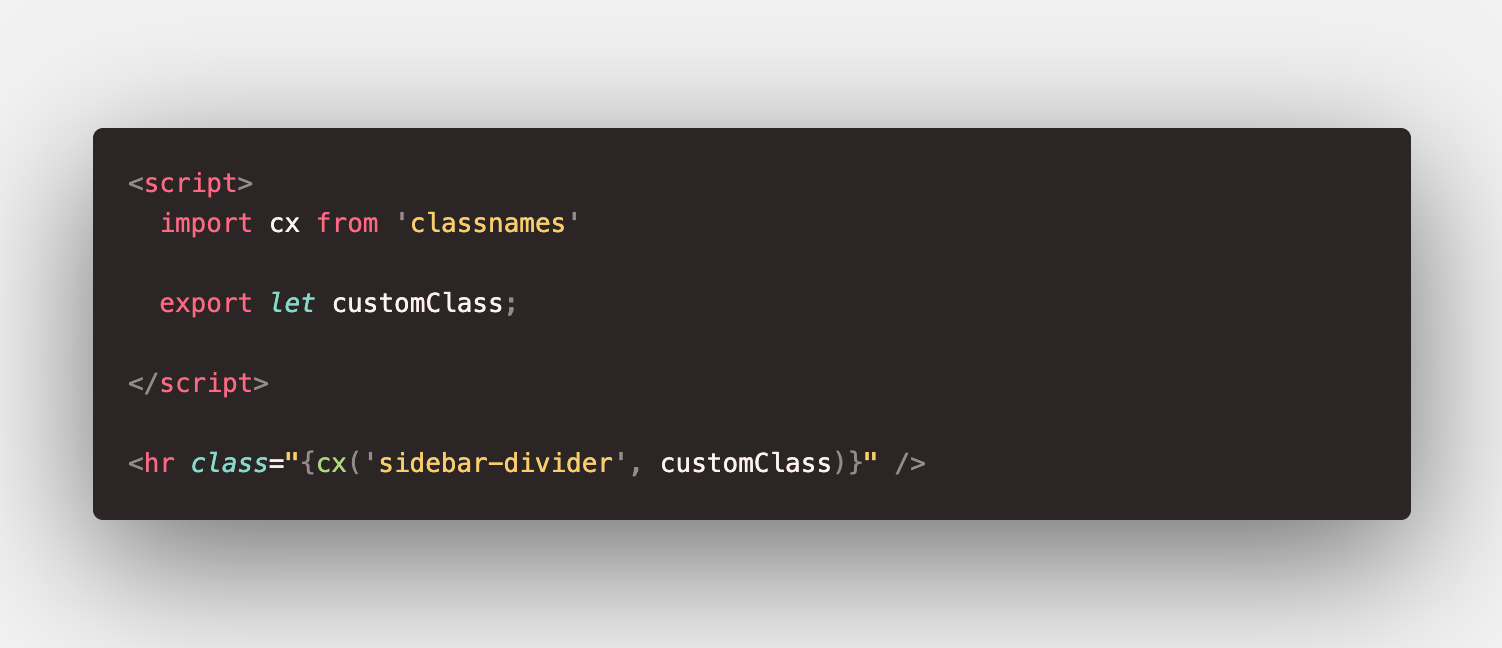
<SidebarDivider customClass="my-0" />
<script>
  import cx from 'classnames'

  export let activeClass = 'active';

  let active = 0

</script>

<hr class="{cx('sidebar-divider',  {customClass: active === 1})}" />
 jddecano
on 10 Apr 2020
jddecano
on 10 Apr 2020
Nope, it does not.
If you declare styles for customClass in the outer component these will be stripped of / optimized away / tree shaken or however you call it.
Obviously passing the class down works. Passing any declared styles down / retaining them requires support by the compiler which won't be implemented as explained here.
nikku
on 10 Apr 2020
TBH It is a bit disheartening to see this issue closed when all proposed solutions do not sufficiently solve the issue at hand, I really like svelte but if this is how feature requests are handled I am probably not going to use it in the future.
AnxiousDarkly
on 19 Apr 2020
This is a deal-breaker for me.
Vue supports child scoping and svelte should too.
For example, I have a <Link> component that manages javascript routing, and renders an <a> tag.
Say I want to style this javascript routing anchor tag on various pages (some may be buttons, plain links, images) it makes it incredibly difficult. Eg:
<Link href="/about">About Us</Link>
<style>
a {
  color: red; //doesn't apply this rule, because scoping doesn't extend to children
}
</style>
We should be able to apply an attribute to the style to apply scoping to child elements, eg:
<Link href="/about">About Us</Link>
<style children>
a {
  color: red; //applies rule to children
}
</style>
Pleaase do it like vue
 AlbertMarashi
on 16 May 2020
AlbertMarashi
on 16 May 2020
We should also allow passing unrecognised props to the rendered component. eg: tabindex might be required on some instances of a component, and not all. Why should developers have to add tabindex support to their components just that it may potentially be used
The language should work for developers, not the other way around. Having to wrap everything in a selector :global(child) { } is hacky
AlbertMarashi
on 16 May 2020
@DominusVilicus if you have a component which looks like this
<h1>Welcome</h1>
<p>Lorem ipsum...</p>
<form>...</form>
Which item should inherit unrecognized props? What you suggest sounds like a potential avalanche of side effects.
You could do something like this instead while maintaining complete control of where different props go.
<div class="wrapper>
  <div {...$$props} >
    ...
  </div>
</div>
And a friendly hint. Your suggestion will most likely be considered based on pros and cons, of which feature parity with Vue and use of caps lock won't carry much weight.
jakobrosenberg
on 16 May 2020
In the end, I prefer to use this approach:
Child:
<p class="{$$props.class}">Test</p>
Parent:
<div class="parent">
  <Child class="parent__child"/>
</div>

<style>
  .parent :global(.parent__child) {
    background: tomato;
  }
</style>
 GoshaEgorian
on 20 May 2020
GoshaEgorian
on 20 May 2020
The most pragmatic hack I've seen that gets the job done. :clap:
nikku
on 20 May 2020
In the end, I prefer to use this approach:
You could just go full react on it and reduce the need to use $$props: https://svelte.dev/repl/b9919b71c505419fb5dca0dc33f5f8bf?version=3.22.3
 antony
on 20 May 2020
antony
on 20 May 2020
https://svelte.dev/docs#1_export_creates_a_component_prop explains how to have props whose names are reserved words (like class).
Conduitry
on 20 May 2020
There is a little thing around undefined: if class prop is not provided and parent class is not the only one class of node the rendered class will be smth undefined.
What I mean:
<p class="test {$$props.class}">Test</p>
will render to
<p class="test undefined">Test</p>
Also you probably want to define more than one class. If you have two buttons you want to customise both. In this case I don't like using $$props so I prefer to use usual svelte props.
So I came to a solution:
Child:
<script>
  let className = '';
  export {className as class};
</script>

<p class="test {className}">Test</p>
Parent:
<div class="parent">
  <Child class="parent__child"/>
</div>

<style>
  .parent :global(.parent__child) {
    background: tomato;
  }
</style>
It works because of default value for prop. Also you can give any name to it and add some more props:
Child:
<script>
  export let firstClass = '';
  export let secondClass = '';
</script>

<p class="{firstClass}">First</p>
<p class="{secondClass}">Second</p>
@GoshaEgorian
<p class="test {$$props.class||''}">Test</p>
I'll have to agree with @jakobrosenberg
Just throwing in
<div class="{$$props.class || ''} otherChildClass"></div>
seems the easiest, and it'll avoid undefined classes. I feel like many aren't noticing the undefined values getting inserted in their classes.
 axtn
on 21 May 2020
axtn
on 21 May 2020
I prefer to use exporting because of readability. Also docs say:
$$props is useful in rare cases, but not generally recommended, as it is difficult for Svelte to optimise.
Anyway it's opinionated details I think.
GoshaEgorian
on 22 May 2020
In general, my focus has shifted from optimization to DX. Partly because Svelte does a lot of the heavy lifting. For things that can be optimized on a need-to basis, I would rarely sacrifice DX.
jakobrosenberg
on 22 May 2020
I agree with @DominusVilicus, Vue does this in a way that just makes sense.
 mattaningram
on 24 Jul 2020
mattaningram
on 24 Jul 2020
I just solved using export {className as class}. Here is my code:
<script>
  export let className = ''
  export {className as class}
</script>

<div class={className}>
  The content
</div>
 sayhicoelho
on 2 Aug 2020
sayhicoelho
on 2 Aug 2020
This is such a basic requirement for any component framework, and I can't believe it isn't supported by Svelte. If I create any kind of low-level component (eg: Link) I can't style it in-situ without some kind of gross hack like global classnames or div wrappers, which is just absurd. I was so excited about Svelte but this is a dealbreaker. How are others getting around this in production?
 seaneking
on 5 Oct 2020
seaneking
on 5 Oct 2020
@seaneking using :global, or passing properties in to style the component. I do it very rarely, when it is required. If you look around the github issues a bit you'll realise why this doesn't exist, and that's because nobody has yet come up with a solution that is any good.
antony
on 5 Oct 2020
@antony I have seen a few of the other issues and RFCs for this, though tbh I got lost pretty quickly. When you say nobody has come up with a decent solution, is that in terms of technical limitation? If so is this at least acknowledged as an important issue that needs a solution/some thinking?
The vibe I got from the issues I saw was that it was dismissed as unimportant, which for a large majority of users just isn't the case (at least not with React/Vue/etc, and I don't see how Svelte offers a significantly different paradigm to address it).
seaneking
on 5 Oct 2020
@antony
and that's because nobody has yet come up with a solution that is any good.
I disagree, the community came up with a pretty good solution (https://github.com/sveltejs/rfcs/pull/22 ), with good community support and was easy to implement, but they closed the RFC.
@seaneking I used the exact same use case (<Link> component) to show why it would be incredibly useful but apparently they don't think it's enough of a valid use case.
I love Svelte, but it's digging itself a hole by not listening to the repeated requests of the community to include such an important feature like this.
When issues like this have been raised over 10 times, it clearly indicates the language is lacking this important functionality
AlbertMarashi
on 7 Oct 2020
Solution 1
<script>
import ChildComponent from '...'
</script>
<style>
ChildComponent {
   color: red;
}
</style>
Solution 2
<script>
import ChildComponent from '...'
</script>
<style>
:component(ChildComponent) {
   color: red;
}
</style>
Solution 3
:global { //allows nesting & easier to write compared to :global(.childComponent a) { }
    .childComponent {
        a {
            color: red;
        }
    }
}
Reasons people may want this feature
- There are child element properties that parent elements should be able to control (eg: align-self, margin, position, left, etc)
- For simple things such as
<Link>components that render a common anchor element (a {}instead ofdiv :global(a){}on hundreds of components - current
:global(el)is broken and doesn't allow nesting in popular CSS preprocessors (eg: stylus, less, scss)
A developer potentially abusing a feature of a language is not a valid reason to not include a useful feature in the language.
AlbertMarashi
on 7 Oct 2020
There have been numerous RFCs / ideas proposed for an API to do this. None of those RFCs or ideas have resulted in a solution which works well enough, or fits the svelte model. As soon as one does, it can be implemented. This hasn't been dismissed as unimportant at all, but it also hasn't been implemented as nobody has yet suggested (in an RFC or otherwise) a suitable way to do it.
antony
on 7 Oct 2020
@Antony that's not true.
For example, Solution 3 I listed above was implemented in the svelte-preprocess plugin, clearly indicating it's possible. It works perfectly fine and am using it in production and there's no reason it shouldn't be included in the main repository
AlbertMarashi
on 7 Oct 2020
I disagree, the community came up with a pretty good solution (sveltejs/rfcs#22 ), with good community support and was easy to implement, but they closed the RFC.
"they" closed the RFC because of the reasons discussed in the closing comment of the RFC. I don't have time to read through the entire history of the RFC right now, but if a solution was proposed that was suitable, then it wouldn't have been closed.
We have no intention of not supporting things that people want, that would be a bit pointless.
For example, Solution 3 I listed above was implemented in the svelte-preprocess plugin, clearly indicating it's possible.
Is it valid CSS?
antony
on 7 Oct 2020
Is it valid CSS?
I would say it's more valid than the existing :global() syntax, as my syntax highlighting doesn't even work when using it:
Existing solution

Solution 3
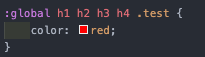
but if a solution was proposed that was suitable, then it wouldn't have been closed.
There were multiple proposed solutions in the comments that would be possible and reasonable to implement into Svelte, but there's no point debating it with someone who has already made their mind.
The community also supported it, given the numerous amounts of issues raised related to the lack of this type of feature.
AlbertMarashi
on 7 Oct 2020
Right, so it looks like global is something specific to the css modules spec, which unfortunately I don't know a huge amount about, so possibly it's as-valid as the :global() modifier.
I appreciate that the community might believe that it's the perfect solution, but unless the maintainers can also agree that it is the perfect solution, obviously it won't gain any traction.
I don't think anybody has made their mind here, but a debate is two directional. Railroading an issue because you can't foster agreement between two parties isn't debating either.
Edit: Now I've gone and studied that RFC, the final two points are pretty clear, and indicate why it wasn't accepted as a solution. Expanding an escape hatch is not a suitable replacement for a decent API to solve the issue, and if you really want to do this, you already can, with preprocessors.
antony
on 7 Oct 2020
@AlbertMarashi I agree this is needed... But, of all solutions, I think the global one is the less suitable (unless it does something different of I'm thinking it does).
Because the problem with actual Svelte «way of doing things» is precisely you need to pollute CSS with global styles everywhere if you want to affect children components.
I need to use CSS-in-JS just because of this and this feels wrong (at least to me). Because of that, I stopped trying Svelte till this gets settled.
The solution I would expect is having the scoped class Svelte adds automatically available, in some way. Or in a special Svelte variable, or added automatically, whatever.
That way, you could pass classes to children components in a prop and deal with all easily and have these components SCOPED.
I don't know about the technical implications of that, but that is what I'm been thinking «it would be nice to have this».
Unless I'm missing something, with that :global alternative, you aren't doing that and you're still polluting CSS with global classes.
(Still I agree that being able to have nesting support in :global could be handy, which can be done with preprocessors... when you want some global classes, which usually you don't want).
Genuine question: is there any issue not closed about this so the mentioned debate can be happening? Because everything that was opened and discussed was promptly closed. I stopped looking around after I observed how, one after another, everything were closed (I was subscribed to them, like to this one, to stay up to date).
 soulchainer
on 7 Oct 2020
soulchainer
on 7 Oct 2020
I also thought this was a big problem at first, but after building several complex projects in Svelte during the last year I haven't actually needed to use any of the workarounds suggested here. I have even gone back and removed some of the code I wrote early on that tried to enable React-style component level class names.
Also, to clear up a common misunderstanding, you can scope style overrides to the child component like this:
Wrapping component:
<script>
import Link from './Link.svelte'
</script>

<style>
.wrapper :global(a) {
  color: red;
}
</style>

<div class="wrapper">
  <Link>Text</Link>
</div>
Link component:
<style>
a {
  color: blue;
}
</style>

<a href="..."><slot /></a>
However, as many people have pointed out several times by now, this breaks the style encapsulation. This leads to a bunch of subtle issues down the line.
If you only treat :global() as an escape hatch it is more than good enough. I'd even go as far as to say that it's a feature that it's a bit more verbose and hard to use, just like the how the dangerouslySetInnerHTML API in React is intentionally made hard to use. This way Svelte guides you (or forces you, depending on you point of view) to consider what you're doing and to (hopefully) write better code.
I also want to point out that this design decision, together with the fact that that you're not able to easily pass around class names makes the styling way easier to reason about. This might be inconvenient at times, but it is nevertheless a BIG win.
Most of the time there are also better options for overriding styles without braking (too much) of the encapsulation. Common solutions include adding an explicit prop for the thing you want to control or wrapping the children (in the example above, the text that goes in the slot) in another element to override the styling. This might feel a bit counter intuitive if you're used to passing around class names all over the place, but it results in much more robust code.
In other words, I've come to believe that the core teams stance of being restrictive about this is correct. As far as I know, there is indeed no suggested solution that keeps the style scoping intact and that works with all the quirks of the Svelte component format. Since components are allowed to have more than one root element, any approach that use them as "selectors" will fail since what to target becomes ambiguous. And just passing around class names like in e.g. React is a worse tradeoff than the existing :global() escape hatch.
With that said, I think there is a huge need for better communication around this. Both to explain the reasoning behind these design decision as well as documenting workarounds/patterns for "how to do it the Svelte way" in situations where you would normally just pass in a class name with another framework.
 jonatansberg
on 7 Oct 2020
jonatansberg
on 7 Oct 2020
I use the wrapper class with :global() with my Tabs component, to provide another example to the discussion:
I do wish there was a little cleaner way to expose the class API, but it works nonetheless.
 techniq
on 7 Oct 2020
techniq
on 7 Oct 2020
Most of the time there are also better options for overriding styles without braking (too much) of the encapsulation. Common solutions include adding an explicit prop for the thing you want to control or wrapping the children (in the example above, the text that goes in the slot) in another element to override the styling. This might feel a bit counter intuitive if you're used to passing around class names all over the place, but it results in much more robust code.
These approaches cause just as many issues as simply passing class names down the way Vue does. It never really made sense to me how against this Svelte and React developers are. Now complex projects have tons of props being passed around with different names and approaches just to do a simple style override, and component designers have to try and take into account every possible override before it is needed. Wrapping children in an element can impact layout itself (for example with CSS Grid) and adds more layers you have to parse to figure out what is going on.
There are big benefits to scoped CSS, but it doesn't mean we need to throw out the idea of the cascade entirely. Vue handles this elegantly and I have not run into any issues even in complex projects.
mattaningram
on 7 Oct 2020
Vue unscopes css by default. That's not an elegant solution, it's just a
non solution.
If you want global css, add a css file and just include it in your html.
On Wed, 7 Oct 2020 at 18:37, Mattan Ingram notifications@github.com wrote:
Most of the time there are also better options for overriding styles
without braking (too much) of the encapsulation. Common solutions include
adding an explicit prop for the thing you want to control or wrapping the
children (in the example above, the text that goes in the slot) in another
element to override the styling. This might feel a bit counter intuitive if
you're used to passing around class names all over the place, but it
results in much more robust code.These approaches cause just as many issues as simply passing class names
down the way Vue does. It never really made sense to me how against this
Svelte and React developers are. Now complex projects have tons of props
being passed around with different names and approaches just to do a simple
style override, and component designers have to try and take into account
every possible override before it is needed. Wrapping children in an
element can impact layout itself (for example with CSS Grid) and adds more
layers you have to parse to figure out what is going on.There are big benefits to scoped CSS, but it doesn't mean we need to throw
out the idea of the cascade entirely. Vue handles this elegantly and I have
not run into any issues even in complex projects.—
You are receiving this because you were mentioned.
Reply to this email directly, view it on GitHub
https://github.com/sveltejs/svelte/issues/2870#issuecomment-705089098,
or unsubscribe
https://github.com/notifications/unsubscribe-auth/AABVORKBWOWSSI4VEAFQ4KTSJSRPNANCNFSM4HPWNANQ
.>
ꜽ . antony jones . http://www.enzy.org
antony
on 7 Oct 2020
Since components are allowed to have more than one root element, any approach that use them as "selectors" will fail since what to target becomes ambiguous. And just passing around class names like in e.g. React is a worse tradeoff than the existing :global() escape hatch.
Don't want to add fuel to any fires here, but why is passing down class names a worse tradeoff than the :global escape hatch? I agree that components can't be used as selectors because you can't guarantee a single root. But if components had access to a scoped class name as a prop the developer can choose where and how it applies (if at all).
I don't see "I don't need/like this" as an argument against a feature, when there's obviously strong need for it in the community, and the wider ecosystem (Vue, React, etc) all have this as a first class feature. From what I understand the reason this hasn't been implemented is because of technical limitations, not conscious design decisions by the Svelte team.
I don't have any solutions to this, but I'd echo what others have said that it would be a very positive step forward to just have a single open issue, referencing all work to date, that we can leave open and discuss this, rather than continually closing and re-erecting a dead horse.
seaneking
on 8 Oct 2020
Don't want to add fuel to any fires here, but why is passing down class names a worse tradeoff than the
:globalescape hatch? I agree that components can't be used as selectors because you can't guarantee a single root. But if components had access to a scoped class name as a prop the developer can choose where and how it applies (if at all).
I'm not a core team member, and I can't speak to how/why certain decisions was made. With that said, to me, leaving things as they are seems like a very intentional decision.
Class names make it really easy to just slap on some more styles and be done with it. It's super convenient. The downside is that it's really easy to customize a lot more than intended by the original component author, and by doing so you couple the components. Worst case, this means that the original component can't be updated or improved in isolation anymore. Any future change needs to take these styling overrides in to account. This either leads to bugs down the road when things unexpectedly change, or the style overrides eventually become a part of the standard usage. This is the very thing per component style scoping tries to fix.
"Style overrides as standard usage" is something I've seen a lot when components that were designed for one use-case are reused elsewhere. It's so easy to slap a class name on an existing component that doesn't look 100% right but otherwise does what you want. But now, when that component's styling can't easily be updated, the next person will need to do the same. Once you establish this pattern it tends to spread throughout the codebase. Eventually the style overrides are mandatory to even use that component.
To me, taking the time to add a proper API for this new usage, or just duplicating the component and tweaking the styling there would probably have been a better tradeoff. Theming using CSS variables could be another.
A close cousin to the "style overrides as standard usage" tends to appear when you need to override the styling of a child component n levels down. Adding a nestedThingClassName prop and passing that on is easier than trying to figure out what styling is safe to change. This comes at great costs of increased complexity down the line when you have to play hide and seek to figure out why something is styled a certain way.
With all of this said, I want to point our that you are still able to pass down class names if you really want to. It's just not as convenient as in other frameworks. It's my understanding that this is by design. Here is the same example as before, but with class names:
Wrapping component:
<script>
  import Link from './Link.svelte'
</script>

<style>
  .wrapper :global(.overrides) {
    color: red;
  }
</style>

<div class="wrapper">
  <Link className="overrides">Text</Link>
</div>
Link component:
<script>
  export let className = '';
</script>
<style>
  a {
    color: blue;
  }
</style>

<a href="..." class={className}><slot /></a>
You can call the prop just class if you do a bit of legwork to circumvent it being a reserved word. However, it is probably better to call it something else since the Svelte compiler will complain if you don't wrap the class you're passing in with :global. To adress the point raised by @mattaningram, you could also drop the wrapper if you're fine with having the class name being global.
These approaches cause just as many issues as simply passing class names down the way Vue does. It never really made sense to me how against this Svelte and React developers are. Now complex projects have tons of props being passed around with different names and approaches just to do a simple style override, and component designers have to try and take into account every possible override before it is needed. Wrapping children in an element can impact layout itself (for example with CSS Grid) and adds more layers you have to parse to figure out what is going on.
This is indeed a valid point. It's my personal opinion after working on larger projects (multi-year, 10s-100s of devs that come and go over time), and specifically on UI libraries for use in those contexts, is that all approaches for overriding styling stuck one way or another. Thus, the best thing to do is trying to avoid it altogether.
Whenever possible, delegating the styling and layout to the parent/consuming component is usually the best option. Renderless or headless components are great for this! (Again, in my opinion.)
If that's not possible for whatever reason, e.g. since you're working in an existing codebase, then css vars or other forms of theming is a decent second option. If you can't do that either, then targeting children using attribute selectors is still a pretty decent option. If thats a no-go as well, then I'd actually consider just duplicating the component(s) in question. If and only if this is also not possible I'd say a class name prop is warranted.
jonatansberg
on 8 Oct 2020
If you don't want to use the feature then don't use it. If you want to have every component isolated from one-another, then that's your choice.
AlbertMarashi
on 8 Oct 2020
@AlbertMarashi not sure what this comment relates to, but a mainstay of Svelte is encapsulated components, so therefore the default is to enable, allow, and foster this. If you want to make components bleed styles into eachother, breaking encapsulation then:
- Use a global stylesheet
- Use
:globalmodifier - Use preprocessors
- Use a framework/library where the intended usage aligns better with your own usage
If there is something that literally can't be done, then an RFC should be raised in order to debate it with the community and maintainers, but if it is closed with reasoning behind why it isn't feasible/desirable then any response should be an adaptation/adjustment to those concerns rather than simply arguing that it should be re-opened. It's important that any solution befits Svelte itself, and also is acceptable to both community and the maintainers who have to, well, maintain it.
antony
on 8 Oct 2020
I have a simple suggestion here that I don't recall having already seen.
Apologies if it has been suggested and I've missed it.
What about a token pattern that (when used in a style block) expands to the
svelte-generated class name for a particular child component?
This could be used to target specific CSS towards a child (for example css
variables).
This would ideally limit the encapsulation leak and using css variables
would make certain patterns of composition more "svelte-like". We can
already pass in JS values as properties to child components, why not allow
css variables too?
On Thu, Oct 8, 2020, 06:24 Antony Jones notifications@github.com wrote:
@AlbertMarashi https://github.com/AlbertMarashi not sure what this
comment relates to, but a mainstay of Svelte is encapsulated components, so
therefore the default is to enable, allow, and foster this. If you want to
make components bleed styles into eachother, breaking encapsulation then:
- Use a global stylesheet
- Use :global modifier
- Use preprocessors
- Use a framework/library where the intended usage aligns better with
your own usageIf there is something that literally can't be done, then an RFC should be
raised in order to debate it with the community and maintainers, but if it
is closed with reasoning behind why it isn't feasible/desirable then any
response should be an adaptation/adjustment to those concerns rather than
simply arguing that it should be re-opened. It's important that any
solution befits Svelte itself, and also is acceptable to both community and
the maintainers who have to, well, maintain it.—
You are receiving this because you are subscribed to this thread.
Reply to this email directly, view it on GitHub
https://github.com/sveltejs/svelte/issues/2870#issuecomment-705565384,
or unsubscribe
https://github.com/notifications/unsubscribe-auth/AAABZHOLSKIKPPWYAIMIEPTSJW4PNANCNFSM4HPWNANQ
.
 ajbouh
on 8 Oct 2020
ajbouh
on 8 Oct 2020
@jonatansberg
With all of this said, I want to point our that you are still able to pass down class names if you really want to. It's just not as convenient as in other frameworks. It's my understanding that this is by design. Here is the same example as before, but with class names:
Wrapping component:
<script>
  import Link from './Link.svelte'
</script>

<style>
  .wrapper :global(.overrides) {
    color: red;
  }
</style>

<div class="wrapper">
  <Link className="overrides">Text</Link>
</div>
Link component:
<script>
  export let className = '';
</script>
<style>
  a {
    color: blue;
  }
</style>

<a href="..." class={className}><slot /></a>
And then you have another component which also has an .overrides global, and this component extends it with these color: red, but also gets the styles from the previous .overrides class, higher in the cascade (which is non intended). Styles you didn't want to hereby, because you wanted to pass instead a class scoped (not global), but you just can't.
When you start having global classes, they will eventually collide. Because no, these classes are not scoped, they are just partially scoped.
Svelte turns that .wrapper :global(.overrides) into something like this: .wrapper.svelte-xp0fd7 .overrides.
So a componente styled with just class="overrides" can get inintended styles from another :global(.overrides) { anytime.
And that's what I previously commented, but you answered that:
Also, to clear up a common misunderstanding, you can scope style overrides to the child component like this
So, the way I see it, that works till it works and then it doesn't.
What would be needed to solve that situation and could have classes really scoped (in my opinion) would be what I previously commented, something like:
<script>
   import Link from './Link.svelte'
 </script>

 <style>
   .wrapper .overrides {
     color: red;
   }
 </style>

 <div class="wrapper">
   <Link className=`${overridesWithScope}`>Text</Link>
 </div>
That class passed to Link would be, ideally, .overrides-{whateverTheHash}.
Part of the problem is that Svelte achieves the scope doing "className.svelte-xp0fd7 className2.svelte-xp0fd7" (composed classes), instead of "className-xp0fd7 className2-xp0fd7" (one, unique, classname). There is no way you can get aditional inintended, by accident styles from outside this component, because you won't get the same hash. But if you are compositing classes, you still can get some styles if you use the same base className, rigth? Or I'm thinking this wrong? >_<.
I know the way svelte does this is just because at the end the CSS code is smaller (just one class, not repeating the hash as many times...), but it has this downside.
Of course, it also works fine if you just don't use :global at all... but the only way to pass a class to a children in Svelte is passing it using :global, because we can't either get .overrides.svelte-xp0fd7 passed to the children, so...
And because of that I was saying that it would be nice so have some special Svelte variable to just get that hash.
That way we could use do class="overrides svelte-${theSpecialVariable}" (yeah, not ideal) given that the Svelte compiler doesn't do that automatically and neither exposes it in some way so some preprocessor (the ideal way? IDK, I'm not too knowledgeable, still learning) can make that replacement in his behalf.
I tried to explain myself the best I can, I hope you understand. And maybe I'm wrong at this, IDK. Thanks for your patience.
soulchainer
on 8 Oct 2020
I have a simple suggestion here that I don't recall having already seen. Apologies if it has been suggested and I've missed it. What about a token pattern that (when used in a style block) expands to the svelte-generated class name for a particular child component? This could be used to target specific CSS towards a child (for example css variables). This would ideally limit the encapsulation leak and using css variables would make certain patterns of composition more "svelte-like". We can already pass in JS values as properties to child components, why not allow css variables too?
…
I was writing :þ. This is just what I have been saying some time now :). About the token pattern, @ajbouh :þ.
soulchainer
on 8 Oct 2020
@soulchainer I think I'm describing something similar, but coming from the other direction. I am imagining a token that expands in the style block itself.
ajbouh
on 8 Oct 2020
@ajbouh you can check out https://github.com/sveltejs/svelte/pull/2888#issuecomment-671132029
We've made 2888 PR in form of a patch-package patch and it is perfectly usable and also very small.
Also look at the comment below that. Due to svelte double class or tag + class scoping implementation it is possible to break components by passing class which component already has.
For a long time I wanted technical reason why this could be bad in svelte, and finally we have it.
Before that, I've only seen answers from ideological standpoint or some slippery topic-shifting answers, which drove me nuts.
The most annoying thing is that there's no tutorial on how to make complex things in svelte-way (not passing classes).
They show you how to make 1-2 component simple stuff, where you work with tags only...
Every anti-class-passing adept I've asked told me that you shouldn't make components from tags because this is antipattern. But they never show code - how exactly this approach looks.
I've started to think that we should avoid making small components like buttons, radios, checkboxes, inputs, etc. and rely on use: instead to implement logic and make widget-scoped global styles for tags with selectors like .widget-scope button to avoid writting default class for all buttons in the widget.
That way you can have the freedom of positioning these buttons and what else.
Scoping some default button styles in button component just feels right, while global widget-scoped styles is not... However with small components you lose all handy features which tags provide.
I would use css modules (webpack) or modular-css (rollup) + classnames on production if I wanted to pass classes.
css modules scoping is much more safe for class-passing workflow.
If only they were integrated better in the SFC format...
https://www.npmjs.com/package/@modular-css/svelte
This is what we have.
https://github.com/sveltejs/rfcs/pull/32#issuecomment-699882933
More thoughts from me on this topic.
 non25
on 9 Oct 2020
non25
on 9 Oct 2020
I guess I'm suggesting something that is an alternative to passing a class. I'm suggesting a way for css variables to get picked up from the style block and properly inherited by the child components
ajbouh
on 9 Oct 2020
If there is something that literally can't be done, then an RFC should be raised in order to debate it with the community and maintainers
I did, yet it was closed (sveltejs/rfcs#22)
An example of something that cannot be done:
Using :global() I can't use nesting features in popular CSS preprocessors, eg:
div :global(){
   .childComponent {
      background: red;
      a {
         color: blue;
      }
   }
}
Is not syntactically valid.
AlbertMarashi
on 9 Oct 2020
I did, yet it was closed (sveltejs/rfcs#22)
@AlbertMarashi The point of a debate is that it comes to a close after a resolution or blocker has been reached. In this case, the debate ended when it was discovered that there were blocking issues preventing it from being added to core. These issues were described in the closing message.
You can get some nesting:
div {
   :global(.childComponent) {
      background: red;
   }

  :global(.childComponent a) {
     color: blue;
  }
}
I believe works.
I think you used to be able to nest further, but it was removed/disabled for some reason. Either way, this could be improved by a PR I'd suspect.
antony
on 9 Oct 2020
@antony
:global(){
  @import 'normalise.scss'
}
isn't possible either
AlbertMarashi
on 9 Oct 2020
@AlbertMarashi there are two ways to do that with the svelte-preprocess plugin - via a global style tag, or via the prependData config object.
To be clear we're not offering global as anything more than an escape hatch for very specific cases.
antony
on 9 Oct 2020
@antony
Vue unscopes css by default. That's not an elegant solution, it's just a non solution. If you want global css, add a css file and just include it in your html.
Yes by default, I was referring to scoped style blocks in Vue single file components since they are more similar to what Svelte has.
More broadly it's clear there isn't an ideal approach here. Any given solution has some benefits on one side, but requires developer awareness and knowledge on the other to avoid downsides. I personally prefer to try passing down classes first, then fall back to using escape hatches like :global or Vue's ::v-deep, and then lastly using props or modifying the child component itself to have another variant. My reasoning is that it is easier to teach a team to insure that components use specific BEM-style class names along with SFC scoping (to avoid the side effects passing classes and globals can cause) than it is to provide documentation for all the various props or component variants that are added just to solve one situation a child component finds itself in.
With good component setups I find I usually only need to pass down classes to provide layout without needing extra wrapper divs, and occasionally use an escape hatch to override something specific in a component. In Svelte I will have to fall back to approaches I find clunkier and harder to keep a team informed and consistent on. That being said I feel this is mostly a philosophical difference and I respect wanting to maintain a particular approach to Svelte components.
As a final aside, I much prefer how Vue's ::v-deep works (and how nicely it plays with SCSS) to Svelte's :global() escape hatch.
mattaningram
on 13 Oct 2020
Hello great Svelte community!
I believe I have a solution that is clean, not hacky, uses Svelte without modification, and provides value for component libraries made and used in Svelte.
https://svelte.dev/repl/c16aa7a6ef714067af6f5eee0a0f453c?version=3.29.0
<script>
    import Nested from './Nested.svelte';
</script>

<style>
    p {
        color: purple;
        font-family: 'Comic Sans MS', cursive;
        font-size: 2em;
    }
    .container :global(.item) {
        color: red;
    }
</style>

<div class="container">
    <p>This is a paragraph.</p>
    <Nested/>
    <Nested class="item"/>
</div>
Looking for any and all feedback, thanks!!
 rcline
on 30 Oct 2020
rcline
on 30 Oct 2020
@rcline I'm sorry, but it's not na solution. it's a workaround. Whole idea of this issue is to have scoped classes passed to child components.
It was discussed few times in this thread.I also pointed it in my first post.
wysher
on 31 Oct 2020
@wysher Fair enough, a workaround. 👍
rcline
on 2 Nov 2020
Related issues
 Rich-Harris
·
3Comments
Rich-Harris
·
3Comments
 angelozehr
·
3Comments
angelozehr
·
3Comments
 plumpNation
·
3Comments
plumpNation
·
3Comments
 matt3224
·
3Comments
matt3224
·
3Comments
 noypiscripter
·
3Comments
noypiscripter
·
3Comments
Most helpful comment
I think the important bit to note is that svelte does perform CSS optimizations, removing any unused class declarations.
Most simple example:
...compiles to CSS without the
class-to-adddeclaration, as svelte currently does not recognize the class name as being used.I'd expect
class-to-addis bundled with all nested style declarationsclass-to-addis passed toChildComponentasclass-to-add svelte-HASHThis looks like a bug / missing feature to me. Not sure how modular-css would help me here.