Survey-library: [feature request] radiogroup: radio button with bigger targeted area.
Are you requesting a feature, reporting a bug or asking a question?
feature
What is the current behavior?
clickable only on radio button
What is the expected behavior?
target area should be 'the whole line' of the radio button. even better, highlight the clickable area when hover.
before I use surveyjs, I made this work. probably I can revive it by customise the css. in my opinion, this should be the default behavior?
 swuecho
All 7 comments
As I can see from our online demo - https://surveyjs.io/Examples/Library?id=questiontype-radiogroup&platform=jQuery&theme=default
It works as you described for me, except the hover highlight
Could you check our example?
 tsv2013
on 19 Sep 2019
tsv2013
on 19 Sep 2019
Yes, for normal radio question, works fine. would be better to make the whole line clickable if the choice is on its own line. (currently, one the radio button and text clickable)
for matrix question in mobile device, check
https://surveyjs.io//Examples/LibrarySinglePage?id=questiontype-matrix&platform=jQuery&theme=default
shrink the screen width or view it under cell phone. only radio button is clickable
swuecho
on 20 Sep 2019
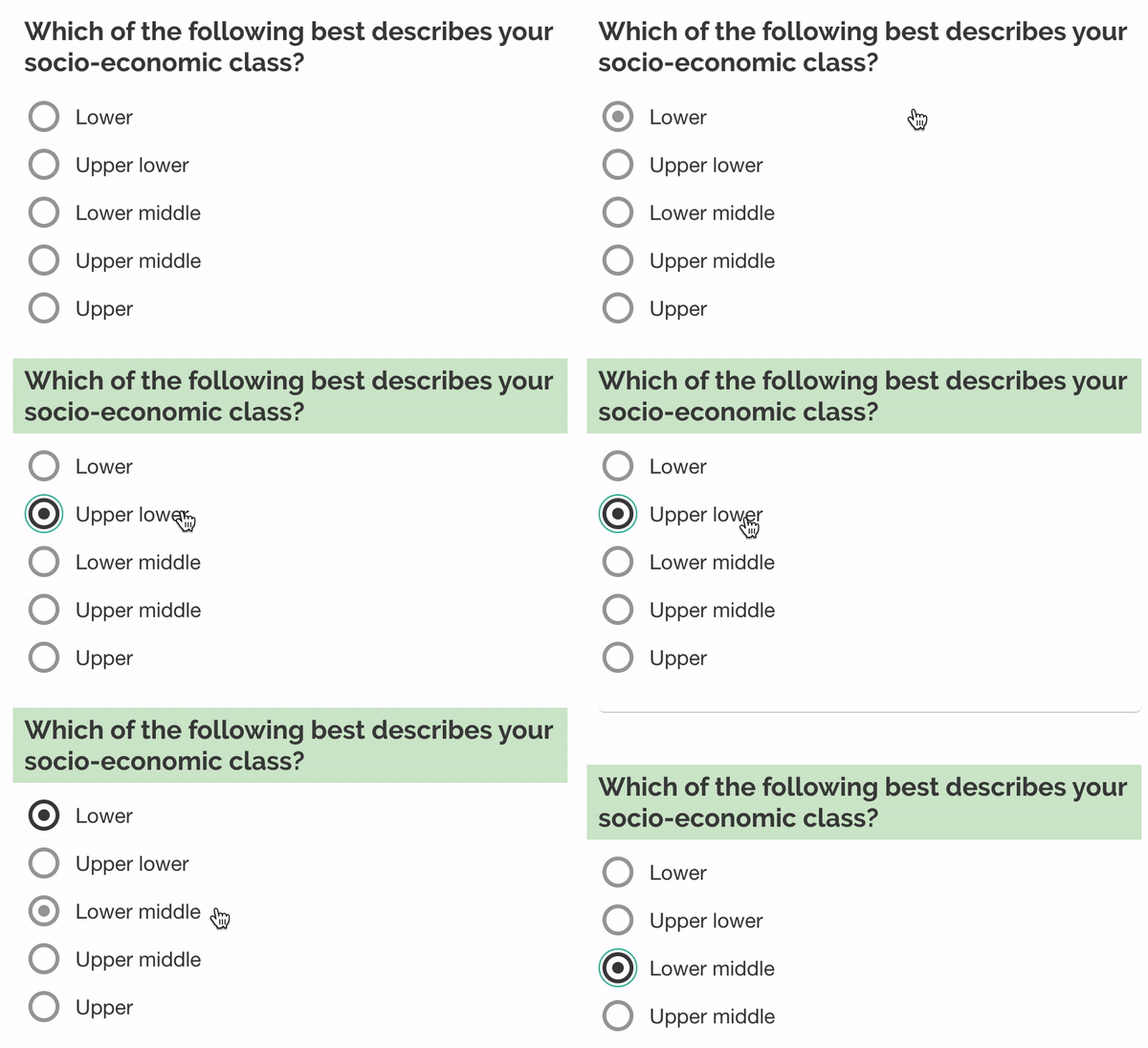
I recorded a short screencast demonstrating the issue. This is with the "modern" theme. Circles represent mouse button clicks.
As you can see, hovering over a question row highlights the radio button. But clicks are only registered if they hit the button or the question text label.
This is a usability issue, as one may believe the entire row is clickable after seeing that hovering leads to a selection. Like @swuecho suggested, if there is only one question per row, the entire row should be clickable to respond to the question. This is especially important on mobile devices with small screens when using short (e.g., single-word) answers.
 hoechenberger
on 21 May 2020
hoechenberger
on 21 May 2020
We've been working on something similar. Please forgive a potentially hacky approach (with all caveats!). Using css alone, you can style the innermost container for the row as a flexbox, and this will make the full row clickable. Try adding this css:
div.sv-item.sv-radio> label {display:flex;}
This is working for us, but interested to hear any feedback about this approach or better alternatives.
 scholarlylabs
on 24 May 2020
scholarlylabs
on 24 May 2020
div.sv-item.sv-radio> label {display:flex;}
Thanks this seems to be doing the trick for me, at least for now! I added align-items: center; so the label would be vertically centered behind the button.
div.sv-item.sv-radio > label {
    display:flex;
    align-items: center;
}
FWIW, this is the CSS I now use for checkboxes
div.sv-item.sv-checkbox > label {
    display:flex;
    align-items: center;
}
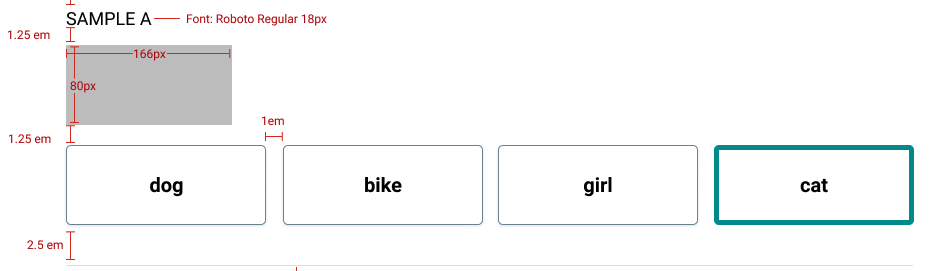
I have a similar question. I need to implement a question like the following picture. It basically displays an image and have button to pick the right answer. It's like a radio but with button and an image. I'm not sure how to implement it, can I extend radiogroup using onAfterRenderQuestion or should i implement a new widget?
 thiagotigaz
on 26 Aug 2020
thiagotigaz
on 26 Aug 2020
Related issues
 AWIXOR
·
3Comments
AWIXOR
·
3Comments
 dmitrykurmanov
·
3Comments
dmitrykurmanov
·
3Comments
 madceb
·
4Comments
madceb
·
4Comments
 spertusatti
·
3Comments
spertusatti
·
3Comments
 alexmc6
·
3Comments
alexmc6
·
3Comments