Survey-library: Reset current choosed value when pressing "back" button
Are you requesting a feature, reporting a bug or asking a question?
question
What is the current behavior?
selecting:
question1 - any value
question2 - any value
question3 - any value
after going back to question1 and going forward:
question2 - value selected
question3 - value selected
What is the expected behavior?
selecting:
question1 - any value
question2 - any value
question3 - any value
after going back to question1 and going forward:
question2 - value should be empty, user need to select again, because it will change visibility of further questions
question3 - value should be empty, user need to select again, because it will change visibility of further questions
How would you reproduce the current behavior (if this is a bug)?
When scrolling and selecting in: question1 -> question2 -> question3....... , then going back to question1, selecting value and then after going to question2 or any other further - the value of question2 is already selected and not cleared. In this way, it shows questions that shouldn't be visible because there are visibleif statements.
Provide the test code and the tested page URL (if applicable)
I will provide my survey URL only for admin.
Specify your
- browser: Chrome
- browser version: up to date
- surveyjs platform (angular or react or jquery or knockout or vue): Jquery
- surveyjs version: 1.0.71
 tadas117
All 22 comments
Hello. Thank you for the interest. Could you please provide an example or json to reproduce the problem. And please specify your:
- browser:
- browser version:
- surveyjs platform (angular or react or jquery or knockout or vue):
- surveyjs version:
Here an example and it looks ok for me https://plnkr.co/edit/WKWwV2rd5PvZzo9lX2gA?p=preview
 dmitrykurmanov
on 21 Feb 2019
dmitrykurmanov
on 21 Feb 2019
@dmitrykurmanov hi, I already edited my problem description. Check it now.
tadas117
on 21 Feb 2019
@dmitrykurmanov your example is when question is in same and single page. I have 32 pages with 1-2 questions for each page.
tadas117
on 21 Feb 2019
@dmitrykurmanov my JSON is here:
tadas117
on 21 Feb 2019
@tadas117 if I understand you correctly you need to clean all selected values of the page when user go pack from that page, isn't it?
If yes you can use this code:
survey. onCurrentPageChanging.add(function(survey, options) {
  var oldPage = options.oldCurrentPage;
  var newPage = options.newCurrentPage;

  if (newPage.visibleIndex < oldPage.visibleIndex ) {
    oldPage.questions.forEach(function(q) {q.value = null})
  }
});
Here an updated plunk https://plnkr.co/edit/z7jWilKHUlZdcuXCyWxJ?p=preview
dmitrykurmanov
on 21 Feb 2019
@dmitrykurmanov thank you! That was exactly what I needed! Could you also help with another issue regarding visibleIF functionality:
when i select qst-16 value item1 then qst-26-D is displayed later, however, than 26.E is also display but only 26.D should be visible. I managed to do all visibleIF statements but im stuck with this one. Also same problem for 27D and 27E
tadas117
on 21 Feb 2019
@tadas117 maybe you need to add additional check for {qst-16} notempty please check the small example https://plnkr.co/edit/jWDeQQoj5mZCp51SPjyX?p=preview
dmitrykurmanov
on 21 Feb 2019
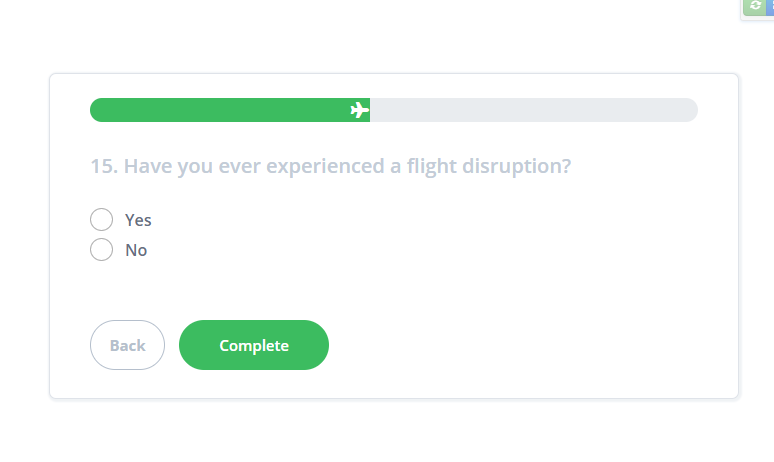
@dmitrykurmanov that also fixed my problem but now, when I'm at:
qst-15 - answers - YES | NO
it shows complete button instead of next. I want still to show button name as "Next"
qst-16 has visibleif: qst-15 = "item1"
tadas117
on 21 Feb 2019
@tadas117 please create a small example to reproduce the problem
dmitrykurmanov
on 21 Feb 2019
@dmitrykurmanov
Here, at 15 question when nothing is pressed
Plunker:
https://plnkr.co/edit/iAyvVT51cUEFGUcKrslX?p=preview
Image:
tadas117
on 21 Feb 2019
@tadas117 unfortunately I can't reproduce it. On my side I see "Next" button:

Do I need to do something else to reproduce it?
dmitrykurmanov
on 21 Feb 2019
@tadas117 it looks like in your case qst-15 is the last question (probable because of visibleIf's)
dmitrykurmanov
on 21 Feb 2019
@dmitrykurmanov check again. I updated JSON. How about to hardcode 15 question button with Jquery from "Complete" to "Next" ?
tadas117
on 21 Feb 2019
@tadas117 hardcode is bad practice. I would not recommend to use it. Sorry but I can't reproduce the problem. I've just tap next button until arrive 15 question and I see "next" button.
dmitrykurmanov
on 21 Feb 2019
@dmitrykurmanov i managed to do it with this code:
survey.onCurrentPageChanged.add(function(){
if (survey.currentPageNo >= 13 && survey.currentPageNo <= 15) {
$(".sv_next_btn").css('display','');
$(".sv_complete_btn").css('display','none','important');
}
else {
}
});
If you know better one - please let me now. I just force not to appear "Complete" button too early.
tadas117
on 22 Feb 2019
I am sorry but it would be great to reproduce the problem. SurveyJS shows complete button then there are no more questions in the survey. And changing button to next programmatically should not help.
Could you please provide exact steps to reproduce the problem in this plunker https://plnkr.co/edit/iAyvVT51cUEFGUcKrslX?p=preview ? We should ensure that we're testing the same code.
If I just tap "next next next" until go to the 15 question then I should see complete button, am I right?
dmitrykurmanov
on 22 Feb 2019
@dmitrykurmanov
https://plnkr.co/edit/jRLbyLn6VAoXfIrNFdjX?p=preview
Use this plunker, because yours cant be edited due permissions.
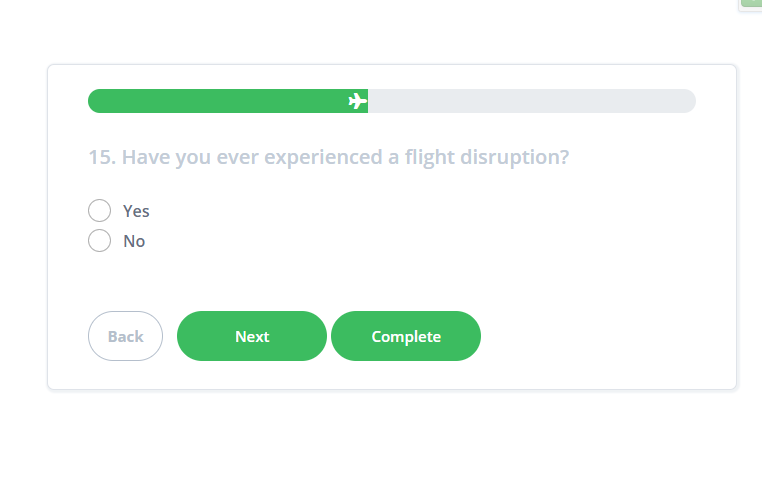
Also, now i have multiple problem: on 15 question - NEXT and COMPLETE buttons, they both are visible.
tadas117
on 24 Feb 2019
@dmitrykurmanov
tadas117
on 24 Feb 2019
@tadas117 thank you for the example. I will check it.
dmitrykurmanov
on 25 Feb 2019
@dmitrykurmanov at 15 question next button working again without any complete but when i reach 26D question, after answering it - it shows 26D then 26E, but 26E shouldn't be visible if question 16 = Delay.
here is qst-26E visible if statement: {qst-15} notempty and {qst-16} != "item1" or {qst-16} != "item2"
Plunker here:
https://plnkr.co/edit/jRLbyLn6VAoXfIrNFdjX?p=preview
tadas117
on 25 Feb 2019
@dmitrykurmanov if 26E has {qst-15} notempty and {qst-16} != "item1" and {qst-16} != "item2" then button COMPLETE appears at 15 question
If 26E has {qst-15} notempty and {qst-16} != "item1" or {qst-16} != "item2" then there is no COMPLETE button, everything is fine until i pick question 15 value as "Yes", question 16 as "Delay", go till question 26D and then after next i see question 26E which should be invisible.
tadas117
on 25 Feb 2019
@tadas117 I've found the problem:
complete button appears because of you don't have any visible questions in the survey until you answered on qst-15 so you can do the following:
 ...
{
    "name": "page19",
    "elements": [{
      "isRequired": true,  // <=============
      "name": "qst-15",
      "title": "15. Have you ever experienced a flight disruption?",
      ...
    }, {
    "name": "page20",
    "elements": [{
      ...
      "visibleIf": "{qst-15} empty or {qst-15} = \"item1\"",   // <============= {qst-15} empty  or
      "title": "16. What kind of disruption did you experience?",
    }
 ...
here an updated plunk https://plnkr.co/edit/dTfgojBmg2vDZRjYokMS?p=preview
dmitrykurmanov
on 25 Feb 2019
Related issues
 GuiAfonso
·
4Comments
GuiAfonso
·
4Comments
 aslanbeily
·
4Comments
aslanbeily
·
4Comments
 enricribas
·
3Comments
enricribas
·
3Comments
 testweird123
·
4Comments
testweird123
·
4Comments
 wollerman
·
4Comments
wollerman
·
4Comments