Survey-library: Text input on top of bootstrap-slider
Are you requesting a feature, reporting a bug or asking a question?
Asking a question
What is the current behavior?
A slider shows which is from "bootstrap-slider" lib
What is the expected behavior?
Implement input text on top of it that copies the value of slider into it
- surveyjs platform (angular or react or jquery or knockout or vue): React
- surveyjs version: Latest
Details
I would like to implement an input on top of the slider that changes according to the slider and according to user input, how can I achieve this? Please check out the pictures below to know exactly what I want:
Without Input:
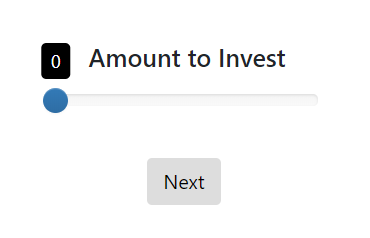
With Input:
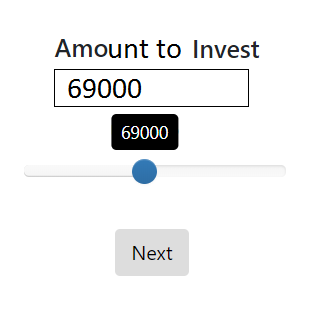
PS: This is only for demonstration/design purpose, I will not use that input for any kind of UX functionality, I'm already getting the result from the slider.
Thanks!
 CedricHadjian
All 10 comments
You can create a custom widget implementing desired design and behavior.
You can take this file - https://github.com/surveyjs/widgets/blob/master/src/bootstrap-slider.js as a start point
 tsv2013
on 12 Oct 2018
tsv2013
on 12 Oct 2018
Ok so I think I can change this part:
slider.on("change", function(valueObj) {
    question.value = slider.getValue();
});
to something like:
slider.on("change", function(valueObj) {
    question.value = slider.getValue();
    customInput.value = slider.getValue();
});
in the node_modules folder, right?
CedricHadjian
on 12 Oct 2018
@CedricHadjian hello! I think that changing some module in the node_modules folder is bad practice (because of npm i or npm update will rewrite it). So you can create a separate file with your own custom widget based on file that @tsv2013 suggested above. Also please check the "tutorial-example": https://plnkr.co/edit/HdnYE5?p=preview.
 dmitrykurmanov
on 13 Oct 2018
dmitrykurmanov
on 13 Oct 2018
@CedricHadjian hello! I think that changing some module in the
node_modulesfolder is bad practice (because ofnpm iornpm updatewill rewrite it). So you can create a separate file with your own custom widget based on file that @tsv2013 suggested above. Also please check the "tutorial-example": https://plnkr.co/edit/HdnYE5?p=preview.
Ok, I will. Thanks Dmitry!
CedricHadjian
on 15 Oct 2018
@CedricHadjian please feel free to ask additional questions or post the examples.
dmitrykurmanov
on 15 Oct 2018
@CedricHadjian please feel free to ask additional questions or post the examples.
Been working on creating the custom file, how will I exactly require it inside widgets function?
I wanna do something like this in my react app:
import * as widgets from "surveyjs-widgets";
widgets.customslider(Survey);
Then use it inside the JSON, where should I put the file when it's not in node_modules? Since I have to import it using "widgets" function from surveyjs-widgets.
CedricHadjian
on 15 Oct 2018
I want something exactly like this but in react and surveyjs: http://jsfiddle.net/FPCRb/2771/
Having trouble achieving it
CedricHadjian
on 15 Oct 2018
Been working on creating the custom file, how will I exactly require it inside widgets function?
the following code do the trick:
function init(Survey, $) {
    const widget = {...};
    Survey.CustomWidgetCollection.Instance.addCustomWidget(widget, "customtype");
}
export default init;
then you can use it something like:
import * as Survey from "survey-react";
import initCustomSlider from "./somepath/customslider.js";
...
initCustomSlider(Survey);
...
also you can check our "nouislider": https://github.com/surveyjs/widgets/blob/master/src/nouislider.js
https://surveyjs.io/Examples/Library/?id=custom-widget-nouislider&platform=Knockoutjs&theme=default
dmitrykurmanov
on 15 Oct 2018
Been working on creating the custom file, how will I exactly require it inside widgets function?
the following code do the trick:
function init(Survey, $) {
    const widget = {...};
    Survey.CustomWidgetCollection.Instance.addCustomWidget(widget, "customtype");
}
export default init;
then you can use it something like:
import * as Survey from "survey-react";
import initCustomSlider from "./somepath/customslider.js";
...
initCustomSlider(Survey);
...
also you can check our "nouislider": https://github.com/surveyjs/widgets/blob/master/src/nouislider.js
https://surveyjs.io/Examples/Library/?id=custom-widget-nouislider&platform=Knockoutjs&theme=default
Thank you!! Will try it now.
I checked nouislider before, not something I exactly want.
CedricHadjian
on 15 Oct 2018
Perfect! Working great :)
Thank you for the support @dmitrykurmanov !
CedricHadjian
on 15 Oct 2018
Related issues
 testweird123
·
4Comments
testweird123
·
4Comments
 wollerman
·
4Comments
dmitrykurmanov
·
3Comments
wollerman
·
4Comments
dmitrykurmanov
·
3Comments
 faso
·
4Comments
faso
·
4Comments
 ian-emsens-sb
·
3Comments
ian-emsens-sb
·
3Comments