Survey-library: Selecting other option with no input from drop down list and no error message is displayed
Are you requesting a feature, reporting a bug or ask a question?
Asking a question
What is the current behavior?
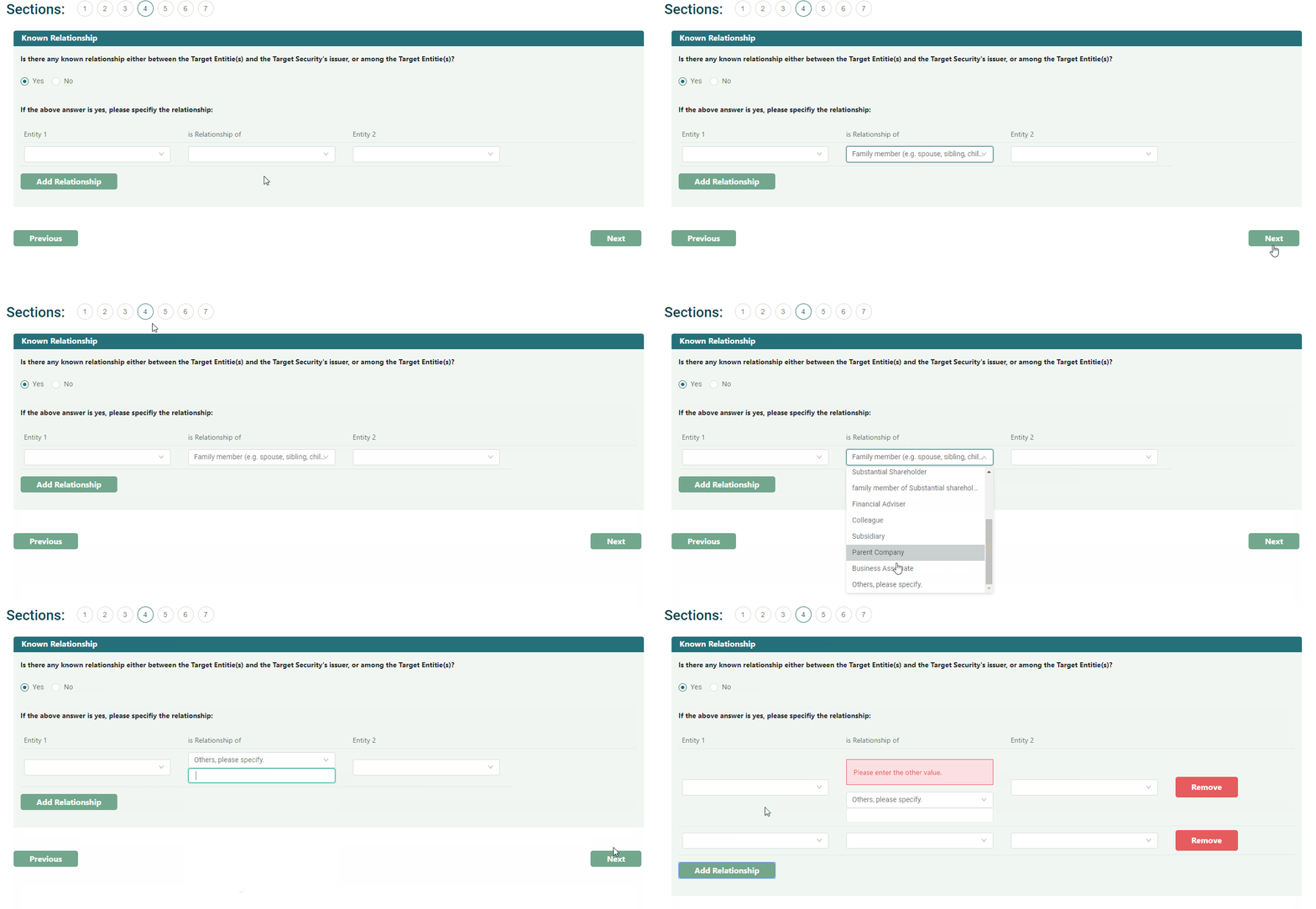
- Select an option from drop down list with question type matrixdynamic
- Click next button and go to next page
- Go back previous page
- Then selecting other option with no input from drop down list and no error message is displayed
What is the expected behavior?
- Select other option from drop down list with question type matrixdynamic
- Click next button and go to next page
- Go back previous page
- Then selecting other option with no input from drop down list and error message is displayed
Specify your
- browser: Google Chrome
- browser version: Version 66.0.3359.181 (Official Build) (64-bit)
- surveyjs platform (angular or react or jquery or knockout or vue): survey-react with ant design custom widget
- surveyjs version: 1.0.20
 KLC215
All 11 comments
@KLC215 I have just tried without custom widget and it works as expected.
Could we get your custom-widget? Right now we can't reproduce the issue.
Thank you,
Andrew
 andrewtelnov
on 28 May 2018
andrewtelnov
on 28 May 2018
@andrewtelnov Thank you for answering the question. Have you tried the issues without custom widget but with survey-react module? If yes, would you mind to send me a source code before further discussion on custom widget? It is because I can produce issue without using custom widget.
KLC215
on 28 May 2018
@KLC215 That is good. Let me try it on the current release version. I was trying to use the developers version. I will be back.
andrewtelnov
on 28 May 2018
@andrewtelnov Thanks
KLC215
on 28 May 2018
@KLC215 Here it is
Thank you,
Andrew
andrewtelnov
on 28 May 2018
@andrewtelnov Thanks for providing your version. I have modified the source for my scenario
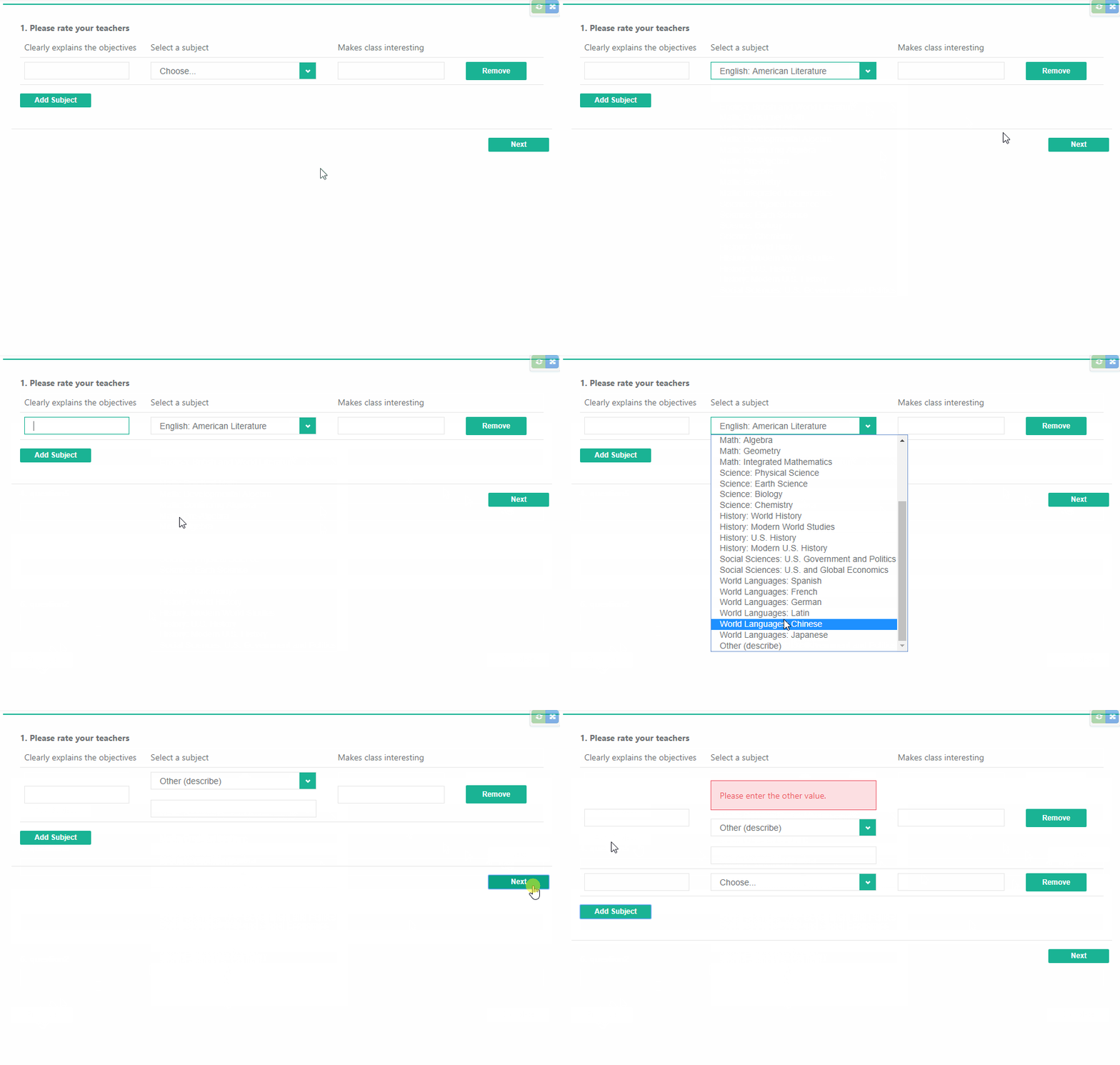
When I select an option and go back to previous page, I choose Other (describe) with no input and click Next button, the error message does not display.
When I do some action such as inputting value in Makes class interesting field and blur or Add Subject, the error message will show.
KLC215
on 28 May 2018
@KLC215 I was able to reproduce the bug on the current release version.
Thank you for your patience,
Andrew
andrewtelnov
on 28 May 2018
Thank you again, Waiting for good news :)
KLC215
on 28 May 2018
@KLC215 The issue has been fixed. We will likely release a new minor update tomorrow.
Thank you,
Andrew
andrewtelnov
on 28 May 2018
It works like a charm. Thanks @andrewtelnov :)
KLC215
on 29 May 2018
Great!
andrewtelnov
on 29 May 2018
Related issues
 GuiAfonso
·
4Comments
GuiAfonso
·
4Comments
 AWIXOR
·
3Comments
AWIXOR
·
3Comments
 aslanbeily
·
4Comments
aslanbeily
·
4Comments
 misamura
·
4Comments
misamura
·
4Comments
 Zucka
·
4Comments
Zucka
·
4Comments