Survey-library: Request: More Customization
Are you requesting a feature, reporting a bug or ask a question?
- Requesting a feature, allowing customization of the survey template itself, being able to add custom classes to question elements, etc.
What is the expected behavior?
- Being able to customize the template, or in this specific case, being able to tie another existing button to be used as the 'next/complete' button.
How would you reproduce the current behavior (if this is a bug)?
N/A
 Braunson
All 33 comments
@Braunson, have you seen this example
Thank you,
Andrew
 andrewtelnov
on 22 Feb 2018
andrewtelnov
on 22 Feb 2018
@Braunson And these:
https://surveyjs.io/Examples/Library/?id=survey-customcss&platform=jQuery&theme=default
https://surveyjs.io/Examples/Library/?id=survey-cssclasses&platform=jQuery&theme=default
 tsv2013
on 22 Feb 2018
tsv2013
on 22 Feb 2018
@andrewtelnov Thanks but that example is for jQuery, I've tried it with Vue with no luck. Also I'm curious why it defined the title as false twice? Is that a typo?
Also why is the function doOnCurrentPageChnged called twice, once in the Survey call and again called by itself?
I'm loading the Survey inside a component which is included into the parent component that first renders on the page.
Gloal:
The goal is to have separate .vue components for each survey and can be loaded/swapped out as needed. Making use of the 'next contact' button which if the survey is valid, submit the data for the contact and reset the form, loading in the next contact.
Flow:
Page loads -> Call List Component Loads > Survey Loads
Parent Call List Component
<template>
    <div class="row clc-container">

        <transition name="fade">
        <div class="clc-loading" v-if="loading">
            <div class="spinner">
                <div></div>
                <div></div>
                <div></div>
            </div>
        </div>
        </transition>

       <!-- left side removed for simplicity sake -->

        <!-- Right Side -->
        <div class="col-lg-8 clc-questions" v-if="!listComplete">

            <div class="panel panel-success">
                <div class="panel-heading">
                    <div class="pull-left">
                        <div class="btn-table-align">
                            <h3 class="panel-title">
                                Calling: {{ name }}
                            </h3>
                        </div>
                    </div>
                    <div class="pull-right">
                        <div class="pull-right" style="padding-top: 2px;">
                            <div role="group" class="btn-group">
                                <strong>{{ this.currentIndex + 1 }} of {{ contacts.length }}</strong>
                            </div>
                        </div>
                    </div>
                    <div class="clearfix"></div>
                </div>

                <div class="panel-body">
                    <template v-for="(question, index) in questionComponents">
                        <component :is="question" :key="question.name"></component>
                    </template>
                </div>
                <div class="panel-footer text-right">
                    <button class="btn btn-lg btn-success" @click="next" id="nextContactButton">Next Contact</button>
                </div>
            </div>

        </div>

    </div>
</template>

<script>
import questions from './call_questions';
export default {
    name: 'call-list-contact',
    props: ['name', 'contacts', 'currentId'],
    mounted() {
        console.log('Call List - Component Loaded!');
        this.loaded();
    },
    data() {
        return {
            currentIndex: this.currentId,
            listComplete: false,
            loading: true,
            questionComponents: questions
        }
    },
    methods: {
        loaded: function () {
            var vm = this;
            this.loading = false;
        },
        listCompleted: function () {
            var vm = this;
            this.listComplete = true;
            this.currentIndex = 0;
        },
        current: function() {
            return this.contacts[this.currentIndex];
        },
        next: function() {
            survey.completeLastPage(); // ?

            this.loading = true;

            setTimeout(function() {
                this.loading = false;

                // What is the next item?
                if (this.currentIndex + 1 < this.contacts.length) {
                    this.currentIndex++;
                } else {
                    this.listCompleted();
                }

            }.bind(this), 300);
        },
    },
    computed: {
        contact: function() {
            return this.current();
        }
    }
}
</script>
Question Component - Child
<template>
    <div id="surveyContainer">
        <survey :survey="survey"></survey>
    </div>
</template>

<script>
// Surveyjs
import * as SurveyVue from 'survey-vue';
const Survey = SurveyVue.Survey;

export default {
    name: 'Question1',
    components: {
        SurveyVue
    },
    data() {
        Survey.cssType = "bootstrap";
        Survey.navigationButton = "btn btn-success";

        var json = {} // Removed survey for simplicity sake

        var model = new SurveyVue.Model(json);

        function setNavigationVisibility(survey) {
            document
                .getElementById('nextContactButton')
                .style
                .display = survey.isLastPage
                    ? "inline"
                    : "none";
        }

        model.onCurrentPageChanged.add(function(survey) {
            setNavigationVisibility(survey);
        });

        model.showTitle = false;

        return {
            survey: model
        }
    },
    methods: {
        sendDataToServer: function () {
            var resultAsString = JSON.stringify(survey.data);
            console.log(resultAsString);
        }
    }
}
</script>
@Braunson Here is the vue example
And have you seen the PanelDynamic Question?
You may find more information in this article on medium, paragraph: Dynamic Panel: Dealing with List Data
Thank you,
Andrew
andrewtelnov
on 22 Feb 2018
@andrewtelnov Yes I've read through that article, thank you however I'm not looking to use Dynamic panels as there is an existing use of the 'contact' data that I don't want to import into dynamic panels.
I'm having quite a few issues with SurveyJS in Vue:
Trying to set the cssType to Bootstrap, throws no errors, following the examples and still no Bootstrap classes or anything remotely related to bootstrap dded
Trying to set a different button in the dom to be the 'complete' button, throws
Cannot read property of 'style' of null, again following the examples givenI'm still curious about why
doOnCurrentPageChngedis being called twice in the example.
Braunson
on 22 Feb 2018
Ok I've removed the Survey logic from the child component and just put it in the Parent component and I have the new 'completed' button working, the bootstrap setting still gets ignored.
Looking to get that bootstrap param accepted still and figure out how to not hide the survey when completed/last page. Also I'm curious if I have to create a custom widget in order to add css classes to certain input types (i.e. I want to make a radio look like a button without the radio button circle.
Braunson
on 22 Feb 2018
@Braunson Here is the example with vue + bootstrap
Here is the example of restarting the survey
Thank you,
Andrew
andrewtelnov
on 22 Feb 2018
Thanks @andrewtelnov I figured another way around it. I'm now working on changing the markup on the radio buttons.
I did notice another odd bug, perhaps not a bug but weird behaviour. How to re-create:
Click YES to Q1
Click YES to Q2 (it should show Q3 a select dropdown)
Click NO to Q1
Then Q2 disappears but Q3 is still shown. I'd expect if the top level parent has changed, all conditional decisions below that should change also, in this case hidden or reset.
I understand I could update my conditional visibleIf to take the parent into account but this can get tedious with multiple conditions and multiple levels. Thoughts?
Here's my example https://plnkr.co/edit/K569JMUS0FUs0VC8Hcnm?p=preview
Braunson
on 22 Feb 2018
@Braunson Please read the following docs
Thank you,
Andrew
andrewtelnov
on 22 Feb 2018
Thanks for all your help @andrewtelnov I did look through some of examples but I guess the wording threw me off.
Braunson
on 22 Feb 2018
@Braunson Yes, we are not a native english speaker here. We are giving our text to a correct time to time.
If you have time to improve this particular document, it would be just great. In this, less people will have the issue that you had.
Thank you,
Andrew
andrewtelnov
on 23 Feb 2018
I will help out as much as I can as I learn more of Surveyjs 😄
Braunson
on 24 Feb 2018
Braunson,
I'm having the same issue with bootstrap setting being ignored. I can't customize the complete button at all. I'm also using Vue. Have you had any luck getting this to work?
Thank you,
Dave
 dxcsolarz
on 23 Jul 2018
dxcsolarz
on 23 Jul 2018
@dxcsolarz Sorry no, I ended up not using SurveyJS.
Braunson
on 23 Jul 2018
@dxcsolarz We've created a live sample - https://plnkr.co/edit/VdjzldPQc7vmkWJTUcCC?p=preview
Does it work for you?
tsv2013
on 23 Jul 2018
I can get the survey to work, but I want to customize the “complete” button.
I’m using Vue along with Quasar-framework.
Survey-vue version: [email protected]
The page looks like this:
[cid:[email protected]]
I’m attempting to change the size, color and shape of the button.
I’m attaching my sample code. I’ve not had any success to modify css classes to change the complete button.
From: tsv2013 [mailto:[email protected]]
Sent: Monday, July 23, 2018 11:01 AM
To: surveyjs/surveyjs surveyjs@noreply.github.com
Cc: Solarz, David david.solarz@dxc.com; Mention mention@noreply.github.com
Subject: Re: [surveyjs/surveyjs] Request: More Customization (#949)
@dxcsolarzhttps://github.com/dxcsolarz We've created a live sample - https://plnkr.co/edit/VdjzldPQc7vmkWJTUcCC?p=preview
Does it work for you?
—
You are receiving this because you were mentioned.
Reply to this email directly, view it on GitHubhttps://github.com/surveyjs/surveyjs/issues/949#issuecomment-407088954, or mute the threadhttps://github.com/notifications/unsubscribe-auth/AdeWMVdG9RaCrVy9wL493Gcitxxkn7R4ks5uJeU0gaJpZM4SOi9u.
DXC - This is a PRIVATE message - If you are not the intended recipient, please delete without copying and kindly advise us by e-mail of the mistake in delivery. NOTE: Regardless of content, this e-mail shall not operate to bind the Company to any order or other contract unless pursuant to explicit written agreement or government initiative expressly permitting the use of e-mail for such purpose.
Customer Survey
<div class="col-.5"> </div>
<div class="col-11 q-mb-sm">
<span class="StandardText">To help improve our service, please complete this survey pertaining to your case</span><br/>
<span class="LabelText2">Service Request Number: </span><span class="TextDetails">{{casenumber}}</span>
<br/>
<span class="LabelText2">Service Type: </span><span class="TextDetails">{{serviceType}}</span>
</div>
<div id="surveyContainer"><survey :survey="survey"></survey>
</div>
<div class="col-1" v-if="surveyComplete">
<br/>
<q-btn @click="$router.push('/app/home')" push color="secondary" >Exit</q-btn>
</div>
dxcsolarz
on 23 Jul 2018
@dxcsolarz, Hello! I think that you just can override css for this button:
.sv_complete_btn {
  background-color: orange;
  color: white;
  font-size: 30px;
}

.sv_complete_btn:hover, .sv_complete_btn:focus {
  color: white;
  opacity: 0.8;
}
I've created an example for you with Vue, Bootstrap and custom Complete button:
https://plnkr.co/edit/1wuYoEYfFU1OSdX4ZJT4?p=preview Could you check it please ?
 dmitrykurmanov
on 23 Jul 2018
dmitrykurmanov
on 23 Jul 2018
I've tried that and it has no impact on the complete button.
Thanks,
dxcsolarz
on 23 Jul 2018
@dxcsolarz ok. May be the problem somewhere in your environment. Could you please share a repo with this problem and we will try out to solve it.
dmitrykurmanov
on 23 Jul 2018
@dxcsolarz we have https://github.com/surveyjs/surveyjs_vue_quickstart repo. You can fork it and make your changes for faster startup.
dmitrykurmanov
on 23 Jul 2018
Here's the repo:
https://github.com/dxcsolarz/TestSurvey
dxcsolarz
on 23 Jul 2018
@dxcsolarz thanks, I'll check it.
dmitrykurmanov
on 24 Jul 2018
@dxcsolarz I've started your project with quasar dev command and can't see the survey. In the console I see the following error:
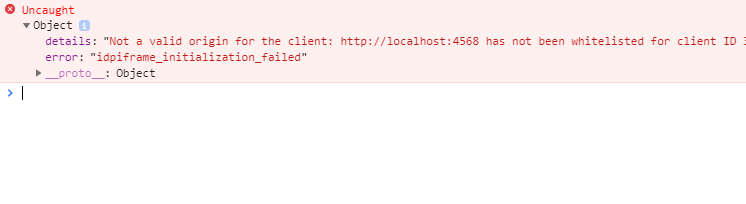
Could you please check it? May be I did something wrong.
dmitrykurmanov
on 24 Jul 2018
Not sure why you would get this error if your running if from your desktop.
Did the project start?
When you execute: quasar dev
You should see something like:
` app:dev Running: Mode [ SPA ] with [ MAT ] theme +0ms
app:quasar-conf Reading quasar.conf.js +2s
app:dev Checking listening address availability (0.0.0.0:8080)... +0ms
app:quasar-conf Generating Webpack config +16ms
app:quasar-conf Extending Webpack config +47ms
app:generator Generating Webpack entry point +0ms
app:dev-server Booting up... +15ms
Build completed in 7.602s`
http://localhost:8080/surveycomp
dxcsolarz
on 24 Jul 2018
Thanks for the /surveycomp path now I see the survey)
dmitrykurmanov
on 24 Jul 2018
@dxcsolarz I've found a several problems:
- you can update your survey-vue to the latest (1.0.34)
- if you want to use bootstrap you need to add
bootstrap.css - if you want to use bootstrap you need to remove survey.css import it is for other themes.
// import "survey-vue/survey.css"; - you need to set bootstrap theme SurveyVue.StylesManager.applyTheme("bootstrap"); please see the example:
https://surveyjs.io/Examples/Library?id=questiontype-radiogroup&platform=Vue&theme=bootstrap - you should remove all code that overrides surveyjs's classes for example:
    // vm.survey.onUpdatePanelCssClasses.add(function(survey, options) {
    //   var classes = options.cssClasses;
    //   classes.complete = "btn sv_q_complete_btn";
    // });
as a result you get the following situation:
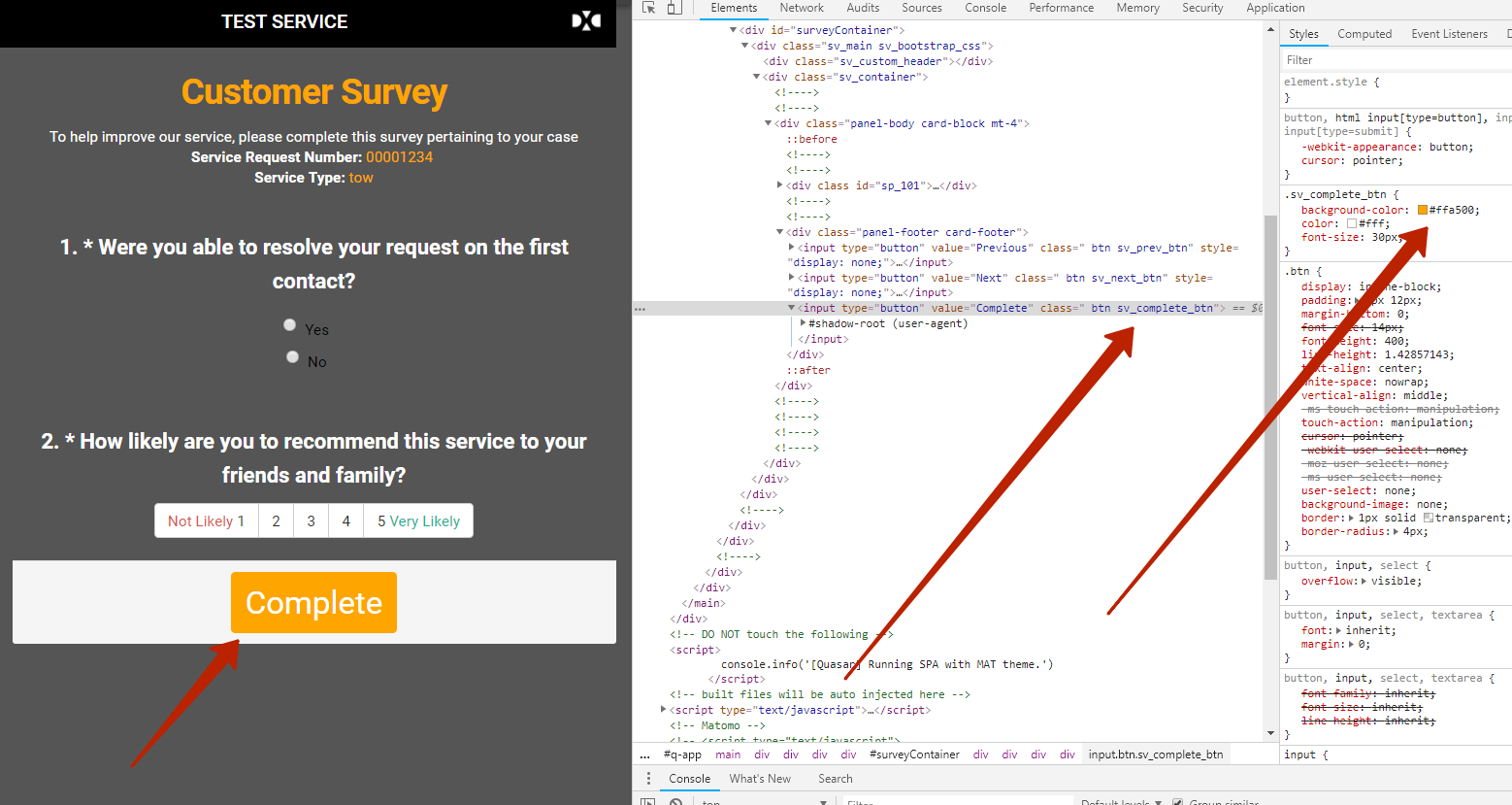
So you can override our css usial way.
Please check my fork https://github.com/dmitrykurmanov/TestSurvey and the commit https://github.com/dmitrykurmanov/TestSurvey/commit/e774d73ff57631783c02d916edeaf3d788cbc2cc
dmitrykurmanov
on 24 Jul 2018
Thanks for looking at this. It appears the only way to customize the complete button is to use "bootstrap" in the .applyTheme and not use the "survey-vue/survey.css"; My only issue is I lose the original format of the questions when I remove the survey.css. I will continue to play with it.
Thanks again!
dxcsolarz
on 24 Jul 2018
@dxcsolarz you are welcome. In fact boostrap.css and survey-vue/survey.css are separate themes. Do you need bootstrap? You can started with our orange theme (bootstrap free) https://surveyjs.io/Examples/Library?id=questiontype-radiogroup&platform=Vue&theme=orange and then customize it.
dmitrykurmanov
on 25 Jul 2018
@dxcsolarz please feel free to create another issue with your problem
dmitrykurmanov
on 25 Jul 2018
Just one last follow up question to your response about using the orange theme and then customize it. Based on my testing with the link in Plunker you provided, you can't customize the "complete" button size, shape, or even location, correct?
dxcsolarz
on 25 Jul 2018
@dxcsolarz It can easily be done via CSS:
.btn.btn-green.btn.sv_complete_btn {
  color: orange;
  background-color: blue;
  border-radius: 20px;
}
.btn.btn-green.btn.sv_complete_btn:hover {
  color: red;
  background-color: yellow;
  border-radius: 0px;
}
Here is the working sample - https://plnkr.co/edit/VdjzldPQc7vmkWJTUcCC?p=preview
tsv2013
on 25 Jul 2018
@dxcsolarz
additional to @tsv2013 's answer:
Based on my testing with the link in Plunker you provided, you can't customize the "complete" button size, shape, or even location, correct?
You are welcome to do it. But you need to iclude survey-vue/survey.css styles instead of bootstrap.css styles and apply "orange" theme:
SurveyVue.StylesManager.applyTheme("orange");
dmitrykurmanov
on 25 Jul 2018
Thanks again for your input. I guess I want the best of both worlds (survey.css and bootstrap). I like the format of the default survery.css and like the customization of the bootstrap.css. It appears you can't have both. Based on my testing when using the survey.css you can't change the complete button look. However you can customize the complete button when you use bootstrap.css; but you lose the format from the survey.css.
I appreciate all your help and suggestions.
Thanks
dxcsolarz
on 25 Jul 2018
Related issues
 GuiAfonso
·
4Comments
GuiAfonso
·
4Comments
 nadialo
·
4Comments
nadialo
·
4Comments
 madceb
·
3Comments
madceb
·
3Comments
 ian-emsens-sb
·
3Comments
ian-emsens-sb
·
3Comments
 alexmc6
·
3Comments
alexmc6
·
3Comments