Survey-library: Could not find RTL support [Question]
I could not find any mention in relation with Right to Left languages.
Is it supported & Documented? or a new feature request?
Thanks!
 Mulli
Mulli
All 6 comments
Hello! RTL should be supported on the browser level. If something doesn't work with our widgets on your browser with RTL settings, we would consider this as a bug and it will be fixed. Just let us know about the issue.
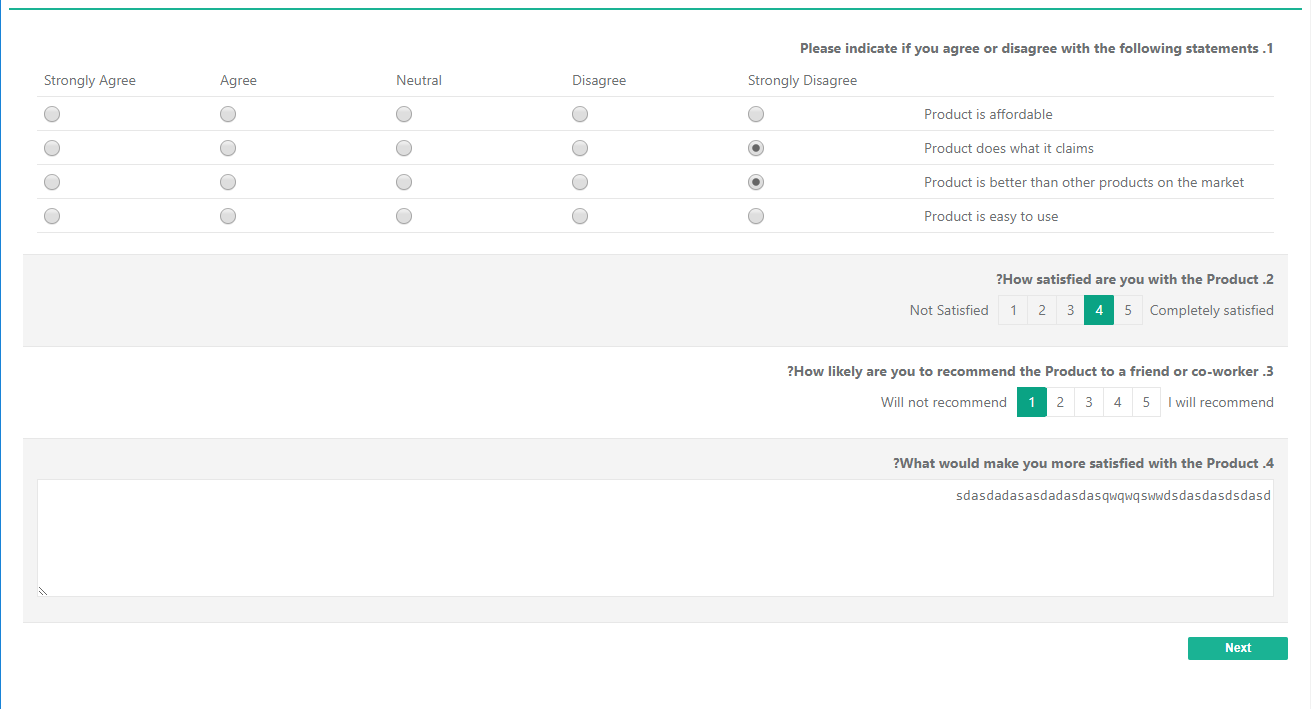
I've checked it with one of our examples:
 dmitrykurmanov
on 21 Feb 2018
dmitrykurmanov
on 21 Feb 2018
Great! Thanks for the quick reply. I shall update soon.
Mulli
on 22 Feb 2018
Добрый день Дмитри,
У меня возникла та же проблема с поддержкой RTL.
На странице прописано dir="rtl" и вся страница отображается правильно но это не срабатывает на все элементы. К примеру "titleLocation". В настройках у меня есть возможность выбрать отображение с лева но на Иврите и на Арабском оно должно быть с права. Все float, margin, padding, text-align и тд которые были left должны превратиться в right и на оборот. На снимке экрана что вы показали видно что текст все равно приравнивается к левой стороне и кнопки 1,2,3,4,5 в не правильном порядке потому что при RTL они должны отображаться в зеркальном порядке 5,4,3,2,1.
Можете пожалуйста это исправить?
Заранее огромное СПС!
Good afternoon Dmitri,
I had the same problem with RTL support.
The page spelled out dir = "rtl" and the entire page is displayed correctly, but it does not work for all elements. For example, "titleLocation". In the settings I have the option to choose the display from left but in Hebrew and Arabic languages it should be right. All the float, margin, padding, text-align and so on that were left must turn into the right and the reverse. In the screenshot you showed that the text is still equal to the left side and the buttons 1,2,3,4,5 in the wrong order because at RTL they should be displayed in mirror order 5,4,3,2,1.
Can you please correct this?
In advance, a huge Thanks!
 sashad2003
on 16 Apr 2018
sashad2003
on 16 Apr 2018
Hi,
To display contents like the screenshot above from right to left, using some properties like isRTL: true.
Please help. Thank you.
 jestintab
on 4 Sep 2018
jestintab
on 4 Sep 2018
@jestintab You can simply add to body tag the
direction: rtl;
CSS style
 tsv2013
on 4 Sep 2018
tsv2013
on 4 Sep 2018
@sashad2003 We are sorry that we lost your comment since the issue was closed. I've reopened the issue. We'll keep your suggestions on our radar. Any community contribution in SurveyJS library is also welcome.
tsv2013
on 4 Sep 2018
Related issues
 wollerman
·
4Comments
wollerman
·
4Comments
 AWIXOR
·
3Comments
AWIXOR
·
3Comments
 testweird123
·
4Comments
testweird123
·
4Comments
 GuiAfonso
·
4Comments
GuiAfonso
·
4Comments
 nadialo
·
4Comments
nadialo
·
4Comments
Most helpful comment
@jestintab You can simply add to body tag the
CSS style