Survey-library: How to change Message "Thank you for completing the survey!" after completing the survey.
Are you requesting a feature, reporting a bug or ask a question?
How to change Message "Thank you for completing the survey!"
What is the current behavior?
What is the expected behavior?
How would you reproduce the current behavior (if this is a bug)?
Provide the test code and the tested page URL (if applicable)
Tested page URL:
Test code
your_code_here
Specify your
- browser:
- browser version:
- surveyjs platform (angular or react or jquery or knockout or vue):
- surveyjs version:
 syash2015
All 7 comments
@syash2015 Please use survey.completedHtml. Take a look at this demo
Thank you,
Andrew
 andrewtelnov
on 6 Sep 2017
andrewtelnov
on 6 Sep 2017
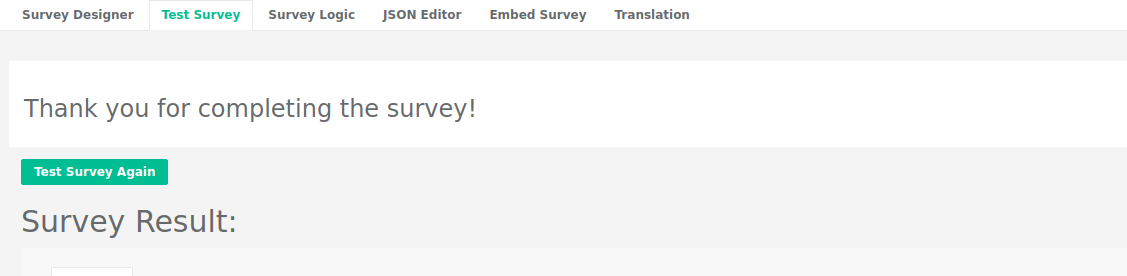
Hello, I'm now using surveyJs creator to create survey, in the meantime, I'm checking the survey through the tab of "Test Survey" when still composing survey, is there a way to change the "Thank you for completing the survey!" text during stage of survey create? I know the demo above is for the mode: window.survey = new Survey.Model, which is more of when conducting survey.

var options = {
showLogicTab: true
};
var creator = new SurveyCreator.SurveyCreator("creatorElement", options);
Thanks.
 yangxu698
on 11 Nov 2019
yangxu698
on 11 Nov 2019
Hello @yangxu698 ,
I am also looking for a way to change "Thank you for completing the survey!" text during stage of survey create? If you got to know any work around. Can you please help me regarding this.
Thanks.
 deepika231-max
on 7 Feb 2020
deepika231-max
on 7 Feb 2020
@yangxu698 @deepika231-max You are talking about SurveyJS Creator, it is another library.
You can change the default localized string for "completingSurvey":
var myloc = Survey.surveyLocalization.locales["localename"];
myloc.completingSurvey= "Your text on completing survey";
For more information, please read localization documentation topic
Thank you,
Andrew
andrewtelnov
on 7 Feb 2020
Is it possible to render something more than text with preprocessing from the survey. I am talking about complete React components or in general styled HTML with some handlers onClick etc.
Thank you
 ssukienn
on 20 Nov 2020
ssukienn
on 20 Nov 2020
@ssukienn You can simply hide react survey component onComplete event and show any react component you want.
Thank you,
Andrew
andrewtelnov
on 20 Nov 2020
Actually, I was doing something alike but was wondering if there is a build-in option for it. But the one you mentioned is also fine. Thanks.
ssukienn
on 20 Nov 2020
Related issues
 madceb
·
3Comments
madceb
·
3Comments
 nadialo
·
4Comments
nadialo
·
4Comments
 dmitrykurmanov
·
3Comments
dmitrykurmanov
·
3Comments
dmitrykurmanov
·
3Comments
dmitrykurmanov
·
3Comments
 GuiAfonso
·
4Comments
GuiAfonso
·
4Comments
Most helpful comment
@syash2015 Please use survey.completedHtml. Take a look at this demo
Thank you,
Andrew