Survey-library: SurveyJs in display only mode
Are you requesting a feature, reporting a bug or ask a question?
Requesting a feature, or ask a question
What is the current behavior?
When it is in display mode, it looks exactly same as edit mode, the only difference is textarea is disabled
This is currently behaviour on the page: http://surveyjs.org/examples/jquery/survey-displaymode/
What is the expected behavior?
would there be there any chance that you could provide example of disable mode not with disabled textbox/radio group, please? but it is a div tag for example as following:
Question on the left and answer in the right.
- surveyjs version: latest version
 xiuzhen1103
All 11 comments
Hi, @xiuzhen1103 ! I've prepared a sample for you with "readonly" custom widget - this plunk. This widget just puts stringified question's value in a div. Does it fit your needs? You can implement more elaborated output for questions of different kind.
 tsv2013
on 25 Jul 2017
tsv2013
on 25 Jul 2017
that is great, very helpful! is there any chance that I could customize question itself not only answer, too?
xiuzhen1103
on 25 Jul 2017
@xiuzhen1103 I've updated the plunk.
Here is the code to access question's label and change it's style:
        var $label = $(el).parent().find('h5');
        $label.css({"display": "inline-block", "font-weight": "bold"});
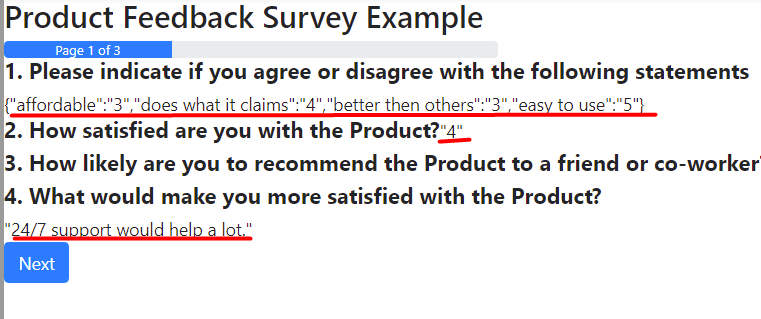
@tsv2013 thanks you for providing plunk for me, I found answer has quotation marks wrap on it. Would you have a look, please?
xiuzhen1103
on 17 Aug 2017
in display mode, in there any chance that if I could show all the questions? it do not matter if question has been set as visible:false.
xiuzhen1103
on 17 Aug 2017
I've used the
$el.text(JSON.stringify(question.value));
code to get string representation of the question value. That's why quotation marks are present in the output. You can write your own values processing.
tsv2013
on 17 Aug 2017
As far as I know there is no built it option to show all questions of the survey - no matter whether they are visible or not.
I think in this case you need to programmatically clear all visibility conditions for the survey you are using to display results. If you provide a sample JSON of such a survey (with hidden questions), I can try to do it in the plunker.
tsv2013
on 17 Aug 2017
@tsv2013 may I check each question type on before render it to the page? I have checked question and el when debug, it do not provide me with type option
xiuzhen1103
on 13 Sep 2017
@xiuzhen1103 question.getType() will return you the question type, like: "text", "dropdown" and so on.
Thank you,
Andrew
 andrewtelnov
on 13 Sep 2017
andrewtelnov
on 13 Sep 2017
@andrewtelnov Thanks, great help, may I check if question type is comment, I would like to have textarea box with comment value inside and disabled, is this possible?
xiuzhen1103
on 13 Sep 2017
question.getType() should return "comment" for QuestionComment
andrewtelnov
on 13 Sep 2017
Related issues
 wollerman
·
4Comments
xiuzhen1103
·
4Comments
wollerman
·
4Comments
xiuzhen1103
·
4Comments
 AWIXOR
·
3Comments
AWIXOR
·
3Comments
 ian-emsens-sb
·
3Comments
ian-emsens-sb
·
3Comments
 GuiAfonso
·
4Comments
GuiAfonso
·
4Comments