Surge: See slider values on mouse over
I've found the only way to see the current value of a slider.. is to roll over it AND click the value .. hoping not to change it .. while trying to get it to display the current value..
I would propose a good idea would be, if possible to allow the current value to be displayed on mouse over alone..
 sense-amr
All 17 comments
That's a really good idea.
 baconpaul
on 22 Jan 2019
baconpaul
on 22 Jan 2019
shouldnt be too hard to implement either i imagine? .. i mean im finding a lot of things here which just seem to have been blanket applied.. in the "code" .. not that i would know from reading it .,. but from user experience its becomming clear there were ideas that were implemented.. and then applied to almost everything instead of applied to the things that would be usefully benefiting from those functions..,
like i mentioned in #376
sense-amr
on 22 Jan 2019
Note you can always right mouse on a control to see its value today without making a change.
baconpaul
on 22 Jan 2019
ahh yeah not as elegant as just having a roll over display it .. :\ also kinda forces you into a new window would be cleaner and neater .. maybe even more dynamically pleasing from a UX .. perspective to have just tempo sync and midi mapping there and maybe put the Name of the parameter in that white box .. where it appears when clicking currently .. there appears to be plenty of room there.. for any known named parameter to fit
sense-amr
on 22 Jan 2019
i know it probably sounds silly.. but from UX perspective i just think having extra windows like that.. makes the application look cheaper than it should
sense-amr
on 22 Jan 2019
I wasn't disagreeing; I was just helping solve your immediate problem!
baconpaul
on 22 Jan 2019
ahh yes i see.. thank you :) ..
sense-amr
on 22 Jan 2019
Linking this with #384 since they are both tooltip related. Seems the path for these two issues is to figure out vstgui CTooptipSupport for subcomponents (the slider is common/gui/CSurgeSlider and the patch is common/gui/CPatchBrowser) in a way which doesn't interfere with the mouse-down tooltip for drag in CSurgeSlider but has the normal OS timing mechanism.
Once that's figured out, this is super easy. Just make the tooltip the patch comment in #384 and the current display value of the slider here.
Not working on this today but leaving this research and linking issues.
baconpaul
on 29 Jan 2019
/*! @class VSTGUI::CTooltipSupport
A generic way to add tooltip support to VSTGUI.
@section ctooltipsupport_example Example
Adding a tooltip to a view
@code
UTF8StringPtr tooltipText = "This is a tooltip";
view->setAttribute (kCViewTooltipAttribute, strlen (tooltipText)+1, tooltipText);
@endcode
Adding CTooltipSupport is done via VSTGUI::CFrame::enableTooltips (true) */
//------------------------------------------------------
This issue will have to be re-targeted for a later 1.6.x or future release, since as of now, the first stable version of 1.6 is out in the wild.
 lunafreya
on 10 Jun 2019
lunafreya
on 10 Jun 2019
Hi @lunafreya yup open issues are still open. We need to retag now a stable release is out there. This is the case for all the issues you asked on so I’ll just drop this comment here.
Best
baconpaul
on 10 Jun 2019
I would suggest, rather than showing the parameter value on hover in a tooltip (like it is now when you click on a control), it would make it a cleaner affair if the name of parameter and its value were displayed in the preset name field temporarily.
 mkruselj
on 24 Dec 2019
mkruselj
on 24 Dec 2019
@baconpaul I'd like to give this a shot as per my suggestion above. So, toggle option in Menu that shows current param value on hover (for now, for sliders only) instead of patch name.
Code hints requested! 🙂
mkruselj
on 22 Aug 2020
i don't like that idea - it is super non-local. Perhaps the thing to do is to change the slider name to show the value on hover.
but the code is easy in either case. CSurgeSlider has hover handling. Just follow those code paths. And it has a reference to SurgeGUIEditor if you want to change the patch name but again I would rather change the slider name perhaps. You could do that in onhover
if you want a timer to send it back rather than an end hover then look for VSTGUI::Timer calls or some such or maybe VSTGUI::Later. There are a few in the SurgeGUIEditor menus.
baconpaul
on 22 Aug 2020
Oh changing the slider name actually might be good too.
My suggestion for using the patch name display ways inspired by - you guessed it - how u-he do things. 😛
mkruselj
on 22 Aug 2020
@baconpaul Obligatory foobar test:
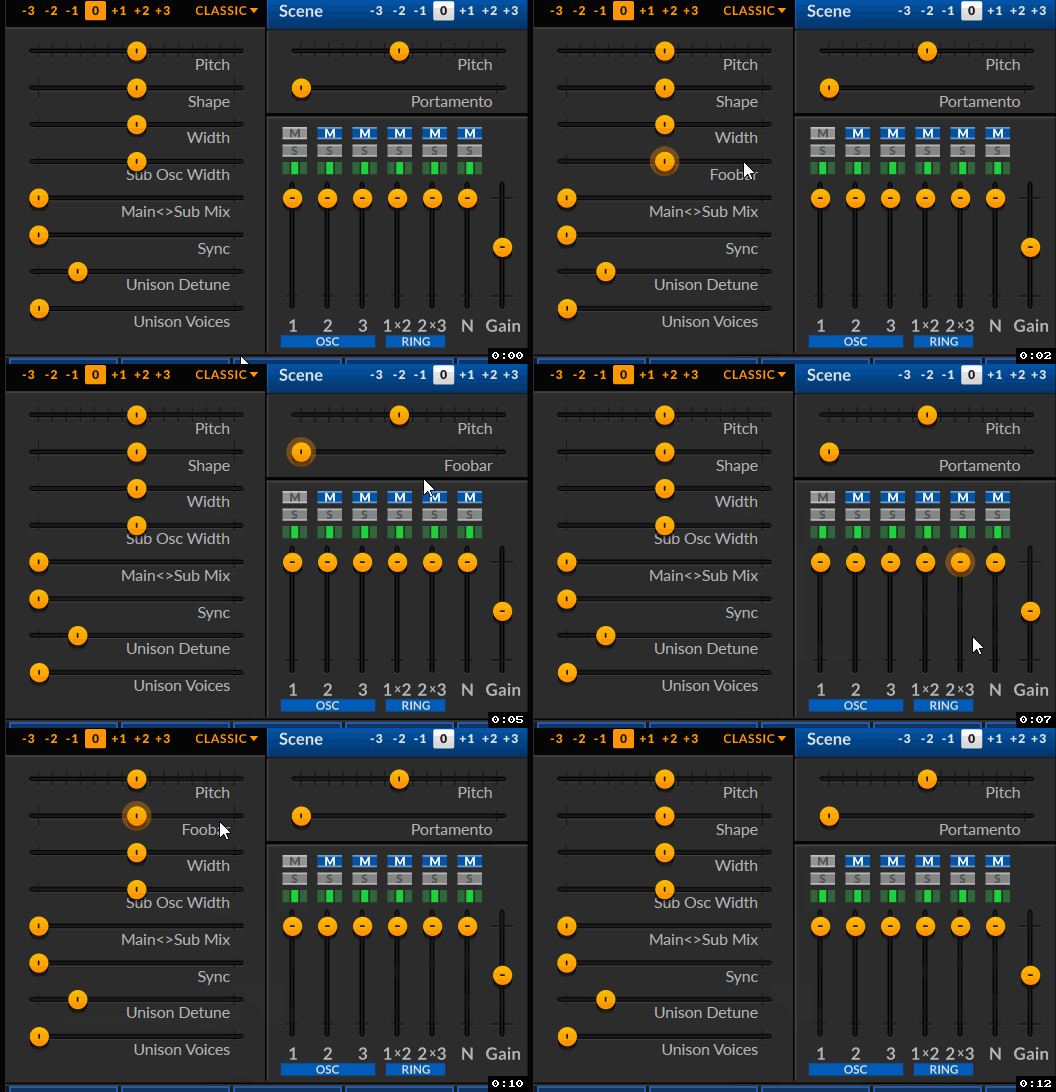
And this is why the patch browser would be a better place for showing parameter values on hover: vertical sliders don't have the text label (text is burned into the background SVG), plus there wouldn't be enough room to show the value for them anyways.
Also, I think I need another hint - how do I get the parameter value and parameter name to print out, from within CSurgeSlider?
mkruselj
on 22 Aug 2020
You can’t the slider needs to message back to surgeguieditor with its tag and then you resolve the param
baconpaul
on 22 Aug 2020
Related issues
 arjen-klar
·
6Comments
sense-amr
·
10Comments
baconpaul
·
5Comments
baconpaul
·
8Comments
baconpaul
·
7Comments
arjen-klar
·
6Comments
sense-amr
·
10Comments
baconpaul
·
5Comments
baconpaul
·
8Comments
baconpaul
·
7Comments
Most helpful comment
That's a really good idea.