Surge: CHSwitch2 don't visually update when modified externally (was Osc1 Octave bug)
Steps to replicate:
- Move Osc1 Octave from -3 to +3
- Add a controller for Osc1 Octave to DAW
- Move slider in DAW to control Osc1 Octave
Expected results:
Osc1 Octave changes from -3 to +3 in real time
Current result:
Osc1 Octave does not change visually, but audio does change.
OTOH, mapping a Cutoff Filter to the same DAW will result in graphical update.
here is a gif

@baconpaul you might find this intriguing
 esaruoho
All 20 comments
I sense a call to ->setDirty(); ->invalid(); coming in some PR somewhere soonish.
 baconpaul
on 27 Dec 2018
baconpaul
on 27 Dec 2018
Anyway able to reproduce this in logic pro with the AU. Will look.
baconpaul
on 27 Dec 2018
Just as a note to myself, since I now have to go back down my needless logging code (d'oh) the difference between a filter cutoff and the oscillator octave is that the filter cutoff has a parameter in param[ j ] around line 300 of SurgeGUIEditor and the octave does not. So we need some other "if" in there for discrete controls that I don't know yet.
baconpaul
on 27 Dec 2018
OK so this happens for any of the visual bitmap switches. Filter type, octave, etc... The problem is that since these aren't "modulatable parameters" they don't save themselves in SurgeGUIEditor params api. That doesn't mean they don't get their value updated.
The code path when you wiggle the external knob in logic or whatever is
aulayer::SetParameter
SurgeSynthesizer::setParameter01 with external = true
update value
add item to refresh_queue

// then on the idle thread
SurgeGUIEditor::idle
Traverse the refresh queue (SurgeGUIEditor around line 294)
If bound to param[ ] then also graphically invalidate the parameter
this explains why things like cutoff work (they are bound to a param) and why things like filter type and osc octave don't (they aren't).
So the question is: How do you get a reference to the graphical item around like 305 of the idle queue if you aren't in the param loop. The item is created around like 877 of SurgeGUIEditor and added to the frame and even bound by tag id. But I need to get back that reference to a control by the parameter id to invalidate it in this circumstance.
Note that some of the controls preserve the reference to the control. Check out filter subtype at line 673, which is preserved just for invalidation later on. So clearly we need to do the same thing here.
I think the solution is to add a 'nonmod_params[] array which is also all zero; and for the items which are created which don't store into params (that is, for each switch statement in SurgeGUI where we call frame->add and don't call params[ j ] = ) add them to that structure, then in the if around line 300, do an invalidate on that if we have a new value. But that's more surgery than I'm doing tonight so I am leaving my sleuth work here.
Nice bug find, @esaruoho
baconpaul
on 27 Dec 2018
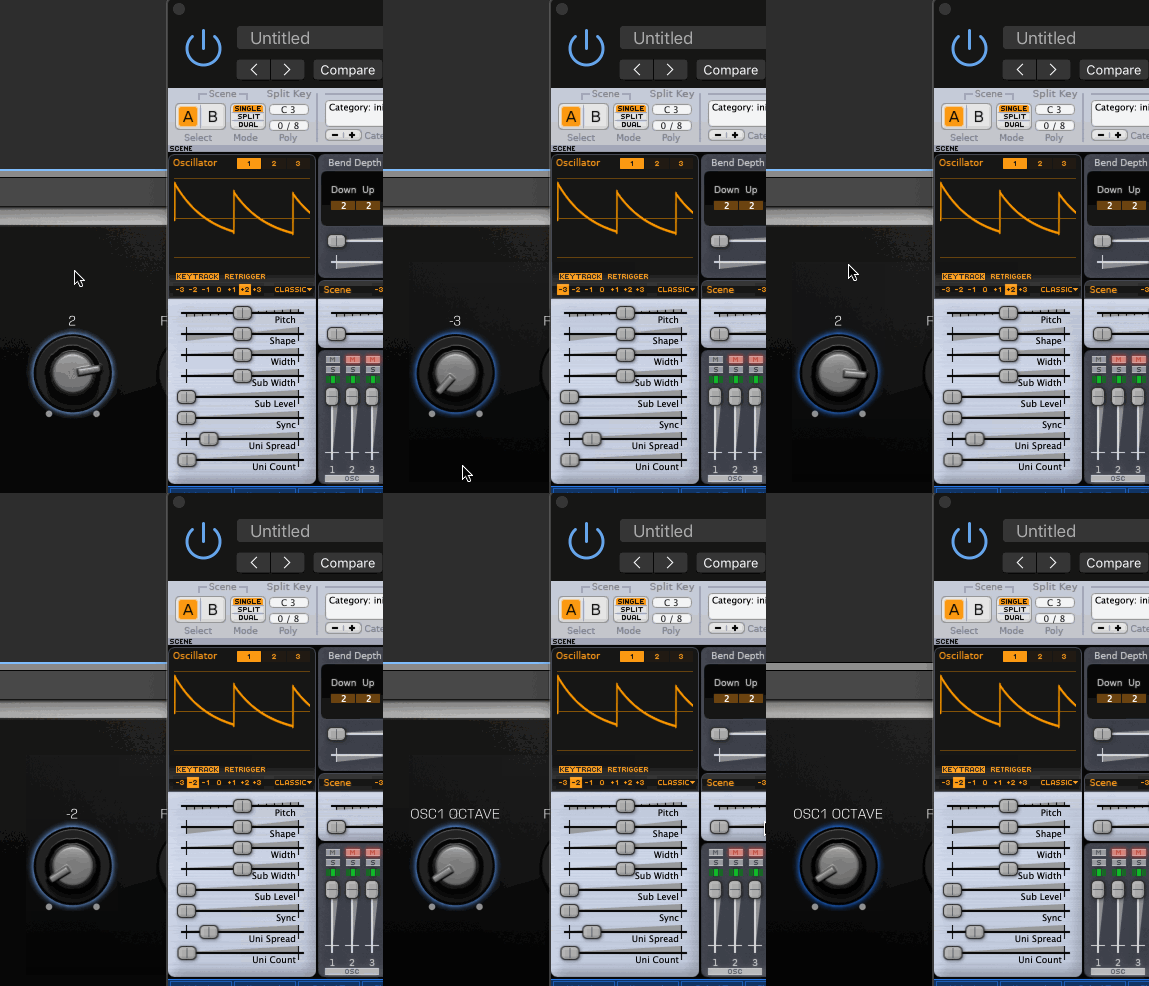
Yeah that's it. An entire class of params has been left out in the cold from external modification which changes the gui as opposed to just the synth.
I don't want to add them to param[]. That has other side effects. But I can store them somewhere else. That's what I did in this little hack non-mergable version I just did. I'll turn it into the right thing and a pull request, but I have some travel in the next 7 days, so it may not be until 2019. May be tomorrow though.
baconpaul
on 27 Dec 2018
Thanks for looking deep into this one @baconpaul !
:)
esaruoho
on 27 Dec 2018
Ok @esaruoho and @jsakkine I have this fixed in a "proper" way and have fixed many of the elements. You need to do something on a per-element basis but I fixed octave, filter type, lfo shape, lfo runmode and a few others.
So what I'd really like is
1: @kurasu to review and approve or improve or reject the way I fixed it.
2: @esaruoho either build my branch or wait for the merge if that's how we're going and then basically do an exhaustive test on all the other controls which should be automatable and aren't.
It's not a blanket change we can do. It's a "consider a control and whether it is something which will repaint on automate then add a like". The structure of the code makes it hard to do this another way at least the way I looked at it, since some items have their own special control caches too and I have't investigated those in detail.
@kurasu very interested in if you like this solution or propose another way. I'm happy to not merge that PR if you think we should go another route.
baconpaul
on 27 Dec 2018
testing the current version and @baconpaul's fix atm. Sorry had a busy day in life.
 jarkk0sakkinen
on 29 Dec 2018
jarkk0sakkinen
on 29 Dec 2018
Even if I change it from synth no visuals change. Can you describe what I'm doing wrong? Live 10+AU
jarkk0sakkinen
on 30 Dec 2018
Thanks for the merge @kurasu
From the pr #179 here’s the todo list
Oscillator Keytrack
Oscillator Retrigger
Oscillator Routing
Oscillator Mute
Oscillator Solo
Polymode
FM Routing
Filter Configuration
Waveshaper Type
Attack/Decay/Release Shape
AEG/FEG Mode
LFO Shape
LFO Unipolar
Keytrack Root key
baconpaul
on 30 Dec 2018
Even if I change it from synth no visuals change. Can you describe what I'm doing wrong? Live 10+A
Not sure @jsakkine - can you rebuild from master and see if you can both bind to scene a osc 1 octave from the daw and watch the change? If you can you are good
No idea how to do that in live. I’m basically Logic Pro only
baconpaul
on 30 Dec 2018
Will do. Sorry doe being passive. Have had more stuff IRL than I expected.
jarkk0sakkinen
on 30 Dec 2018
@baconpaul, @esaruoho, I did with and without your fix (cherry picked it to my tree) but I cannot map any Surge's parameters to Ableton. If I press configure and click Surge's controls they do not appear to the panel representing the synth in Ableton. This is what happens with the AU plugin.
Ableton (10.5) does not even seem to detect the VST2 plugin.
I checked your commit and I understand it and makes sense for me, though. The rest looks fairly low hanging fruit to fix too, but yeah, kind of difficult to contribute ATM :/
jarkk0sakkinen
on 31 Dec 2018
Hmm no idea on that. I’ve never used live.
If you want to debug you could see if and how live calls aulayer::getparameter maybe?
baconpaul
on 31 Dec 2018
@baconpaul, could do that.
jarkk0sakkinen
on 31 Dec 2018
any word on this?
esaruoho
on 3 Jan 2019
Your bug is fixed and merged
There’s a list of others to fix
Shortly someone will fix them
If shortly intersects with the next 5-7 days I will fix them
baconpaul
on 3 Jan 2019
@baconpaul for president! Hurraa!
esaruoho
on 3 Jan 2019
Just in case anyone looks here this morning, I have this done except for the osc solo control which stubbornly won't automate. I'll figure that out and send over a PR later today.
baconpaul
on 4 Jan 2019
OK I got all of these fixed and have a PR in. I'll close this issue. (There is one tiny issue about envelope mode and external automation which I will log as a low priority issue)
baconpaul
on 4 Jan 2019
Related issues
 hems
·
3Comments
baconpaul
·
5Comments
hems
·
3Comments
baconpaul
·
5Comments
 arjen-klar
·
6Comments
arjen-klar
·
6Comments
 ContemporaryInsanity
·
4Comments
baconpaul
·
7Comments
ContemporaryInsanity
·
4Comments
baconpaul
·
7Comments
Most helpful comment
Yeah that's it. An entire class of params has been left out in the cold from external modification which changes the gui as opposed to just the synth.
I don't want to add them to param[]. That has other side effects. But I can store them somewhere else. That's what I did in this little hack non-mergable version I just did. I'll turn it into the right thing and a pull request, but I have some travel in the next 7 days, so it may not be until 2019. May be tomorrow though.