Support: Please review my project :)
Items we can review on a live stream:
- GitHub profile: SamDev98
- Open source project: Password Manager - Python
You can also join the discord community here
- Done! :)
Feel free to check out other cool repositories of EddieHub here
- And done! :))
 SamDev98
All 9 comments
It's great having you contribute to this project
Welcome to the community :nerd_face:If you would like to continue contributing to open source and would like to do it with an awesome inclusive community, you should join our Discord Server and our GitHub Organisation - we help and encourage each other to contribute to open source little and often 🤓 . Any questions let us know.
![github-actions[bot] picture](https://avatars.githubusercontent.com/in/15368?v=4&s=40) github-actions[bot]
on 12 Mar 2021
github-actions[bot]
on 12 Mar 2021
Little suggestion from my end:
- Add Screenshots of your project in the readme
- Add a working demo of your Project in the readme
 Nitesh-thapliyal
on 13 Mar 2021
Nitesh-thapliyal
on 13 Mar 2021
Thanks for the suggestions,
- The screenshots are present in the documentation.
- As for the working demo, it being a desktop application, I cannot deploy it.
SamDev98
on 13 Mar 2021
I mean you can record a video of your application working and then make a gif which you can show in the readme
Nitesh-thapliyal
on 13 Mar 2021
Will do, thanks!
SamDev98
on 13 Mar 2021
The link to your GitHub Profile in this issue does not work :(
Profile
Find it a little bit confusing that you pin the project in the readme and in your pinned repositories.
Maybe you can do only one of those things.
Project
Like the others submitted a gif / demo of the application would be nice in the readme.
I love the style of your documentation. But its little bit hidden and should be more present in the main readme.
Think there is a little styling issue.
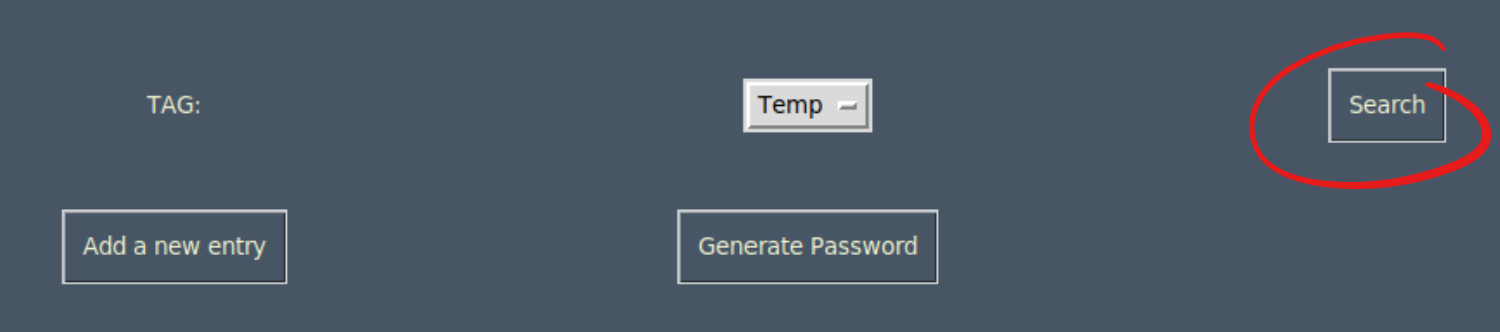
Maybe you can also add a link on where to install Python3 (https://www.python.org/download/releases/3.0/) in the documentation.
 schmelto
on 15 Mar 2021
schmelto
on 15 Mar 2021
@schmelto Thanks for the detailed review!
- I fixed the link, I didn't know it wasn't working before.
- I pinned the repo because I will be adding a lot more soon and I wanted this one to be on top separately so I've added it in my readme.
- The reason why the documentation seems a little hidden is because this repo will have multiple implementations and so I will have multiple docs linked to the main one soon, but I will keep this in mind for sure.
- About the styling issue, It's just how the tkinter grid system scales. I don't like the idea of absolute positioning. The search button is to search based on the tag selected so that was the workflow there. Tag -> Search. But I'm no UI/UX expert, i will see if there is something I can do here.
- I will add the link to install python3 for sure. Thanks!
Thank you for all your suggestions!
Also, if you want to contribute by fixing any of these code or documentation issues you are welcome to create an issue and PRs on them.
SamDev98
on 15 Mar 2021
- I fixed the link, I didn't know it wasn't working before.
🚀🚀🚀
- About the styling issue, It's just how the tkinter grid system scales. I don't like the idea of absolute positioning. The search button is to search based on the tag selected so that was the workflow there. Tag -> Search. But I'm no UI/UX expert, i will see if there is something I can do here.
Yeah with this explanation this looks correct for me 🙈
Also, if you want to contribute by fixing any of these code or documentation issues you are welcome to create an issue and PRs on them.
I will do that
schmelto
on 16 Mar 2021
@schmelto Can you check out my repo now? I merged some beta updates to main and changed the documentation as well. :)
SamDev98
on 18 Mar 2021
Related issues
 ChoukseyKhushbu
·
4Comments
ChoukseyKhushbu
·
4Comments
 DoomHammer
·
4Comments
DoomHammer
·
4Comments
 PulkitSinghDev
·
4Comments
PulkitSinghDev
·
4Comments
 BhuvaneshHingal
·
3Comments
BhuvaneshHingal
·
3Comments
 mohit01-beep
·
4Comments
mohit01-beep
·
4Comments