Support: Can't npm install within Vagrant machine (Laravel)

I'm trying to set up Passport with Laravel, I've followed along with the initial set up instructions from the docs. Once I've run -
php artisan vendor:publish --tag=passport-components and added the components to the resources/js/app.js file.
It then wants my to run 'npm run dev' however I just get a list of errors such as
'sh: 1: cross-env: not found
npm ERR! code ELIFECYCLE
npm ERR! syscall spawn
npm ERR! file sh
npm ERR! errno ENOENT'
 natelloyd1
All 14 comments
@natelloyd1 can you share what you have in the package.json file
 eddiejaoude
on 30 Jul 2020
eddiejaoude
on 30 Jul 2020
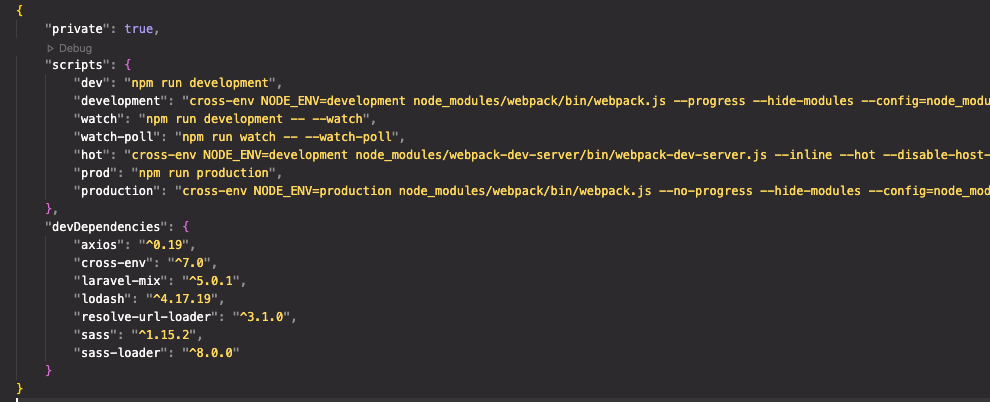
natelloyd1
on 30 Jul 2020
@natelloyd1 ahh, [adds some context here, this is a Homestead VM]
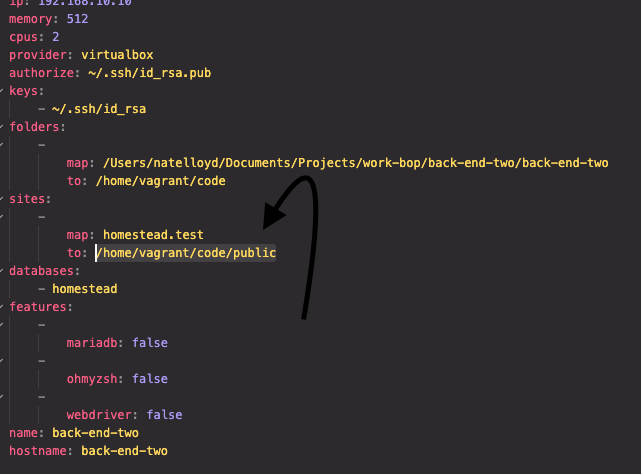
you need to be in the directory where the site is, the ENOENT suggests it can't find that file,
you'll find this in your homestead yaml it will generally be a case of switching to /mnt/something, /var/www/, /srv/ something
 stemount
on 30 Jul 2020
stemount
on 30 Jul 2020
I think there are a few issues, but lets start off with issue 1 as others might become less of an issue later on.
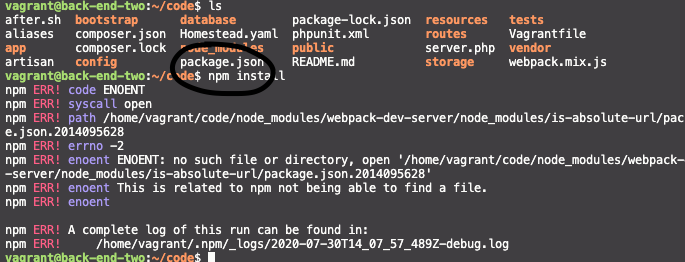
npm install can not find package.json, you need to run the command in the same directory
eddiejaoude
on 30 Jul 2020
OK, so it looks like it is in the same directory that I'm running the command in, see img.
natelloyd1
on 30 Jul 2020
Oh sorry, just seen @stemount 's comment. Hang on.
natelloyd1
on 30 Jul 2020
This file path here? Looking now.
natelloyd1
on 30 Jul 2020
I found another issue similar to yours.
Does providing the
--no-bin-linksoption tonpm installsolve your issue?
_Originally posted by @goloroden in https://github.com/npm/npm/issues/7308#issuecomment-73489075_
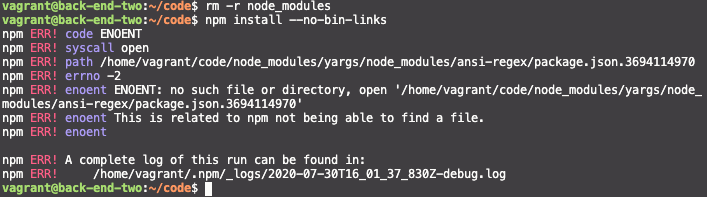
Delete node_modules directory and try this command npm install --no-bin-links
 alrifay
on 30 Jul 2020
alrifay
on 30 Jul 2020
thanks @alrifay. Didn't seem to work for me, see below -
natelloyd1
on 30 Jul 2020
Destroying your Homestead box and recreating it may help, NFS may have fallen over here, so you can restart NFS and maybe the machine. An off and on job hopefully...
stemount
on 30 Jul 2020
I remember from my time with vagrant many years ago, if commands were mix (run on local and in vm), then it would cause the project to break.
eddiejaoude
on 30 Jul 2020
I think the issue is in the path because you are using window.
I found this in Laravel documentation - homestead:
Windows users should not use the ~/ path syntax and instead should use the full path to their project, such as C:\Users\user\Code\project1.
alrifay
on 30 Jul 2020
Ok thanks. I tried many things, such as clearing the npm cache and re-installing many times but no joy. Then I deleted the package.json and couldn’t seem to recover the VM...
So at the point of no return I’ve started again in another project and I seem to have it working now. Thanks for all your help!
natelloyd1
on 30 Jul 2020
On another project now and ran 'npm install and npm run dev' within the directory - got errors.
Then I tried 'npm install', closed VS Code, then went back into the directory and successfully compiled the project with 'npm run dev'.
Not sure this will help anyone but I think it helped me.
natelloyd1
on 3 Aug 2020
Related issues
 plazzy99
·
4Comments
plazzy99
·
4Comments
 mohit01-beep
·
4Comments
mohit01-beep
·
4Comments
 BhuvaneshHingal
·
3Comments
BhuvaneshHingal
·
3Comments
 AllanRegush
·
4Comments
AllanRegush
·
4Comments
 schmelto
·
5Comments
schmelto
·
5Comments
Most helpful comment
Ok thanks. I tried many things, such as clearing the npm cache and re-installing many times but no joy. Then I deleted the package.json and couldn’t seem to recover the VM...
So at the point of no return I’ve started again in another project and I seem to have it working now. Thanks for all your help!