Supervisor: Latest supervisor break updates and snapshots on synology dsm
Describe the issue
Trying to update ha to 0.118.2 from 0.118.1, get error
20-11-23 10:15:34 WARNING (MainThread) [supervisor.jobs] 'HomeAssistantCore.update' blocked from execution, system is not healthy
also when trying to update addon
20-11-23 11:00:24 WARNING (MainThread) [supervisor.jobs] 'AddonManager.update' blocked from execution, system is not healthy
also snapshots are broken
20-11-23 11:12:41 WARNING (MainThread) [supervisor.jobs] 'SnapshotManager.do_snapshot_full' blocked from execution, system is not healthy
Steps to reproduce
I know that synology docker installation isn official supported, but it popular way to use home assistant
May be there are some way to disable this health check to update? Or downgrade supervisor is nessesary?
Enviroment details
- Operating System:: Synology DSM
- Supervisor version:: 2020.11.2
- Home Assistant version: 0.118.1
- Docker version: 18.09.8, build bfed4f5 (latest on DSM so far)
Supervisor logs
Supervisor logs
Paste supervisor logs here
 fufar
fufar
All 80 comments
Agree I am now experiencing this same issue. It seems that everything is now being totally blocked...
Here are some samples from me:
20-11-23 07:57:56 WARNING (MainThread) [supervisor.jobs] 'AddonManager.update' blocked from execution, system is not healthy
20-11-23 09:00:00 WARNING (MainThread) [supervisor.jobs] 'SnapshotManager.do_snapshot_partial' blocked from execution, system is not healthy
 BradleyFord
on 23 Nov 2020
BradleyFord
on 23 Nov 2020
https://github.com/home-assistant/architecture/blob/master/adr/0014-home-assistant-supervised.md#0014-installation-method-home-assistant-supervised
Edit: next version will show a link to https://deploy-preview-15729--home-assistant-docs.netlify.app/more-info/unhealthy/docker
 pvizeli
on 23 Nov 2020
pvizeli
on 23 Nov 2020
Update:
Unhealthy is not like Unsupported. You need docker-ce min 19.03 to have a healthy system which is reported over 6month now. If the system runs in an unknown state, we freeze the system to provide a full working system until it's fixed.
pvizeli
on 23 Nov 2020
can in next releases added disable this check option? so far now all working ok on old docker, and no fresh docker on synology
fufar
on 23 Nov 2020
Having the same issue, running on Docker 19.03
- Running on: Raspberry Pi 4 Model B Rev 1.2
- Operating System: Raspbian GNU/Linux 10 (buster)
- Docker version: 19.03.13
- Supervisor Version: 2020.11.2
- Home Assistant: 0.117.0
20-11-23 13:06:15 WARNING (MainThread) [supervisor.jobs] 'SnapshotManager.do_snapshot_full' blocked from execution, system is not healthy
20-11-23 13:06:41 WARNING (MainThread) [supervisor.jobs] 'HomeAssistantCore.update' blocked from execution, system is not healthy
 voxipbx
on 23 Nov 2020
voxipbx
on 23 Nov 2020
can in next releases added disable this check option? so far now all working ok on old docker, and no fresh docker on synology
It cannot, it needs the Docker version specified (or newer) to function correctly.
 frenck
on 23 Nov 2020
frenck
on 23 Nov 2020
can in next releases added disable this check option? so far now all working ok on old docker, and no fresh docker on synology
It cannot, it needs the Docker version specified (or newer) to function correctly.
The challenge from my understanding is that this then eliminates everyone running on a Synology NAS as they have not moved forward beyond 18.09.8. (Unless I am mistaken)
BradleyFord
on 23 Nov 2020
Hi, same here, running supervisor as docker compose on Qnap, I do have the proper docker version 19.03.13, but it is flagged as unhealthy due to not approved operating system... this is essentially rendering the supervisor useless.
I am not sure what to do... any suggestion (other than buying debian server or a Pi) ?
 Nordicfastware
on 23 Nov 2020
Nordicfastware
on 23 Nov 2020
@Nordicfastware I think you've not diagnosed your issue correctly. The operating system does not cause an Unhealthy system (it does make it unsupported, but that is something different).
frenck
on 23 Nov 2020
Thanks and noted. Granted there was other issues, but until recently there was not problem updating core and add-ons. Now log says it is prevented due to "unhealthy" state.
I will try to revert to 2020.11.0 of the supervisor, worked fine then. Until something else is figured out.
EDIT: downgrading to 2020.11.0 of the supervisor did the trick, and function are no longer blocked.
Nordicfastware
on 23 Nov 2020
So, what did the logs say? As in, instead of downgrading, you could just consider fixing the issue it triggers on.
frenck
on 23 Nov 2020
I'm also seeing this now when I try to upgrade from 0.118.2 to 0.118.3.
I've read the attached and although I am running on an unsupported OS (ubuntu) I've got the correct docker version and can't see any other issues in my logs or otherwise.
Operating System
Ubuntu 18.04.3 LTS
Docker version
19.03.5
Supervisor Version
2020.11.2
 mcinnes01
on 23 Nov 2020
mcinnes01
on 23 Nov 2020
I think the key here is rather than just being told the system is
unsupported and proceed at your own risk, it is being actively blocked.
Actively blocking was not mentioned in the original decisions regarding
supported devices.
On Mon, Nov 23, 2020, 10:30 PM mcinnes01 notifications@github.com wrote:
I'm also seeing this now when I try to upgrade from 0.118.2 to 0.118.3.
I've read the attached and although I am running on an unsupported OS
(ubuntu) I've got the correct docker version and can't see any other issues
in my logs or otherwise.Operating System
Ubuntu 18.04.3 LTS
Docker version
19.03.5
Supervisor Version
2020.11.2—
You are receiving this because you commented.
Reply to this email directly, view it on GitHub
https://github.com/home-assistant/supervisor/issues/2288#issuecomment-732377389,
or unsubscribe
https://github.com/notifications/unsubscribe-auth/AACOZ7ZICWMUUN6J73Q67DLSRKZ3VANCNFSM4T7K7KDQ
.
BradleyFord
on 23 Nov 2020
No @BradleyFord That is incorrect. Unsupported vs Unhealthy. Those are 2 different things. Unsupported doesn't block anything. Unhealthy is an actual system issue and pull the emergency brakes.
frenck
on 23 Nov 2020
Strangely I just restarted my server which I hardly ever do and I was able to update to 0.118.3, again still no errors in the logs etc and the OS itself looks absolutely fine. My system has been running rock solid for so long I can't even remember the last time I had an issue.
I wonder if the supervisor is either incorrectly determining there is an issue with something, perhaps something in the wrong state or it couldn't read the state since the previous upgrade. Or it's interpreting something in a slightly overzealous way?
mcinnes01
on 23 Nov 2020
So, what did the logs say? As in, instead of downgrading, you could just consider fixing the issue it triggers on.
Alright fair enough, as a quick fix I downgraded to be able to install an add-on I needed. Now I went back to 2020.11.2,
Operating System
QNAP QTS, with Container station running a docker compose
Docker version
19.03.13
Supervisor Version
2020.11.2
Home Assistant
Now 0.118.3
I get:
20-11-23 20:51:10 WARNING (MainThread) [supervisor.resolution.evaluations.base] NetworkManager is not correctly configured (more-info: https://www.home-assistant.io/more-info/unsupported/network_manager)
20-11-23 20:51:10 WARNING (MainThread) [supervisor.resolution.evaluations.base] Detected unsupported OS: None (more-info: https://www.home-assistant.io/more-info/unsupported/os)
20-11-23 20:51:10 WARNING (MainThread) [supervisor.resolution.evaluations.base] Systemd is not correctly working (more-info: https://www.home-assistant.io/more-info/unsupported/systemd)
[...]
20-11-23 20:51:31 WARNING (MainThread) [supervisor.jobs] 'AddonManager.install' blocked from execution, system is not healthy
Indeed I am aware of the two other issues (Network manager and systemd) which I never have been able to resolve, but I manged to get by until now, that any function of the supervisor is blocked.
Nordicfastware
on 23 Nov 2020
So, what did the logs say? As in, instead of downgrading, you could just consider fixing the issue it triggers on.
same here, chief

and in su logs
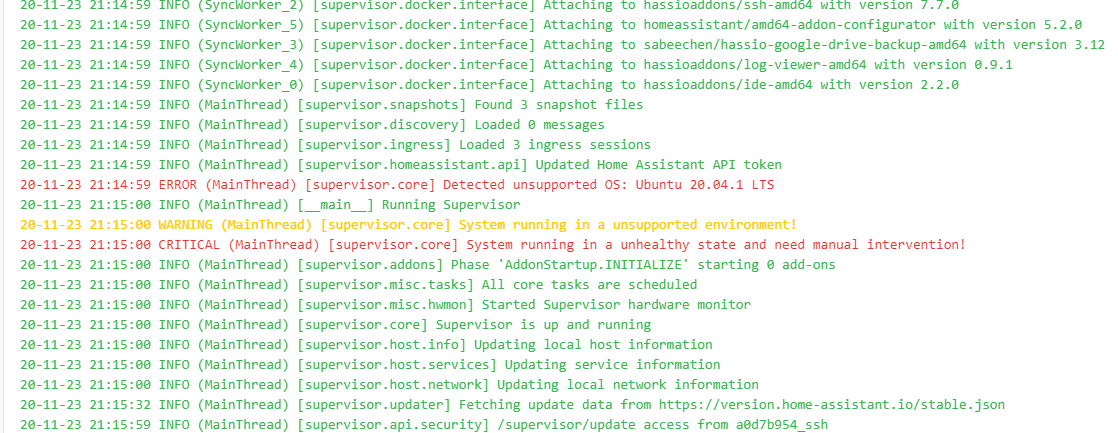
already tried to restart host, restart su, did su repair...no effects. it's also sayin that were not able to update to 2020.11.2
 to4ko
on 23 Nov 2020
to4ko
on 23 Nov 2020
ik got the same: (MainThread) [supervisor.jobs] 'HomeAssistantCore.update' blocked from execution, system is not healthy
I use:
Docker version 19.03.8, build afacb8b7f0
supervisor Version: 2020.11.2
updated to
Operating System
Ubuntu 20.04.1 LTS
Docker version
19.03.13 < newer
But still not able to update zwave addon en from 0.118.2 to 0.118.3.
no clue what to do
 shakanson
on 23 Nov 2020
shakanson
on 23 Nov 2020
@frenck My issue is using watchtower. HA does not seem to discriminate whether watchtower is only used for other unrelated containers running on the host. If you were me, how would you have unrelated containers automatically updated?
 tkdrob
on 23 Nov 2020
tkdrob
on 23 Nov 2020
So, what did the logs say? As in, instead of downgrading, you could just consider fixing the issue it triggers on.
same here, chief
just did
docker pull homeassistant/amd64-hassio-supervisor
and restarted supervisor - now i'm having 2020.11.2 with unhealthy state
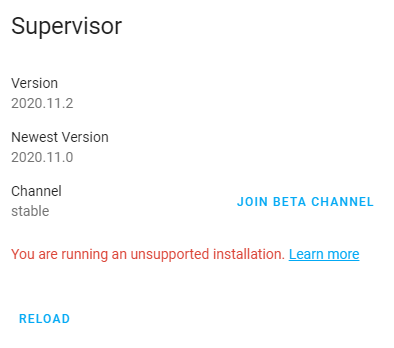
to4ko
on 23 Nov 2020
@frenck My issue is using watchtower. HA does not seem to discriminate whether watchtower is only used for other unrelated containers running on the host. If you were me, how would you have unrelated containers automatically updated?
exactly my case..watchtower for non HA containers
to4ko
on 23 Nov 2020
@frenck My issue is using watchtower. HA does not seem to discriminate whether watchtower is only used for other unrelated containers running on the host. If you were me, how would you have unrelated containers automatically updated?
exactly my case..watchtower for non HA containers
Not exactly what I'm saying. Supervisor is HA related. I'm talking about things like pihole.
tkdrob
on 23 Nov 2020
docker pull homeassistant/amd64-hassio-supervisor
That one should never do.
frenck
on 23 Nov 2020
@frenck My issue is using watchtower. HA does not seem to discriminate whether watchtower is only used for other unrelated containers running on the host. If you were me, how would you have unrelated containers automatically updated?
exactly my case..watchtower for non HA containers
Not exactly what I'm saying. Supervisor is HA related. I'm talking about things like pihole.
I meant the same, wrong wording used
to4ko
on 23 Nov 2020
docker pull homeassistant/amd64-hassio-supervisor
That one should never do.
Yes. This was done on a test host. Just trying to understand what can be done. As all other ways not helping out at all. Still unhealthy
to4ko
on 23 Nov 2020
Pascal has opened a PR today that will allow people to disable the health check enforcement https://github.com/home-assistant/supervisor/pull/2290 . Possible but not advised.
 balloob
on 24 Nov 2020
balloob
on 24 Nov 2020
Yes, same problem here. I noticed over the last few days since updating to version 0.118.0, that I cannot update the core. As well my daily snapshots have not happened for the same time period.
I see:
Update Available
Home Assistant Core 0.118.3
You are currently running version 0.118.0
When I select
Update Home Assistant Core
Are you sure you want to update Home Assistant Core to version 0.118.3?
and when I select that
When I look in the log I see:
WARNING (MainThread) [supervisor.jobs] 'HomeAssistantCore.update' blocked from execution, system is not healthy
WARNING (MainThread) [supervisor.jobs] 'SnapshotManager.do_snapshot_full' blocked from execution, system is not healthy
I also tried to install an Add-On, and then I see:
WARNING (MainThread) [supervisor.jobs] 'AddonManager.install' blocked from execution, system is not healthy
Host System is an Intel Nuc
Operating System Ubuntu 20.04.1 LTS
Docker version 19.03.13
Running Nabu Casa
Supervisor
Version 2020.11.2
Newest Version 2020.11.0
Channel stable
You are running an unsupported installation.
I've done multiple restarts of HA, full reboots of host system, and tried through VNC and the iOS apps. No joy.
Is it possible that the update to 0.118.0 caused an error?
I recognize Supervisor is not supported for Ubuntu 20.04.1 LTS. Is it even possible to not run Supervisor, and should I remove it somehow? How does one figure out why the "system is not healthy"? The "More Info" link just takes me to the log where I see the above entries. Thanks!
 AndyZaa
on 24 Nov 2020
AndyZaa
on 24 Nov 2020
Pascal has opened a PR today that will allow people to disable the health check enforcement #2290 . Possible but not advised.
but if system in unhealthy state (not able to identify the reason for that) how would one update?
to4ko
on 24 Nov 2020
Can we add this as a breaking change in the release notes?
It is obviously a potential issue for many people that we not clear before
updating.
On Tue, Nov 24, 2020, 2:56 AM Andy_Z notifications@github.com wrote:
Yes, same problem here. I noticed over the last few days since updating to
version 0.118.0, that I cannot update the core. As well my daily snapshots
have not happened for the same time period.I see:
Update Available
Home Assistant Core 0.118.3
You are currently running version 0.118.0When I select I get the next box:
Update Home Assistant Core
Are you sure you want to update Home Assistant Core to version 0.118.3?
and when I select that button, nothing happens.When I look in the log I see:
WARNING (MainThread) [supervisor.jobs] 'HomeAssistantCore.update' blocked
from execution, system is not healthy
WARNING (MainThread) [supervisor.jobs] 'SnapshotManager.do_snapshot_full'
blocked from execution, system is not healthyI also tried to install an Add-On, and then I see:
WARNING (MainThread) [supervisor.jobs] 'AddonManager.install' blocked
from execution, system is not healthyHost System is an Intel Nuc
Operating System Ubuntu 20.04.1 LTS
Docker version 19.03.13
Running Nabu CasaSupervisor
Version 2020.11.2
Newest Version 2020.11.0
Channel stable
You are running an unsupported installation.I've done multiple restarts of HA, full reboots of host system, and tried
through VNC and the iOS apps. No joy.Is it possible that the update to 0.118.0 caused an error?
I recognize Supervisor is not supported for Ubuntu 20.04.1 LTS. Is it even
possible to not run Supervisor, and should I remove it somehow? How does
one figure out why the "system is not healthy"? The "More Info" link just
takes me to the log where I see the above entries. Thanks!—
You are receiving this because you were mentioned.
Reply to this email directly, view it on GitHub
https://github.com/home-assistant/supervisor/issues/2288#issuecomment-732493719,
or unsubscribe
https://github.com/notifications/unsubscribe-auth/AACOZ764K557ZSY3I2QFTILSRLZCBANCNFSM4T7K7KDQ
.
BradleyFord
on 24 Nov 2020
hop this will be fixed yeah.. it's ok and good preventing users from breaking their system by using no supported platforms / Versions off Docker etc but for people with alternative installation methods (and I think there are a lot) we really appreciate the function to ignore the healthy check :) for my it's the ubuntu version which is not supported. Will ubuntu Focal be supported in the furure?
 thundergreen
on 24 Nov 2020
thundergreen
on 24 Nov 2020
@thundergreen You are mixing up Unsupported VS Unhealty.
Unsupported is fine and doesn't block anything. You can run on Ubuntu, although unsupported. Unhealthy is a state in which something has been detected that causes problems. That is something else.
frenck
on 24 Nov 2020
I also got the unhealthy message. I have updated my docker, disabled watchtower (that I use for other containers) and restarted/rebooted. How can I check what to do to resolve this? Are there logs with the reason for going into the unhealthy state?
some clues?
shakanson
on 24 Nov 2020
@thundergreen You are mixing up Unsupported VS Unhealty.
Unsupported is fine and doesn't block anything. You can run on Ubuntu, although unsupported. Unhealthy is a state in which something has been detected that causes problems. That is something else.
@frenck , is there anything can be done with unhealthy caused by
CRITICAL (MainThread) [supervisor.misc.hwmon] Not privileged to run udev monitor!
i'm getting this right after fresh HA supervised install on my test machine (ubuntu 20.04.1, docker 19.03.13)
apt update apt upgrade done few times
to4ko
on 24 Nov 2020
@to4ko Well I get this error
20-11-24 07:04:33 WARNING (MainThread) [supervisor.jobs] 'SnapshotManager.do_snapshot_full' blocked from execution, system is not healthy
and the issue is indeed not supported OS:
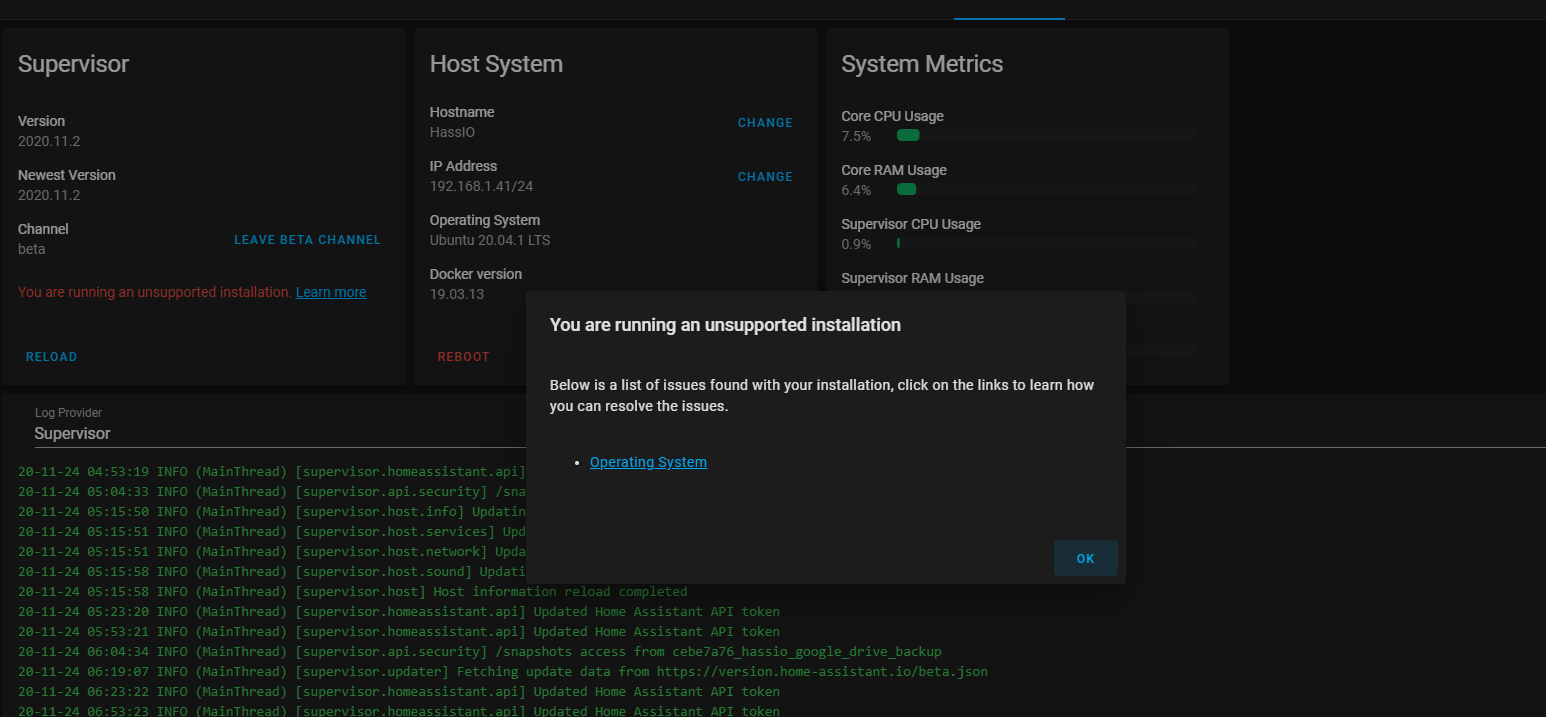
So it is related to unsopported OS :)
thundergreen
on 24 Nov 2020
@thundergreen same here plus udev issue in supervisor log...not clear what is the reason
to4ko
on 24 Nov 2020
@thundergreen Again, you are mixing up unsupported vs unhealthy.
Your system is marked unsupported because of the OS. Unhealthy, however, is not related to that.
The screenshot you posted is even titled: "You are running an unsupported installation", indicating that is the reasoning for being unsupported NOT unhealthy.
These are currently our documented reasons for a system to become unhealty:
frenck
on 24 Nov 2020
@frenck why would supervisor then mark system as unhealthy and then just guide me to the site where it shows me that my operating system is not supported as I don't use Buster but *Focal * which is currently not supported. My Docker version is OK! It's kind of weird then to call it unhealthy if the OS is just not supported right?
thundergreen
on 24 Nov 2020
@thundergreen The UI is on route to roll out to provide more information, similar to how it is done with unsupported. But really, those are not related. You can run a healthy unsupported system.
So this has nothing to do with either Buster, Focal, Debian, Armbian, Ubuntu.
Currently, the information on why a system becomes unhealthy is available in the logs (as it always has been, for quite some time already).
Your Docker version is not the only concern in this. It is also permissions. For example, if the Supervisor can't get permission to access or monitor udev, it will cause problems and thus mark the system as unhealthy. You need to make sure your custom set up allows for that.
frenck
on 24 Nov 2020
@frenck which logs except the one in supervisor give me more detail how to resolve?
20-11-24 08:40:19 WARNING (MainThread) [supervisor.jobs] 'AddonManager.update' blocked from execution, system is not healthy
20-11-24 08:40:24 WARNING (MainThread) [supervisor.jobs] 'HomeAssistantCore.update' blocked from execution, system is not healthy
20-11-24 08:46:01 WARNING (MainThread) [supervisor.host.network] Can't update connectivity information: Error: Timeout was reached
20-11-24 08:46:48 WARNING (MainThread) [supervisor.host.network] Can't update connectivity information: Error: Timeout was reached
shakanson
on 24 Nov 2020
@frenck how can this issue with udev be resolved? any suggestions?
to4ko
on 24 Nov 2020
yes. Sorry but the error handling or error logs are missleading as i don't have ANY error message about wrong Docker version at all. Just the udev thing like @to4ko .
I fully understand your reaction here but please bear in mind that we are not seeing those error messages from the perspective of a dev who created those messages. We just track and trace those error messages and try to figure out how to solve. But by pointing us to docs which are not obvisouly releated to the error message in our logs won't help us to solve the problem here.
thundergreen
on 24 Nov 2020
yes. Sorry but the error handling or error logs are missleading as i don't have ANY error message about wrong Docker version at all. Just the udev thing like @to4ko .
I'm not understanding your reply. I wrote:
Your Docker version is not the only concern in this. It is also permissions. For example, if the Supervisor can't get permission to access or monitor udev, it will cause problems and thus mark the system as unhealthy. You need to make sure your custom set up allows for that.
If your Docker version is alright, it most likely is a permission issue. As I wrote, version is not the only concern in this.
frenck
on 24 Nov 2020
how can this issue with udev be resolved? any suggestions?
Sorry, I'm not using Ubuntu, so I'm not aware of their handling/influence in this. A good start might be checking the journals. It might be related to the AppArmor profiles.
frenck
on 24 Nov 2020
updated the supervisor today.
and now the message is better CRITICAL (MainThread) [supervisor.misc.hwmon] Not privileged to run udev monitor!
it seams to be more detailed.
shakanson
on 24 Nov 2020
gents, isn't this one connected to what we have
to4ko
on 24 Nov 2020
I have the same problem using it on a synology NAS
 arodriguezf
on 26 Nov 2020
arodriguezf
on 26 Nov 2020
@balloob @pvizeli @ludeeus can you please tell the command to disable this blocking?
 Krocko
on 26 Nov 2020
Krocko
on 26 Nov 2020
@Krocko add jobs.json {"ignore_conditions": ["healthy"]} in the hassio folder just above config. This ignores unhealthy conditions
tkdrob
on 26 Nov 2020
@Krocko add jobs.json {"ignore_conditions": ["healthy"]} in the hassio folder just above config. This ignores unhealthy conditions
Where can I add this? I have a same problem.
 Vodike
on 26 Nov 2020
Vodike
on 26 Nov 2020
@tkdrob thank you very much!
@Vodike create the jobs.json inside the hass.io folder.
Krocko
on 26 Nov 2020
@tkdrob thank you very much!
@Vodike create the jobs.json inside the hass.io folder.
THX, but could you please help me how? Step by step if no problem :-)
Vodike
on 26 Nov 2020
@tkdrob thank you very much!
@Vodike create the jobs.json inside the hass.io folder.THX, but could you please help me how? Step by step if no problem :-)
Disabling health checks is not advised. I checked out the PR that enabled this bypass and figured out how to use it before any documentation was posted. In my case, watchtower is used for pihole and a few others not HA. If you know your way around an ssh terminal, the above instructions are sufficient. I just don't think it's wise to say anything further. Helping you now may not help you later when things break from running unhealthy. Cheers
tkdrob
on 26 Nov 2020
At the least, the HA community could use more clarity on what constitutes an unhealthy condition. In my case I am running Ubuntu 20.04.1 LTS and Docker version 19.03.13. I recognize Ubuntu is unsupported (not unhealthy) and the Docker version is at the proper rev to be healthy. Beyond that nothing in my logs indicates why my HA is shown to be in an unhealthy state. Not all of us are Linux gurus - my knowledge base is more around Windows. I'm running Ubuntu on an Intel NUC because it was my selection to be the on-ramp to Home Assistant. I love HA and the community but if it is only to be supported for those with the deepest technical know-how, it will not ascend to its deserved level of adoption in a widespread manner.
AndyZaa
on 26 Nov 2020
Can you see your supervisor logs? It should tell you what the cause is. https://www.home-assistant.io/more-info/unhealthy/docker
I'm no guru either but it's important for us to understand the intent behind these updates. HASS OS makes it easier to keep things working and to address support issues since the devs have full control of the OS environment. This means a simple setup to make it more accessible and enjoyable to less techie people.
tkdrob
on 26 Nov 2020
Thank you @tkdrob. Today for some reason (after no changes), my HA is not labeled as unhealthy. I have been examining the Supervisor logs. The only unusual thing I see today is:
WARNING (MainThread) [supervisor.updater] Can't fetch versions from https://version.home-assistant.io/stable.json:
I had reviewed the referenced page but nothing there seemed to apply to my installation. I agree that we should understand the intent behind the updates, and not just bypass them. Folks like me just need some more information about what is unhealthy so we can figure out how to remedy the unhealthy state.
AndyZaa
on 27 Nov 2020
@Krocko add jobs.json {"ignore_conditions": ["healthy"]} in the hassio folder just above config. This ignores unhealthy conditions
I tried to add jobs.json file with that values and didn´t work for me, do I need to do anything else?
arodriguezf
on 27 Nov 2020
@Krocko add jobs.json {"ignore_conditions": ["healthy"]} in the hassio folder just above config. This ignores unhealthy conditions
I tried to add jobs.json file with that values and didn´t work for me, do I need to do anything else?
Have you restart supervisor?
Krocko
on 27 Nov 2020
@Krocko add jobs.json {"ignore_conditions": ["healthy"]} in the hassio folder just above config. This ignores unhealthy conditions
I tried to add jobs.json file with that values and didn´t work for me, do I need to do anything else?
It works fine for me. See attached screenshot how it should look like. I restarted the supervisor container and now I am able to play with add-ons.
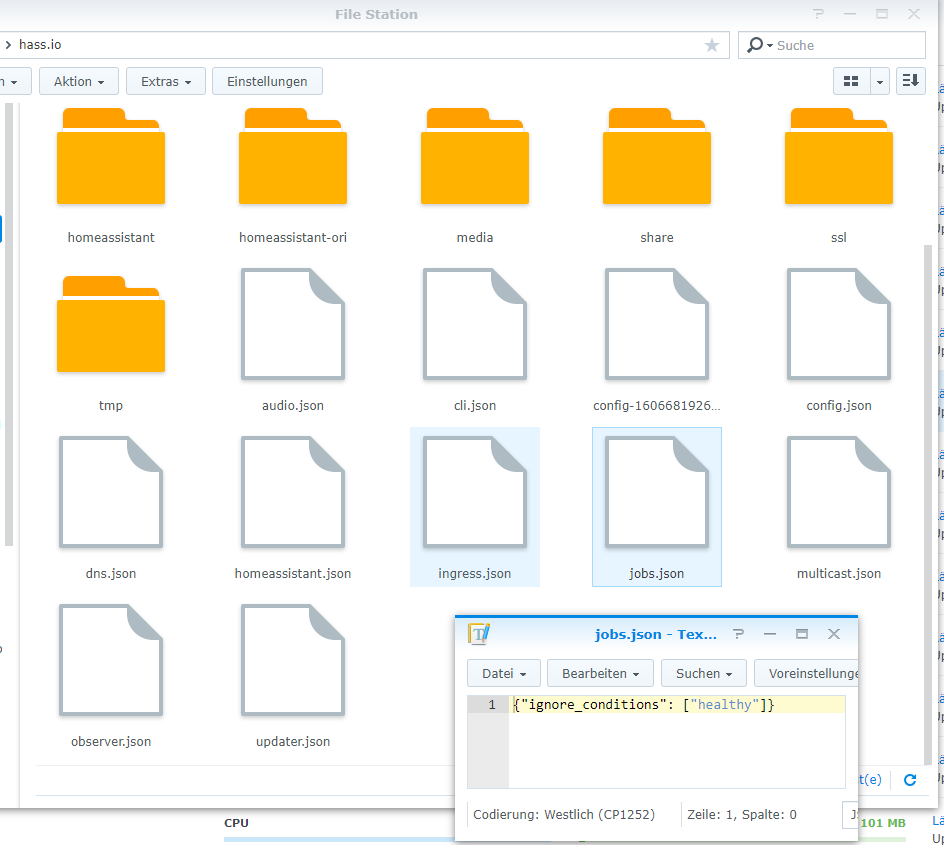
Sad to see this breaking change, too. Yes, Synology uses some old docker version, but it is the most recent version for all synology users out there. Can understand the intention to move forward, but am unhappy to see so many installations break...
 MaxWinterstein
on 30 Nov 2020
MaxWinterstein
on 30 Nov 2020
@Krocko add jobs.json {"ignore_conditions": ["healthy"]} in the hassio folder just above config. This ignores unhealthy conditions
I tried to add jobs.json file with that values and didn´t work for me, do I need to do anything else?
It works fine for me. See attached screenshot how it should look like. I restarted the supervisor container and now I am able to play with add-ons.
Sad to see this breaking change, too. Yes, Synology uses some old docker version, but it is the most recent version for all synology users out there. Can understand the intention to move forward, but am unhappy to see so many installations break...
I have the same as you but still I get the supervisor giving me the following:
20-12-01 13:12:59 WARNING (MainThread) [supervisor.jobs] 'HomeAssistantCore.update' blocked from execution, system is not healthy
20-12-01 13:14:40 WARNING (MainThread) [supervisor.jobs] 'AddonManager.install' blocked from execution, system is not healthy
I've tried following things:
- Set the permissions/owner of jobs.json the same as the config.json.
- Restarted the
hassio_supervisordocker container. - Restarted Home Assistant via HA > server controls > restart
- Restarted Home Assistant via Package Center of DSM
no luck so far, any other suggestions?
UPDATE: had to manually 'docker pull' latest version of hassio_supervisor (there was a problem with the version I had). after that I could upgrade.
 cskiwi
on 1 Dec 2020
cskiwi
on 1 Dec 2020
This is the issue tracker for bugs related to the supervisor.
Please move the conversation about how to disable the jobs to the Home Assistant forums.
balloob
on 1 Dec 2020
Having exact same issue - I cant restore from snapshot, not even partial.... I can't say when it started as I havent had to do a restore in a LONG time, but today I get:
Error: Unknown error, see supervisor
20-12-03 00:41:49 WARNING (MainThread) [supervisor.jobs] 'SnapshotManager.do_restore_partial' blocked from execution, system is not healthy
Operating System
Ubuntu 20.04.1 LTS
Docker version
19.03.13
Supervisor Version
2020.12.2
Core CPU Usage 2.2%
Core RAM Usage 4%
Supervisor CPU Usage 0.7%
Supervisor RAM Usage 3%
Used Space 53.3%
 jazzmonger
on 3 Dec 2020
jazzmonger
on 3 Dec 2020
@Krocko add jobs.json {"ignore_conditions": ["healthy"]} in the hassio folder just above config. This ignores unhealthy conditions
Thank you very much for this!
Was annoyed that updates were blocked because I have watchtower installed, but only to update non-homeassistant containers. This helped me, running what I know is not 100% standard.
 tinuva
on 3 Dec 2020
tinuva
on 3 Dec 2020
For anyone finding this thread that isn't running Synology, this also affects other installs, such as my barebones Arch Linux host with the supervisor manually installed on top with the correct version of Docker and all of the other checks passing. Updates/addons/downgrades all blocked.
The jobs.json file works as a stop-gap
 spurgelaurels
on 3 Dec 2020
spurgelaurels
on 3 Dec 2020
The actual FIX is this post:
https://github.com/home-assistant/supervisor/issues/2288#issuecomment-738158680
and how I implemented it here:
https://github.com/home-assistant/supervisor/issues/2288#issuecomment-738182230
For posterity, I'm keeping this in case its needed by others in the future:
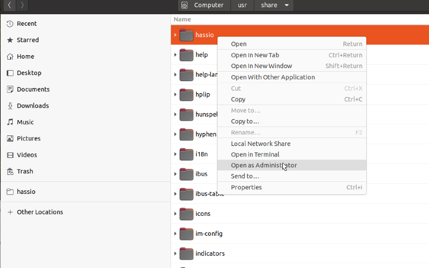
For those searching for a solution here who are NOT as technical (like me) and you're using Ubuntu or other Linux Supervised Installs, here are detailed steps used to FIX (OK, BYPASS)this problem:
1) find your Home assistant install directory ("hassio"). It will look like the pic below. rt-click Open the dir AS ADMINISTRATOR
2) Create a new file there with all the other json files called jobs.json. or just duplicate one of the existing files and rename it
3) put this one line in that file:
{"ignore_conditions": ["healthy"]}
4) save it
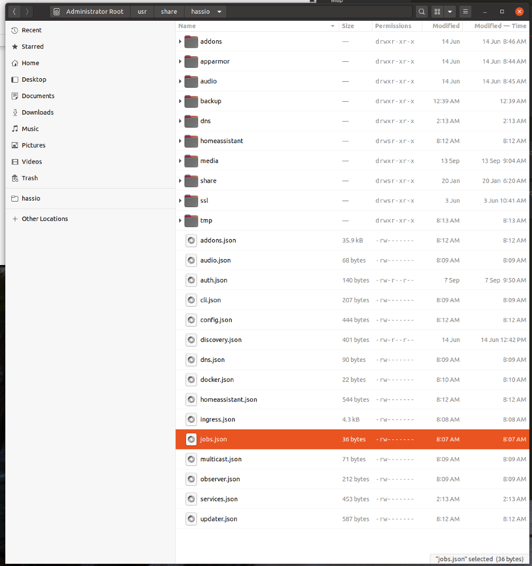
5) restart the Supervisor Docker container either in Portainer or reboot your system.
I Was successfully able to restore a Snapshot after doing this. All is now well in the Universe. I can now see my chickens are about to lay eggs on each other!
Jeff
jazzmonger
on 3 Dec 2020
For those searching for a solution here who are NOT as technical (like me) and you're using Ubuntu or other Linux Supervised Installs, here are detailed steps used to FIX this problem:
Just to be clear here, this is not a FIX for the issue. It's a stopgap, and it will allow you to downgrade / continue using your system. This stopgap will need to be removed afterwards, when this is fixed upstream.
spurgelaurels
on 3 Dec 2020
I STRONGLY suggest this is noted in the next update or 100's of ppl will keep this setting going forward.
jazzmonger
on 3 Dec 2020
@frenck wrote
You are mixing up Unsupported VS Unhealty.
It's not only we users that mixes these up. Log messages and docs mix these up as well, and this led me to look for something else for a couple of hours, so I thought I'd document it for others that find this (this was my first hit when googling for Unhealthy Home Assistant).
My reason for an _unhealthy_ system, as for many others in this thread, was that I was running Watchtower (configured to only control specific, non Home Assistant, containers). I read in the logs and in the docs that it was _not supported_, and I thought it meant _Unsupported_ in the same way that running on Ubuntu is _not supported_, but that's not the case.
In the logs, Supervisor reports Watchtower with a _warning_ (as opposed to critical) and as _not supported_:
_WARNING_ (MainThread) [supervisor.resolution.evaluations.base] Found images: {'watchtower'} which are _not supported_, remove these from the host! (more-info: https://www.home-assistant.io/more-info/unsupported/container)
And if we check the page in the link it says:
If you remove all offending containers from your host and then reload the Supervisor, it will no longer be marked as _unsupported_ for this reason
https://www.home-assistant.io/more-info/unsupported/container
Again, running Watchtower will cause the system to be _unhealthy_, so what the page states is not true.
To fix it, you not only need to stop, and remove the Watchtower container. You actually need to remove the Watchtower image as well, docker rmi imagename.
I hope we in the future will have the ability to somewhere configure "Yes, I know I'm running the unsupported container Watchtower but it's been configured to not interfere with Home Assistant, so please ignore Watchtower"
 HCanber
on 3 Dec 2020
HCanber
on 3 Dec 2020
@frenck wrote
You are mixing up Unsupported VS Unhealty.
It's not only we users that mixes these up. Log messages and docs mix these up as well, and this led me to look for something else for a couple of hours, so I thought I'd document it for others that find this (this was my first hit when googling for Unhealthy Home Assistant).
My reason for an _unhealthy_ system, as for many others in this thread, was that I was running Watchtower (configured to only control specific, non Home Assistant, containers). I read in the logs and in the docs that it was _not supported_, and I thought it meant _Unsupported_ in the same way that running on Ubuntu is _not supported_, but that's not the case.
In the logs, Supervisor reports Watchtower with a _warning_ (as opposed to critical) and as _not supported_:
_WARNING_ (MainThread) [supervisor.resolution.evaluations.base] Found images: {'watchtower'} which are _not supported_, remove these from the host! (more-info: https://www.home-assistant.io/more-info/unsupported/container)
And if we check the page in the link it says:
If you remove all offending containers from your host and then reload the Supervisor, it will no longer be marked as _unsupported_ for this reason
https://www.home-assistant.io/more-info/unsupported/containerAgain, running Watchtower will cause the system to be _unhealthy_, so what the page states is not true.
To fix it, you not only need to stop, and remove the Watchtower container. You actually need to remove the Watchtower image as well,
docker rmi imagename.I hope we in the future will have the ability to somewhere configure "Yes, I know I'm running the unsupported container Watchtower but it's been configured to not interfere with Home Assistant, so please ignore Watchtower"
10000000% this!
This is exactly my situation as well. I couldn't have said it better than @HCanber did here.
tinuva
on 3 Dec 2020
For those searching for a solution here who are NOT as technical (like me) and you're using Ubuntu or other Linux Supervised Installs, here are detailed steps used to FIX (OK, BYPASS)this problem:
Jeff
```
Great Jeff, thank you for clear explanation!
I could restore backup on my Docker 18.09 HA
 akunia
on 3 Dec 2020
akunia
on 3 Dec 2020
Thanks for the fix. Have an untouched HA that went from OK to unsomething over a few days and refused to updated. Nothing in the logs other then NetworkManager (no thanks) and Ubuntu 20.04.1LTS, and those have not changed in months. Adding jobs.json let me upgrade.
 gcormier
on 3 Dec 2020
gcormier
on 3 Dec 2020
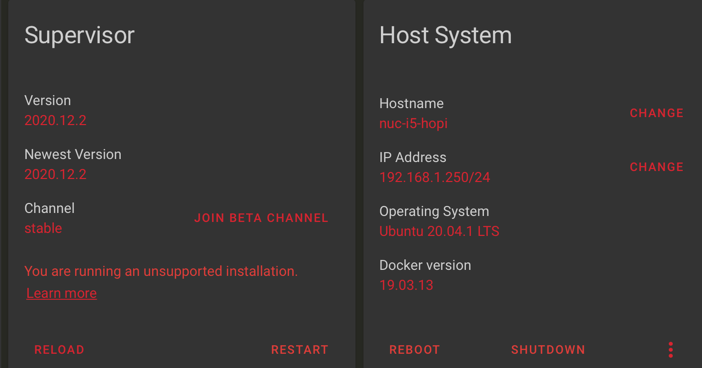
well, @HCanber, that's a VERY helpful explaination... Further investigating, I did see "watchtower" in Portainer looking at the "Images" section (Not under containers) and I removed it and rebooted Home assistant.
I also removed jobs.json, and now the "Unhealthy" state is GONE.
So this is the real FIX. For now... I've updated my posts accordingly so others can get on with their day.
jazzmonger
on 3 Dec 2020
Hi Guys,
same here for me: Debian 9 in ESXi with docker 18.x and hupsakee System unhealthy (and warning that supervisor not in privileged mode)
upgrade debian 10 and docker did not help
check networkmanager did not help
but what did help was:
https://community.home-assistant.io/t/supervisor-in-privileged-mode/170629
changing the json file cleared all errors 👍
It is easy visualised with portainer - superviser container - Inspect - Hostconfig - Privileged
@frenck, the concept is noble & good maybe a summary why unhealthy could be interesting in the search of a solution. I did not known about that hostconfig.json (and privileged entry) with the supervisor container ...
Mario
 mariowitdoek
on 3 Dec 2020
mariowitdoek
on 3 Dec 2020
@frenck wrote
You are mixing up Unsupported VS Unhealty.
It's not only we users that mixes these up. Log messages and docs mix these up as well, and this led me to look for something else for a couple of hours, so I thought I'd document it for others that find this (this was my first hit when googling for Unhealthy Home Assistant).
My reason for an _unhealthy_ system, as for many others in this thread, was that I was running Watchtower (configured to only control specific, non Home Assistant, containers). I read in the logs and in the docs that it was _not supported_, and I thought it meant _Unsupported_ in the same way that running on Ubuntu is _not supported_, but that's not the case.
In the logs, Supervisor reports Watchtower with a _warning_ (as opposed to critical) and as _not supported_:
_WARNING_ (MainThread) [supervisor.resolution.evaluations.base] Found images: {'watchtower'} which are _not supported_, remove these from the host! (more-info: https://www.home-assistant.io/more-info/unsupported/container)
And if we check the page in the link it says:
If you remove all offending containers from your host and then reload the Supervisor, it will no longer be marked as _unsupported_ for this reason
https://www.home-assistant.io/more-info/unsupported/containerAgain, running Watchtower will cause the system to be _unhealthy_, so what the page states is not true.
To fix it, you not only need to stop, and remove the Watchtower container. You actually need to remove the Watchtower image as well,
docker rmi imagename.I hope we in the future will have the ability to somewhere configure "Yes, I know I'm running the unsupported container Watchtower but it's been configured to not interfere with Home Assistant, so please ignore Watchtower"
Thank you for this tip, and others in this thread. I was able to ascertain that I did already have Supervised set to True in the Supervisor container. And when I removed Watchtower using these clear directions, I am now back in a healthy state. I also removed the patch jobs.json file. Cheers!
AndyZaa
on 3 Dec 2020
Removing watchtower container and image with a reboot worked for me. Thanks for the feedback. I now understand Debian is supported so explore Wonder if I can run it on ESXI as a VM as 'supported'? Thanks!
 kozoke
on 4 Dec 2020
kozoke
on 4 Dec 2020
I love home assistant and it's ecosystem but I really don't like it when changes as significant as this are just snuck into things. I respect how hard it is to ensure integrity of a system and this is especially an area of concern when homeassistant gets more and more commercial potential with consumers that are not as technically inclined. But this needs to be treated much like Red Hat does Fedora vs RHEL. Right now there is NO RHEL official productized version HA....but that is the version where hard locked down hardened configuration can be enforced...the version Nabu Cass services will only work with for example.
But to keep the community driving features and velocity we need to always have a version that allows us to experiment and play. That is the only version that HA exists in today.
I would encourage the community leaders of HA to think about this carefully because the requirements of your commercial intentions, while totally respectable, are starting to influence the upstream a little too much of which this to me is an early example.
A consumer should never be able to turn off the health and system integrity precautions. But upstream users and collaborators that help test, document, feedback etc most certainly need to have the ability to innovate freely on the platform and that means anything as invasive as this blocking must be a) documented b) alerted and c) configurable.
Watchtower is superb in what it does and can easily be configured to never touch HA.
You / we could instead also make a good wiki page that describes that!
 s3frank
on 4 Dec 2020
s3frank
on 4 Dec 2020
Oh and I have tried the jobs.json solutions but for me it is not working....or not entirely.
I was able to update one of my addons which is how I got to debugging and came here.
the jobs.json file seems to now allow me to update again, but the error conditions remains on the screen.
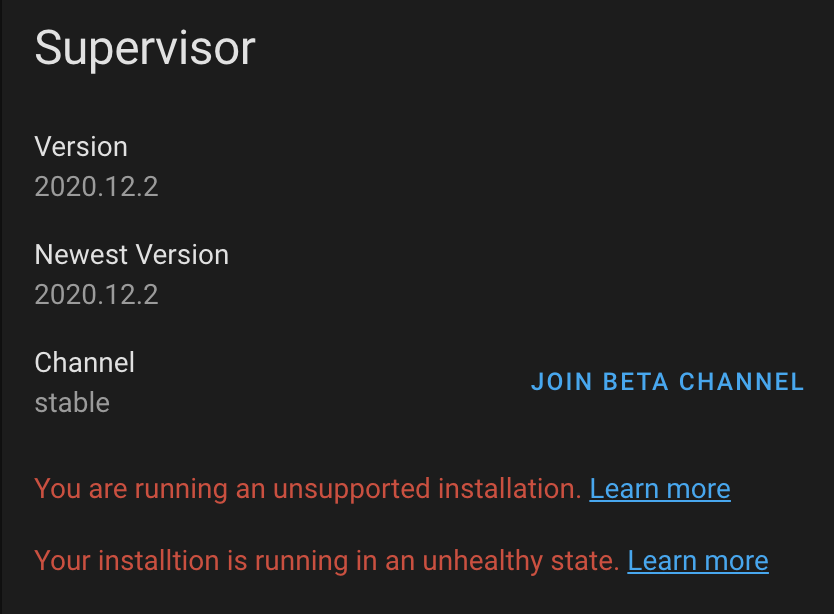
s3frank
on 4 Dec 2020
Ive got the same problem, but the issue here is not caused by an unsupported docker version, but by watchtower running in Docker, which i use to keep some of my docker containers up to date.
Watchtower only updates whitelisted containers and doesn’t affect HA, Hass supervisor or any of the addons at all in my setup.
I appreciate that HA team wants to keep away users who don't know what they're doing and just install watchtower to "keep their Home Assistant updated" but I don't think this is the way forward
 Dinth
on 4 Dec 2020
Dinth
on 4 Dec 2020
Synology Docker Version: 18.09.0-0513
as I understand there will no way for my hassio/homeassistant
working properly on Synology/Docker NAS.
I Had spend many hour's for install!
i m sad because i love HA!
but i'l think searching another system.
 manolenso
on 4 Dec 2020
manolenso
on 4 Dec 2020
@s3frank, I agree with that! I think they are headed there, if you join the Beta channel, you'll see the next update is 1.0.00b0 to be announced at the dev conf. I didn't press go, but it's there for the adventurous. It's been pretty clear from all my interactions that thIs project is a hacker's paradise but it's going to get serious and soon, hence the upcoming 1.0 release.
Heck, look how many decades it took for Windoze to become mainstream, and that's still buggy as hell. I literally hate Windows with every fiber of my being (used it since 2.0) now that I'm a Mac/Linux advocate. I cringe every time I spin that VM up for something that requires it, which is less and less as time goes by.
Personally, I have a parallels system set up on my Mac with Debian Supervised Docker per the support matrix and if something goes haywire with an update, I Go to that system and test. Watchtower isn't on that since they are pretty darn clear about what can and can't be on a "supported" platform and it usually works fine. The Dev team isn't Google, thank God, and you have to draw the line somewhere with limited resources. At least their line is about as far away from the CREEPY Line as you can get. And that's the one BIG reason I'm all in on this platform.
Like any system that needs to mature, it will be interesting to see the direction this project goes, and for now, I'm a huge supporter and happily pay for Nabu Casa and Keep writing detailed tutorials breaking down how to implement some esoteric fix or workaround for hairy problems that one of the tech Gods here proposes in some cryptic one sentence post only a select few really understand, especially if I happen to find that coveted secret "Tech Speak" decoder ring in my Captain Crunch that day. If it stays that way remains to be seen, but all indications seem to say it will.
I was a newbie a couple yrs ago too. I know firsthand how daunting it can seem at first.
Jeff
jazzmonger
on 4 Dec 2020
Still, clarify:
ha help jobs
You can self decide to run the system and ignore all issues. But to ignore issues instead of addressing them, will not help you in the future. We build a full API and CLI tools to help you to disable any kind of protection which we do not recommend doing. On Synology, use the Open Virtual Appliance, that is the best and stable way to run HA without to ignore tons of issue in your logs.
Please move the discussion into the Forum. This is an issue tracker and it looks like all system with issues are not covered by our support.
And for all new readers: unsupported is not unhealthy. You can run an unsupported system as healthy. For sure, there are mostly the reason why somethings are not supported and some of that reason can end with an unhealthy system, but if you address this reason, it is healthy again.
pvizeli
on 4 Dec 2020
Related issues
 probonopd
·
9Comments
probonopd
·
9Comments
 sepulworld
·
8Comments
sepulworld
·
8Comments
 olskar
·
9Comments
olskar
·
9Comments
 CiquattroFPV
·
3Comments
CiquattroFPV
·
3Comments
 jcwillox
·
5Comments
jcwillox
·
5Comments
Most helpful comment
It works fine for me. See attached screenshot how it should look like. I restarted the supervisor container and now I am able to play with add-ons.
Sad to see this breaking change, too. Yes, Synology uses some old docker version, but it is the most recent version for all synology users out there. Can understand the intention to move forward, but am unhappy to see so many installations break...