Supervisor: Supervisor not starting after update to 207
Operating environment (HassOS/Generic):
Ubuntu 18.04 Supervisor 207
Supervisor logs: Description of problem: Just updated the supervisor to 207 via frontend, now it logs the
Mar 03 15:30:58 hassio hassio-supervisor[7786]: raise EnvironmentError('Could not create udev monitor')
Mar 03 15:30:58 hassio hassio-supervisor[7786]: OSError: Could not create udev monitor
Mar 03 15:30:58 hassio hassio-supervisor[7786]: 20-03-03 15:30:58 ERROR (MainThread) [asyncio] Unclosed client session
Mar 03 15:30:58 hassio hassio-supervisor[7786]: client_session:
Mar 03 15:30:58 hassio hassio-supervisor[7786]: 20-03-03 15:30:58 ERROR (MainThread) [asyncio] Unclosed client session
Mar 03 15:30:58 hassio hassio-supervisor[7786]: client_session:
Mar 03 15:30:58 hassio hassio-supervisor[7786]: [cont-finish.d] executing container finish scripts...
Mar 03 15:30:58 hassio hassio-supervisor[7786]: [cont-finish.d] done.
Mar 03 15:30:58 hassio hassio-supervisor[7786]: [s6-finish] waiting for services.
Mar 03 15:30:58 hassio hassio-supervisor[7786]: [s6-finish] sending all processes the TERM signal.
Supervisor doesn't start, see log above.Could not create udev monitor error
 Alexxtheonly
All 61 comments
Hi,
As i saw your post, I pressed update to 207 with shaking hand .
Works on my side, Ubuntu 18.04.4. LTS:

 jsiemek
on 3 Mar 2020
jsiemek
on 3 Mar 2020
Same issue here. Running the generic installation on:
Distributor ID: Ubuntu
Description: Ubuntu 18.04.4 LTS
Release: 18.04
Codename: bionic
```
[s6-init] making user provided files available at /var/run/s6/etc...exited 0.
[s6-init] ensuring user provided files have correct perms...exited 0.
[fix-attrs.d] applying ownership & permissions fixes...
[fix-attrs.d] done.
[cont-init.d] executing container initialization scripts...
[cont-init.d] udev.sh: executing...
starting version 3.2.9
[16:15:43] INFO: Update udev informations
[cont-init.d] udev.sh: exited 0.
[cont-init.d] done.
[services.d] starting services
[services.d] done.
20-03-03 16:15:44 INFO (MainThread) [__main__] Initialize Supervisor setup
Traceback (most recent call last):
File "/usr/local/lib/python3.7/runpy.py", line 193, in _run_module_as_main
"__main__", mod_spec)
File "/usr/local/lib/python3.7/runpy.py", line 85, in _run_code
exec(code, run_globals)
File "/usr/src/supervisor/supervisor/__main__.py", line 41, in
coresys = loop.run_until_complete(bootstrap.initialize_coresys())
File "uvloop/loop.pyx", line 1456, in uvloop.loop.Loop.run_until_complete
File "/usr/src/supervisor/supervisor/bootstrap.py", line 61, in initialize_coresys
coresys.hwmonitor = HwMonitor(coresys)
File "/usr/src/supervisor/supervisor/hwmon.py", line 22, in __init__
self.monitor = pyudev.Monitor.from_netlink(self.context)
File "/usr/local/lib/python3.7/site-packages/pyudev/monitor.py", line 121, in from_netlink
raise EnvironmentError('Could not create udev monitor')
OSError: Could not create udev monitor
20-03-03 16:15:44 ERROR (MainThread) [asyncio] Unclosed client session
client_session:
20-03-03 16:15:44 ERROR (MainThread) [asyncio] Unclosed client session
client_session:
[cont-finish.d] executing container finish scripts...
[cont-finish.d] done.
[s6-finish] waiting for services.
[s6-finish] sending all processes the TERM signal.
[s6-finish] sending all processes the KILL signal and exiting.
````
 bratanon
on 3 Mar 2020
bratanon
on 3 Mar 2020
I don't know what caused it, but after
docker pull homeassistant/amd64-hassio-supervisor:202
docker tag homeassistant/amd64-hassio-supervisor:202 homeassistant/amd64-hassio-supervisor:latest
systemctl stop hassio-supervisor.service
systemctl start hassio-supervisor.service
It work's again. it even displays version 207 in the logs. So i guess the pull/tag did nothing, however stopping and starting of hassio-supervisor.service did not work before. ¯\_(ツ)_/¯
@bratanon can you try the four commands and see if it solves the issue for you?
Alexxtheonly
on 3 Mar 2020
@Alexxtheonly: Nope, didn't work, same issue. :(
bratanon
on 3 Mar 2020
I also started systemctl start systemd-resolved again in my journey of trial and error. Initially this was disabled because of pi-hole. If this also applies to you @bratanon, it may be worth trying.
Alexxtheonly
on 3 Mar 2020
Also having the same issue on Ubuntu 18.04 LTS, and tried the 4 commands above. Also did not work for me.
 jkabradley
on 3 Mar 2020
jkabradley
on 3 Mar 2020
Same here. On Ubuntu 18.04.4 LTS.
 Kendobendo
on 3 Mar 2020
Kendobendo
on 3 Mar 2020
Same here, I'm not even able to access hassio.
I can only access the host.
Host: Ubuntu 18.04,02 LTS.
Hassio: 0.106.4
 kernehed
on 3 Mar 2020
kernehed
on 3 Mar 2020
Same Problem here on Ubuntu as well. 18.04.3 LTS / 106.4
 almostserious
on 3 Mar 2020
almostserious
on 3 Mar 2020
Same here, resolved thanks to @Alexxtheonly (Thank a lot, your commands save my afternoon ;) )
https://github.com/home-assistant/supervisor/issues/1556#issuecomment-594034569
edit not recommanded by Frenck below...
 schmurtzm
on 3 Mar 2020
schmurtzm
on 3 Mar 2020
So, for everyone on 18.04, this is how I manage to get it to work with help from @ludeeus .
You need to run the install scritp again.
# curl -sL "https://raw.githubusercontent.com/home-assistant/hassio-installer/master/hassio_install.sh" | bash -s
https://www.home-assistant.io/hassio/installation/#alternative-install-home-assistant-supervised-on-a-generic-linux-host
bratanon
on 3 Mar 2020
So, for everyone on 18.04, this is how I manage to get it to work with help from @ludeeus .
You need to run the install scritp again.
# curl -sL "https://raw.githubusercontent.com/home-assistant/hassio-installer/master/hassio_install.sh" | bash -shttps://www.home-assistant.io/hassio/installation/#alternative-install-home-assistant-supervised-on-a-generic-linux-host
@ubuntu:~$ sudo curl -sL "https://raw.githubusercontent.com/home-assistant/hassio-installer/master/hassio_install.sh" | bash -s
ModemManager.service enabled
[Warning] ModemManager service is enabled. This might cause issue when using serial devices.
bash: line 133: /etc/hassio.json: Permission denied
@ubuntu:~$ sudo systemctl disable ModemManager.service
Removed /etc/systemd/system/multi-user.target.wants/ModemManager.service.
Removed /etc/systemd/system/dbus-org.freedesktop.ModemManager1.service.
@ubuntu:~$ sudo curl -sL "https://raw.githubusercontent.com/home-assistant/hassio-installer/master/hassio_install.sh" | bash -s
bash: line 133: /etc/hassio.json: Permission denied
Not sure what to do about that. It doesn't seem to work?
Kendobendo
on 3 Mar 2020
Go through all the steps for the (re-)installation https://www.home-assistant.io/hassio/installation/#preparation
Do not skip the sudo -i, or systemctl disable ModemManager
 ludeeus
on 3 Mar 2020
ludeeus
on 3 Mar 2020
So, for everyone on 18.04, this is how I manage to get it to work with help from @ludeeus .
You need to run the install scritp again.
# curl -sL "https://raw.githubusercontent.com/home-assistant/hassio-installer/master/hassio_install.sh" | bash -shttps://www.home-assistant.io/hassio/installation/#alternative-install-home-assistant-supervised-on-a-generic-linux-host
This works for me!
 9zenith
on 3 Mar 2020
9zenith
on 3 Mar 2020
Go through all the steps for the (re-)installation https://www.home-assistant.io/hassio/installation/#preparation
Do not skip the
sudo -i, orsystemctl disable ModemManager
Just did that, after successfully reinstalling:
[Info] Install supervisor Docker container
[Info] Install supervisor startup scripts
[Info] Install AppArmor scripts
[Info] Run Hass.io
The supervisor still does not start. It is active for maybe 2-3 seconds
almostserious
on 3 Mar 2020
What does the logs say @almostserious ?
bratanon
on 3 Mar 2020
root@ubuntu:~# docker ps
CONTAINER ID        IMAGE                                   COMMAND             CREATED             STATUS              PORTS               NAMES
c4133bf73226        homeassistant/amd64-hassio-supervisor   "/init"             36 minutes ago      Up 2 seconds                            hassio_supervisor
root@ubuntu:~# docker ps
CONTAINER ID        IMAGE               COMMAND             CREATED             STATUS              PORTS               NAMES
root@ubuntu:~#
It seems to start for 2-3 seconds and then shuts down again. It cant start properly. Any suggestions would be helpful :)
Kendobendo
on 3 Mar 2020
What does the logs say @almostserious ?
Can you please tell me how to get to the log?
almostserious
on 3 Mar 2020
docker logs hassio_supervisor
ludeeus
on 3 Mar 2020
docker logs hassio_supervisor
Thanks. Then i get the following error:
OSError: Could not create udev monitor
 File "/usr/local/lib/python3.7/runpy.py", line 193, in _run_module_as_main
    "__main__", mod_spec)
  File "/usr/local/lib/python3.7/runpy.py", line 85, in _run_code
    exec(code, run_globals)
  File "/usr/src/supervisor/supervisor/__main__.py", line 41, in <module>
    coresys = loop.run_until_complete(bootstrap.initialize_coresys())
  File "uvloop/loop.pyx", line 1456, in uvloop.loop.Loop.run_until_complete
  File "/usr/src/supervisor/supervisor/bootstrap.py", line 61, in initialize_coresys
    coresys.hwmonitor = HwMonitor(coresys)
  File "/usr/src/supervisor/supervisor/hwmon.py", line 22, in __init__
    self.monitor = pyudev.Monitor.from_netlink(self.context)
  File "/usr/local/lib/python3.7/site-packages/pyudev/monitor.py", line 121, in from_netlink
    raise EnvironmentError('Could not create udev monitor')
OSError: Could not create udev monitor
20-03-03 17:24:24 ERROR (MainThread) [asyncio] Unclosed client session
client_session: <aiohttp.client.ClientSession object at 0x7fd7772d9b90>
20-03-03 17:24:24 ERROR (MainThread) [asyncio] Unclosed client session
client_session: <aiohttp.client.ClientSession object at 0x7fd777303e10>
[cont-finish.d] executing container finish scripts...
[s6-init] making user provided files available at /var/run/s6/etc...exited 0.
[s6-init] ensuring user provided files have correct perms...exited 0.
[fix-attrs.d] applying ownership & permissions fixes...
[fix-attrs.d] done.
[cont-init.d] executing container initialization scripts...
[cont-init.d] udev.sh: executing...
starting version 3.2.9
[17:27:48] INFO: Update udev informations
[cont-init.d] udev.sh: exited 0.
[cont-init.d] done.
[services.d] starting services
[services.d] done.
20-03-03 17:27:48 INFO (MainThread) [__main__] Initialize Supervisor setup
Traceback (most recent call last):
File "/usr/local/lib/python3.7/runpy.py", line 193, in _run_module_as_main
"__main__", mod_spec)
File "/usr/local/lib/python3.7/runpy.py", line 85, in _run_code
exec(code, run_globals)
File "/usr/src/supervisor/supervisor/__main__.py", line 41, in
coresys = loop.run_until_complete(bootstrap.initialize_coresys())
File "uvloop/loop.pyx", line 1456, in uvloop.loop.Loop.run_until_complete
File "/usr/src/supervisor/supervisor/bootstrap.py", line 61, in initialize_coresys
coresys.hwmonitor = HwMonitor(coresys)
File "/usr/src/supervisor/supervisor/hwmon.py", line 22, in __init__
self.monitor = pyudev.Monitor.from_netlink(self.context)
File "/usr/local/lib/python3.7/site-packages/pyudev/monitor.py", line 121, in from_netlink
raise EnvironmentError('Could not create udev monitor')
OSError: Could not create udev monitor
20-03-03 17:27:48 ERROR (MainThread) [asyncio] Unclosed client session
client_session:
20-03-03 17:27:48 ERROR (MainThread) [asyncio] Unclosed client session
client_session:
[cont-finish.d] executing container finish scripts...
[cont-finish.d] done.
[s6-finish] waiting for services.
[s6-finish] sending all processes the TERM signal.
[s6-finish] sending all processes the KILL signal and exiting.
My logs.
Kendobendo
on 3 Mar 2020
@almostserious seems we got the exact same problem :)
Kendobendo
on 3 Mar 2020
same here after following install instructions
 btuysser
on 3 Mar 2020
btuysser
on 3 Mar 2020
Ah... seems to be a problem because before that i already tagged release 206 as latest.
Doing this:
docker pull homeassistant/amd64-hassio-supervisor:latest
docker tag homeassistant/amd64-hassio-supervisor:latest homeassistant/amd64-hassio-supervisor:latest
and then doing again:
curl -sL "https://raw.githubusercontent.com/home-assistant/hassio-installer/master/hassio_install.sh" | bash -s
seems to have fixed it
almostserious
on 3 Mar 2020
This is caused by older startup scripts, which causes the Supervisor to have incorrect permissions. The permissions changed over a half year ago, your instance would have thrown warnings for that same time as well.
Running the install instructions from our website again will fix this issue.
Running the installer again, preserves data.
Generally the above-listed installer command "should" be enough. But as a general good practice, running the full set of instructions might uncover some "older" missing things.
Warning
Note: I strongly disadvise to run manual Docker pull, tag or similar commands, it will only cause things to go out of sync OR ending up with an edge dev version that might be broken.
 frenck
on 3 Mar 2020
frenck
on 3 Mar 2020
Any advice for those of us on Ubuntu 18.04 who have not yet made the upgrade to avoid or predict if we will have this issue? I don't see any glaring warnings in the log. Anyone know what message we should look for and in what log? Home assistant or supervisor?
 scstraus
on 3 Mar 2020
scstraus
on 3 Mar 2020
I got mine finally working too. I had to fix it slightly differently.
First:
sudo -i
docker pull homeassistant/amd64-hassio-supervisor:latest
When I then tried:
docker tag homeassistant/amd64-hassio-supervisor:latest homeassistant/amd64-hassio-supervisor:latest
I got this error:
Error response from daemon: No such image: homeassistant/amd64-hassio-supervisor:latest
So instead:
docker tag homeassistant/amd64-hassio-supervisor:207 homeassistant/amd64-hassio-supervisor:latest
And then, it worked:
docker tag homeassistant/amd64-hassio-supervisor:latest homeassistant/amd64-hassio-supervisor:latest
And finally:
systemctl disable ModemManager.service
curl -sL "https://raw.githubusercontent.com/home-assistant/hassio-installer/master/hassio_install.sh" | bash -s
For some reason latest / latest didn't work for me. I have to admit I'm not sure about most of this. So this is just my experience.
Kendobendo
on 3 Mar 2020
I got mine finally working too. I had to fix it slightly differently.
Thank you so much. This worked for me as well. My installation was dead but now it's running again.
 Dawnes
on 3 Mar 2020
Dawnes
on 3 Mar 2020
This is not working. Followed the suggested steps and still getting this error
20-03-03 19:27:07 INFO (MainThread) [__main__] Initialize Supervisor setup
Traceback (most recent call last):
File "/usr/local/lib/python3.7/runpy.py", line 193, in _run_module_as_main
"__main__", mod_spec)
File "/usr/local/lib/python3.7/runpy.py", line 85, in _run_code
exec(code, run_globals)
File "/usr/src/supervisor/supervisor/__main__.py", line 41, in
coresys = loop.run_until_complete(bootstrap.initialize_coresys())
File "uvloop/loop.pyx", line 1456, in uvloop.loop.Loop.run_until_complete
File "/usr/src/supervisor/supervisor/bootstrap.py", line 61, in initialize_coresys
coresys.hwmonitor = HwMonitor(coresys)
File "/usr/src/supervisor/supervisor/hwmon.py", line 22, in __init__
self.monitor = pyudev.Monitor.from_netlink(self.context)
File "/usr/local/lib/python3.7/site-packages/pyudev/monitor.py", line 121, in from_netlink
raise EnvironmentError('Could not create udev monitor')
OSError: Could not create udev monitor
20-03-03 19:27:08 ERROR (MainThread) [asyncio] Unclosed client session
client_session:
20-03-03 19:27:08 ERROR (MainThread) [asyncio] Unclosed client session
client_session:
[cont-finish.d] executing container finish scripts...
[cont-finish.d] done.
[s6-finish] waiting for services.
[s6-finish] sending all processes the TERM signal.
[s6-finish] sending all processes the KILL signal and exiting.
 slipx06
on 3 Mar 2020
slipx06
on 3 Mar 2020
I don't know what caused it, but after
docker pull homeassistant/amd64-hassio-supervisor:202
docker tag homeassistant/amd64-hassio-supervisor:202 homeassistant/amd64-hassio-supervisor:latest
systemctl stop hassio-supervisor.service
systemctl start hassio-supervisor.serviceIt work's again. it even displays version 207 in the logs. So i guess the pull/tag did nothing, however stopping and starting of hassio-supervisor.service did not work before. ¯_(ツ)_/¯
@bratanon can you try the four commands and see if it solves the issue for you?
This worked for me
slipx06
on 3 Mar 2020
Yes, but now your versioning is out of sync, you are running 202, but the system thinks you are running 207.
frenck
on 3 Mar 2020
@frenck As you recommended I ran through all installation steps again, however it didn't resolve the issue. I used the Docker method as a work-around (it's running fine now), however I understand this is just a band-aid. What would be the best long-term solution? You mentioned permissions issues previously, is it possible to manually fix these permissions? I took a disk image prior to the work-around and can roll back to the broken state at any point.
 jharder01
on 3 Mar 2020
jharder01
on 3 Mar 2020
Yes, but now your versioning is out of sync, you are running 202, but the system thinks you are running 207.
I think it must have updated itself when I restarted the supervisor service
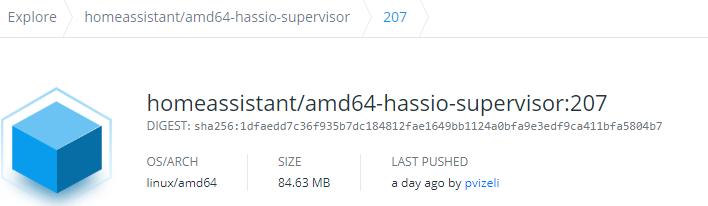
docker pull homeassistant/amd64-hassio-supervisor:207
207: Pulling from homeassistant/amd64-hassio-supervisor
Digest: sha256:1dfaedd7c36f935b7dc184812fae1649bb1124a0bfa9e3edf9ca411bfa5804b7
Status: Image is up to date for homeassistant/amd64-hassio-supervisor:207
docker.io/homeassistant/amd64-hassio-supervisor:207
REPOSITORY                               TAG                 DIGEST                                                                    IMAGE ID            CREATED             SIZE
homeassistant/amd64-hassio-supervisor    207                 sha256:1dfaedd7c36f935b7dc184812fae1649bb1124a0bfa9e3edf9ca411bfa5804b7   ff6b7ba44d13        35 hours ago        277MB
homeassistant/amd64-hassio-supervisor    latest              sha256:1dfaedd7c36f935b7dc184812fae1649bb1124a0bfa9e3edf9ca411bfa5804b7   ff6b7ba44d13        35 hours ago        277MB
slipx06
on 3 Mar 2020
Same problem here!!!
Nothing help.
Ok all addons start, Supervisor start but no home assistant docker on the list.
 mredone
on 3 Mar 2020
mredone
on 3 Mar 2020
So, for everyone on 18.04, this is how I manage to get it to work with help from @ludeeus .
You need to run the install scritp again.
# curl -sL "https://raw.githubusercontent.com/home-assistant/hassio-installer/master/hassio_install.sh" | bash -s
https://www.home-assistant.io/hassio/installation/#alternative-install-home-assistant-supervised-on-a-generic-linux-host@ubuntu:~$ sudo curl -sL "https://raw.githubusercontent.com/home-assistant/hassio-installer/master/hassio_install.sh" | bash -s
ModemManager.service enabled
[Warning] ModemManager service is enabled. This might cause issue when using serial devices.
bash: line 133: /etc/hassio.json: Permission denied@ubuntu:~$ sudo systemctl disable ModemManager.service
Removed /etc/systemd/system/multi-user.target.wants/ModemManager.service.
Removed /etc/systemd/system/dbus-org.freedesktop.ModemManager1.service.@ubuntu:~$ sudo curl -sL "https://raw.githubusercontent.com/home-assistant/hassio-installer/master/hassio_install.sh" | bash -s
bash: line 133: /etc/hassio.json: Permission deniedNot sure what to do about that. It doesn't seem to work?
I ran into the same problem. This is a permission issue. Try switching to root user (su root) and rerun curl -sL "https://raw.githubusercontent.com/home-assistant/hassio-installer/master/hassio_install.sh" | bash -s
 cmlittle
on 4 Mar 2020
cmlittle
on 4 Mar 2020
Ah... seems to be a problem because before that i already tagged release 206 as latest.
Doing this:docker pull homeassistant/amd64-hassio-supervisor:latest
docker tag homeassistant/amd64-hassio-supervisor:latest homeassistant/amd64-hassio-supervisor:latest
and then doing again:
curl -sL "https://raw.githubusercontent.com/home-assistant/hassio-installer/master/hassio_install.sh" | bash -s
seems to have fixed it
This solved my issue, but now I'm concerned about being "out of sync" with the Supervisor versions. Obviously I'd rather have my system up and running and worry about a fix later, but hopefully someone can suggest a long term fix to resolve this.
Yes, but now your versioning is out of sync, you are running 202, but the system thinks you are running 207.
I think it must have updated itself when I restarted the supervisor service
docker pull homeassistant/amd64-hassio-supervisor:207
207: Pulling from homeassistant/amd64-hassio-supervisor
Digest: sha256:1dfaedd7c36f935b7dc184812fae1649bb1124a0bfa9e3edf9ca411bfa5804b7
Status: Image is up to date for homeassistant/amd64-hassio-supervisor:207
docker.io/homeassistant/amd64-hassio-supervisor:207
REPOSITORY TAG DIGEST IMAGE ID CREATED SIZE homeassistant/amd64-hassio-supervisor 207 sha256:1dfaedd7c36f935b7dc184812fae1649bb1124a0bfa9e3edf9ca411bfa5804b7 ff6b7ba44d13 35 hours ago 277MB homeassistant/amd64-hassio-supervisor latest sha256:1dfaedd7c36f935b7dc184812fae1649bb1124a0bfa9e3edf9ca411bfa5804b7 ff6b7ba44d13 35 hours ago 277MB
I followed your instructions (thank you by the way) and I'm also showing that I'm running Supervisor 207, so hopefully we haven't tricked HA to thinking we're on 207 and not 202. Regardless, I'm happy everything is working properly for now.
cmlittle
on 4 Mar 2020
I had to manually remove all the homeassistant containers from docker before running the install script. After that, it worked like a charm :)
 JonnyKabisa
on 4 Mar 2020
JonnyKabisa
on 4 Mar 2020
I tried removing all of the Docker containers and running the script but Hassio_supervisor keep spitting that error? I am kinda freaking out as my whole house is now unusable due to Home-assistant not booting.
 maxi1134
on 4 Mar 2020
maxi1134
on 4 Mar 2020
@maxi1134 not only the script, but all the installation steps starting at sudo -i (important)
https://www.home-assistant.io/hassio/installation/#preparation
Then a reboot of the whole thing, most likely.
 cogneato
on 4 Mar 2020
cogneato
on 4 Mar 2020
I'm also slightly panicking... I've done this years ago on an Intel NUC and never looked back but seem to have the same error/issue.
In all honesty I have no idea what I'm doing just following steps 1:1.
Just logging into my Ubuntu 18.04 NUC and running sudo curl -sL "https://raw.githubusercontent.com/home-assistant/hassio-installer/master/hassio_install.sh" | sudo bash -s did not do the trick. (I had to add sudo 2x has otherwise I would get permission errors) got:
[Info] Install supervisor Docker container
[Info] Install supervisor startup scripts
[Info] Install AppArmor scripts
[Info] Run Hass.io
But I did not come online.
What is now the best way to proceed? Somebody posted stopping or deleting some containters first before running the install script? Please post in NOOB language...
Update:
So I don't know if I also broke something in the process but I now also did:
Sudo docker container kill "number of hass container eg 09e01412ac47"
Then run the above curl command
Sudo docker prune
And boom, hassio came up again.
p.s. I'm 100% sure I did not touch anything on hassio for weeks. Also still on version 104.x So a bit confused why this suddenly happened.
 tyfoon
on 4 Mar 2020
tyfoon
on 4 Mar 2020
What is now the best way to proceed? Somebody posted stopping or deleting some containters first before running the install script? Please post in NOOB language...
I just did this:
login via ssh
sudo docker stop hassio_supervisor
sudo docker rm hassio_supervisor
run install again
 0xQSL
on 4 Mar 2020
0xQSL
on 4 Mar 2020
I managed to get the script to run. But now I cannot find the install folder of Home-Assistant.
It used to be at /docker/homeass/homeassistant.
I tried looking at the script to see where it would be installed but no luck.
Anyone can head me to the right direction? I'd like to restore my configuration files.
maxi1134
on 4 Mar 2020
$ docker ps
to find CintainreID of Homeassistan Container
$docker inspect -f '{{ .Mounts }}' containerid
To display mounts
Jarek
W dniu śr., 4.03.2020 o 21:17 maxi1134 notifications@github.com
napisał(a):
I managed to get the script to run. But now I cannot find the install
folder of Home-Assistant.It used to be at /docker/homeass/homeassistant.
I tried looking at the script to see where it would be installed but no
luck.Anyone can head me to the right direction? I'd like to restore my
configuration files.—
You are receiving this because you commented.
Reply to this email directly, view it on GitHub
https://github.com/home-assistant/supervisor/issues/1556?email_source=notifications&email_token=AIYQNLDJQOGWRY65FRD6JZLRF2ZPPA5CNFSM4LANFDM2YY3PNVWWK3TUL52HS4DFVREXG43VMVBW63LNMVXHJKTDN5WW2ZLOORPWSZGOEN2B44Q#issuecomment-594812530,
or unsubscribe
https://github.com/notifications/unsubscribe-auth/AIYQNLAFIOOC72VFAQCTDZTRF2ZPPANCNFSM4LANFDMQ
.
jsiemek
on 4 Mar 2020
Does https://github.com/home-assistant/supervisor/pull/1566 fix the issue or just print the new warning that I see. I get that there is a problem, but the 'run all steps' does not work.
 wellsi
on 5 Mar 2020
wellsi
on 5 Mar 2020
Why is this issue closed? 208 still crashes on my system with similar errors, and "forcing" 206 seems to be the only way to get everything started.
 jsb5151
on 5 Mar 2020
jsb5151
on 5 Mar 2020
@jsb5151 Because the original issue raised in here was resolved and reported working again by the issue author. Thanks.
frenck
on 5 Mar 2020
in case anybody else is also unhappy about automatic supervisor updates, vote here:
https://community.home-assistant.io/t/feature-request-block-supervisor-auto-updates/112743
 rockinglama
on 5 Mar 2020
rockinglama
on 5 Mar 2020
Thanks guys! I deleted hass.io at all before find that topic. But with your help, everything works now for me :)
 TEDSv
on 8 Mar 2020
TEDSv
on 8 Mar 2020
THANKS EVERYONE! This worked
I logged in via ssh
sudo docker container stop hassio_supervisor
sudo docker container rm hassio_supervisor
sudo curl -sL "https://raw.githubusercontent.com/home-assistant/hassio-installer/master/hassio_install.sh" | sudo bash -s
sudo docker restart homeassistant
 mkotlarz
on 10 Mar 2020
mkotlarz
on 10 Mar 2020
I'm on Hassio and I can't run any sudo commands...
What can I do to fix this problem?
 sirs2k
on 14 Mar 2020
sirs2k
on 14 Mar 2020
Why is this closed- it is an ongoing issue.
 SteveRMann
on 2 Apr 2020
SteveRMann
on 2 Apr 2020
This is not working. Followed the suggested steps and still getting this error
20-03-03 19:27:07 INFO (MainThread) [main] Initialize Supervisor setup
Traceback (most recent call last):
File "/usr/local/lib/python3.7/runpy.py", line 193, in _run_module_as_main
"main", mod_spec)
File "/usr/local/lib/python3.7/runpy.py", line 85, in _run_code
exec(code, run_globals)
File "/usr/src/supervisor/supervisor/main.py", line 41, in
coresys = loop.run_until_complete(bootstrap.initialize_coresys())
File "uvloop/loop.pyx", line 1456, in uvloop.loop.Loop.run_until_complete
File "/usr/src/supervisor/supervisor/bootstrap.py", line 61, in initialize_coresys
coresys.hwmonitor = HwMonitor(coresys)
File "/usr/src/supervisor/supervisor/hwmon.py", line 22, in init
self.monitor = pyudev.Monitor.from_netlink(self.context)
File "/usr/local/lib/python3.7/site-packages/pyudev/monitor.py", line 121, in from_netlink
raise EnvironmentError('Could not create udev monitor')
OSError: Could not create udev monitor
20-03-03 19:27:08 ERROR (MainThread) [asyncio] Unclosed client session
client_session:
20-03-03 19:27:08 ERROR (MainThread) [asyncio] Unclosed client session
client_session:
[cont-finish.d] executing container finish scripts...
[cont-finish.d] done.
[s6-finish] waiting for services.
[s6-finish] sending all processes the TERM signal.
[s6-finish] sending all processes the KILL signal and exiting.
Got the same Errors but like @sirs2k i am on Hassio, so can not get around with docker etc.
Also Hassio just stops working out of nowhere and i can only get it up runnning again by a complete reboot of my pi.
 biejay
on 3 Apr 2020
biejay
on 3 Apr 2020
I just followed all setup steps here: https://www.home-assistant.io/hassio/installation/#alternative-install-home-assistant-supervised-on-a-generic-linux-host
But I still cat use the supervisor page, getting "Unable to load the panel source: /api/hassio/app/entrypoint.js."
Anything else I can try?
 jankete
on 6 Apr 2020
jankete
on 6 Apr 2020
Same issue for me. This is tiring
 arnonel
on 8 Apr 2020
arnonel
on 8 Apr 2020
I ended up with removing all homeassistant / hassio containers and images and rebuild them via install script. After that it worked again. For the future I excluded all these containers from being updated via watchdog.
jankete
on 8 Apr 2020
I had the same from overnight - can't get into Configurator.
I have worked around this, hoping its more than a temp fix though, by SSHing into the RPI on port 22222 and doing a restore from last backup:
ha snapshot -----> make a note of the slug id
ha snapshot restore "2997e2ca"
Seems to have worked so far however root cause probably still remains
 townsmcp
on 9 Apr 2020
townsmcp
on 9 Apr 2020
Now it's
curl -sL https://raw.githubusercontent.com/home-assistant/supervised-installer/master/installer.sh | bash -s
 grigio
on 10 Apr 2020
grigio
on 10 Apr 2020
I'm sorry guys I wish I could help you more, im pretty terrible at this and I likely had done some other step that contributed it working that I just didn't know. I had tried 100 things. I will say I had gotten that panel error just prior to resolving the issue with my steps. I might have updated all the docker images too, I just don't remember.
mkotlarz
on 10 Apr 2020
@SteveRMann this bug is fix in 208 since over a month. You need just reinstall the supervisor.
 pvizeli
on 11 Apr 2020
pvizeli
on 11 Apr 2020
@SteveRMann this bug is fix in 208 since over a month. You need just reinstall the supervisor.
Interesting because I found this thread due to supervisor not restarting.
I've reinstalled supervisor, following: https://www.home-assistant.io/hassio/installation/#alternative-install-home-assistant-supervised-on-a-generic-linux-host
and i still have the same problem?
I've also manually deleted the image and container for supervisor, and rerun the scripts from the lin above, and neither have fixed this issue yet?
🤷♂️
 randomlyalex
on 11 Apr 2020
randomlyalex
on 11 Apr 2020
I'm going to share my fix for "Unable to load the panel source: /api/hassio/app/entrypoint.js." issue here in case it helps anyone. Just so you know the background, I was trying to move a previous instance of hass.io from an ubuntu 16.04 lxc container into an ubuntu 18.04 VM. Banged my head around for a few hours before figuring this out so here are my steps:
1 sudo -i
- Make sure you have network-manager installed or install with apt-get update && apt-get -y install network-manager
2. sudo systemctl stop hassio-supervisor.service
3. docker stop $(docker ps -a -q) && docker rm $(docker ps -a -q)
- You may also need to do docker rmi $(docker images -a -q) but I didn't have to
4. Move your files over from previous installation if you need to
5. sudo systemctl start hassio-supervisor.service - at this point everything started except homeassistant docker container itself (which you can check by running docker ps) so my final step was...
6. reboot now
This seemed to do everything needed to restart the containers with proper networking.
 achaiah
on 13 Apr 2020
achaiah
on 13 Apr 2020
Related issues
pvizeli
·
5Comments
 CiquattroFPV
·
3Comments
CiquattroFPV
·
3Comments
 probonopd
·
9Comments
pvizeli
·
4Comments
probonopd
·
9Comments
pvizeli
·
4Comments
 elsbrock
·
5Comments
elsbrock
·
5Comments
Most helpful comment
This is caused by older startup scripts, which causes the Supervisor to have incorrect permissions. The permissions changed over a half year ago, your instance would have thrown warnings for that same time as well.
Running the install instructions from our website again will fix this issue.
https://www.home-assistant.io/hassio/installation/#alternative-install-home-assistant-supervised-on-a-generic-linux-host
Running the installer again, preserves data.
Generally the above-listed installer command "should" be enough. But as a general good practice, running the full set of instructions might uncover some "older" missing things.
Warning
Note: I strongly disadvise to run manual Docker
pull,tagor similar commands, it will only cause things to go out of sync OR ending up with an edge dev version that might be broken.