Supervisor: Can't remove addon: 400 Client Error: Bad Request ("invalid reference format")
Environment
Home Assistant 0.98.3 on Raspberry Pi 3B+ (Official Hass.io Image)
Problem
When removing a custom add-on, the following error is logged and the addon is not removed:
400 Client Error: Bad Request ("invalid reference format")
The container CAN be successfully deleted via Portainer, but this does not remove the addon reference in the Addon UI.
This MAY not necessarily be a bug with Hass.io, but I don't know what I could be doing differently to get this addon to work.
Addon Repo: https://github.com/qJake/hassio-addon-repository
System Logs
19-09-08 15:03:03 INFO (SyncWorker_18) [hassio.docker.addon] Start Docker add-on qjake/hacc-hassio-armv7 with version
19-09-08 15:32:10 INFO (SyncWorker_5) [hassio.docker.interface] Stop addon_ac23ff49_hacc application
19-09-08 15:32:12 INFO (SyncWorker_5) [hassio.docker.interface] Clean addon_ac23ff49_hacc application
19-09-08 15:32:12 INFO (SyncWorker_5) [hassio.docker.interface] Remove image qjake/hacc-hassio-armv7 with latest and
19-09-08 15:32:12 WARNING (SyncWorker_5) [hassio.docker.interface] Can't remove image qjake/hacc-hassio-armv7: 400 Client Error: Bad Request ("invalid reference format")
Addon Dockerfile
# ASP.NET Core 3.x Runtime
FROM mcr.microsoft.com/dotnet/core/aspnet:3.0-buster-slim-arm32v7 AS dotnet

ARG TAG

ENV HACC_VERSION $TAG
ENV ASPNETCORE_URLS http://*:8095
ENV ASPNETCORE_ENVIRONMENT Production
ENV LANG C.UTF-8

EXPOSE 8095

WORKDIR /

RUN apt-get update -yq && apt-get install -yq wget

RUN mkdir /app \
    && cd /app \
    && wget -qO app.tar.gz https://github.com/qJake/HADotNet.CommandCenter/releases/download/v$TAG/HADotNet.CommandCenter-armhf.tar.gz \
    && tar xzf app.tar.gz \
    && rm -rf app.tar.gz

WORKDIR /app

CMD ["dotnet", "HADotNet.CommandCenter.dll"]

# Build arguments
ARG BUILD_DATE
ARG BUILD_REF
ARG BUILD_VERSION

# Labels
LABEL \
    io.hass.name="HACC" \
    io.hass.description="Wall-mountable tablet interface for Home Assistant." \
    io.hass.arch="armv7|armhf|i386|amd64" \
    io.hass.type="addon" \
    io.hass.version=${BUILD_VERSION} \
    maintainer="qJake <https://github.com/qJake/>" \
    org.label-schema.description="Wall-mountable tablet interface for Home Assistant." \
    org.label-schema.build-date=${BUILD_DATE} \
    org.label-schema.name="HACC" \
    org.label-schema.schema-version="$TAG" \
    org.label-schema.url="https://github.com/qJake/HADotNet.CommandCenter/" \
    org.label-schema.usage="https://github.com/qJake/HADotNet.CommandCenter/README.md" \
    org.label-schema.vcs-ref=${BUILD_REF} \
    org.label-schema.vcs-url="https://github.com/qJake/HADotNet.CommandCenter/" \
    org.label-schema.vendor="qJake"
 qJake
qJake
All 23 comments
just as a +1 to this, seeing the same issue on Ha 98.5
please have a look.
see: https://community.home-assistant.io/t/hacc-home-assistant-command-center/134843/184?u=mariusthvdb
as a fyi, this only happened to me yet with this specific add-on, any other add-on I un-installed went away nicely ;-) (though admittedly that has been done before 98.5, so I am not 100% positive for the current version HA)
 Mariusthvdb
on 19 Sep 2019
Mariusthvdb
on 19 Sep 2019
Possible duplicate of #1233
 frenck
on 19 Sep 2019
frenck
on 19 Sep 2019
Additionally, oddly enough, when it starts up there is no version number. Perhaps that's the issue with it removing it, is it's trying to call the image by version number but it's blank? I'm still sort of new to Docker so I'm not quite sure how it all works.
19-09-21 13:53:25 INFO (SyncWorker_3) [hassio.docker.addon] Start Docker add-on homeassistant/aarch64-addon-configurator with version 3.5
19-09-21 13:53:26 INFO (SyncWorker_14) [hassio.docker.addon] Start Docker add-on hassioaddons/node-red-aarch64 with version 4.1.0
19-09-21 13:53:28 INFO (SyncWorker_0) [hassio.docker.addon] Start Docker add-on hassioaddons/appdaemon3-aarch64 with version 4.0.3
19-09-21 13:53:29 INFO (SyncWorker_4) [hassio.docker.addon] Start Docker add-on qjake/hacc-hassio-armv7 with version
That's not cut off, it just says with version and stops. I would expect it to say with version 0.6.0. 🤔
qJake
on 21 Sep 2019
In 0.99.2, instead of blank, the version number now reports as with version None. Still doesn't display the correct version number.
qJake
on 25 Sep 2019
Hi, I have the same problem. I can't uninstall HACC.
I have also tried with CLI.
core-ssh:~# hassio addons uninstall "7b35ebbf_hacc"
Error: Unknown Error, see logs
Thanks
 perikillo70
on 8 Oct 2019
perikillo70
on 8 Oct 2019
on Hassio Rpi4, now on 0.100.1:
19-10-13 08:25:39 INFO (SyncWorker_1) [hassio.docker.interface] Remove image qjake/hacc-hassio-armv7 with latest and
19-10-13 08:25:39 WARNING (SyncWorker_1) [hassio.docker.interface] Can't remove image qjake/hacc-hassio-armv7: 400 Client Error: Bad Request ("invalid reference format")
Mariusthvdb
on 13 Oct 2019
why was this closed? any update yet? still unable to uninstall now own HA 101.2
please have a look if this can be solved.
thanks!
Mariusthvdb
on 6 Nov 2019
hassio su repair do that fix the issue?
 pvizeli
on 7 Nov 2019
pvizeli
on 7 Nov 2019
@Mariusthvdb This wasn't closed, it was just referenced in another issue that was closed. This is still open.
Waiting to hear from a Docker expert on the HA team that can explain this behavior.
It looks like, from the log text, that something is missing or not able to be read - the fact that it ends with ... with latest and is odd behavior.
qJake
on 10 Nov 2019
hassio su repairdo that fix the issue?
Hi @pvizeli , thanks for chiming in.
I am afraid it does not fix the issue:

Mariusthvdb
on 22 Nov 2019
__UPDATE__
so I finally managed to get rid of the still listed add-on:
here's what the order was:
- install portainer
- delete the container from the list (in Portainer)
- tried to delete from Hassio Dasboard (unsuccessfullly)
- updated to the most up to date HA version 102.2
- rebooted the host system yet again
- checked the Hassio Add-on Dashboard (HACC was still listed, grayed)
- click the Add-on, click uninstall
- Woosh!
Mariusthvdb
on 26 Nov 2019
Yep, there is an issue with version
pvizeli
on 27 Nov 2019
This issue has been automatically marked as stale because it has not had recent activity. It will be closed if no further activity occurs. Thank you for your contributions.
![stale[bot] picture](https://avatars.githubusercontent.com/in/1724?v=4&s=40) stale[bot]
on 26 Jan 2020
stale[bot]
on 26 Jan 2020
Bad bot, leave open. 🙂
qJake
on 27 Jan 2020
So, I think I found the root cause of this issue. (CC @Mariusthvdb @frenck @pvizeli)
It turns out that, due to an oversight on my part, my Dockerfile for my pre-built addon container was missing ALL of its labels.
Interestingly enough, through the Hass.io Addon interface, you can still install the addon and use it... you just can't delete it. My guess is that it's trying to run docker rm user/container: - since there's no version at the end, it just leaves the : at the end, hence the Docker error? It may also be putting :None - see below.
This is sort of confirmed if we "fix" the issue and then upgrade the addon, in the logs you can see the Docker tag is corrected once the file contains a proper label with a version:
20-02-08 03:12:18 INFO (SyncWorker_10) [hassio.docker.interface] Update image qjake/hacc-hassio-amd64:None to qjake/hacc-hassio-amd64:1.0.1
Also interesting is that, for a "broken" addon, Portainer shows it all by itself in the image list - not sure if that's just the type of container I built, or if this is like some sort of "orphaned" image that's running but not really "correct" from a Hass.io standpoint.
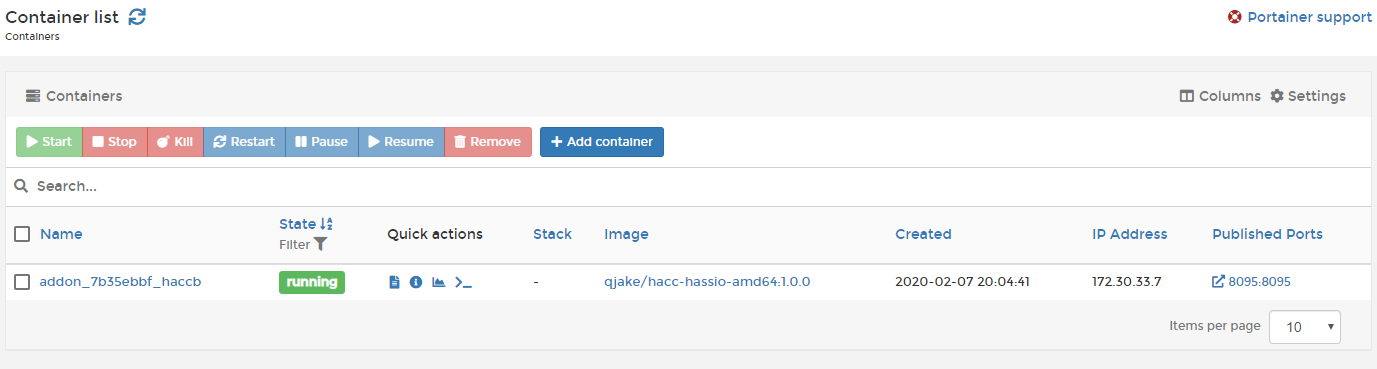
So, there is a bug here, but I'm not sure what it is. This is the best "description" of the bug that I can come up with:
When installing a Hass.io Addon from a pre-built Docker image that is missing its Hass.io Dockerfile LABEL metadata, the addon container cannot be removed via the Hass.io Addons UI.
I see two possible solutions here:
First, we should know the full image name/tag already - even if we don't have a version, we can still query on a partial name and get the first one, or, worst case, get the sha256 value? So, in the case where we have an incomplete tag name, just find a matching user/container image and remove it I would think?
Second, if we can't uninstall these "label-less" containers, then if a Hass.io addon is missing Docker labels, it should fail to install. If these labels are required, no container should exist on Hass.io without them.
P.S. In some version of HA between 100.x and 103.x, a "None" label was added if the version is missing:
20-02-08 01:33:08 INFO (SyncWorker_19) [hassio.docker.addon] Start Docker add-on qjake/hacc-hassio-amd64 with version None
which led me to discover the issue. So thank you to whoever added this fallback value to the logs!
qJake
on 8 Feb 2020
UPDATE
so I finally managed to get rid of the still listed add-on:
here's what the order was:
- install portainer
- delete the container from the list (in Portainer)
- tried to delete from Hassio Dasboard (unsuccessfullly)
- updated to the most up to date HA version 102.2
- rebooted the host system yet again
- checked the Hassio Add-on Dashboard (HACC was still listed, grayed)
- click the Add-on, click uninstall
- Woosh!
Removing via portainer and after a host reboot i was able to uninstall the addon :)
 bjkoekkoek
on 22 Feb 2020
bjkoekkoek
on 22 Feb 2020
This issue has been automatically marked as stale because it has not had recent activity. It will be closed if no further activity occurs. Thank you for your contributions.
stale[bot]
on 23 Apr 2020
This is technically still an issue - see my previous comment. I think something should be done so that this scenario doesn't occur for other Supervisor addons.
CC @balloob maybe to chime in or CC the correct people?
qJake
on 23 Apr 2020
It is caused by the add-on in question, which does not use the proper settings in the add-on configuration...
Furthermore, pinging is generally not appreciated.
frenck
on 23 Apr 2020
@frenck Is it not a bug that the Supervisor allows you to install an addon without the proper docker labels, and then refuses to uninstall that same add-on? I don't think the issue is specific to my add-on, and adding the necessary labels restores proper control to the Supervisor and it can uninstall normally.
Just trying to make sure this actually gets recognized and triaged as a proper bug if it needs fixing.
qJake
on 27 Apr 2020
@qJake Partly agree on that. Have you reported it to the add-on/repository in question? Can you link it up, please?
frenck
on 27 Apr 2020
I am the author of the addon in question. 🙂 You can find it here: https://github.com/qjake/hadotnet.commandcenter/
One of the dockerfiles specifically in question:
https://github.com/qJake/HADotNet.CommandCenter/blob/master/Docker/linux-debian-amd64/Dockerfile
Notice that a previous version of this dockerfile did not contain any LABELs, and exhibited the behavior of the bug:
Also, for a summary of the issue, please see this comment up higher in this issue: https://github.com/home-assistant/supervisor/issues/1280#issuecomment-583697057
If you'd like, I can open a new issue with this text if it's easier to track that way?
qJake
on 28 Apr 2020
If people would read the docs, the solution would be there. The other 50% is another orchestrator on the host they affect our images/container negative. Feel free to provide a PR.
pvizeli
on 30 Apr 2020
Related issues
 tjorim
·
5Comments
tjorim
·
5Comments
 greencharlie100
·
4Comments
greencharlie100
·
4Comments
 creack
·
10Comments
creack
·
10Comments
 sepulworld
·
8Comments
sepulworld
·
8Comments
 jcwillox
·
5Comments
jcwillox
·
5Comments