Supervisor: Home Assistant stuck on udevd[10]: Starting eudev-3.2.5
Home Assistant release with the issue:
HassOs 2.3
Home Assistant release with the issue:
1.4.0
Operating environment (HassOS/Generic):
Supervisor logs:
Description of problem:
Home Assistant stuck on udevd[10]: Starting eudev-3.2.5
 imcoltanmay
All 22 comments
The same was happening to me for days... If you have a chromecast or google home in the network try to disconnect it and restart hassio.
 sadsadie
on 28 Dec 2018
sadsadie
on 28 Dec 2018
Yeah, ChromeCast can lock your startup. We need to fix that
 pvizeli
on 28 Dec 2018
pvizeli
on 28 Dec 2018
Same problem here. RPi 3 B+, fresh install, nothing but ethernet, hdmi and power plugged in. No chromecast or Google home on network.
 tobynz
on 6 Jan 2019
tobynz
on 6 Jan 2019
Seem to be having the Same issue, No active Chromecast in network
 rudgr
on 12 Jan 2019
rudgr
on 12 Jan 2019
I 'had' the same issue. RP1 3 B+, ethernet, HDMI, power, and unplugged my Chromecast. Must have installed it 10 times, not an exaggeration. Wrote down what I configured, installed, rebooted, etc. EVERY time I installed weather, either DarkSky or Openweather, it would hang on EUDEV. This time I installed SSH. Added weather, rebooted, it was hung at EUDEV. I SSHed in, edited the Configuration.yaml, took out the weather, rebooted, it's working!
 pondguy1115
on 21 Jan 2019
pondguy1115
on 21 Jan 2019
I had the same issue. PRI 3 B+, hassio 0.86.4
It worked when I unplugged GH mini and then plugged PRI.
 acmeGR
on 3 Feb 2019
acmeGR
on 3 Feb 2019
Same issue here. There is no Chromecast in my network.
 btoorenburg
on 3 Feb 2019
btoorenburg
on 3 Feb 2019
Same here. Unplugged Google Homes and Chromecasts and still stuck.
 obiraa
on 3 Feb 2019
obiraa
on 3 Feb 2019
@pondguy1115
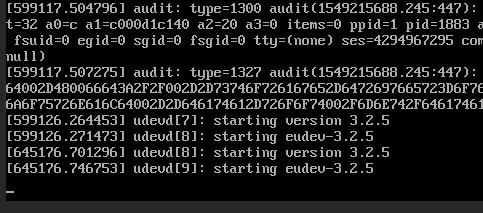
This is normal to see. A configuration error can prevent your UI from loading. You may have been adding the weather component incorrectly?
 cogneato
on 4 Feb 2019
cogneato
on 4 Feb 2019
I haven't been adding anything.
Just the normal installation.
Van: cogneato notifications@github.com
Aan: home-assistant/hassio hassio@noreply.github.com
Cc: Bas Toorenburg toorenburgsj@timbv.nl, Comment comment@noreply.github.com
Verzonden: 4-2-2019 16:25
Onderwerp: Re: [home-assistant/hassio] Home Assistant stuck on udevd[10]: Starting eudev-3.2.5 (#859)
@pondguy1115
This is normal to see. A configuration error can prevent your UI from loading. You may have been adding the weather component incorrectly?
—
You are receiving this because you commented.
Reply to this email directly, view it on GitHub, or mute the thread.
Met vriendelijke groet,
Bas Toorenburg
www.timbv.nl
[email protected]
Drs. ing. SJ Toorenburg
De Kwartel 5
8251 MS DRONTEN
Telefoonnr +31 321 382 816
Mobiel + 31 6 270 703 15
http://twitter.com/#!/bastoorenburg
http://nl.linkedin.com/pub/bas-toorenburg/a/60/243
E-mail disclaimer:
Dit e-mailbericht en enige bijlage is uitsluitend bestemd voor de geadresseerde(n) en strikt vertrouwelijk of anderszins wettelijk beschermd. In dit bericht vervatte opvattingen of meningen zijn uitsluitend die van de schrijver en niet per definitie die van TIM Bedrijfskundig Advies. Als dit bericht niet voor u bestemd is, wordt u vriendelijk verzocht dit aan de afzender te melden. Alleen de geadresseerde mag de informatie gebruiken. Het is niet toegestaan om de informatie openbaar te maken, te vermenigvuldigen, te verspreiden of te verstrekken aan derden.
TIM Bedrijfskundig Advies spant zich ervoor in dat u juiste, volledige en tijdige informatie ontvangt.
TIM Bedrijfskundig Advies kan op geen enkele wijze verantwoordelijk of aansprakelijk worden gehouden voor en/of in verband met de gevolgen van en/of schade ontstaan door het onjuist, onvolledig en/of niet-tijdig versturen en ontvangen van de inhoud van dit bericht. TIM Bedrijfskundig Advies is niet aansprakelijk voor virussen in dit e-mailbericht en/of enige bijlage.
Voor informatie over TIM Bedrijfskundig Advies raadpleegt u www.timbv.nl
btoorenburg
on 4 Feb 2019
Hi everyone,
I'm doing a fresh installation for the first time. I had disconnected existing Iris, Alexa, Chromecast and Firesticks from my network. HassOs is running on Raspberry pi 2B+ and it got stuck at boot time. Error message is the same as everyone having here, starting eudev-3.2.5.
Kindly appreciate if anyone sharing some leads.
Thank you
 phienan
on 9 Feb 2019
phienan
on 9 Feb 2019
I just spent half an hour configuring this and now the first time I come to reboot, it hangs! All I did was follow instructions in the video... :-(
 xerxel
on 17 Feb 2019
xerxel
on 17 Feb 2019
I did not install every one, but with the latest batch of updates, it no longer hangs. Weather was configured the same now as it was when hanging. Whatever my issue was, it was fixed in the updates.
pondguy1115
on 17 Feb 2019
I have had the exact same thing but hangs on udevd[8]: starting eudev-3.2.7 after 8 tried to get this built on a RaspPi 3 B+. I am updated to 89 version.
 gdreelin
on 12 Mar 2019
gdreelin
on 12 Mar 2019
Exactly the same for me as well, hangs on udevd[8]: starting eudev-3.2.7 - running 0.89
 dheath73
on 13 Mar 2019
dheath73
on 13 Mar 2019
Same here running on a vmware environment. Stuck exactly at the same place. I removed all the sensors and forced a reboot, still does not work. The really interesting thing is that NodeRed, mosquitto, SAMBA still work (added them via addons) and they are (obviously) on the same box and IP Addresss.
 JuliusLedoux
on 17 Mar 2019
JuliusLedoux
on 17 Mar 2019
So not sure if anyone else is as dumb as I am but I was 'stuck' in the same spot when trying to set this up in a vm environment. Not sure why I expected my VM to have a gui but that's what I was waiting for... Moved over to my desktop and realized it was waiting for me to complete the setup in my browser.
 averagecanadian
on 19 Mar 2019
averagecanadian
on 19 Mar 2019
You will never see more as udevd[8]: starting eudev-3.2.7. That means Home Assistant is starting up.
If you want see logs, try hassio ha logs
Anyway, Home Assistant is a Web App. That mean, you need a new device with a browser to setup the device. https://www.home-assistant.io/hassio/installation/
pvizeli
on 20 Mar 2019
same here. seems it stops at the configuration . yaml now i wish i could just enter command -del config/configuration.yaml. or open nano configuration.yaml and edit it.
 uglurass
on 26 Mar 2019
uglurass
on 26 Mar 2019
This issue has been automatically marked as stale because it has not had recent activity. It will be closed if no further activity occurs. Thank you for your contributions.
![stale[bot] picture](https://avatars.githubusercontent.com/in/1724?v=4&s=40) stale[bot]
on 25 May 2019
stale[bot]
on 25 May 2019
Same error here :(
It was working yesterday, today it is stucked there.
The only different thing I done was to place my Tinker Box in a case... and plugged a cooler fan... but it shouldn't have had any impact on it.... :(
Update: for the 10th time I tried rebooting it worked for 30 min and then the udevd starting version 3.2.7 error returned and the web interface became offline again :(
Update 2: I think I found a solution here: https://community.home-assistant.io/t/hassio-is-stuck-at-32-048795/86993/4
I tried and it worked.
Just conected through the Tinkerbox "ip:port" (example: http://192.168.0.21:8123)
 cestfauxcestfaux
on 30 May 2019
cestfauxcestfaux
on 30 May 2019
This issue has been automatically marked as stale because it has not had recent activity. It will be closed if no further activity occurs. Thank you for your contributions.
stale[bot]
on 30 Jul 2019
Related issues
![move[bot] picture](https://avatars.githubusercontent.com/in/6673?v=4&s=40) move[bot]
·
8Comments
move[bot]
·
8Comments
 sibbl
·
8Comments
sibbl
·
8Comments
 frenck
·
4Comments
frenck
·
4Comments
 elsbrock
·
5Comments
elsbrock
·
5Comments
 riksmithuk
·
5Comments
riksmithuk
·
5Comments
Most helpful comment
I just spent half an hour configuring this and now the first time I come to reboot, it hangs! All I did was follow instructions in the video... :-(