Supervisor: rpi_camera 'Image not available'
I'm seeing 'Image not available' under 0.53 on Pi-zero-W and pi-3 with platform: rpi_camera

 robmarkcole
All 50 comments
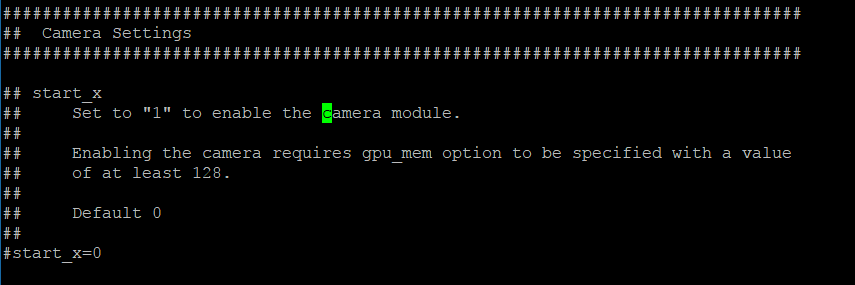
Try also first to update config.txt:
 pvizeli
on 11 Sep 2017
pvizeli
on 11 Sep 2017
Hi, where is config.txt? I have samba share setup as below.
Cheers

robmarkcole
on 11 Sep 2017
Yeah you need do that on SD card. But @gollo have try it and mean that will not work
pvizeli
on 11 Sep 2017
I'm looking into it when I have the time...
On Mon, 11 Sep 2017 at 22:44 Pascal Vizeli notifications@github.com wrote:
Yeah you need do that on SD card. But @gollo https://github.com/gollo
have try it and mean that will not work—
You are receiving this because you were mentioned.Reply to this email directly, view it on GitHub
https://github.com/home-assistant/hassio/issues/184#issuecomment-328667719,
or mute the thread
https://github.com/notifications/unsubscribe-auth/AAJ2FErm1kGQo5dq4tiHz4JTxrR0S0rJks5shanEgaJpZM4PSuRo
.
 gollo
on 13 Sep 2017
gollo
on 13 Sep 2017
Same issue, hoping for a fix but have a workaround with a dropcam for now
 gsbrown
on 1 Oct 2017
gsbrown
on 1 Oct 2017
The problem look like with a blob firmware that need to be load and docker/alpine. But It is hard to discovery that without hardware :(
pvizeli
on 1 Oct 2017
Anyone figure this out yet?
gsbrown
on 30 Oct 2017
I have the same problem - I have enabled the camera in the config file on the sd card but still "image not available"...
 jasiekzar
on 4 Nov 2017
jasiekzar
on 4 Nov 2017
I have tried editing config.txt to enable the camera and gpumem to 128 (as required) but the result is the same
 thesplitter
on 7 Nov 2017
thesplitter
on 7 Nov 2017
The root problem is that the module does not run in the Alpine docker
container. Ideally, if I get time, I will attempt to get it to run in
native Alpine on the Pi, then move to attempting to get it to run in the
container. Attempting to get it running in the container has not worked
for me so far (I know the cam works fine with a raspbian image, native or
in a container, for example). If anyone has more time that is where I
would focus first.
On Tue, 7 Nov 2017 at 15:08 thesplitter notifications@github.com wrote:
I have tried editing config.txt to enable the camera and gpumem to 128 (as
required) but the result is the same—
You are receiving this because you were mentioned.
Reply to this email directly, view it on GitHub
https://github.com/home-assistant/hassio/issues/184#issuecomment-342511318,
or mute the thread
https://github.com/notifications/unsubscribe-auth/AAJ2FJhCUyELLwXsMgsy9cD7Zlko1TUhks5s0HJZgaJpZM4PSuRo
.
gollo
on 7 Nov 2017
Hi.
Raspberry pi 3,
Home Assistant 0.57.2,
Same error, I don't think I can even see the SD :/
 sardauker
on 13 Nov 2017
sardauker
on 13 Nov 2017
Just posting another friendly request for this to be fixed - pi camera is hooked up in my garage (where my pi3 running hassio is located) and it gives me visual confirmation of garage door status.
I know it is tough to find time to work on a free project so please don't construe this as any form of complaint. Home Assistant is amazing and I just don't want pi camera support in hassio to be forgotten about.
Thanks to the community for all the work they put into HA!
gsbrown
on 27 Nov 2017
I'm having the same issue as well HA 0.58.1 where the front end says "Image not available".s Not trying to complain at all either just wondering whats going on and if there's any way to help out! Is there a certain file to look at on the SD card to modify?
 kotopoulos10
on 27 Nov 2017
kotopoulos10
on 27 Nov 2017
Please view the entire issue, it has all the details...
On Mon, 27 Nov 2017, 20:59 Thomas Kotopoulos, notifications@github.com
wrote:
I'm having the same issue as well HA 0.58.1 where the front end says
"Image not available".s Not trying to complain at all either just wondering
whats going on and if there's any way to help out! Is there a certain file
to look at on the SD card to modify?—
You are receiving this because you were mentioned.
Reply to this email directly, view it on GitHub
https://github.com/home-assistant/hassio/issues/184#issuecomment-347325923,
or mute the thread
https://github.com/notifications/unsubscribe-auth/AAJ2FCl9c9mVU-e6bNqv5fsIIwF0Jwg7ks5s6yKLgaJpZM4PSuRo
.
gollo
on 28 Nov 2017
Hi gollo,
It's nice to know the cause - but still, most of the users of hass.io have choosen it, because, they don't want to start development themselves - they just want to use the system. And that's why it does not help just to know why it is actually not working. This bug will force them to switch to hassbian or similar. Is anyone still working on that issue or is hass.io not supporting rpi cameras anymore? Or did I miss a sufficient workaround?
Don't missunderstand my impatience, I really appreciate the work the comunity has done so far.
BR
Guido
 gdampf
on 21 Dec 2017
gdampf
on 21 Dec 2017
Hi, I found some information to get the camera module working on resinOS
https://docs.resin.io/hardware/i2c-and-spi/#raspberry-pi-camera-module
In addation to:
gpu_mem=128
start_x=1
in the config.txt file, modprobe bcm2835-v4l2 is needed before starting scripts in either the package.json start command or Dockerfile CMD command.
 Mryck
on 22 Dec 2017
Mryck
on 22 Dec 2017
I've just sent out an order for a couple of camera's.
Will look into this as soon as they arrive.
 frenck
on 28 Dec 2017
frenck
on 28 Dec 2017
Package has arrived 🎉
frenck
on 16 Jan 2018
To update, I tried to make this work on a raw alpine install on the pi and could not, this I believe is the first step to understanding how it might work in the hass.io docker image
gollo
on 16 Jan 2018
@gollo I would like to take the approach of trying to make it work inside any Docker container on the Hass.io/ResinOS Docker host.
frenck
on 16 Jan 2018
I was having this same issue and I debugged and seemingly fixed it through noticing that the rpi_camera.py component was essentially running the raspistill command. I tried to emulate the command it was running using
sudo -u homeassistant raspistill --nopreview -o /tmp/raspistill.jpg -t 0 -w 640 -h 480 -tl 1000 -q 7 -rot 0
Which gave me an error:
* failed to open vchiq instance
And through some googlefu it seems like the homeassistant profile I was running as needed to be added to the raspberry pi video group.
sudo adduser homeassistant video
Then I restarted the home assistant service
sudo systemctl restart home-assistant
And it started working just fine. Hopefully this is enough info for others to figure out what might be wrong with their camera too.
 GregoryDosh
on 18 Jan 2018
GregoryDosh
on 18 Jan 2018
Hello all,
I am having the same problem with the RPi camera.
I installed Hassio and enabled SSH.
When I login as root, I cannot run the sudo adduser homeassistant video as indicated above.
It says -bash: sudo: command not found
I'm not a pro in programming or anything like it.
Can anyone point me in the right direction? I've been searching for this for so long, I am actually getting frustrated something that should be so easy has become such a pain.
Thank you for any help you can give me.
 doscas
on 27 Jan 2018
doscas
on 27 Jan 2018
@doscas If you're already logging in as root you should be able to remove the sudo from all of the commands above.
GregoryDosh
on 27 Jan 2018
Thank you for your comment,@GregoryDosh.
That's one of the few things I learned.
But when I do, it tells me addgroup: unknown user homeassistant
So my question now is: what's the user Home Assistant uses?
doscas
on 29 Jan 2018
I have the same - no home assistant user...
jasiekzar
on 24 Feb 2018
Has anyone got the PI Camera to work?
It changed to rpi_cam and now back to rpi_camera.
I believe some thing must have been done.
Anyone with news?
doscas
on 17 Mar 2018
I just switched from plain raspbian to hassio (instead of hassbian) and I am quite astonished that rpi_camera is not working. Can I be of any help to solve this issue?
 enurist
on 18 Mar 2018
enurist
on 18 Mar 2018
On Hassio there is a workaround that you can do in order to use the Raspberry camera until this issue is fixed:
As @Mryck pointed out in order to use the camera, 2 additional steps need to be done:
- In the
resin-bootpartition of your SD card, modify the fileconfig.txtwith the following value:
start_x=1
gpu_mem=128
- Enable the bcm2835-v4l2 kernel module:
For that, you need a shell access to the resin-os system (not a shell inside a container): You can use the debug SSH access described here. Then, once logged, type the following commands:
$> mount -o remount,rw  /dev/mmcblk0p2 /
$> echo -e "# Load the bcm2835-v4l2 module \nbcm2835-v4l2" > /etc/modules-load.d/bcm2835-v4l2.conf
The first command will remount the main file system with write permission and the second one create a configuration file that will load the kernel module bcm2835-v4l2 at startup.
$> reboot
Reboot in order to apply changes.
Now the camera should be exposed in /dev/. If you want to check, log in again and type ls /dev/video*. For me, as I have just the Raspberry camera, I only see one line:/dev/video0
Finally to use the camera in Home Assistant you can use the ffmpeg component. Put something like this inside your configuration.yaml:
```(yaml)
ffmpeg:
camera:
- platform: ffmpeg
input: /dev/video0
```
Note: For me, even after this modification the Raspberry camera component doesn't work. When I try using the
raspistillcommand inside the Home Assistant container, it always give me the same error:mmal: mmal_component_create_core: could not find component 'vc.camera_info' mmal: Failed to create camera_info component ...
Done on a Raspberry 2 with a fresh install of Hassio (build 1.3).
Hassio 0.98, Home assistant 0.65.6.
 Vincent-Ma
on 24 Mar 2018
Vincent-Ma
on 24 Mar 2018
@frenck did you ever receive your pi cameras?
robmarkcole
on 15 Apr 2018
@robmarkcole do we know of any update on this yet?
 Dmurph24
on 19 Jun 2018
Dmurph24
on 19 Jun 2018
I'm having the same issue. Is there any way to fix this in hass.io? This setup didn't work and searching around wasn't helpfull.
 Chamondgl
on 29 Jul 2018
Chamondgl
on 29 Jul 2018
sudo adduser homeassistant video
Solved it....
 toretest
on 20 Dec 2018
toretest
on 20 Dec 2018
In the resin-boot partition of your SD card, modify the file config.txt with the following value:
start_x=1
gpu_mem=128
My RPi 3 refuses to boot with this??
 Morphy99
on 5 Jan 2019
Morphy99
on 5 Jan 2019
@Vincent-Ma
If I'm not mistaken, this solution does not work with the current suggested version. It bases on HassOS and does not offer any Linux commands. Looks like the config.txt modification isn't valid any more for HassOS. We have to wait for a fix, I assume.
 lukie80
on 16 Jan 2019
lukie80
on 16 Jan 2019
I will leave a comment here, as i got a workaround working for me. Hopefully it helps someone ;)
- I am running home-assistant in Docker on raspberry pi as described in here: https://www.home-assistant.io/docs/installation/docker/ .
- There is another very comfortable container for streaming raspi cam here: https://datarhei.github.io/restreamer/docs/guides-raspicam.html
- adding following lines to your config will give you the steam in HomeAssistant:
camera:
  - platform: generic
    name: remoteRPiCam
    still_image_url: http://IP.of.Ra.Pi:8080/images/live.jpg
 lustigerluke
on 24 Jan 2019
lustigerluke
on 24 Jan 2019
I will leave a comment here, as i got a workaround working for me. Hopefully it helps someone ;)
- I am running home-assistant in Docker on raspberry pi as described in here: https://www.home-assistant.io/docs/installation/docker/ .
- There is another very comfortable container for streaming raspi cam here: https://datarhei.github.io/restreamer/docs/guides-raspicam.html
- adding following lines to your config will give you the steam in HomeAssistant:
camera:
  - platform: generic
    name: remoteRPiCam
    still_image_url: http://IP.of.Ra.Pi:8080/images/live.jpg
This may work on Homeassistant but not on HASSOS as trying to run "raspi-config" doesn't work.
editing config.txt makes the rpi3 not boot
is there really no solution for this?? I'm getting "idle" status and can't see an image using raspberry pi camera
 nirkons
on 27 Feb 2019
nirkons
on 27 Feb 2019
same issue :( a little bit disapointed... I switch to hass.io to escape this kind of troubles and keep concentrate on designing a cool gui
 internet-conception
on 9 Mar 2019
internet-conception
on 9 Mar 2019
Finaly I installed an old usb webcam as replacement and FYI I installed this Repositories : https://www.github.com/HerrHofrat/hassio-addons (motion packet)
So there is a way to add a webcam via a Repositories ;o)
internet-conception
on 10 Mar 2019
Please can you resolve this issue?
Regards,
 ezar
on 4 May 2019
ezar
on 4 May 2019
I found this "Known issues and limitations"
Local USB or Pi cameras are currently not supported yet. This is caused by a limitation of Hass.io. A request for a change has been made to make this possible in the future. motionEye(OS) allows you to use a second instance (e.g., a Pi Zero W) for those kinds of purposes.
That was found here:
https://github.com/hassio-addons/addon-motioneye#known-issues-and-limitations
 GrowFOUR
on 11 May 2019
GrowFOUR
on 11 May 2019
This issue has been automatically marked as stale because it has not had recent activity. It will be closed if no further activity occurs. Thank you for your contributions.
![stale[bot] picture](https://avatars.githubusercontent.com/in/1724?v=4&s=40) stale[bot]
on 10 Jul 2019
stale[bot]
on 10 Jul 2019
Did we get this problem fixed yet ?
 PKHarsimran
on 10 May 2020
PKHarsimran
on 10 May 2020
I would also ask for this, since in 0.110 the rpi_camera has been modified, whats the point if it's not working?
 marcinbauer85
on 25 May 2020
marcinbauer85
on 25 May 2020
any chance to make Raspberry Cam work on hassio?
 Pavel-Efimov
on 15 Jul 2020
Pavel-Efimov
on 15 Jul 2020
Any resolution? Have RPi3B+ and running latest everything (as of 22.07.2020) and added an RPi cam for surveillance, but cannot get it enabled
 cortado
on 22 Jul 2020
cortado
on 22 Jul 2020
https://raspberrypi.stackexchange.com/questions/46851/raspberry-pi-2-camera-and-alpinelinux/51440#51440
Apparently this is the only solution, but I don't know how to do it on a RPI running HassOS.
marcinbauer85
on 30 Jul 2020
I swear the more I try to do the most basic simple things with HassIO the more I realize it's a joke. Every step of the way has been like pulling teeth.
 morrowsend
on 11 Nov 2020
morrowsend
on 11 Nov 2020
Any one find solution? I can't enable camera.
If I put start_x=1 in config.txt rpi2 with latest HassOS Release-4 build 20 won't start.
 lpt2007
on 12 Dec 2020
lpt2007
on 12 Dec 2020
To be honest, HassOS as platform is not really good for low level hardware at all. This is a bit the disadvantage of dockerization.
I solved the camera issue for me in 2018 by installing hass on a vanilla raspian, which I kept up to date by standard apt-process and just recently tweaked by a python 3.8.6 installation and everything is running pretty well. If HassOS would remain the last and only platform for home assistant, I would look for a complete different solution.
So, I hope, the ability to install hass by hand will remain for the next decade.
Even, if the "one image to run" approach may satisfy the needs of complete newbies, it is much to inflexible. And I don't believe, that this little advantage is worth the effort of maintaining a complete linux-distribution at all.
Back to the roots!
BR
Guido
gdampf
on 13 Dec 2020
I agree with @gdampf . However here you can find a workaround: https://gist.github.com/enegaard/a57af286205914bd912270c89650fb1b
 denics
on 25 Feb 2021
denics
on 25 Feb 2021
Related issues
 notoriousbdg
·
4Comments
pvizeli
·
5Comments
notoriousbdg
·
4Comments
pvizeli
·
5Comments
 riksmithuk
·
5Comments
riksmithuk
·
5Comments
![move[bot] picture](https://avatars.githubusercontent.com/in/6673?v=4&s=40) move[bot]
·
8Comments
move[bot]
·
8Comments
 CiquattroFPV
·
3Comments
CiquattroFPV
·
3Comments
Most helpful comment
Any resolution? Have RPi3B+ and running latest everything (as of 22.07.2020) and added an RPi cam for surveillance, but cannot get it enabled