Supertux: Game Crashes when hovering cursor over bottom bar in level editor.
SuperTux version: v0.5.1
System information: Windows 10
When I drag the cursor over the bottom bar on the level editor with the "Mario's supposed to deal with this..." level in Bonus Island III, the game closes.
 Alzter
All 13 comments
Bonus Island 2, not 3, right?
 tobbi
on 2 Aug 2017
tobbi
on 2 Aug 2017
I just checked and I can't really reproduce the issue. Are you comfortable with a debugger?
tobbi
on 2 Aug 2017
I was able to reproduce on the Windows build for 0.5.1.
tobbi
on 2 Aug 2017
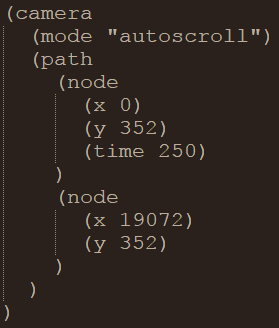
I was able to reproduce this as well. And maybe this part of the level code has something to do with it.
 ShadevKits
on 3 Aug 2017
ShadevKits
on 3 Aug 2017
Are you able to get me a backtrace? I have tried it using the wine debugger but got nothing useful.
tobbi
on 3 Aug 2017
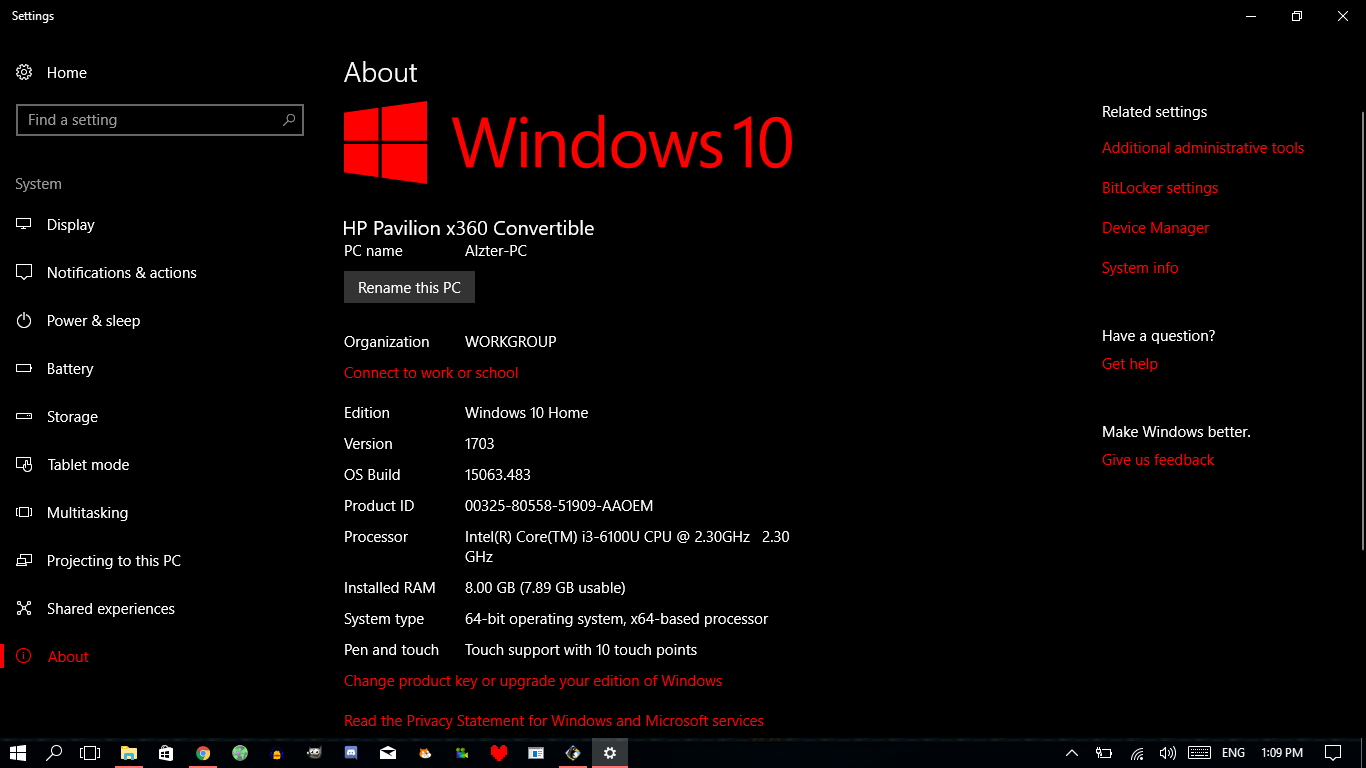
My system info is:
Alzter
on 3 Aug 2017
I don't have a debugger, nor do I know how to debug; however, this is what comes up in the console:
[TINYGETTEXT] levels/monde/en.po:15: error: expected 'msgid': #: levels/monde/info
[WARNING] C:\projects\supertux-o8t59\src\supertux\level_parser.cpp:125 [levels/bonus2/level1.stl] The level author "Kevin" did not specify a license for this level "Mario's Supposed to Deal With This...". You might not be allowed to share it.
[FATAL] C:\projects\supertux-o8t59\src\supertux\main.cpp:510 Unexpected exception: bad allocation
This is pretty much all I can do :/
ShadevKits
on 7 Aug 2017
In the editor for 0.5/0.5.1, there are only two modes for the camera; manual and normal. It's trying to load the mode "autoscroll" but there is no specified mode in the editor for that.
Support for the autoscroll mode would probably help, or the level could just be modified to have an init script to scroll.
ShadevKits
on 7 Aug 2017
We deliberately deprecated autoscroll mode because in our opinion it shouldn't be used anymore.
tobbi
on 8 Aug 2017
Why remove it though? If you don't like it, maybe make a message when you select it saying that you shouldn't really use it.
Alzter
on 12 Aug 2017
And the auto scroll test level was REALLY cool and original!
 busybody42
on 16 Jun 2018
busybody42
on 16 Jun 2018
@Alzter Is this a still occuring issue?
 Rusty-Box
on 17 Nov 2019
Rusty-Box
on 17 Nov 2019
Seems to be fixed now by the look of things.
Alzter
on 19 Jan 2020
Related issues
 GlowingApple
·
7Comments
GlowingApple
·
7Comments
 weluvgoatz
·
4Comments
Rusty-Box
·
3Comments
Alzter
·
6Comments
weluvgoatz
·
6Comments
weluvgoatz
·
4Comments
Rusty-Box
·
3Comments
Alzter
·
6Comments
weluvgoatz
·
6Comments
Most helpful comment
Why remove it though? If you don't like it, maybe make a message when you select it saying that you shouldn't really use it.