Super-productivity: Extreme resource use
Your environment:
Version 6.1.0
Operating system: Ubuntu 20.04
Current behavior:
Since this morning (maybe with the latest update), super-productivity seems to be using a lot of system resources, causing my whole system to slow down (when I typed in other programs, the letters showed up with a delay) and super-productivity itself to freeze multiple times, but without throwing any errors. This occurs in particular when I have the pomodoro timer running.
When I run top, I see that super-productivity is using 100% (or more) of a CPU:
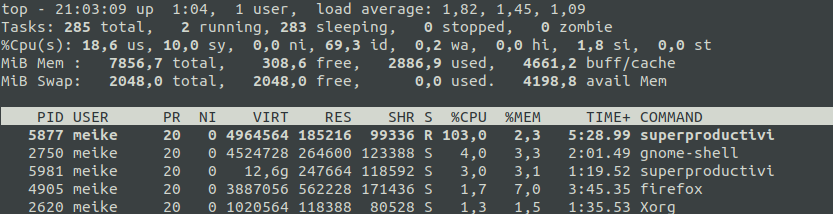
Earlier today, also gnome-shell used a lot of resources, so I suspected the issue was about a new way that super-productivity interacts with gnome-shell. After I have disabled usage of the Ubuntu Top bar by all applications, gnome-shell is more well-behaved again, but the problems with the super-productivity resource use persist.
Steps to reproduce
- Start program
- Start pomodoro timer on project
Please let me know if I can provide any other information that might help clarify the issue.
Thanks a lot for your awesome work on this project! I have been using super-productivity every day for the last few months and it really helps me a lot to organize my day and keep track of my time.
 meikew
All 19 comments
It makes my system slow sometimes, can I turn off the animation.
 imyhxy
on 19 Nov 2020
imyhxy
on 19 Nov 2020
I have the same problem with snap version. The main problem is that the mouse becomes laggy. With AppImagen also although less serious. The deb version seems to work without impacting my UX, although I do see in top that "Load average" goes up when activating a counter. Thanks for the program by the way.
Edit: For some reason, after a system reboot, the deb version turns the mouse laggy also.
System:
- Ubuntu 20.04
- Kernel 5.4.0-54
 niubit
on 19 Nov 2020
niubit
on 19 Nov 2020
Thanks for reporting this! Can you maybe check if this only happens with the snap version or also with the AppImage? There seem to be some issues with snapcraft lately unrelated to the app itself.
 johannesjo
on 19 Nov 2020
johannesjo
on 19 Nov 2020
Edit: For some reason, after a system reboot, the deb version turns the mouse laggy also.
Hm alright then. We need to narrow this down.
- For none of you this happens with 6.0.1? (would be cool, if you could check again)
- Does this happen only for the snap version or also the AppImage or DEB version?
johannesjo
on 19 Nov 2020
I'm also being affected by this. I've found something, which seems to be related. When monitoring my system with journalctl -f I can see a constant flow of messages like this:
nov 19 12:53:09 cheetara [email protected][2055]: superProductivity1, Impossible to lookup icon for 'superProductivity1_14-panel'
nov 19 12:53:09 cheetara gnome-shell[2055]: JS ERROR: Exception in callback for signal: icon: Error: Argument 'filename' (type filename) may not be null
                                            _createIconByName@/usr/share/gnome-shell/extensions/[email protected]/appIndicator.js:406:26
                                            _cacheOrCreateIconByName@/usr/share/gnome-shell/extensions/[email protected]/appIndicator.js:368:14
                                            _updateIconByType@/usr/share/gnome-shell/extensions/[email protected]/appIndicator.js:574:18
                                            _updateIcon@/usr/share/gnome-shell/extensions/[email protected]/appIndicator.js:601:14
                                            _emit@resource:///org/gnome/gjs/modules/core/_signals.js:133:47
                                            _onPropertiesChanged/<@/usr/share/gnome-shell/extensions/[email protected]/appIndicator.js:220:22
                                            _onPropertiesChanged@/usr/share/gnome-shell/extensions/[email protected]/appIndicator.js:214:15
                                            refreshPropertyOnProxy/<@/usr/share/gnome-shell/extensions/[email protected]/util.js:51:19
These messages only appear when I am tracking time for some task (i.e. I press the blue Play button on superproductivity) - which correlates to when my system is slooow.
As soon as I stop tracking time in superproductivity, the log messages go away, and also my system seems to become responsive again.
I'm using the snap version of superproductivity on ubuntu 20.04
 ricardogsilva
on 19 Nov 2020
ricardogsilva
on 19 Nov 2020
I've reverted to superproductivity version 6.0.1 and I'm not getting those JS Exception... logs anymore. My system seems to be running smooth too.
ricardogsilva
on 19 Nov 2020
@ricardogsilva thank you! This narrows it down quite a bit. I try to provide a fix asap!
johannesjo
on 19 Nov 2020
Thank you all! I get the same error messages as @ricardogsilva when I run journalctl -f. Thanks so much for looking into this @johannesjo !
meikew
on 19 Nov 2020
I can't make many tests with this, sorry, but using other similar app (gnome-shell-pomodoro) I have observed a similar behavior!
Correlation does not imply causality, but it seems related with changing the app icon in tray, so could be a Gnome or Ubuntu bug. In that application the problems begin when I pause the counter and the app icon begins to flash in tray.
I hope it helps.
niubit
on 19 Nov 2020
Another question: Are all of you using gnome? I am asking because this might also be an issue of https://github.com/ubuntu/gnome-shell-extension-appindicator
johannesjo
on 19 Nov 2020
https://bugs.launchpad.net/ubuntu/+source/gnome-shell-extension-appindicator/+bug/1849142
https://github.com/ubuntu/gnome-shell-extension-appindicator/issues/236
johannesjo
on 19 Nov 2020
I have the same issue running GNOME Shell 3.36.4/Ubuntu 20.04.
 jonasallgeier
on 20 Nov 2020
jonasallgeier
on 20 Nov 2020
I reverted to try to fix this, but it looks like it wiped out my time tracking data post-update. Is there a way to recover it?
 squarebracket
on 20 Nov 2020
squarebracket
on 20 Nov 2020
I reverted to try to fix this, but it looks like it wiped out my time tracking data post-update. Is there a way to recover it?
https://github.com/johannesjo/super-productivity#automatic-backups
johannesjo
on 20 Nov 2020
Unfortunately, I tried running snap refresh superproductivity to re-activate 6.1.0 (to see if the data was still there), and that seems to have copied the 6.0.1 data to 6.1.0, wiping out the data and the backups...
I will keep that in mind for the future, thank you.
squarebracket
on 20 Nov 2020
Sorry to hear that. Maybe there is a way to restore this data via snap somehow? Snapcraft is saving so much garbage on my harddrive (all the apps previous versions for some reason) I find it had to believe that the data is lost forever.
johannesjo
on 20 Nov 2020
I still assume that this is an error of gnome-shell-extension-appindicator. However, as this basically makes working with Super Productivity impossible for some of you I made two adjustments:
- the updates of the tray icon are now only made in a much lower frequency
- If this doesn't help, you should be able to disable the tray icon completely by using the
--disable-trayflag when starting the app.
I'll provide a patch release shortly.
johannesjo
on 20 Nov 2020
Can anybody confirm if this update improves the situation (ideally even without using --disable-tray)?
johannesjo
on 21 Nov 2020
I just tried the new version and everything appears fine again, even without using --disable-tray. Thanks so much!!!
meikew
on 21 Nov 2020
Related issues
 theCalcaholic
·
3Comments
theCalcaholic
·
3Comments
 NPReport
·
3Comments
NPReport
·
3Comments
 alexanderadam
·
3Comments
alexanderadam
·
3Comments
 D06E
·
3Comments
D06E
·
3Comments
 wimel
·
3Comments
wimel
·
3Comments
Most helpful comment
I just tried the new version and everything appears fine again, even without using --disable-tray. Thanks so much!!!