Super-productivity: Neuroscientfic Improvements
@smalltimer I thought it might be better if I open a separate thread about this.
I'm a neuroscientist, so if you need some advice regarding the design of the software from a more cognitive/psychological perspective, do not hesitate to get in touch as well! It will be great to put my knowledge to some applied, non-academic use.
I take you by the word! :) I am sure that you have some pretty interesting insights and ideas to offer! Maybe we can start with the single best improvement the app should implement?
 johannesjo
All 11 comments
Exciting! First up, a disclaimer: my academic specialisation is more towards sensory neuroscience and brain/neural plasticity.
-- Preamble: Can be skipped! ---
That said, I am very much interested in more practical aspects of how decision-making and thinking patterns are represented/organised in our brain. And perhaps more importantly, and how this knowledge can be ported to practical everyday tasks and the management of our daily lives. I am not into increasing productivity for the sake of it, or going into a blind pursuit of 'success'. Usually the definitions of success are pushed upon us by media and constructed by a social narrative driven by consumerism.
Overall, I think what is important is to minimise stress (we have evolved for this!), find out algorithms and develop systems which allow an optimal allocation of time for different activities which matter to YOU, and to measure things in terms of satisfaction and long-term happiness (these metrics are non-stationary in time, just like everything about the human brain - but, they are not random, or even chaotic). And of course, coming from a biological perspective, I think we should know our place in the biosphere - you are not special, just another biological organism - and strive to live in harmony and symbiosis with nature. It needs to be injected deep into our systems of everyday work, not just hikes on the weekend or holiday camping trips.
--- End of preamble ---
I really like how @johannesjo has taken an approach where this app does not offer negative reinforcement for things like procrastination, but helps the user dig deeper and think about questions like why they may be procrastinating, and whether this is actually a bad thing. Mind-wandering is, after all, a fantastic catalyst for creative thinking. One suggestion could be to help the user log the time they procrastinate (are 'non-productive'), and give them some options for tracking what they were doing when they weren't 'working' (e.g., the ability to mark the procrastination with keywords or tags, or the ability to jot down quick notes about what they did/thought etc.).
I am afraid such suggestions might turn superproductivity into some kind of a CBT app though, so feel free to discard the ideas! Your app is useful because it has a very intentional design, and it is very good at doing the things it promises to do.
I am using it regularly, so whenever I feel like there are some new ideas/suggestions, I'll add them to this thread!
 smalltimer
on 11 Jul 2020
smalltimer
on 11 Jul 2020
Thank you very much for this! It's really nice to read that you like the tiny CBT inspired bits of the app. I've read a book or two from this area and I know for sure that it really can do good for people (far beyond just questions of productivity). I'm all for going a bit further in this direction and I am even a little bit excited about it.
I've just one broad rule to limit this in my mind: People who don't care about "psychobla" should not get annoyed by the additions and should be able to use it just as a (more or less) simple Todo app. Nobody should feel lectured or being pushed into something they don't want or need. But expanding on optional features should hopefully not bother anyone.
I am really looking forward to hear your ideas!
johannesjo
on 11 Jul 2020
That was very nice to read. So if I get this right, what you are saying is that you would like to blend together user-centric software design with responsible software design. This is a fantastic approach! I think it needs to be adopted more and more in our society. Yes, software needs to get things done, but (the user-facing side of it) it also needs to be designed for humans, and with their well-being in mind. Go @johannesjo go! ^_^
I also have some ideas about decluttering the tasks for the day. So far one of the most simple and effective ways I have found is the prioritisation method where you assign (and reassess) priorities for the day's tasks. And then you start hammering away in descending order of priority. I think the first place I read about this seemingly simple approach was the book 'eat that frog'. Perhaps I don't agree with everything in that book, but I like the main premise - that organisation needs to be cognitively as low-stress as possible. Otherwise you will shy away from organising your projects and activities - ultimately leading to a lot of mental space being occupied by unorganised and vague plans with no action plans.
And I think the idea of 'responsible' software design is important. I think most software which try to do this restrict themselves to the UI design. But I think it needs to go deeper into the design philosophy. I think writing down my ideas on here also helps me consolidate what my thoughts on this topic are. At some point when I have learnt enough I'll try to put all these ideas together in a blog or perhaps even a (very) short book and maybe illustrate them using your software.
smalltimer
on 12 Jul 2020
I remember thinking about something like this before, in fact I think there is a feature request open for this (#203 found it). So far my point of view was that ordering the tasks via drag & drop basically offers the same thing and is much easier to access and to communicate. I must admit that I am always a little hesitant when it comes to adding new layers to the app. Some people have also rightly pointed out that there is a little bit of feature creep going on :)
This being said I think that It might be nice to nudge users a little bit more into this direction. I can see this having a positive effect on my own work routine because I sometimes end up feeling stressed when I spend way too much time with stuff that isn't actually that important. I can also imagine some sort of (re-)planning mode being triggered. Maybe it even doesn't have to be very sophisticated. Just as simple reminder or text message or something like this. Another idea would be some sort of warning when a user works on a task that is not on top of the list. The hardest part is probably to make this accessible and not annoying when it shouldn't be. Do you maybe have suggestions and ideas on how this could be translated into an intuitive and not too technical user interface?
johannesjo
on 12 Jul 2020
Btw. I just had a look at your webpage. Really really interesting stuff there! It must be exciting to research one of the great mysteries of the human condition!
johannesjo
on 12 Jul 2020
Ah I see. I should have checked the open issues first! I agree with your point-of-view on this. No need to make the interface cluttered - the tools you have already provided are very flexible. Using them the users can implement their own systems. I do not think the app is too busy. Just the right amount to be very usable! KonTy has a very good point that the order of tasks is an excellent visual cue to their priority.
I also like your idea of having a simple reminder for users who are employing some kind of a priority-based system. For instance, when they try to attempt a lower-priority task while higher-priority tasks still remain undone - a small message could ask them if they want to re-tag the task as high priority. This could be a subtle way of reminding them that they might be getting distracted by a less important task. But importantly, as you said, it should probably be optional so that it does not affect users who do not employ a priority-based system.
-- My own workflow [skippable!] ---
In my own workflow, I use two of the tools you have provided: drag and drop, and tags. I plan actionable tasks for my projects and make sure to assign a tag (A, B, C or D) to each task. Taking the prioritising-scheme from 'eat that frog' directly, the idea is:
- A: Tasks, which if not done, will have serious and fairly immediate consequences for the project.
- B: Tasks which are important, but if not done right away, do not have immediate serious consequences.
- C: Tasks it would be nice to do, but can wait. Usually if I draw an initial plan for the project, most tasks tend to fall in this category.
- D: Tasks where I am waiting for inputs from other people, or tasks I should delegate as soon as possible because the action required is not up to me.
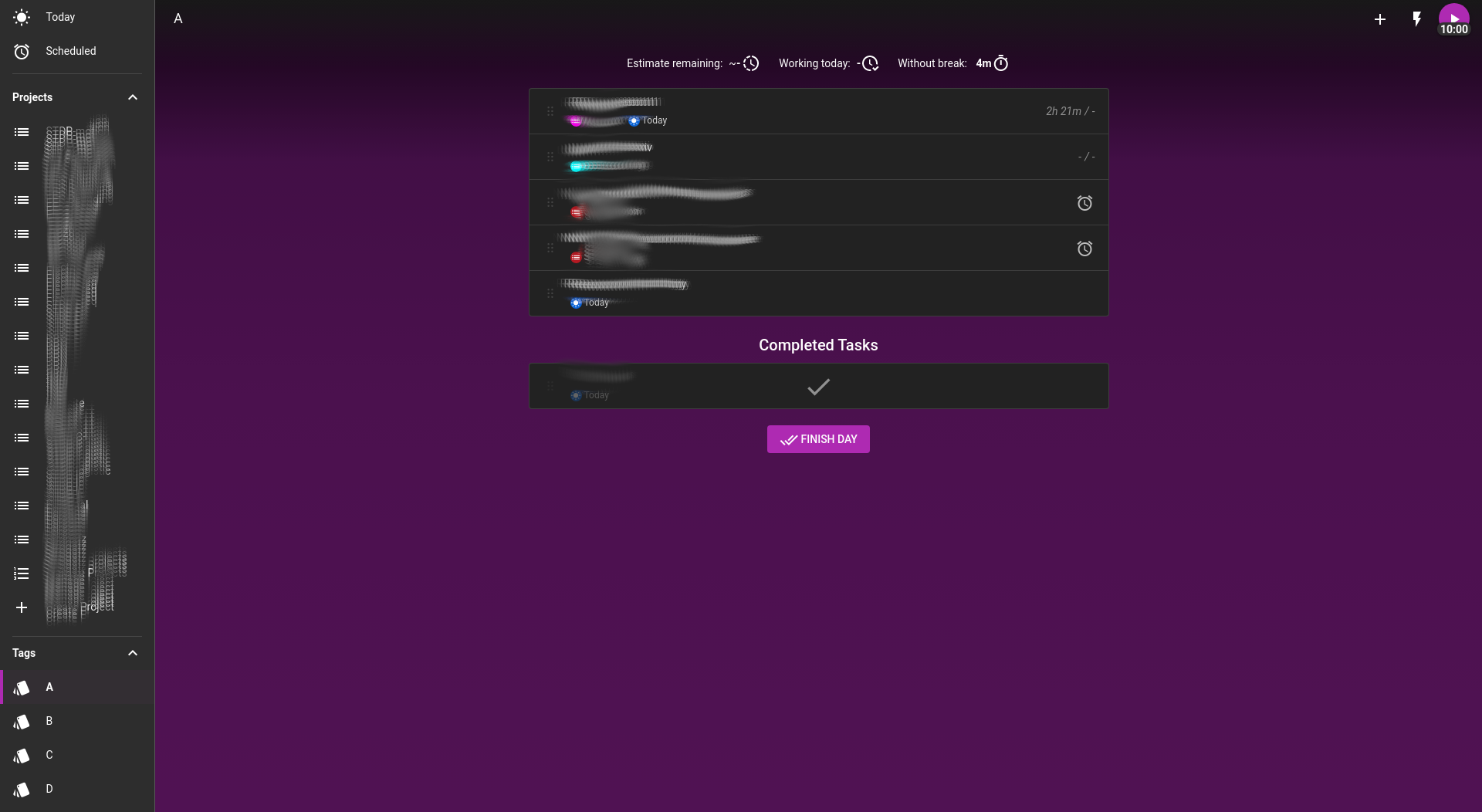
Of course, for each project, I go through the plan every few days and revise the tasks and the priorities. Then, each morning or the night before, it is just a matter of going through my 'A' tag and identifying the tasks for the day. I am attaching a couple of screenshots of my system. I am sure people have come up with their own ways of using your software to manage their day. Maybe this could be a nice addition to the documentation - various systems/styles/workflows that your current users have designed using your software!
_Figure 1: Tasks for the day (usually scheduled in advance). Projects and the four tags for the priorities._
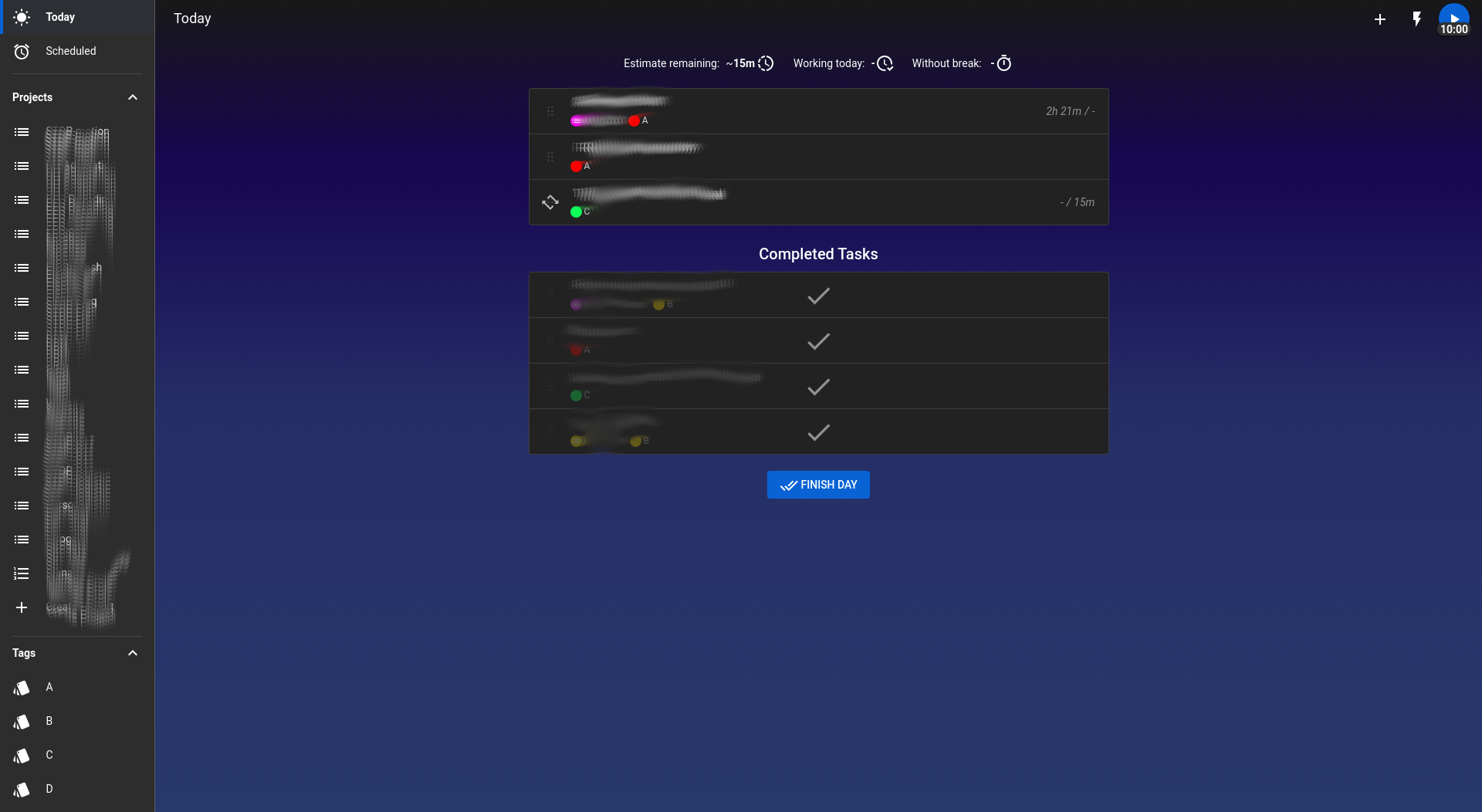
_Figure 2: Tasks currently tagged A: These are the tasks which have the highest impact for their respective projects._
-- End: My own workflow [skippable!] ---
I am sure you have your own system figured out as well. Perhaps you could try this prioritising routine for a bit and see if it helps to deal with unimportant tasks. I adopted it because it is flexible and allows me to triage like hell. In this world where we are constantly battling distractions I think the best way is to triage ruthlessly like the medical staff in an ICU. I find that this leaves me time to do my own things like participating in discussions like this, spending time with my partner and so forth!
And finally, thank you! I am really lucky I get to do something I like so much. Feel free to contact me by email in case you have ideas for projects or would like to explore a bit of neuroscience. I am sure with your skills in programming there can be many interesting ways you can contribute too!
smalltimer
on 13 Jul 2020
Thank you very much for sharing your workflow! Would it be ok for you if I made this into a blog post for my web page? I think this could be pretty useful for others as well!
johannesjo
on 14 Jul 2020
Absolutely! Please feel free to use this as you see fit (and do share the link!). At some point I will write something about workflows too. Perhaps starting from my current system. If I do, I will definitely be proposing your app, and providing a link to your post :)
smalltimer
on 14 Jul 2020
Thank you very much! The article is out now:
https://dev.to/johannesjo/the-prioritising-scheme-how-to-eat-the-frog-with-super-productivity-mlk
Please let me know if I should change anything.
Probably should have spent a little bit more time explaining the whole frog thing, but I didn't want to spend more than 2 hours on it :)
johannesjo
on 15 Jul 2020
That is fantastic! I think you got the method across very nicely and concisely. You motivated me to write a more detailed version at some point to cover my take on 'eating the frog'!
smalltimer
on 15 Jul 2020
I would love to read that. Please send me a link if that happens !
johannesjo
on 15 Jul 2020
Related issues
 Kl4tch
·
3Comments
Kl4tch
·
3Comments
 calvadosxo
·
4Comments
calvadosxo
·
4Comments
 NPReport
·
3Comments
NPReport
·
3Comments
 theCalcaholic
·
4Comments
theCalcaholic
·
4Comments
 mar-v-in
·
3Comments
mar-v-in
·
3Comments
Most helpful comment
Thank you very much! The article is out now:
https://dev.to/johannesjo/the-prioritising-scheme-how-to-eat-the-frog-with-super-productivity-mlk
Please let me know if I should change anything.
Probably should have spent a little bit more time explaining the whole frog thing, but I didn't want to spend more than 2 hours on it :)