Super-productivity: Creating task - Improvement
Your Environment
- Version used:
- Operating System and version: Windows 10
Expected Behavior
There should be a button to create a new task. Mayble close to the "Ready to Work". I spend some time trying to figure out how to add a task. It's awesome to be able to just tap enter and the task is added but not very intuitive (of course, that´s my opinion )
Current Behavior
Today is hard to know what to do to add a new task. If people are like me, they will hit the "Ready to Work" button and expect the task to be created.
 fiuzaB
All 18 comments
You're absolutely right! This needs to be improved. Will require quite some changes, though. I'll work on that as soon as i can.
 johannesjo
on 25 Sep 2019
johannesjo
on 25 Sep 2019
If you need any help, count me in.
fiuzaB
on 25 Sep 2019
Oh that's great to hear!
My general idea is to redo the whole ui for the add task use case using a combination of todoists approach of a split input bar (one input for the title, one for the due date of the task) and the general design of microsoft todo: an empty input at the buttom of the list, which is always visible on the task list page.
The most complex part in respect to the code required is probably the date selection part and in place of a seperate input we also could extend the short syntax (though a separate input is probably easier for new users). But we can always add the whole due date selection later on when we're done with the general ui.
There are several tricky bits to consider about the ui as well. One of it is the how to deal with the toast notifications. The material design spec specifies for fab buttons (the big ones which are usually used in the bottom center or bottom right) to below the content (https://material.io/components/snackbars/#placement). Maybe a always visible task input is a little bit similiar. Either way we need some solution for what happens when a snack notification appears. Having it appear just on top of the input is probably not a good idea.
The other thing which comes to mind is the current backlog implementation. What happens when the backlog is pulled up? Would the input bar move up with it as well? Or do we let it disappear completely. My first feeling is, that letting it disappear (maybe in favor of a static variant at the end of the list) might be the best solution for now.
Well and then there is the add task overlay... Maybe we can just use the same one we use for the task list, but slide it up, when being summoned from somewhere else. Not really sure...
Don't know. What do you think? I've to admit, that just adding a button might be the easier solution :D
johannesjo
on 25 Sep 2019
Oh that's great to hear!
My general idea is to redo the whole ui for the add task use case using a combination of todoists approach of a split input bar (one input for the title, one for the due date of the task) and the general design of microsoft todo: an empty input at the buttom of the list, which is always visible on the task list page.
I got the part of the todois approach but I didn't understand very well the empty input at the bottom. I mean, we have a lot of space. If we set an element at the bottom of the screen, we will have a big empty space in between the first input and the last, right ? The reason you want to have this "bottom input" is to minimize the amount of clicks the user has to do before inserting a new task ?
The most complex part in respect to the code required is probably the date selection part and in place of a seperate input we also could extend the short syntax (though a separate input is probably easier for new users). But we can always add the whole due date selection later on when we're done with the general ui.Yeah, date is always a problem. Checking the system, I got two types of calendars. One when doing the schedule thing and the other going through Estimate Time > Add Time Spent for other day. Maybe one type of calendar would make life easier too.
There are several tricky bits to consider about the ui as well. One of it is the how to deal with the toast notifications. The material design spec specifies for fab buttons (the big ones which are usually used in the bottom center or bottom right) to below the content (https://material.io/components/snackbars/#placement). Maybe a always visible task input is a little bit similiar. Either way we need some solution for what happens when a snack notification appears. Having it appear just on top of the input is probably not a good idea.Yep. That would be annoying. I'm not 100% familiar with the system. Do you have an idea when the snackbar appears ? Probably after an user interaction, right ?
The other thing which comes to mind is the current backlog implementation. What happens when the backlog is pulled up? Would the input bar move up with it as well? Or do we let it disappear completely. My first feeling is, that letting it disappear (maybe in favor of a static variant at the end of the list) might be the best solution for now.Yep. I agree.
Well and then there is the add task overlay... Maybe we can just use the same one we use for the task list, but slide it up, when being summoned from somewhere else. Not really sure...I like the way it is today. It is simple. I don't know if it was your intention, but maybe we could have a more detailed way to add tasks when the user come from the Task Menu and a simple one when coming from the Plus button. I see it like a shortcut, a fast way to add a new task.
Don't know. What do you think? I've to admit, that just adding a button might be the easier solution :D
Waaay easier. It always depends on time. But we could do something to fix this issue for now and open new issues to deal with these details.
Another option is to insert the task if the input is different than empty and the user clicks on "Ready to Work" .
fiuzaB
on 25 Sep 2019
Thanks for the feedback! :) Maybe let's go with a simple button for now.
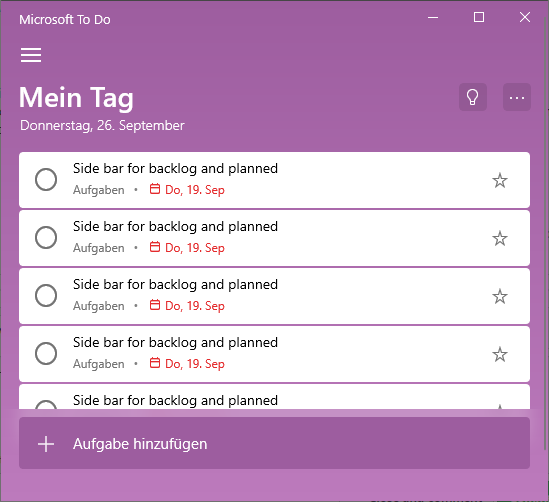
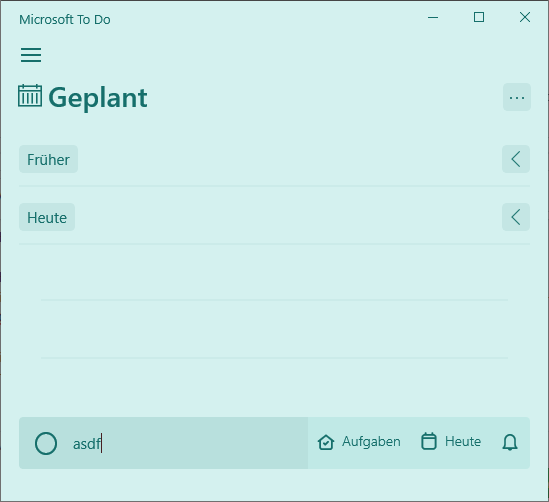
This is what I mean by the bar at the bottom.
johannesjo
on 26 Sep 2019
The most complex part in respect to the code required is probably the date selection part and in place of a s
We could also use this opportunity to do some natural language processing using SugarJS library
https://sugarjs.com/
I love the Idea just typing "My todo due @tomorrow" and the it will be added automatically. This will save so many clicks.
 KonTy
on 27 Sep 2019
KonTy
on 27 Sep 2019
Oh man I wish I had more time for this, there is so much we can do with your app! So many cool ideas floating around.
KonTy
on 27 Sep 2019
I'll take this, if that is alright.
fiuzaB
on 1 Oct 2019
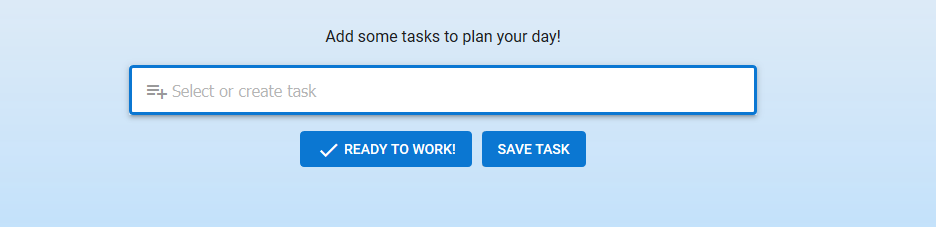
Something like this ?
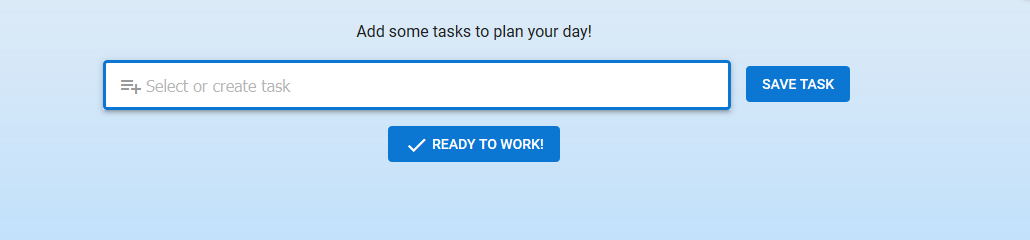
Or ( I like this one ):
fiuzaB
on 1 Oct 2019
Personally for me looking at how the other Todo apps behave you are sort of expected to hit enter even on the phone, because even on the phone you are typing at this time and you have the keyboard up and there is an Enter key there. IMHO having an extra button adds unnecessary clutter, and it is just a matter of a learning curve to know that you have to hit enter.
If you still decided to add a button, one thing to consider is to change the icon on the left side to a SAVE icon. That's how MS Todo does it for example:

KonTy
on 1 Oct 2019
@KonTy nice suggestion. Could you maybe open up a new issue about the short syntax? I probably wouldn't import the whole sugar.js lib. It's most of the time much more performant to code those things for the specific case at hand, but the date stuff is pretty nice!
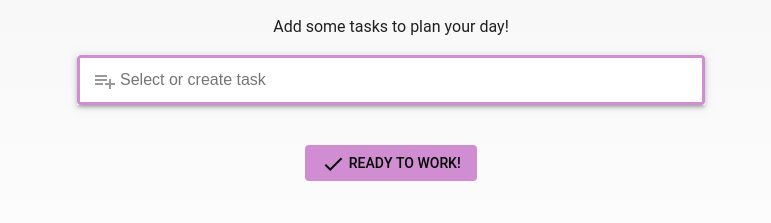
@fiuzaB Sorry, I think I misunderstood you. I thought you meant another button to show the add task bar (Shift+A or the + icon on the top). I have to agree with Tony. Hitting enter is not too uncommon for search bars and single inputs of all kinds. The only way I can imagine this, is a very subtle approach like the one KonTy mentioned or like this one:

What might be confusing is the button below. Maybe we need to give it a little bit more margin to the input?
johannesjo
on 1 Oct 2019
Personally for me looking at how the other Todo apps behave you are sort of expected to hit enter even on the phone, because even on the phone you are typing at this time and you have the keyboard up and there is an Enter key there. IMHO having an extra button adds unnecessary clutter, and it is just a matter of a learning curve to know that you have to hit enter.
If you still decided to add a button, one thing to consider is to change the icon on the left side to a SAVE icon. That's how MS Todo does it for example:
Way better. I just checked Microsoft Todo :
 its way more classy.
@fiuzaB Sorry, I think I misunderstood you. I thought you meant another button to show the add task bar (Shift+A or the + icon on the top). I have to agree with Tony. Hitting enter is not too uncommon for search bars and single inputs of all kinds. The only way I can imagine this, is a very subtle approach like the one KonTy mentioned or like this one:
What might be confusing is the button below. Maybe we need to give it a little bit more margin to the input?
No problem ! I'm using your app in a Windows machine and I'm used to hit buttons while working on Windows. So I tought if I clicked Ready To Work it would add my task to the queue :)
How about we close this task and if ppl start talking about it we open this issue again ?
fiuzaB
on 1 Oct 2019
@fiuzaB githubs issue template is pretty good now. So people should find it when they try to create a new one. I will add some more space to the read to work button. You're right that this a little confusing at the moment.
johannesjo
on 1 Oct 2019
@KonTy nice suggestion. Could you maybe open up a new issue about the short syntax? I probably wouldn't import the whole sugar.js lib.
Actually thinking about it some more, you are probably better off using the library. because of Locale issues. I would imagine that January in English and German are spelled differently. SugarJS comes with different local support right out the box, The list is here https://github.com/andrewplummer/Sugar
Catalan (ca)
Danish (da)
Dutch (nl)
Finnish (fi)
French (fr)
German (de)
Italian (it)
Japanese (ja)
Korean (ko)
Norwegian (no)
Polish (pl)
Portuguese (pt)
Russian (ru)
Spanish (es)
Swedish (sv)
Simplified Chinese (zh-CN)
Traditional Chinese (zh-TW)
KonTy
on 1 Oct 2019
@KonTy that really looks promising!
One request though: Could you maybe try to keep stuff more separated and focused on the issue titles and open up new issues for new subjects? I think it gets hard to follow for people which are looking for a solution described in the title. :D
For a less focused general discussion or just random ideas, I also opened up this spectrum chat:
https://spectrum.chat/super-productivity
johannesjo
on 2 Oct 2019
One request though: Could you maybe try to keep stuff more separated and focused on the issue titles and open up new issues for new subjects? I think it gets hard to follow for people which are looking for a solution described in the title. :D
Sorry about that. I didn't mean to randomize the thread. I just get too excited about the potential of this app. It is so close to being the best productivity/todo app out there.
KonTy
on 2 Oct 2019
@KonTy no worries :)
johannesjo
on 3 Oct 2019
With the addition of advanced short syntax this can be closed I think. Please feel free to open up a new issue, if you like to see further improvements.
johannesjo
on 18 Oct 2020
Related issues
 mar-v-in
·
3Comments
mar-v-in
·
3Comments
 Mindstormer619
·
4Comments
Mindstormer619
·
4Comments
 Kl4tch
·
3Comments
Kl4tch
·
3Comments
 theCalcaholic
·
4Comments
theCalcaholic
·
4Comments
 jac1013
·
3Comments
jac1013
·
3Comments