Super-productivity: Can not "Finish your day", notification keeps appearing.
Your Environment
- Version used: superproductivity-git 2.11.1.r17.g1ae80248-1
- Operating System and version: Arch
- Desktop Environment: XFCE
Expected Behavior
I can't "finish" a previous day. When I click dismiss or "finish day" in the notification, I expect that to clear the nag.
Current Behavior
I did finish that day last day, the nag is incorrect, and even attempting to do so now it, it keeps telling me I have not.
Video: https://streamable.com/b4dtb
Steps to Reproduce (for bugs)
It may be specific to my database of tasks. I'm not sure if there is an easy way to reproduce this. This is my work task list in work and may contain confidential information, so if needed, I can confidentially provide that.
Console Output
No output when taking any actions specific to this bug, beyond this:
project.reducer.ts:207 DEFAULT 2019-09-18
Error Log (Desktop only)
no logs associated with any of these actions
Other than that, I've been loving the recent updates. Suuuuch a great program.
 Ghoughpteighbteau
All 30 comments
Thanks for reporting! I look into it.
Meanwhile: Did you know that you can disable the naggers completely in the settings?
 johannesjo
on 20 Sep 2019
johannesjo
on 20 Sep 2019
Unfortunately I am unable to reproduce this issue. Could you maybe check your local database for possible wrong values? You can look at it by opening up the console and going to application. There you have to select IndexedDB on the left panel and navigate SUB_STORE.
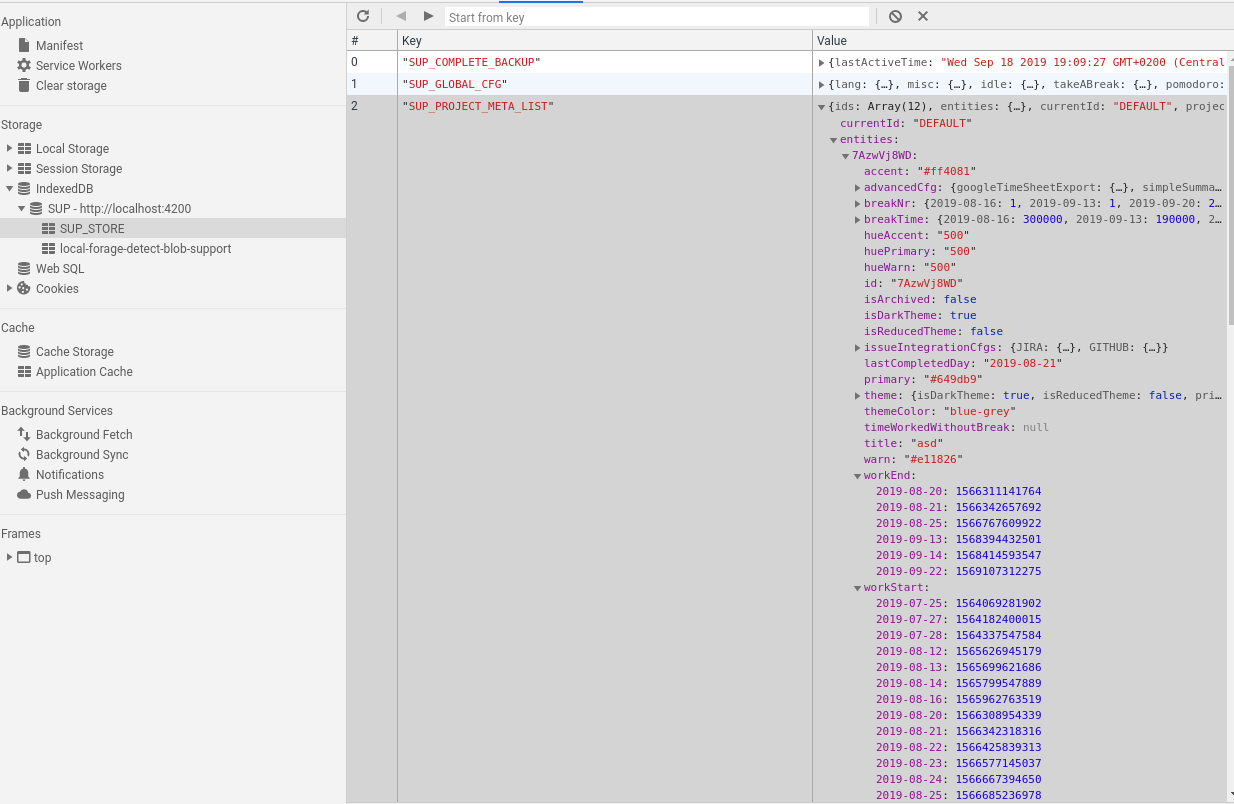
The actual comparison looks like this:
        return !!(lastCompletedDay)
          && (lastWorkEnd < today)
          && (lastWorkEnd > lastCompletedDay);
Might be that some values are saved wrongly somehow or that something goes awry when converting from timestamp and stringDates to regular javascript date objects. Also I'm wondering in which time zone are you located?
johannesjo
on 22 Sep 2019
Sorry for the delay in response. Works getting interesting on my end ;)
I'm Pacific Daylight Time, BC (GMT-7)
So based on the information you gave me here's what I did:
- I opened up the dev console. In
entities.DEFAULT.lastCompletedDayThe time was set to 2019-09-19 - I turned last day reminders and got a notification to complete day 2019-09-23.
- I finished that day per notificaiton
lastCompletedDayis now at 2019-09-23, but the notification returns.
Looking at the workEnd and workStart objects after following this procedure:
The final entry in workEnd is 2019-09-23: 1569282725545
The final entry in workStart is 2019-09-24: 1569338400483
today should be 2019-09-24: 1569345197634
So evaluating that:
(lastWorkEnd < today) == true
(lastWorkEnd > lastCompletedDay) == false
does it compare on the days? Because workEnd includes a timestamp, and lastCompletedDay is just the date.
??
best of luck with this one :S
Ghoughpteighbteau
on 24 Sep 2019
Hey there! Sorry for not replying earlier. The full comparision code looks like this:
        const today = new Date();
        const lastWorkEnd = new Date(lastWorkEndStr);
        const lastCompletedDay = new Date(lastCompletedDayStr);

        today.setHours(0, 0, 0, 0);
        lastWorkEnd.setHours(0, 0, 0, 0);
        lastCompletedDay.setHours(0, 0, 0, 0);

        // NOTE: ignore projects without any completed day
        return !!(lastCompletedDay)
          && (lastWorkEnd < today)
          && (lastWorkEnd > lastCompletedDay);
This is what I did in the browser console to check the code:
checkFn = (lastWorkEndStr, lastCompletedDayStr, todayStamp) => {
        const today = new Date(todayStamp);
        const lastWorkEnd = new Date(lastWorkEndStr);
        const lastCompletedDay = new Date(lastCompletedDayStr);

        today.setHours(0, 0, 0, 0);
        lastWorkEnd.setHours(0, 0, 0, 0);
        lastCompletedDay.setHours(0, 0, 0, 0);

        return !!(lastCompletedDay)
          && (lastWorkEnd < today)
          && (lastWorkEnd > lastCompletedDay);
      }

checkFn(1569282725545, '2019-09-23', 1569345197634);
Which correctly returns false... So it seems like the logic works correctly (would probably be smart to write a unit test for it :)), which probably means that some of the values entering the function is not correct for some reason. It might be that the function to get the last worked day is not correct. I'll have a look.
johannesjo
on 29 Sep 2019
Ok yes. I messed that one up... Thank you very much for help!
johannesjo
on 29 Sep 2019
arg. Sorry, I've wanted to get to this, but arch has updated to node V12 and its not building super-productivity right now. If I can work out which changes I need to make to get it building I'll submit a patch.
Ghoughpteighbteau
on 1 Oct 2019
@Ghoughpteighbteau about this one? This is fixed I think, not released yet though. :)
What kind of troubles are you running into with node v12? I am running it locally and I haven't had any issues so far.
johannesjo
on 1 Oct 2019
node-sass. seems the fix was to add that as a dependency. https://github.com/sass/node-sass/issues/2736
the dependency seems to be the angular build tools.
diff --git a/package.json b/package.json
index 84e8e567..983c7ae3 100644
--- a/package.json
+++ b/package.json
@@ -159,6 +159,7 @@
     "@types/jasminewd2": "~2.0.3",
     "@types/moment-duration-format": "^2.2.2",
     "@types/node": "^12.0.4",
+    "node-sass": "^4.12.0",
     "all-contributors-cli": "^6.8.0",
     "angular-material-css-vars": "0.1.5",
     "angular2-promise-buttons": "latest",
@@ -192,7 +193,6 @@
     "ng2-dragula": "^2.1.1",
     "ngx-electron": "^2.1.1",
     "ngx-markdown": "^8.0.2",
-    "node-sass": "^4.12.0",
     "protractor": "^5.4.2",
     "rxjs": "^6.5.3",
     "rxjs-tslint": "0.1.5",
```
edit wait why does my diff say that was already there?
wait it was already there... what the heck?! ok actually I dunno why this broke.
OK ignore me I'm confused as heck. I'm not sure why the build is failing, all my errors seem to relate to node-sass and https://www.npmjs.com/package/@angular-devkit/build-angular?activeTab=dependencies
Ghoughpteighbteau
on 2 Oct 2019
hehe. Yeah the build stuff can get messy... Are you using npm or yarn?
johannesjo
on 2 Oct 2019
npm
Ghoughpteighbteau
on 2 Oct 2019
Might be related to that. I only have a yarn.lock but no package.lock. Also a good old clean install (deleting the node_modules folder and installing again), while normally not necessary, can sometimes fix these things.
johannesjo
on 2 Oct 2019
ahhhh. that might be it. Full pastebin of build failure here: https://pastebin.com/tdtzdasD
but I'll try removing the package-lock and see if that works.
Ghoughpteighbteau
on 2 Oct 2019
Good idea! Also v2.5.1 is already quite old now. The most recent published version is 2.12.3.
johannesjo
on 2 Oct 2019
2.5? that ... oh I see. another mistake. I forked the wrong AUR repository.
Ghoughpteighbteau
on 2 Oct 2019
OK. Thanks. Only thing left is this:
$ ng lint
Linting "sp2"...

WARNING: /home/oehpr/src/superproductivity-git/src/super-productivity/src/app/core-ui/main-header/main-header.component.ts:29:43 - combineLatest is deprecated: Pass arguments in a single array
 instead `combineLatest([a, b, c])`

Lint warnings found in the listed files.
Linting "sp2-e2e"...
All files pass linting.
$ ng test --watch=false
10% building 3/3 modules 0 active01 10 2019 15:37:03.550:INFO [karma-server]: Karma v4.3.0 server started at http://0.0.0.0:9876/
01 10 2019 15:37:03.552:INFO [launcher]: Launching browsers ChromeHeadless with concurrency unlimited
01 10 2019 15:37:03.555:INFO [launcher]: Starting browser Chrome
01 10 2019 15:37:10.932:INFO [HeadlessChrome 76.0.3809 (Linux 0.0.0)]: Connected on socket ka2WlwXv-Sr8_3O4AAAA with id 88826197
HeadlessChrome 76.0.3809 (Linux 0.0.0) isShowFinishDayNotification should be false if last lastCompletedDay === today FAILED
        Error: Expected true to be false.
            at <Jasmine>
            at UserContext.<anonymous> (http://localhost:9876/_karma_webpack_/src/app/features/project/util/is-show-finish-day-notification.spec.ts:6:20)
            at ZoneDelegate../node_modules/zone.js/dist/zone.js.ZoneDelegate.invoke (http://localhost:9876/_karma_webpack_/node_modules/zone.js/dist/zone.js:391:1)
            at ProxyZoneSpec.push../node_modules/zone.js/dist/zone-testing.js.ProxyZoneSpec.onInvoke (http://localhost:9876/_karma_webpack_/node_modules/zone.js/dist/zone-testing.js:308:1)
HeadlessChrome 76.0.3809 (Linux 0.0.0): Executed 17 of 19 (1 FAILED) (0 secs / 0.135 secs)
HeadlessChrome 76.0.3809 (Linux 0.0.0) isShowFinishDayNotification should be false if last lastCompletedDay === today FAILED
        Error: Expected true to be false.
            at <Jasmine>
            at UserContext.<anonymous> (http://localhost:9876/_karma_webpack_/src/app/features/project/util/is-show-finish-day-notification.spec.ts:6:20)
            at ZoneDelegate../node_modules/zone.js/dist/zone.js.ZoneDelegate.invoke (http://localhost:9876/_karma_webpack_/node_modules/zone.js/dist/zone.js:391:1)
HeadlessChrome 76.0.3809 (Linux 0.0.0): Executed 19 of 19 (1 FAILED) (0.239 secs / 0.136 secs)
TOTAL: 1 FAILED, 18 SUCCESS
TOTAL: 1 FAILED, 18 SUCCESS
error Command failed with exit code 1.
info Visit https://yarnpkg.com/en/docs/cli/run for documentation about this command.
error Command failed with exit code 1.
info Visit https://yarnpkg.com/en/docs/cli/run for documentation about this command.
error Command failed with exit code 1.
info Visit https://yarnpkg.com/en/docs/cli/run for documentation about this command.
error Command failed with exit code 1.
info Visit https://yarnpkg.com/en/docs/cli/run for documentation about this command.
npm ERR! code ELIFECYCLE
npm ERR! errno 1
npm ERR! [email protected] dist: `yarn buildAllElectron && electron-builder "-l" "deb"`
npm ERR! Exit status 1
npm ERR!
npm ERR! Failed at the [email protected] dist script.
npm ERR! This is probably not a problem with npm. There is likely additional logging output above.
And it sounds like you've got that fixed.
Ghoughpteighbteau
on 2 Oct 2019
Yes. This should be fixed with the latest version.
johannesjo
on 2 Oct 2019
sorry to be a pest, which version should this be fixed in? I just tried building current master, past 2.13.0
yarn; yarn buildAllElectron
yarn install v1.19.0
[1/4] Resolving packages...
success Already up-to-date.
Done in 0.50s.
yarn run v1.19.0
$ yarn buildFrontendElectron && yarn electron:build
$ yarn preCheck && node --max_old_space_size=4096 ./node_modules/@angular/cli/bin/ng build --aot --prod --base-href=''
$ yarn lint && yarn test
$ ng lint
Linting "sp2"...

WARNING: /home/oehpr/src/super-productivity/src/app/features/google/store/google-drive-sync.effects.ts:279:34 - saveLastActive is deprecated: use persistenceService directly.
WARNING: /home/oehpr/src/super-productivity/src/app/features/google/store/google-drive-sync.effects.ts:369:45 - saveLastActive is deprecated: use persistenceService directly.
WARNING: /home/oehpr/src/super-productivity/src/app/features/project/project.const.ts:30:49 - GoogleTimeSheetExport is deprecated: was removed.
WARNING: /home/oehpr/src/super-productivity/src/app/features/project/project.model.ts:49:46 - GoogleTimeSheetExportCopy is deprecated: was removed.
WARNING: /home/oehpr/src/super-productivity/src/app/features/project/project.model.ts:71:26 - GoogleTimeSheetExport is deprecated: was removed.
WARNING: /home/oehpr/src/super-productivity/src/app/features/project/project.service.ts:355:58 - GoogleTimeSheetExport is deprecated: was removed.

Lint warnings found in the listed files.
Linting "sp2-e2e"...
All files pass linting.
$ ng test --watch=false
10% building 3/3 modules 0 active09 10 2019 10:08:26.783:INFO [karma-server]: Karma v4.3.0 server started at http://0.0.0.0:9876/
09 10 2019 10:08:26.784:INFO [launcher]: Launching browsers ChromeHeadless with concurrency unlimited
10% building 6/6 modules 0 active09 10 2019 10:08:26.820:INFO [launcher]: Starting browser Chrome
09 10 2019 10:08:35.096:INFO [HeadlessChrome 77.0.3865 (Linux 0.0.0)]: Connected on socket ulexiux4IYryfl9jAAAA with id 2402827
HeadlessChrome 77.0.3865 (Linux 0.0.0) isShowFinishDayNotification should be false if last lastCompletedDay === today FAILED
        Error: Expected true to be false.
            at <Jasmine>
            at UserContext.<anonymous> (http://localhost:9876/_karma_webpack_/src/app/features/project/util/is-show-finish-day-notification.spec.ts:6:20)
            at ZoneDelegate../node_modules/zone.js/dist/zone.js.ZoneDelegate.invoke (http://localhost:9876/_karma_webpack_/node_modules/zone.js/dist/zone.js:391:1)
            at ProxyZoneSpec.push../node_modules/zone.js/dist/zone-testing.js.ProxyZoneSpec.onInvoke (http://localhost:9876/_karma_webpack_/node_modules/zone.js/dist/zone-testing.js:308:1)
HeadlessChrome 77.0.3865 (Linux 0.0.0): Executed 6 of 20 (1 FAILED) (0 secs / 0.122 secs)
HeadlessChrome 77.0.3865 (Linux 0.0.0) isShowFinishDayNotification should be false if last lastCompletedDay === today FAILED
        Error: Expected true to be false.
            at <Jasmine>
            at UserContext.<anonymous> (http://localhost:9876/_karma_webpack_/src/app/features/project/util/is-show-finish-day-notification.spec.ts:6:20)
            at ZoneDelegate../node_modules/zone.js/dist/zone.js.ZoneDelegate.invoke (http://localhost:9876/_karma_webpack_/node_modules/zone.js/dist/zone.js:391:1)
HeadlessChrome 77.0.3865 (Linux 0.0.0): Executed 20 of 20 (1 FAILED) (0.282 secs / 0.149 secs)
TOTAL: 1 FAILED, 19 SUCCESS
TOTAL: 1 FAILED, 19 SUCCESS
error Command failed with exit code 1.
info Visit https://yarnpkg.com/en/docs/cli/run for documentation about this command.
error Command failed with exit code 1.
info Visit https://yarnpkg.com/en/docs/cli/run for documentation about this command.
error Command failed with exit code 1.
info Visit https://yarnpkg.com/en/docs/cli/run for documentation about this command.
error Command failed with exit code 1.
info Visit https://yarnpkg.com/en/docs/cli/run for documentation about this command.
No worries. This truly weird though. Test run fine on my machine and they should on the ci. Just pushed a new build to check: https://travis-ci.org/johannesjo/super-productivity/jobs/595727656
johannesjo
on 9 Oct 2019
By the by. I use chromium for the test env. CHROME_BIN is set to my chromium binary. And chromium is currently Version 77.0.3865.90 (Official Build) Arch Linux (64-bit) and not
HeadlessChrome 72.0.3626 (Linux 0.0.0)
Maybe something has changed?
Ghoughpteighbteau
on 9 Oct 2019
Locally my tests run with the same version:
09 10 2019 19:19:05.967:INFO [launcher]: Starting browser Chrome
09 10 2019 19:19:15.653:INFO [HeadlessChrome 77.0.3865 (Linux 0.0.0)]: Connected on socket Az1yOOGFJTyEt6XkAAAA with id 12312715
HeadlessChrome 77.0.3865 (Linux 0.0.0): Executed 1 of 20 SUCCESS (0 secs / 0.017 secsHeadlessChrome 77.0.3865 (Linux 0.0.0): Executed 2 of 20 SUCCESS (0 secs / 0.017 secsHeadlessChrome 77.0.3865 (Linux 0.0.0): Executed 3 of 20 SUCCESS (0 secs / 0.018 secsHeadlessChrome 77.0.3865 (Linux 0.0.0): Executed 4 of 20 SUCCESS (0 secs / 0.018 secsHeadlessChrome 77.0.3865 (Linux 0.0.0): Executed 5 of 20 SUCCESS (0 secs / 0.019 secsHeadlessChrome 77.0.3865 (Linux 0.0.0): Executed 6 of 20 SUCCESS (0 secs / 0.027 secsHeadlessChrome 77.0.3865 (Linux 0.0.0): Executed 7 of 20 SUCCESS (0 secs / 0.033 secsHeadlessChrome 77.0.3865 (Linux 0.0.0): Executed 8 of 20 SUCCESS (0 secs / 0.038 secsHeadlessChrome 77.0.3865 (Linux 0.0.0): Executed 9 of 20 SUCCESS (0 secs / 0.038 secsHeadlessChrome 77.0.3865 (Linux 0.0.0): Executed 10 of 20 SUCCESS (0 secs / 0.038 secHeadlessChrome 77.0.3865 (Linux 0.0.0): Executed 11 of 20 SUCCESS (0 secs / 0.039 secHeadlessChrome 77.0.3865 (Linux 0.0.0): Executed 12 of 20 SUCCESS (0 secs / 0.047 secHeadlessChrome 77.0.3865 (Linux 0.0.0): Executed 13 of 20 SUCCESS (0 secs / 0.047 secHeadlessChrome 77.0.3865 (Linux 0.0.0): Executed 14 of 20 SUCCESS (0 secs / 0.047 secHeadlessChrome 77.0.3865 (Linux 0.0.0): Executed 15 of 20 SUCCESS (0 secs / 0.047 secHeadlessChrome 77.0.3865 (Linux 0.0.0): Executed 16 of 20 SUCCESS (0 secs / 0.048 secHeadlessChrome 77.0.3865 (Linux 0.0.0): Executed 17 of 20 SUCCESS (0 secs / 0.048 secHeadlessChrome 77.0.3865 (Linux 0.0.0): Executed 18 of 20 SUCCESS (0 secs / 0.049 secHeadlessChrome 77.0.3865 (Linux 0.0.0): Executed 19 of 20 SUCCESS (0 secs / 0.05 secsHeadlessChrome 77.0.3865 (Linux 0.0.0): Executed 20 of 20 SUCCESS (0 secs / 0.051 secHeadlessChrome 77.0.3865 (Linux 0.0.0): Executed 20 of 20 SUCCESS (0.08 secs / 0.051 secs)
TOTAL: 20 SUCCESS
TOTAL: 20 SUCCESS
Not sure what to make of this... :/
johannesjo
on 9 Oct 2019
arg... curse you node and your build consistency. let me try wiping my local repo out and building again.
I tried to build the dockerfile but it looks like I need a token for some kind of build server?
I'll try to get it to reproduce by making my own Dockerfile. I wonder if this is some kind of timezone shenanigans thing.
oh, I should mention my timezone:
timedatectl
               Local time: Wed 2019-10-09 10:57:11 PDT
           Universal time: Wed 2019-10-09 17:57:11 UTC
                 RTC time: Wed 2019-10-09 17:57:11
                Time zone: America/Vancouver (PDT, -0700)
System clock synchronized: yes
              NTP service: active
          RTC in local TZ: no
TIMEZONE SHENANIGANS.
ok just double checking my Dockerfile I have now reproduces the issue.
Ghoughpteighbteau
on 9 Oct 2019
I hate timezones! :)
To be honest I almost never use the docker image, so it hasn't received much love...
johannesjo
on 9 Oct 2019
sorry for the delay, for some reason my disk keeps locking up while I run this? Problems for future me I think.
This does reproduce the issue:
FROM node:12.2.0 as build

WORKDIR /app

ENV PATH /app/node_modules/.bin:$PATH

RUN apt-get update\
 && apt-get -yq install chromium\
 && ln -fs /usr/share/zoneinfo/America/Vancouver /etc/localtime\
 && dpkg-reconfigure -f noninteractive tzdata

ENV CHROME_BIN /usr/bin/chromium

COPY package.json /app/package.json
COPY ./tools /app/tools

RUN yarn
RUN yarn global add @angular/[email protected]

COPY . /app

RUN yarn && yarn test
Thanks for sharing! Interesting that it does that. That could explain the issue you were running into.
johannesjo
on 9 Oct 2019
I have seen this issue on Windows as well. This happened where I want on vacation not finishing anything for a week obviously. Then SP wanted me to finish a day which was like a week ago. I would finish it but it would reappear. I tried many things and it would still reappear until I closed and reopened SP app, then everything was fixed.
 KonTy
on 10 Oct 2019
KonTy
on 10 Oct 2019
Hm, seems like I definitely should revisit this.
johannesjo
on 10 Oct 2019
:ghost: tiiimmeezooone shenanigans :ghost:
Ghoughpteighbteau
on 10 Oct 2019
👀
 GiancarlosIO
on 4 May 2020
GiancarlosIO
on 4 May 2020
I am closing this, because finish day has been reworked and I removed the feature. Thanks again for your help @Ghoughpteighbteau.
johannesjo
on 27 Oct 2020
Related issues
 sdruskat
·
3Comments
sdruskat
·
3Comments
 theCalcaholic
·
4Comments
theCalcaholic
·
4Comments
 tiotrom
·
4Comments
tiotrom
·
4Comments
 jac1013
·
3Comments
jac1013
·
3Comments
 wada3n
·
3Comments
wada3n
·
3Comments
Most helpful comment
Ok yes. I messed that one up... Thank you very much for help!