Super-productivity: [color request] custom dark theme colors (customs stylesheets?)
hi. I don't like the dark theme color can you add another color for dark themes? like arc (arc-dark) or nord or another
https://www.pling.com/p/1167639/
https://github.com/horst3180/arc-theme
https://github.com/arcticicestudio/nord
 fla15
fla15
All 37 comments
Hey there! Thanks for the suggestion. I am currently on setting custom theme colors. Background colors for the dark theme are not yet editable, but the the feature will lay the groundwork for that.
 johannesjo
on 21 Aug 2019
johannesjo
on 21 Aug 2019
Hey there! Thanks for the suggestion. I am currently on setting custom theme colors. Background colors for the dark theme are not yet editable, but the the feature will lay the groundwork for that.
This is great especially for color challenged people they will be able to set a their own high contrast colors!!! Right now the contrast is not ideal for people with color vision issues.
 KonTy
on 3 Sep 2019
KonTy
on 3 Sep 2019
Ideally I'd like to provide a feature where users can load their own custom stylesheet where they can specify the underlying css variables and overwrite every other style they want (also allowing for background images...).
johannesjo
on 28 Sep 2019
This would be awesome. Cannot find any setting for dark theme?
 ronilaukkarinen
on 28 Oct 2020
ronilaukkarinen
on 28 Oct 2020
@ronilaukkarinen currently you can only switch between light and dark theme (apart from mac where this is set according to the system settings).
johannesjo
on 28 Oct 2020
Okay. I use light theme as system theme on a macOS but then prefer dark theme in some apps. Custom CSS would be a killer feature so really awaiting this. 👍
ronilaukkarinen
on 28 Oct 2020
By the way, I would be glad to create multiple themes (Arc, Nord and Dracula are some good examples) for Super Productivity if this feature would be reality some day. CSS is my strong suit. The general UI could need some polisihing as well, might as well roll in the development version in the near future to test out some styles.
ronilaukkarinen
on 29 Oct 2020
This would be very welcome indeed! I let you know when I get to this, which is hopefully soon! :) Meanwhile, if anybody wants to give it a shot, this would be very welcome as well!
johannesjo
on 29 Oct 2020
@ronilaukkarinen btw: I just had a look at your stuff. I like it! Looks pretty nice and clean! Seems like, I better get this feature rolling before you change your mind ;)
johannesjo
on 29 Oct 2020
I just added very simple support for this. If there is a styles.css in the user data folder (as shown in settings/AutomaticBackups) it is loaded into the app. This won't work for the web and the mobile app, but I think it is a good start!
johannesjo
on 29 Oct 2020
Wow, that's awesome! Will definitely test my styles over the weekend. I have a problem building the Mac app though. I have no experience in packaging Electron and there seems not to be enough information about building it. Any step by step instructions on how to get Super Productivity.app built? The package.json link is broken here btw.
ronilaukkarinen
on 30 Oct 2020
Hey @ronilaukkarinen ! yarn start or npm start should be enough to test this. You don't need to package the app. That's only for when you want to install it on your machine.
git clone https://github.com/johannesjo/super-productivity.git
cd super-productivity
npm install
npm install -g @angular/cli
ng serve

# in a new console tab
npm start
Or for yarn (preferred):
git clone https://github.com/johannesjo/super-productivity.git
cd super-productivity
yarn
yarn global add @angular/cli
ng serve

# in a new console tab
yarn start
Thank you for clear instructions! I now got dev environment up and running and have started to work on styles. I'm going to try and separate angular UI based styles and other upcoming UI styles. Also for my convenience I'm going to include some devpackages like stylelint and its rules as I noticed there is no style linting (postCSS/stylelint/prettier etc.) or debugging included in the build process, I hope you don't mind.
It's easiest for me to start working on a Dracula theme as it's the most familiar to me since I'm one of the maintainers and it has documented color guidelines but these UI themes will be easily extended to other color schemes as well.
I hope I'm not stepping on any toes as I'm creating some guidelines on the fly although naturally without touching or overriding any existing angular UI styles which I think are good to have as base. As I'm not originating from Angular world I do not know if there are any CSS styling guidelines accorindg to themes, if so, feel free to guide me.
This will be great! Will let you know when something is ready for testing under styles-dev under my own fork.
ronilaukkarinen
on 2 Nov 2020
@ronilaukkarinen that sounds like a great plan! Stylelint is great, I don't mind adding that at all and I am using the Dracula theme every day with my IDE, so I'm looking forward to trying it out!
There are no guidelines yet. Are you referring to some sort of code style? I tried to describe my favorite approach for structuring CSS here though to be honest the (s)css used for this app is just .... maximally "pragmatic". If we were to introduce a new system to the complete code base it probably makes sense to talk about it first in detail. For only the theming, I would say: The floor is yours! :) I imagine this to be real challenge, if we can make any changes in the existing styling to make theming easier, I am all for it!
What is special about angular is the scoped css which in practise just applies dynamic unique parent classes to most components. But this can be overwritten in a normal fashion if you just take care that your selectors have a even higher specificity.
Let me know if you have any questions!
johannesjo
on 2 Nov 2020
I meant the predefined templates and documentation about how to build style framework for this project. As naming conventions I use a combination of WPCS, SMACSS and Airbnb CSS, that means in short that I like to keep it the most simple and straightforward without nesting too much, strongly disliking underscores and big letters in my CSS and use selector extensions like is-active or .col.col-something to define specificity. Great thing is that angular standards support this as many styles and things in this project are class-based as well.
Good to know that I have some freedom! :) Yes, for now I try not to complicate things too much and leave angular scoped CSS as-is, also easier to test out themes because just need to comment-out/comment to test out different color schemes, easy to revert back if necessary.
ronilaukkarinen
on 2 Nov 2020
As naming conventions I use a combination of WPCS, SMACSS and Airbnb CSS, that means in short that I like to keep it the most simple and straightforward without nesting too much, strongly disliking underscores and big letters in my CSS and use selector extensions like
is-activeor.col.col-somethingto define specificity. Great thing is that angular standards support this as many styles and things in this project are class-based as well.
This sounds pretty compatible with my own preferences.
I meant the predefined templates and documentation about how to build style framework for this project.
I appreciate that you also think about others providing custom templates! That's great :)
I am looking forward to seeing what you cook up! Let me know if you have an early draft available! As this might be a larger undertaking, it probably makes some sense trying to sort out possible miscommunications on my part early on.
johannesjo
on 2 Nov 2020
I am looking forward to seeing what you cook up! Let me know if you have an early draft available! As this might be a larger undertaking, it probably makes some sense trying to sort out possible miscommunications on my part early on.
Sure thing! However as I have a very active day job as a 24/7 coding CTO I have to warn you the progress may happen in random cycles in between whenever I can find some extra time but I def make sure to keep you in the loop!
ronilaukkarinen
on 2 Nov 2020
@ronilaukkarinen No worries! I totally understand that and it's no problem at all. But thanks for the warning. It's definitely also good to know this ahead of time.
johannesjo
on 2 Nov 2020
Just letting you know I have made some progress. I have established some defaults for "dark-base" UI theme, because it's easier for me first to define all the variables that are changeable and then move to color schemes. It's easiest to override practically every simple elements that we want to theme despite any light/dark preferences by user. This can (and should) be easily changed when we go to testing and production. Right now this has to be done this way because there are many styles wrongly (in my personal opinion) set up dynamically based on body classes (like .isLightTheme) and not by style sheet or some other color scheming method instead.
To see yourself what "overrides" or base establishments I'm talking about check out _main-content.scss from dark-base.
After I get some polished dark theme as base set up, I will move on to other color schemes.
ronilaukkarinen
on 9 Nov 2020
Thanks for the update!
Right now this has to be done this way because there are many styles wrongly (in my personal opinion) set up dynamically based on body classes (like .isLightTheme) and not by style sheet or some other color scheming method instead.
Do you mean
.isDarkTheme .some-el {...}
.isLighTheme .some-el {...}
// VS
.some-el {
some-style: var(--some-var);
}
?
I never actually tested it for this application, but one of the reasons behind using this approach is that from my experience using CSS variables tends to be slower/requires more resources than just using CSS variables. As I said: I never benchmarked this for this application and as my practical experience with this is a couple of years old this might not apply to newer browser versions anymore. You're probably more experienced with this. What do you think and what's your experience with it?
Another important reason is, that this is the approach angular material uses for their theming, and using CSS variables would lead to having two different approaches within the same application, which would complicate things unnecessarily (imho "less ideal but more consistent" is favorable to the increased complexity of two different approaches at the same time).
If those two aspects wouldn't apply, I also would lean towards a purely CSS-variable-based approach, however. If you have a good idea to switch things up we could also approach the problem with angular material more systematically by creating a special version of this repo:
https://github.com/johannesjo/angular-material-css-vars
johannesjo
on 9 Nov 2020
Do you mean
Yes. :)
I agree, it's best not to overcomplicate things too much. We shouldn't have multiple competing approaches in the same app. I'm just doing the styles-dev at the moment based on CSS vars and forcing them in to the default theme, because I don't know angular or how to setup classes in the app. That's what I tried to explain and my thoughts and ideas about the overall approach.
So in short I'm just creating the styles for now, test them out and after let's figure out the way to make them work with the current/preferred way. I hope this is okay.
As for CSS variables in general, as far as I know they have come a long way and are fully supported everywhere. I use them daily and have not noticed any performance issues. In fact in Electron world it's pretty preferred way to do things as it's more native than SCSS mixins or SCSS vars since CSS variables are literally directly supported by browser like normal selector attributes. We could combine these two easily by using your class based styling AND CSS variables inside schemes without overly complicating things.
It would mean that we could have it like this:
Base for _variables.scss:
scss
/* Defaults */
:root {
  --color-something: #fff;
  --color-other-thing: #000;
}
Dracula _variables.scss:
scss
/* Dracula */
.isDraculaTheme {
  --color-something: #fff;
  --color-other-thing: #000;
}
And other parts would be like so:
_main-content:
scss
.isDraculaTheme {
   .some-el {
      color: var(--color-something);
      /* some-styles */
   }
}
This could work, just needs some more polishing.
ronilaukkarinen
on 10 Nov 2020
Ah, maybe we have a slight misunderstanding here. I would expect something like this for the themes:
// dracula.css
// should overwrite existing styles, as it is imported after them
.some-selector {
  // ...styles

  .isLightTheme & {...}  // (only if this even makes sense for dracula)
  // might be needed for specifity, if overwriting colors stuff
  .isDarktTheme & {...}
}

// or
.isDarkTheme .some-selector {...}

// or
.some-sel {
  @include darkTheme() {
     // ...styles
  }
}
As far as I can see we don't need a parent class like .isDraculaTheme, because we're just overwriting all the base CSS.
johannesjo
on 10 Nov 2020
Oh yeah that is exactly what I was asking/confirming about, just contemplating about different possible scenarios as your stack is not yet that familiar to me. But it doesn't matter which way it's going to be as I'm currently indeed overwriting everything in their own files and while testing solely writing SCSS/CSS. 👍
ronilaukkarinen
on 10 Nov 2020
Basic dark UI theme is almost ready, it looks like this right now:
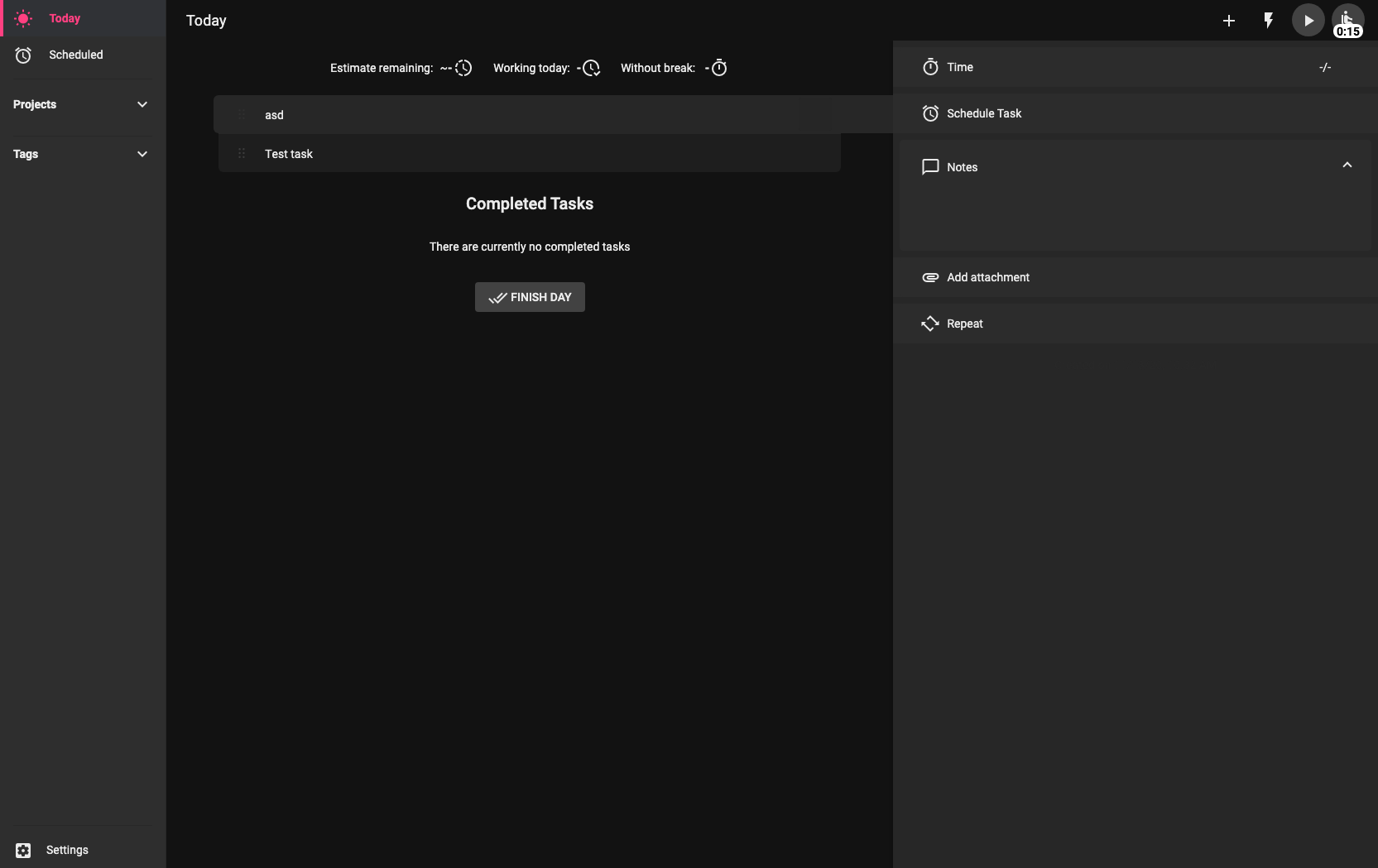
After base theme it's super easy to test different themes like Dracula by just changing the vars and including the theme from src/styles/ui-themes/
// Full UI themes
@import "styles/ui-themes/dark-base/index";
// @import "styles/ui-themes/dracula/index";
Looks very nice! Thanks for the update!
johannesjo
on 13 Nov 2020
Dracula theme is somewhat ready, maybe needs more testing but as far as I'm concerned it's ready. It currently looks like this:
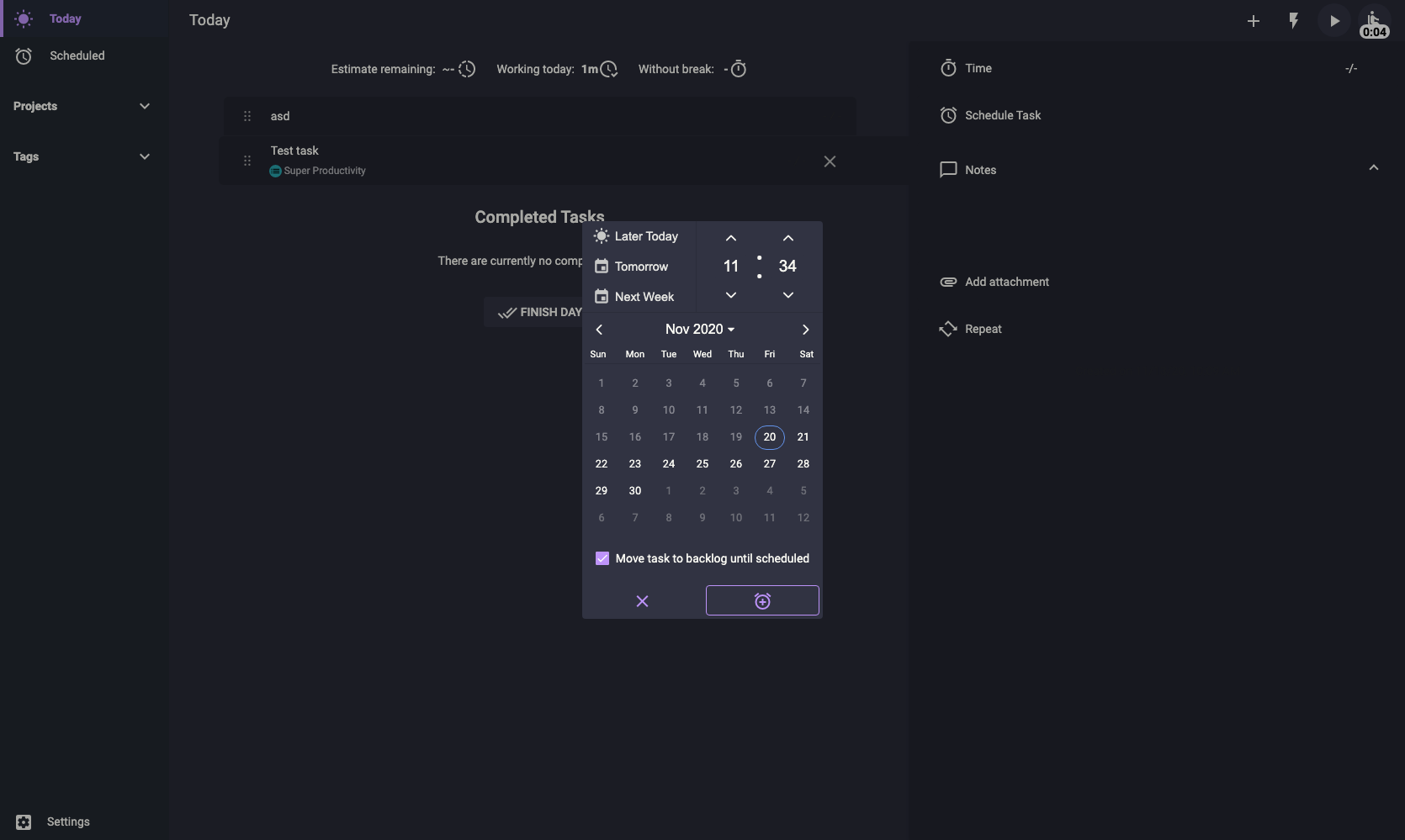
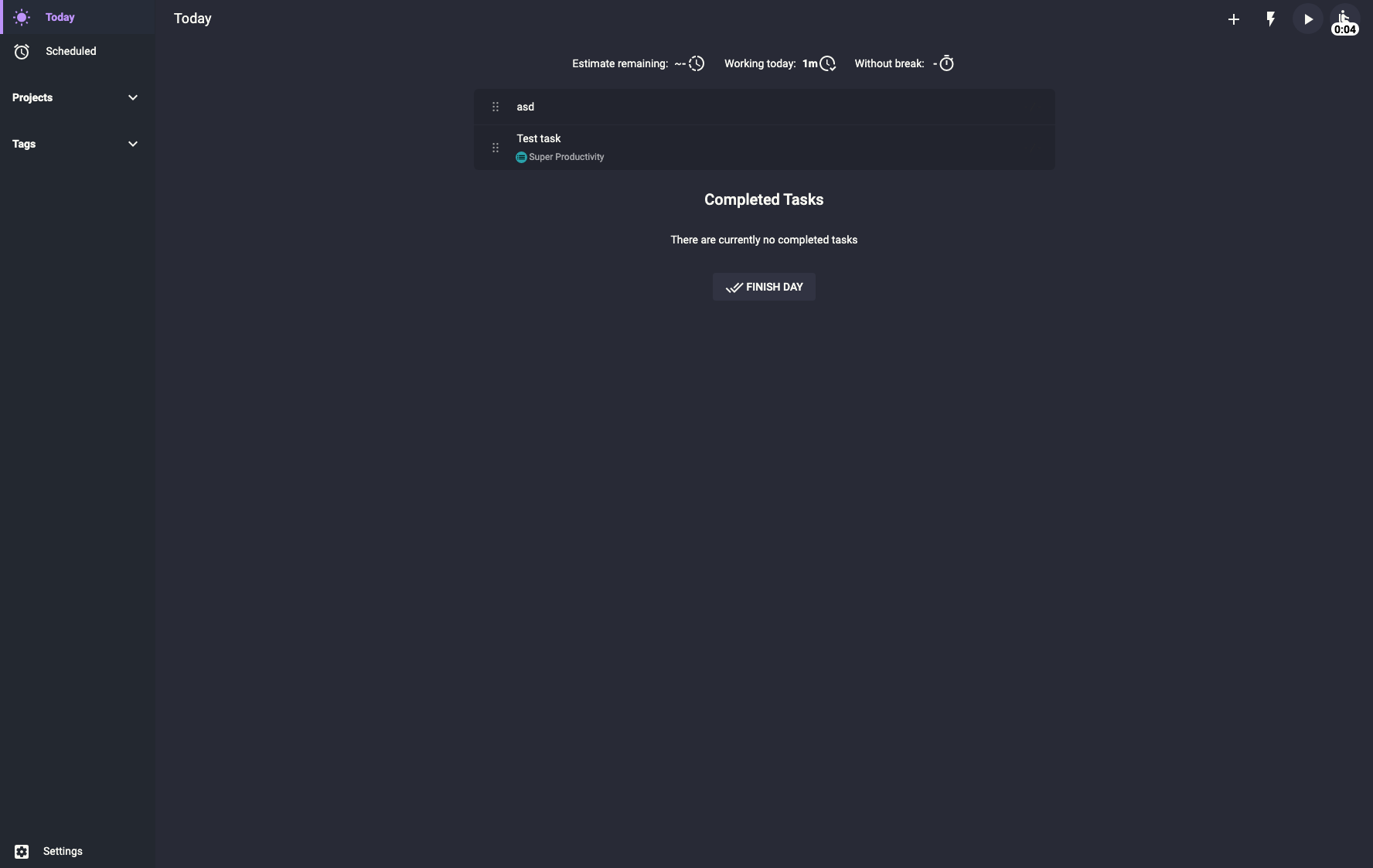
Right now I'm at the end of my "part" because I don't know how to proceed. Can you create a branch for theme settings and I can then send a pull request to that branch where you could start working on the new theme selection panel - or how do we proceed? As I implied earlier the "back-end side" is not my thing and it would be crazy and time consuming for me to start learning angular related stuff of this project at this time.
ronilaukkarinen
on 20 Nov 2020
...edit: added one more screenshot. I'll try other themes after this step, now it's very easy to just override the color vars to test them out. Dracula theme has dark base as dependency and consists of purely this:
scss
// Vars
:root {
  // Colors
  --color-current: #44475a;
  --color-background: #282a36;
  --color-foreground: #f8f8f2;
  --color-comment: #6272a4;
  --color-cyan: #8be9fd;
  --color-green: #50fa7b;
  --color-orange: #ffb86c;
  --color-pink: #ff79c6;
  --color-purple: #bd93f9;
  --color-red: #f55;
  --color-yellow: #f1fa8c;
  --color-background-main: #282a36;
  --color-background-sidebar: #232830;
  --color-border-sidebar: #232830;
  --color-border-divider-sidebar: #232830;
  --color-background-panels: #22242e;
  --color-border-panels: #232830;
  --color-background-slide-toggle-bar-disabled: #444;
  --color-background-setting-buttons: #313342;
  --color-background-banner: #313342;
  --color-background-task: #22242e;
  --color-tag-title: rgba(255, 255, 255, .6);
  --color-large-toggle-panels: #22242e;
  --color-large-toggle-panels-inputs: #22242e;
  --color-disabled-dates: rgba(255, 255, 255, .4);
  --color-accent: var(--color-purple);
}
ronilaukkarinen
on 20 Nov 2020
Hey @ronilaukkarinen this looks pretty cool! I'm impressed!
I created a branch called feat/custom-themes, wich we can further use as long as this is work in progress. As long as this is the just a css file as final output, we might also consider using a separate github project for this, which maybe can even beused as a base for people to create their own themes? What do you think?
johannesjo
on 20 Nov 2020
As long as this is the just a css file as final output, we might also consider using a separate github project for this, which maybe can even beused as a base for people to create their own themes? What do you think?
That's fine with me! I'm not sure how it's best to do but it's up to you, you can separate it. I can gladly be maintainer/contributer in this if possible.
ronilaukkarinen
on 21 Nov 2020
Feel free to suggest me new color schemes, they are rather easy and fast to implement as UI themes now that the base is all set up :) it doesn't actually matter if it's dark or light, everything goes with just replacing the vars. It's that easy.
I'm still not sure how this will be implemented in the app. There are multiple ways to achive the theme switching. In my opinion using @include would be complicate the structure too much and I'm not a fan of overusing SCSS mixins. CSS vars can be inside a class or in :root like they are now. Best way would perhaps be to always include dark-base (@import "styles/ui-themes/dracula/index";) and inlining JUST the vars inside body like this (the example is Nord Snow Storm):
html
<style type="text/css">
:root {
  --color-background: #eceff4;
  --color-foreground: #3b4252;
  --color-background-main: var(--color-background);
  --color-background-sidebar: #d8dee9;
  --color-border-sidebar: var(--color-background-sidebar);
  --color-border-divider-sidebar: var(--color-background-sidebar);
  --color-background-panels: #e5e9f0;
  --color-border-panels: var(--color-background-sidebar);
  --color-background-slide-toggle-bar-disabled: #bbb;
  --color-background-setting-buttons: var(--color-background-panels);
  --color-background-banner: var(--color-background-panels);
  --color-background-task: var(--color-background-panels);
  --color-tag-title: rgba(59, 66, 82, .6);
  --color-large-toggle-panels: var(--color-background-panels);
  --color-large-toggle-panels-inputs: var(--color-background-panels);
  --color-disabled-dates: rgba(59, 66, 82, .4);
  --color-accent: #2e3440;
}
</style>
Currently I've just been testing out commenting/uncommenting the theme in styles.scss:
```` scss
// Full UI themes
@import "styles/ui-themes/dark-base/index";
// These themes depend on dark-base
@import "styles/ui-themes/dracula/index";
// @import "styles/ui-themes/nord-polar-night/index";
// @import "styles/ui-themes/nord-snow-storm/index";
// @import "styles/ui-themes/arc/index";
````
But from my standpoint @johannesjo can take it from here and decide what's best 👍
ronilaukkarinen
on 21 Nov 2020
@ronilaukkarinen I added a new section to the readme for now. I will try to make the whole process easier later on and hopefully also add support for the mobile app as well. Thank you so much for helping out with this. I am very happy with the results!!!
johannesjo
on 6 Dec 2020
@johannesjo Coool, that's nice! Nice work 🎉 I'll check it out soon and update the README in themes repo on how to apply and install them.
How about the mac app? Does the "desktop only" mean only web? Did not see any ready-built app yet. I mainly use my macbook pro and although I currently use the dev version to have the themes in effect myself (and develop them further when necessary) I really much would like to have them in production as well in some point to get the full features in place like the official icon for dock instead of electron dev etc... what do you think of that?
ronilaukkarinen
on 7 Dec 2020
How about the mac app? Does the "desktop only" mean only web?
The mac app should work fine already in the latest version!! Web and mobile will not (yet).
johannesjo
on 7 Dec 2020
The mac app should work fine already in the latest version!! Web and mobile will not (yet).
Right, thanks! I was using the app store version and it's not yet updated. Now updated via zip and it works beautifully ❤️
ronilaukkarinen
on 7 Dec 2020
Ah alright. That one might no be up to date yet. I'll try to make a new release there tomorrow.
johannesjo
on 7 Dec 2020
I have now updated the readme with theme screenshots.
ronilaukkarinen
on 7 Dec 2020
That's great! I also love how you added command-line instructions on how to install each theme!
johannesjo
on 7 Dec 2020
Related issues
 wada3n
·
3Comments
wada3n
·
3Comments
 sdruskat
·
3Comments
sdruskat
·
3Comments
 generic-user
·
3Comments
generic-user
·
3Comments
 wimel
·
3Comments
wimel
·
3Comments
 calvadosxo
·
4Comments
calvadosxo
·
4Comments
Most helpful comment
Hey there! Thanks for the suggestion. I am currently on setting custom theme colors. Background colors for the dark theme are not yet editable, but the the feature will lay the groundwork for that.