Super-linter: _LINTER_RULES rules doesn't exist
I'm also seeing issues when MARKDOWN_CONFIG_FILE is set, it is unable to find the file unless LINTER_RULES_PATH is also set.
Doesn't work
      - uses: github/super-linter@v3
        env:
          VALIDATE_MARKDOWN: true
          MARKDOWN_CONFIG_FILE: docs/.markdownlint.yml
Works
      - uses: github/super-linter@v3
        env:
          LINTER_RULES_PATH: '.' # From https://github.com/github/super-linter/pull/859#issuecomment-709625090
          VALIDATE_MARKDOWN: true
          MARKDOWN_CONFIG_FILE: docs/.markdownlint.yml
Continued from #858 & #859
Not sure if it's #854 or #859 but, if you provide, for example, JAVASCRIPT_ES_CONFIG_FILE it still tries to look for it in the DEFAULT_RULES_LOCATION when LINTER_RULES_PATH is not set (so i guess it ignores the default?). When you set LINTER_RULES_PATH it works fine.
_Originally posted by @PhunStyle in https://github.com/github/super-linter/pull/859#issuecomment-709625090_
 pdelre
All 10 comments
My troubleshooting attempts, including TRACE from later runs: https://github.com/pdelre/commonmark/actions?query=workflow%3A%22Lint+Docs%22+branch%3Aissue-553-add-markdownlint
pdelre
on 16 Oct 2020
I think you're experiencing #685
@admiralAwkbar do you think we should update the README? We receive many questions like this one.
 ferrarimarco
on 18 Oct 2020
ferrarimarco
on 18 Oct 2020
@ferrarimarco @admiralAwkbar
The current docs make it seem like there's a default value for LINTER_RULES_PATH and that the default will, if it's not explicitly set, be used when you specify a custom config file. And to be honest that's what I think the expected behavior is here (seeing as how this problem has been posted as an issue multiple times now).

 PhunStyle
on 18 Oct 2020
PhunStyle
on 18 Oct 2020
The thing is that LINTER_RULES_PATH is relative to GITHUB_WORKSPACE (or DEFAULT_WORKSPACE if GITHUB_WORKSPACE is not set).
ferrarimarco
on 18 Oct 2020
Ah, I see, I see. Then a doc update would suffice! Thanks so much for explaining
PhunStyle
on 18 Oct 2020
@ferrarimarco @admiralAwkbar
What do you folks think about eliminating the LINTER_RULES_PATH env var, and replacing it with functionality that just searches the user's repo for a config file if the user has set a config file env var in their super-linter linter.yml?
For example, if a user has set a config file env var in their linter.yml such as MARKDOWN_CONFIG_FILE: .markdownlint.yml, super-linter could search the entire repo for .markdownlint.yml and then pass the path and file name to the markdown linter binary upon execution.
This functionality would be similar to how cosmiconfig works. Some linters already have cosmiconfig functionality built in such as stylelint. Folks may find it helpful if we were to apply this functionality to all linters in super-linter that support config file env vars such as stylelint, hadolint, markdownlint, eslint, pylint, robucup etc.
Alternatively, updating the documentation is also a good idea. I'd be happy to contribute some text to the README to help with this issue :smile: if you folks would like me to.
 josephmarino
on 19 Oct 2020
josephmarino
on 19 Oct 2020
As a inexperienced Super-Linter user, documenting the use of how env vars are required to be used together would have likely made this a non-Issue.
However, without fully understanding the intended developer experience of Super-Linter, as a user I think I'd first expect this to work by setting only one env var and that a the base/root location would be based on my project and not the vendor specific workspace.
My opinion on that point is based on the fact that my workflow involves linting locally first, typically via an IDE, which expects configuration files placed in the root of project or root of the project's specific directory (in my example case, docs/ for markdownlint.yaml).
Thank you for this tool!
pdelre
on 19 Oct 2020
I have the same problem with eslint:
My yaml configuration looks like this after what I read from here:
- name: Lint Code Base
  uses: github/super-linter@v3
  env:
    LINTER_RULES_PATH: ${{ github.workspace }}
    VALIDATE_ALL_CODEBASE: true
    JAVASCRIPT_ES_CONFIG_FILE: .eslintrc.json
    DEFAULT_BRANCH: main
    GITHUB_TOKEN: ${{ secrets.GITHUB_TOKEN }}
Linter logs are:
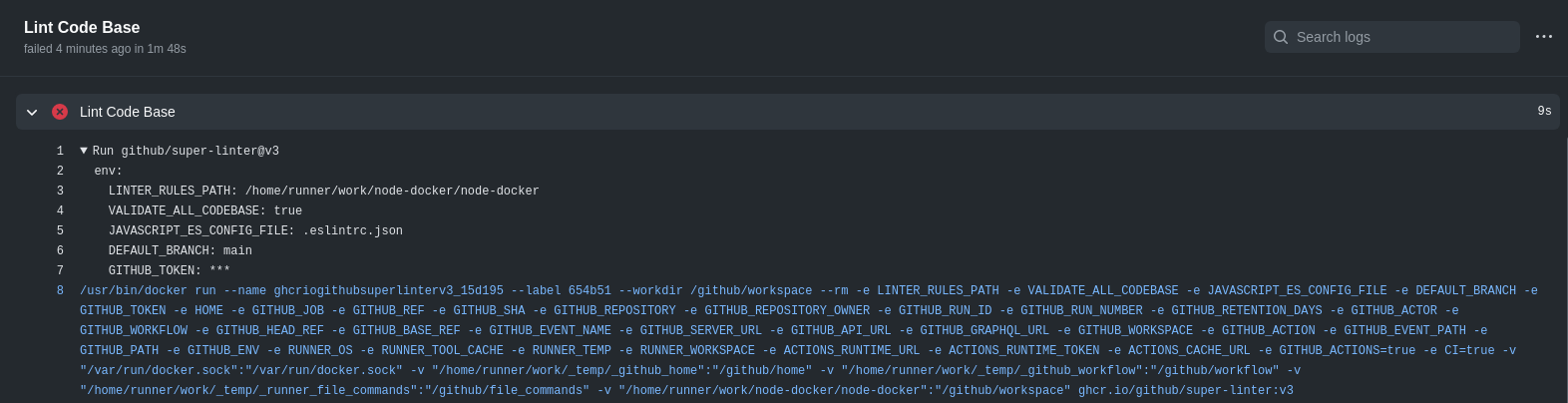

As you can see I've set LINTER_RULES_PATH to the workspace of my code, but still fails.
Is there anything that I'm missing?
 gon1332
on 8 Nov 2020
gon1332
on 8 Nov 2020
@gon1332 try adding VALIDATE_JAVASCRIPT_ES: true, and also try replacing LINTER_RULES_PATH: ${{ github.workspace }} with the directory where your .eslintrc.json file is located. For example, if your .eslintrc.json file is located in your repo's root directory, your LINTER_RULES_PATH ENV VAR should look like LINTER_RULES_PATH: / notice that the forward slash is used to define the root directory.
Also, take a look at: https://github.com/github/super-linter/blob/master/docs/using-rules-files.md to learn more about how to tell super-linter what your custom rule filenames are and where they are located.
Hopefully this helps. If not, please let us know.
josephmarino
on 13 Nov 2020
@josephmarino Nice! It worked. :D
gon1332
on 20 Nov 2020
Related issues
 ymd-h
·
3Comments
ymd-h
·
3Comments
 bbaassssiiee
·
5Comments
bbaassssiiee
·
5Comments
 DawidJanczak
·
5Comments
DawidJanczak
·
5Comments
 zkoppert
·
3Comments
zkoppert
·
3Comments
 sergey-muntyanu
·
4Comments
sergey-muntyanu
·
4Comments
Most helpful comment
@gon1332 try adding
VALIDATE_JAVASCRIPT_ES: true, and also try replacingLINTER_RULES_PATH: ${{ github.workspace }}with the directory where your .eslintrc.json file is located. For example, if your .eslintrc.json file is located in your repo's root directory, yourLINTER_RULES_PATHENV VAR should look likeLINTER_RULES_PATH: /notice that the forward slash is used to define the root directory.Also, take a look at: https://github.com/github/super-linter/blob/master/docs/using-rules-files.md to learn more about how to tell super-linter what your custom rule filenames are and where they are located.
Hopefully this helps. If not, please let us know.