Super-linter: Super-Linter Build step feels slow
Hello!
I've eagerly setup Super-Linter and found that it is by far slowest GitHub Action that I run against my PR.
Build github/[email protected] step has taken 4m 27s to complete.
My GitHub Action defined as follows:
---
###########################
###########################
## Linter GitHub Actions ##
###########################
###########################
name: Lint Code Base

#
# Documentation:
# https://help.github.com/en/articles/workflow-syntax-for-github-actions
#

#############################
# Start the job on all push #
#############################
on:
  push:
    branches-ignore:
      - 'master'

###############
# Set the Job #
###############
jobs:
  build:
    # Name the Job
    name: Lint Code Base
    # Set the agent to run on
    runs-on: ubuntu-latest

    ##################
    # Load all steps #
    ##################
    steps:
      ##########################
      # Checkout the code base #
      ##########################
      - name: Checkout Code
        uses: actions/checkout@v2

      ################################
      # Run Linter against code base #
      ################################
      - name: Lint Code Base
        uses: github/[email protected]
        env:
          VALIDATE_ALL_CODEBASE: false
          VALIDATE_YAML: true
Is there anything that I am doing wrong?
Are there any suggestions on how I can make it go faster?
 dmitri-lerko
All 7 comments
Hey there!
Check out the bottom note at: https://github.com/github/super-linter#example-connecting-github-action-workflow, namely:
NOTE: Using the line:uses: docker://github/super-linter:v2.1.0 will pull the image down from DockerHub and run the GitHub Super-Linter. Using the line: uses: github/[email protected] will build and compile the GitHub Super-Linter at build time. This can be far more costly in time...
It's time a while, because you are building the container yourself, instead of using the published image 😄
 Hanse00
on 22 Jun 2020
Hanse00
on 22 Jun 2020
Hey @Hanse00 ,
Thank you for the prompt reply. I've run it with the docker image and it only took 37s. Dramatic improvement. Also 👎 to me for not reading README properly
Feels like docker image should be presented as a default option here.
dmitri-lerko
on 22 Jun 2020
Check out the bottom note at: github/super-linter#example-connecting-github-action-workflow, namely:
NOTE: Using the line:uses: docker://github/super-linter:v2.1.0 will pull the image down from DockerHub and run the GitHub Super-Linter. Using the line: uses: github/[email protected] will build and compile the GitHub Super-Linter at build time. This can be far more costly in time...
It's time a while, because you are building the container yourself, instead of using the published image 😄
this note is no longer part of the readme.. is it still a good way to improve performance?
is there a particular reason why it is no longer part of the README?
 clxmstaab
on 14 Dec 2020
clxmstaab
on 14 Dec 2020
In https://github.com/github/super-linter/pull/577 it says that it is no longer required to prepend docker:// because it will happen automatically
 estensen
on 22 Dec 2020
estensen
on 22 Dec 2020
I see, thanks for your reply.
I got download times of a few minutes, therefore got the impression I am facing the same issue (private repo):
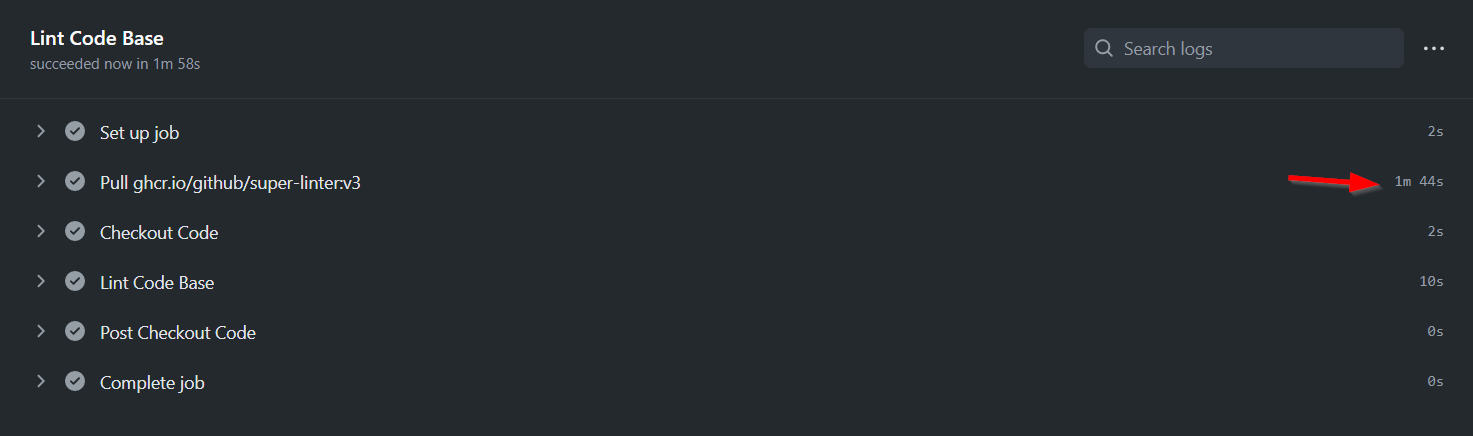
but as you say, it seems it was even slower before and what I am facing here is the expected download time.
clxmstaab
on 23 Dec 2020
It's very slow for me too. Takes between 1m 44s and 1m 57s to pull the image.
estensen
on 23 Dec 2020
Same here, very slow.
 angristan
on 21 Feb 2021
angristan
on 21 Feb 2021
Related issues
 ymd-h
·
3Comments
ymd-h
·
3Comments
 jimsmith
·
5Comments
jimsmith
·
5Comments
 MuhaddiMu
·
3Comments
MuhaddiMu
·
3Comments
 bbaassssiiee
·
5Comments
bbaassssiiee
·
5Comments
 thehesiod
·
4Comments
thehesiod
·
4Comments
Most helpful comment
It's very slow for me too. Takes between 1m 44s and 1m 57s to pull the image.