Sumatrapdf: PDF liquid/reading mode
Not entirely sure if this falls within the purview of Sumatra, but is it possible to implement a liquid mode/reading mode?
 DhruvaSambrani
All 12 comments
Mupdf make a point that they provide code to Adobe for mobile devices.
Liquid Mode is designed by Adobe for mobile devices.
However I suspect the two may not be connected.
Either way I am not sure that the Mupdf libs as they stand have any related code to build upon, and although tentative SumatraPDF fork feelers were made towards android / smaller factor arm based processors, I have yet to see any working results.
But @kjk may have different insights on this issue
 GitHubRulesOK
on 11 Dec 2020
GitHubRulesOK
on 11 Dec 2020
I too think mupdf doesn't handle this.
The thing is that I often read academic papers which are 2 or 3 columned. Scrolling in such a document is weird. If this is easy to implement within Sumatra, then it would be so much easier to run the document through some code to get nice single columned PDFs.
So the use case is not the same as what Adobe made it for, but yeah.
DhruvaSambrani
on 11 Dec 2020
Page split/rebuild mods is a heavily covered topic by SumatraPDF users sometimes adding/building front-ends/gui alternatives (soPdf was built around older SumatraPDF) and other pdf tools such as briss on PDF forum https://www.mobileread.com/forums/forumdisplay.php?f=184 most notable SumatraPDF user is Willus (https://willus.com/k2pdfopt or https://willus.org/k2pdfopt ) and he recommends using Word 2013 or later !!
GitHubRulesOK
on 11 Dec 2020
@DhruvaSambrani
I am NOT suggesting you go down this path but your query tickled my interest as to can SumatraPDF split pages, The answer is generally no, and controlling printer output was/is notoriously difficult if you don't work within limitations however it is possible in windows to define your own half page outputs (50% is defined as margin) then use newest SumatraPDF paper settings to print to each half as images like this.
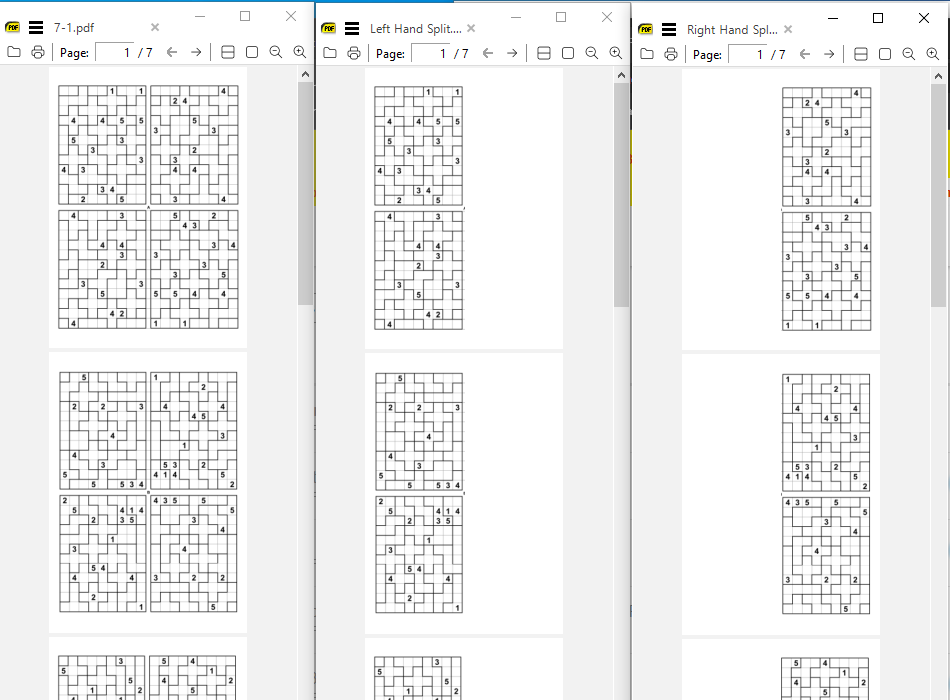
Using other workflow those two sides could then be interlaced as 14 pages (again SumatraPDF can do that via a .vbkm template but there are much better CLI tools) and then cropped as discussed in Fit width to content width (page crop view) #767
In fact using the cropping tool pdfCropMargins directly on the source split into 2 x single page outputs (i.e. mask each half) would be much simpler and efficient, for batch processing and although it would be double the source size its likely to be less resource hungry than SumatraPDF image printed output
The most effective method would be to use a tool to cleve the source pages in half and thus we are full circle to finding a means of efficient page reflow, which may be possible using better / more efficient half page vector orientated virtual PDF printers,
The best I expect from SumatraPDF version 3.0 would be only the left half page, similar to this
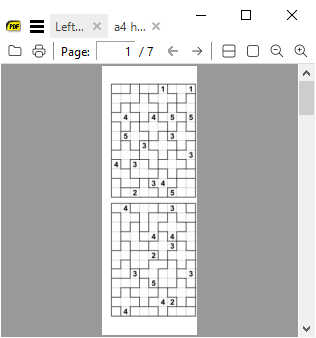
though I could possibly use a rotate tool to flip all pages 180 befor printing and back again, its too much trouble just for a proof of concept.
GitHubRulesOK
on 12 Dec 2020
I guess a lot of people have these fringe case problems. Is it possible to setup a plugin system? And then allow plugin creators to showcase their products on the main site (updates via PRs to the website)? I'm not entirely sure if Sumatra already has a Plugin system, but I had a simple "Sumatra PDF plugin" Google search, but nothing interesting came up.
DhruvaSambrani
on 12 Dec 2020
There is no formal API though some tentative work was done and others have forked towards a dll
I often use autohotkey to drive specific workflow tasks
some ways to hook in lower level were as discussed by Nod5 in controlling now redundant highlight extensions
There was the old browser netscape plug-in (which still works in waterfox)
there is the DDE call backs and as you know it is possible to call external CLI app with filename and page number ( and I would hope eventually 🙂 a users search selection)
GitHubRulesOK
on 12 Dec 2020
Oh right! External CLI should be enough for this!
Then all Plugin Makers would need to do is create an exec. Sumatra can then call it with whatever cli necessary. It won't be that deeply integrated, but I don't think you need anything like that anyway. Most PDF tools work on the file, which can be accessed by %1 anyway :smile:
DhruvaSambrani
on 12 Dec 2020
But you can't implement callbacks with that, can you? Like for this case, if I wanted to run it through k2pdfopt, I'd do k2pdfopt --some-options %1 --output-arg %1_1col.pdf to create the 1 column file, but I can't auto open it. Is it possible to implement some well defined signals with some data being returned back to Sumatra for further steps? Like in this case, SIG_OPENFILE would be the signal with path_to_new_file as the data.
DhruvaSambrani
on 12 Dec 2020
SumatraPdf does not lock %1 (PDF only, AFAIK not other types) if its under 32 MB (was 10 MB) that's why it is used by ad hoc pdf compilers such as PDF LaTeX.
the 2way calling is usually via forward/inverse cli or older dde signals. (but dde is rarely needed for externalviewers.)
when triggered with double click pdf in SumatraPDF the external command is run and then editor makes changes prior to refocusing altered file in SumatraPDF.
So for manipulations I tend to CMD copy current file to backup.pdf, and process that with CLI to replace %1 which on local drive (especially works well on NTFS but may not work well with syncing tools) SumatraPDF will reload automatically once the servicing app signals file completion. I gave such examples in forum and linked here is one using a cmd here https://github.com/sumatrapdfreader/sumatrapdf/issues/1005#issuecomment-389344244 but the CMD call could equally be a one liner using ampersands without the need for an intermediate batch file, cmd files just make it easier to debug / expand to multiple steps
GitHubRulesOK
on 12 Dec 2020
But isn't it worthy to add a specific locations where Sumatra looks for plugins? For now, it could simply run the plugin on the main file like you explained, but later, we can extend it to message back results.
DhruvaSambrani
on 15 Dec 2020
Since I work mainly with portable version, as possibly do many others, and since there are sometimes usage rights with installed copies the easiest location to nominate for plugins root is the directory that contains SumatraPDF-settings.txt.
I thus personally tend to add routines as \SumatraPDFsome name i like\sub settings & exes mixed
There are potential pitfalls to that approach
As a subdir it may be obliterated on update, which I seem to recollect can happen with installed version
The exe[s] may be in a remote location (and may not be on path) however when running utilities relative from SumatraPDF that should not be a problem in scripting.
Thus I generally for my own usage use locations all over the place, and agree that is messy and inconsistent for a plugin approach. I favour using SumatraPDF\Addins\unique name1\ or SumatraPDF\Plugins\name of plugin\
where SumatraPDF folder is the one with settings not the one with exe, however they will often be the same.
GitHubRulesOK
on 15 Dec 2020
@DhruvaSambrani
as a result of this discussion I am looking at collecting my various mods into one common folder beneath \SumatraPDF\
I call it Addins (they are not true plugins) and each utility will have its own folder, I attach a template script I wrote for the root folder to illustrate how simple mods to settings may be achieved even using CLI but there are much better ways that would benefit from fuller integration e.g. my AutoHotKey 9 choices Web search can read aloud the selection etc. but it requires better hooks hence my interest in your pull-request
GitHubRulesOK
on 16 Dec 2020
Related issues
 wins9900
·
7Comments
wins9900
·
7Comments
 yozhic
·
5Comments
yozhic
·
5Comments
 kloked
·
6Comments
kloked
·
6Comments
 kbitlive
·
7Comments
kbitlive
·
7Comments
 lanhktc
·
3Comments
lanhktc
·
3Comments