Sumatrapdf: Unable to run as standard user
First thanks a lot for this nice PDF reader! :-)
I have an issue with the latest version (3.2) on Windows 10 64-bit version 1909. The installer SumatraPDF-3.2-64-install.exe puts Sumatra PDF inside the account of the administrator user running the installer :
C:\Users\<Name of the Admin>\AppData\Local\SumatraPDF\
So standard users cannot access it.
This problem does not occur with version 3.1.2 as this version puts Sumatra PDF in C:\Program Files.
 gsutre
All 8 comments
This is a duplicate of Security problems with 2 user install #1414
You need to uninstall a single user installation then do fresh installation into Program Files for multiple users
 GitHubRulesOK
on 18 Mar 2020
GitHubRulesOK
on 18 Mar 2020
As far as I remember, I did my first install of Sumatra PDF 3.2 using an admin account and no choice of single-user/multiple-user install was given. The software was directly installed inside the admin account. Did I miss something?
gsutre
on 18 Mar 2020
There appears there was a policy shift from encouraging use of Program files with attendant issues .
Version 3.2 presumes fresh single users will benefit from a user/appdata/local based install (and usually re-installs over Program Files if existing multi-user files are detected)
However administrators installing for multiple users should be aware of the problems when a single user application is assigned to multiple users. Hence, my request to include a reminder.
GitHubRulesOK
on 18 Mar 2020
As far as I remember, I did my first install of Sumatra PDF 3.2 using an admin account and no choice of single-user/multiple-user install was given.
@gsutre: Unfortunately the installer by default hides certain options, including the install path. Click the appropriately named Options button like so:
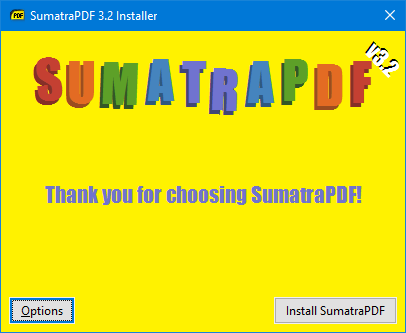
To reveal the following where you can change the install path among other things:

@kjk: This new install location was bound to cause issues as I predicted. The installers for 3.2.1 in case it's planned to be released soon, otherwise updated ones for 3.2 definitely need to do away with the hidden options IMO, so that folks aren't caught by surprise and can at least modify the path as per their needs. (Frankly, I still wish for the default to be set back to Program Files, but this would be an acceptable compromise.)
 SumatraPeter
on 19 Mar 2020
SumatraPeter
on 19 Mar 2020
Re-run the installer and change install location.
As to Options, they'll be hidden by default.
Sumatra's philosophy always was: simplicity and solving 80% of use case.
Chrome doesn't ask by default for install location because it's unnecessary burden for 99% of the people.
For the 1%, the option is there but they have to click the button, read the docs and understand the consequences.
 kjk
on 19 Mar 2020
kjk
on 19 Mar 2020
Thanks to all for the help, I did miss something: the Options button. My bad.
However, I do agree with others that the installer should be more explicit about this. The current behavior is definitely not user-friendly for standard users (I mean users logged in with a standard non-admin account). A standard user who uses the installer, provides the admin credentials when UAC asks for them, and then simply clicks on Install, will get a broken installation (as Sumatra PDF will be installed inside the admin account). This seems to be a fairly common use case to me.
gsutre
on 19 Mar 2020
Chrome doesn't ask by default for install location because it's unnecessary burden for 99% of the people.
The point is not to _ask_ by default for the install location, but to simply _display_ it by default instead of hiding it. I simply don't see what hiding these 3 things (path + 2 checkboxes for preview/search) accomplishes. There's a great argument to be made for simplicity, and the program itself exemplifies it. Hiding things in the installer however is not only obvious overkill, but clearly is causing various issues, leading to unnecessary uninstalls/reinstalls for folks who missed the Options button (and there are many as we've seen over the years).
Even non-technical users who've installed practically _any_ program have seen the install path displayed, even if they've had no cause to tweak it and just went along with the default, so I really don't think anyone's going to be "unnecessarily burdened" simply by unhiding those options. Quite the opposite in fact, because it not only prevents them from missing out on features they might not even know the program includes, but also reduces subsequent complaints.
SumatraPeter
on 20 Mar 2020
@kjk: On a Windows 10 machine, I confirm this problem with 3.2 x64, no problem with 3.1.2 x64.
Can you reopen this ticket and release a 3.2.1 with the solution?
Thanks in advance.
 Neustradamus
on 22 May 2020
Neustradamus
on 22 May 2020
Related issues
 Aliaksandr3by
·
4Comments
Aliaksandr3by
·
4Comments
 StefanSchroeder
·
7Comments
StefanSchroeder
·
7Comments
 lanhktc
·
3Comments
lanhktc
·
3Comments
 kyle-goodwin
·
7Comments
kyle-goodwin
·
7Comments
 banbonic
·
4Comments
banbonic
·
4Comments
Most helpful comment
Thanks to all for the help, I did miss something: the Options button. My bad.
However, I do agree with others that the installer should be more explicit about this. The current behavior is definitely not user-friendly for standard users (I mean users logged in with a standard non-admin account). A standard user who uses the installer, provides the admin credentials when UAC asks for them, and then simply clicks on Install, will get a broken installation (as Sumatra PDF will be installed inside the admin account). This seems to be a fairly common use case to me.