Sumatrapdf: Please add smooth touchpad support
I have a Thinkpad with a synaptics touchpad and the newest version of windows. It would be nice to have smooth touchpad scrolling and zooming (not in steps) as it is already possible when using the touchscreen and sumatra.
 vvRFvv
All 4 comments
I don't know what "smooth scrolling and zooming" means in this context.
Zooming will always happen in steps because it's very expensive operation.
Scrolling already happens in small increments (assuming contiguous layout), which should be true for mouse, touchpad and any other device that generates scroll events.
 kjk
on 1 Sep 2016
kjk
on 1 Sep 2016
Please take a look at the video. First I use the touchscreen to scroll and zoom, then the trackpad. Especially the zooming with the trackpad has huge steps.
vvRFvv
on 2 Sep 2016
Yes, this already works, but Sumatra is ignoring the input.
You also already can scroll smoothly when you hold the right mouse button and move the mouse, but then you are forced to release the RMB and move to another place to scroll again. On a laptop this is very unconvenient.
When using precision touchpad the two finger scroll should be smooth as well then.
I would very appreciate if this feature could be implemented.
 myphs
on 20 Jan 2020
myphs
on 20 Jan 2020
SumatraPDF is not ignoring any scroll input it is respecting the inputs from Windows telling it to move # lines of text
Touchpad or mouse scrolling (much the same as font sizes) is tied to the OS (Windows settings) there is no 0.01 line granularity it is simply # of lines in a step range of 1 to 99 (or page by page)
Please write to Bill G and his team to change that.
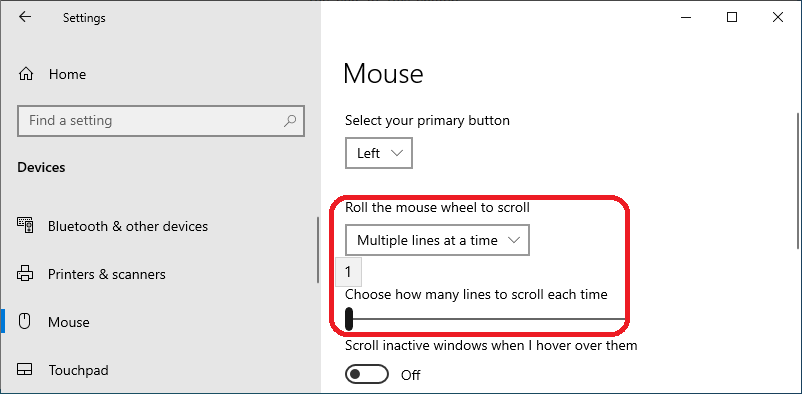
SumatraPDF uses an engine that is similar in reaction to similar document apps (check out your word Pad etc. and yes large programming teams can bypass that limitation in most paid for applications)
The next best option is Auto scroll drivers which are common on the middle button of a mouse but not always found on touchpads Please write to Synaptics or others to add that option if it is missing.
The third option is coasting not usually found on mice but may be offered on some touchpads however it is normally tied to the default number of full lines as above.
Finally, we have the fall back of smooth grab'n'drag as described by Myphs Which, if you have enabled vertical scrolling on your touchpad, can be achieved within the hardware limits by holding down the right button and sliding a finger up and down the slider zone.
Zooming is a different matter, as stated above SumatraPDF uses zoom steps (again similar to many other apps) you can edit the settings file to change the step percentages between 8.33 and 6400.
ZoomLevels = 8.33 12.5 18 25 33.33 50 66.67 75 100 125 150 200 300 400 600 800 1000 1200 1600 2000 2400 3200 4800 6400
ZoomIncrement = 0
 GitHubRulesOK
on 18 Feb 2020
GitHubRulesOK
on 18 Feb 2020
Related issues
 banbonic
·
4Comments
banbonic
·
4Comments
 kbitlive
·
7Comments
kbitlive
·
7Comments
 lRadha
·
4Comments
lRadha
·
4Comments
 zeniko
·
5Comments
zeniko
·
5Comments
 gblazex
·
7Comments
gblazex
·
7Comments