Sumatrapdf: When hovering over highlighted region, comment is only shown for about 5 seconds
It would be great if the comment could be shown indefinitely.
 petebachant
All 19 comments
To add on: It would be pretty neat if users can click on a comment, read through it and then click somewhere else in the PDF to exit the comment box.
 powerpuff88
on 5 Oct 2017
powerpuff88
on 5 Oct 2017
I'd like to see the ability to click comments for a draggable comment box that I can close when I'm done with it; this is useful when a comment might be relevant to multiple areas in the text, but is not repeated at every instance.
Of course, with lightweightness being a concern, I'd be happy for just petebachant's suggestion of indefinitely-visible mouseover comments. As it stands, long comments (such as errata in rulebooks or remarks on academic work) are simply too difficult to read.
 archie-m-vist
on 14 Oct 2017
archie-m-vist
on 14 Oct 2017
I love to see this feature too. It is annoying that the tip window is gone before the tip is read. This behavior is different from Adobe Reader too.
 Paul2017C
on 15 Oct 2017
Paul2017C
on 15 Oct 2017
I'd love to see this feature implemented too.
 Vsevolod-Shustov
on 11 Nov 2017
Vsevolod-Shustov
on 11 Nov 2017
Any news on this feature?
 dany4president
on 27 Aug 2018
dany4president
on 27 Aug 2018
All, not the ideal answer but until there is a change in timer,
you can right click a comment and select the "Copy Comment" option then paste into another window i.e. a web site like this or the editor your using at the time or quickly start Notepad / WordPad to right click again and paste
[Later update]
As discussed below, the tooltip timer default of 5 seconds has a max of 32.767 seconds which is now used for most (not all) tooltips, and in addition, if you currently use pre-release you can also right click to view annotations including comments without a timer.
 GitHubRulesOK
on 31 Aug 2018
GitHubRulesOK
on 31 Aug 2018
+1, it's a pain to read long comments in Sumatra
 Tangvaffel
on 12 Sep 2018
Tangvaffel
on 12 Sep 2018
Yes, the short 'popup windows for comments' exists even in the latest prerelease.
I think this is a tooltip window and their display time can be extended via an api command, TTM_SETDELAYTIME message.
It would be more functional to display an editable text box for copy and paste.
Whatever approach is taken will be a necessary improvement to read commented pdf's!
 sky5walk
on 11 Oct 2018
sky5walk
on 11 Oct 2018
5000ms is the current default This value can be made smaller if desired , or simply click elsewhere.
5000 is the MAX allowed by Windows since a tip is a quick hint and a brief "comment" should be SHORT !
If commenters insist on abusing the term comment by including an essay then see my suggestion above.
"An infotip is a small pop-up window that concisely describes the object being pointed to"

@kjk since this feature works as intended at the max allowed by this method, I suggest it may require an alternative feature similar to the secondary (not currently exposed) dialog invoked by Ctrl+D twice
GitHubRulesOK
on 11 Oct 2018
sky5walk
on 11 Oct 2018
5000ms is the MAX allowed by Windows
@GitHubRulesOK: Can you point me to the MS doc where you read that the MAX possible timeout value for tooltip/infotip display is 5 secs. only?
I suggest it may require an alternative feature similar to the secondary (not currently exposed) dialog invoked by Ctrl+D twice
A modal dialog (or heck, even a non-modal one) for simple comment/annotation display? Gotta say that sounds like ridiculous overkill. It's not as if infotips can't be displayed for longer durations (have you ever checked out how long the infotip for file/folder info. in File Explorer remains visible?). And even if that's not possible in Sumatra for some strange reason, a custom infotip on hover would make far more sense than opening a separate dialog for viewing a simple comment.
See for example the comment infotip in Firefox:
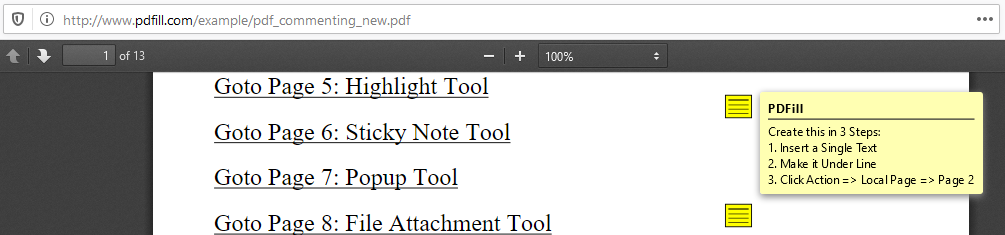
And the far uglier version in ChrEdge:
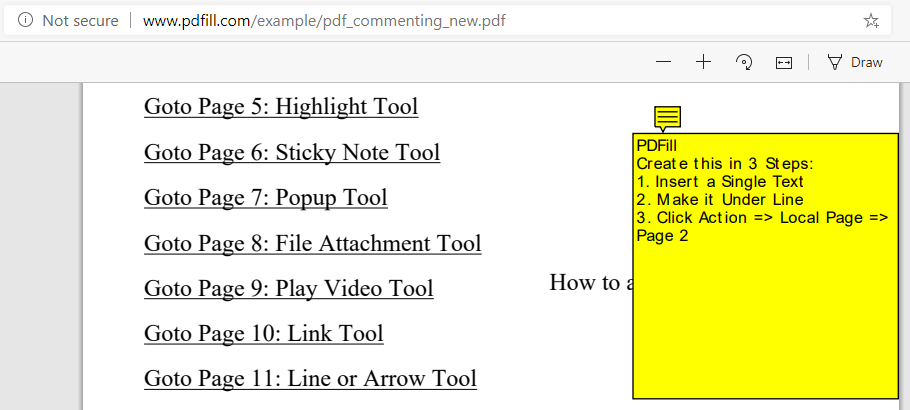
Both are custom implementations, and in both cases the infotips seem to stay visible indefinitely until the mouse pointer is moved away.
 SumatraPeter
on 10 Feb 2020
SumatraPeter
on 10 Feb 2020
@SumatraPeter
at the time I would have relied on msdn info which mentions setting.default up to 5000, however it looks like searching stackexchange/superuser comments the max is 16bit~32k thus 32760 should hold it for 32.76 seconds
@kjk
is it easy/possible to add the value setting for the max TTM timeout to 32 seconds ?
the user can always click away if they have read within that limit
GitHubRulesOK
on 10 Feb 2020
Hi @GitHubRulesOK
Under my test, we can add a statement in void TooltipCtrl::Show(const WCHAR* text, Rect& rc, bool multiline) to make the comment display for about 32 seconds.
diff --git a/src/wingui/TooltipCtrl.cpp b/src/wingui/TooltipCtrl.cpp
index 36d92d65c..dcc63d06e 100644
--- a/src/wingui/TooltipCtrl.cpp
+++ b/src/wingui/TooltipCtrl.cpp
@@ -68,7 +68,7 @@ void TooltipCtrl::Show(const WCHAR* text, Rect& rc, bool multiline) {
     ti.rect = rc.ToRECT();
     UINT msg = isShowing ? TTM_NEWTOOLRECT : TTM_ADDTOOL;
     SendMessageW(hwnd, msg, 0, (LPARAM)&ti);
-
+    SendMessageW(hwnd, TTM_SETDELAYTIME, TTDT_AUTOPOP, (LPARAM)32767);
     isShowing = true;
 }
 Enna1
on 3 May 2020
Enna1
on 3 May 2020
@Enna1
If that's holding tooltip for 32 seconds and any action elsewhere closes it (to move on) then that certainly would be a vast improvement
GitHubRulesOK
on 3 May 2020
@kjk
If the above apparent current max of 32.767 seconds (=32kb-1 millisecond) works across comments, bookmarks, other tooltips and dare I mention tab names 🙂 then can we close this issue as met by the system limit ?
GitHubRulesOK
on 3 May 2020
@GitHubRulesOK
I build a x64 release version for this, you can download it at https://github.com/Enna1/sumatrapdf/releases/download/Enna1-patched/SumatraPDF.exe
Enna1
on 3 May 2020
@Enna1 Thanks that's promising
My test suggest there may be a second affected location
Does work for 32 seconds on first screen OR comments OR Hyperlinks
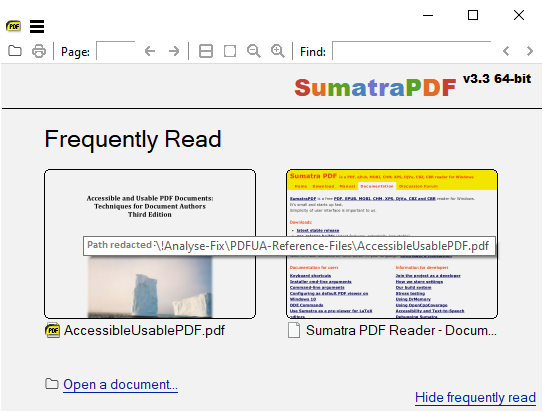
But only 5 seconds on bookmarks OR Toolbar tips 🙂
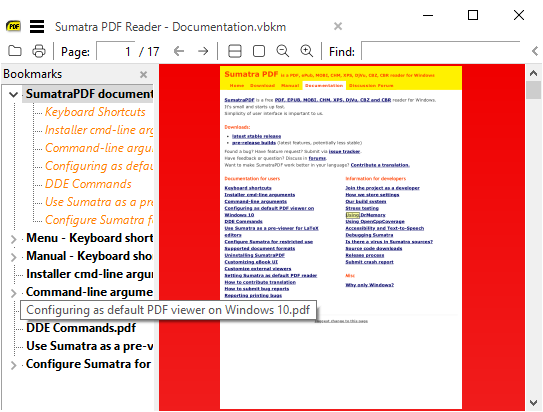
@kjk are there multiple related locations ?
GitHubRulesOK
on 3 May 2020
@GitHubRulesOK The reason it doesn't work for bookmarks view is: tooltip control is used internally by tree view. Not sure if there's a way to access it.
 kjk
on 5 May 2020
kjk
on 5 May 2020
@Enna1 , Thanks for your investigation
and
@kjk for the extended implementation
although toolbar icon "tooltips" are defaulting to 5 seconds, I think that is acceptable
GitHubRulesOK
on 5 May 2020
Related issues
 akontsevich
·
15Comments
kjk
·
15Comments
akontsevich
·
15Comments
kjk
·
15Comments
 joshua1000
·
26Comments
joshua1000
·
26Comments
 nbrummerstedt
·
15Comments
nbrummerstedt
·
15Comments
 deveee
·
18Comments
deveee
·
18Comments
Most helpful comment
@Enna1 , Thanks for your investigation
and
@kjk for the extended implementation
although toolbar icon "tooltips" are defaulting to 5 seconds, I think that is acceptable