Sumatrapdf: Notify user of missing fonts if any, and add feature to display complete list of fonts used in the document
As mentioned by @kjk here: https://github.com/sumatrapdfreader/sumatrapdf/issues/330#issuecomment-152665699
A missing font is actually a frequent problem. It would be a good idea to add some notification when this happens that would list missing font(s) and link to an explanation page.
In addition, as mentioned by me on the forum, it would be great to see the "list all PDF fonts by pressing Ctrl+D twice" feature from Zeniko's dev build (see #23) added to the stable release (and also have it work for other formats besides PDF if relevant).
 SumatraPeter
All 10 comments
I fully support this request.
 Alfonsib
on 10 Nov 2015
Alfonsib
on 10 Nov 2015
@SumatraPeter
I am closing #23 as superseded by this one
Since your request here is broader, to both show document embedded fonts in PDF (which is usually disabled in formal release, perhaps due to performance concerns as stated in https://github.com/sumatrapdfreader/sumatrapdf/issues/23#issuecomment-66515521 ) and you also mention missing PDF font info. I suggest "other formats" such as CBx that do not normally include fonts is opened as a separate Issue as mentioned in https://github.com/sumatrapdfreader/sumatrapdf/issues/170#issuecomment-155112142
 GitHubRulesOK
on 3 Feb 2020
GitHubRulesOK
on 3 Feb 2020
@GitHubRulesOK: Thanks, and yeah, this is the broader issue. The "other formats besides PDF if relevant" that I also wanted the font info. dialog to work with were obviously text-based ones like EPUB, MOBI, DJVU etc. It makes no sense to open another issue for image-based formats such as CBx.
BTW, any concerns related to the time taken to retrieve & display font info. from a document are not all that hard to overcome. After all, many other PDF viewers/editors (even JS-based ones running in a browser) manage it just fine. Heck, I and I'm most others interested in this would gladly put up with a non-modal dialog that uses a secondary thread to retrieve the data and displays a progress bar until done. In any case so far I haven't come across any files that zeniko's pre-release versions took inordinately long to display the font info. for, so I really don't know why this useful feature has been kept on hold for more than half a decade now.
P.S. I guess you've been granted the right by kjk to close issues opened by others?
SumatraPeter
on 3 Feb 2020
Yes I got the burden of not bugging kjk 🙂 with high numbers of closures or tags. There is no "Consolidate Button" as far as I can see, so I am having to cross-link comments before closure.
My point about images is that is what you used as an example for a non font file in https://cloud.githubusercontent.com/assets/15380332/11038990/a8975a8a-872b-11e5-8c53-c1e0a064a47e.png and I didn't want to close #170 without that aspect being covered.
GitHubRulesOK
on 3 Feb 2020
Good luck with the scut work! 🙂
SumatraPeter
on 3 Feb 2020
I am using 3.1.2 64 bit. Ctrl +D brings up the properties but a second one does not bring up font info. Tested on 3 pdfs.
 boardtc
on 15 May 2020
boardtc
on 15 May 2020
@boardtc
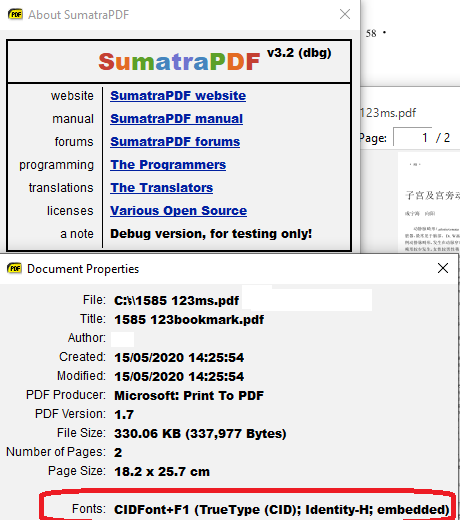
That is the reason for this thread the Double CTRL D has to be specified when compiling from code so is non functional in Formal / Pre-release / Daily versions
it is active in the considerably larger / slower debug version and the font info in a PDF is often not that useful to most users Font names could be Alice Bob or Cid it does not tell you that SimSun was used to generate the file
GitHubRulesOK
on 15 May 2020
Thanks for explaining. I just assumed Calibri or Times New Roman, etc would be stored in the pdf format.
boardtc
on 15 May 2020
@boardtc
In some cases the name does follow the source used but its not required thus less common here one small part of the visible fonts includes a clue that some parts are Times Roman but i might have guessed that anyway

GitHubRulesOK
on 15 May 2020
Whilst many fonts may be well specified in a PDF they sometimes are not for embeded fonts.
Here I have intentionally masked the fonts used to show what can happen when poorly defined or missing.
Often the font may be infered from the way an object is rendered but here the stamp has no definition and many a PDF reader will use a Sans Serif font but MuPDF has defaulted to TiRo (Times Roman)
Adobe will sometimes fall back to its own fonts even when embeded so here has declared Adobe Sans MM for AliceBob&Cid whereas Foxit will show it as Foxit Sans MM and MuPDF appears to be using a different font style for the embeded sans-serif. Frequently it is an Arial for Swiss/Helvetic forms but the "a" glyphs are not like MS Arial as far as I can tell.
Foxit does well with its replacements for both cases
In comparison Adobe and MuPDF have problems but the Missing Font name is no clue as to either problem or how to resolve them.

GitHubRulesOK
on 4 Jun 2020
Related issues
 zeniko
·
5Comments
zeniko
·
5Comments
 gblazex
·
7Comments
gblazex
·
7Comments
 carlvn
·
3Comments
carlvn
·
3Comments
 lRadha
·
4Comments
lRadha
·
4Comments
 kyle-goodwin
·
7Comments
kyle-goodwin
·
7Comments
Most helpful comment
I fully support this request.