Sulu: Let the user trigger routes from the CMS
Problem description
We'd like to have a opportunity to let the CMS user trigger a symfony route from the CMS.
Use case 1:
We have an entity that gets filled by submitting data from the website to an custom controller endpoint.
The customer would like a button somewhere in the CMS that he can click and trigger an symfony route with for example a download response from an export route (leage/writer CSV file).
Use case 2:
Let the user trigger the update of vacancies from an endpoint and update all documents.
Proposed solution
As @danrot proposed something like a LinkToolbarAction would be nice.
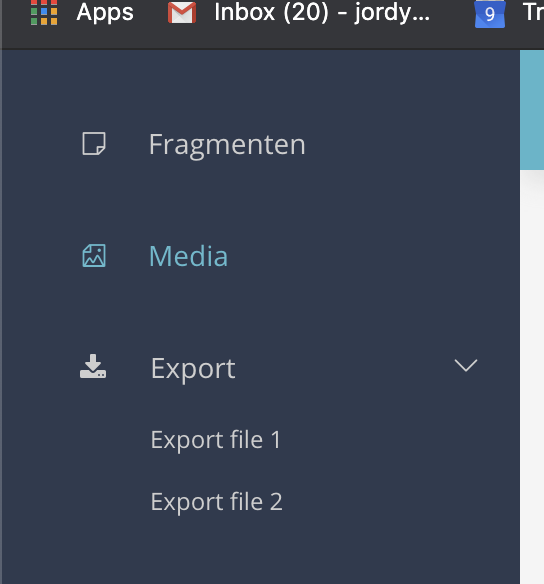
Or maybe a NavigationItem where we can set a URL on it instead of setup a view and everything.
So the customer can trigger: /api/export/something from the CMS.
Examples below:

 jordygroote
All 8 comments
I've started implementing this, and in a first draft I came up with something like this:
$listToolbarActions[] = new ToolbarAction(
    'sulu_admin.link',
    [
        'url' => 'http://www.google.at',
        'label' => 'sulu_admin.blabla',
        'icon' => 'su-focus',
    ],
);
I think label and icon are pretty simple and uncontroversial, since it just works as in other ToolbarActions. But the url is more interesting.
I am wondering if we should use a url attribute, since it would allow to do anything. However, it is not optimal regarding Symfony integration. Alternatively we could use a route_name and route_parameters attribute, which would allow to just pass the name of the route in Symfony in addition to some parameters that might be necessary to generate valid URL.
@jordygroote Would only supporting the route_name and route_parameters be good enough for your use case?
@sulu/core-team WDYT? Should we maybe even support both variants? (Although that is usually my least favourite way of doing things).
 danrot
on 22 Jun 2020
danrot
on 22 Jun 2020
I don't have a strong opinion about url or route_name/route_parameters, but there should definitely be the possibility to use placeholders, e.g. for id in forms or locale on lists.
 luca-rath
on 22 Jun 2020
luca-rath
on 22 Jun 2020
@danrot
@jordygroote Would only supporting the
route_nameandroute_parametersbe good enough for your use case?
This would be perfect!
jordygroote
on 22 Jun 2020
I think both usecases (urls/routes) are valid. Maybe there should be a RouteToolbarAction for routes and a LinkToolbarAction for external links?
 nnatter
on 22 Jun 2020
nnatter
on 22 Jun 2020
I think both usecases (urls/routes) are valid. Maybe there should be a
RouteToolbarActionfor routes and aLinkToolbarActionfor external links?
Great idea :)
jordygroote
on 22 Jun 2020
@jordygroote Just to be sure: You are looking for a way to trigger these URLs/routes in an AJAX request, not to open something in a new tab or the current window, right?
danrot
on 22 Jun 2020
If the toolbar action is doing a ajax request, the name LinkToolbarAction is in my opinion totally misleading. For me a Link or Route Toolbar Action should open the url in the current tab or allow to open in a new tab with a shift/cmd click (Example usecases would be to show a link to external system ERP / PIM or example Sylius).
If we are going to implement a ToolbarAction which does just do a ajax call, I would go with something like a TriggerToolbarAction (or TriggerLinkToobarAction / TriggerRouteToolbarAction) in that case it would also make sense to define the http method which should be used:
e.g.:
$listToolbarActions[] = new ToolbarAction(
    'sulu_admin.trigger_url',
    [
        'url' => 'http://www.google.at',
        'method' => 'POST',
        'label' => 'sulu_admin.blabla',
        'icon' => 'su-focus',
    ],
);
 alexander-schranz
on 22 Jun 2020
alexander-schranz
on 22 Jun 2020
@jordygroote Just to be sure: You are looking for a way to trigger these URLs/routes in an AJAX request, not to open something in a new tab or the current window, right?
Yes, i think the route option would be okay to do as an Ajax request since my use case would be to create an export and send it via mail or something.
However the url option i think should trigger a new tab or load in current tab as alexander mentions, i think this is also needed to trigger a download response?
Maybe LinkToolbarAction and TriggerRouteToolbarAction
jordygroote
on 22 Jun 2020
Related issues
alexander-schranz
·
3Comments
 MichelFalke
·
5Comments
MichelFalke
·
5Comments
 Quehnie
·
9Comments
Quehnie
·
9Comments
 mtnorthrop
·
6Comments
mtnorthrop
·
6Comments
 lightglitch
·
11Comments
lightglitch
·
11Comments
Most helpful comment
I think both usecases (urls/routes) are valid. Maybe there should be a
RouteToolbarActionfor routes and aLinkToolbarActionfor external links?