Suitecrm: Account Selector Checkbox in User's Inbound Email Account Profile is incorrect
Issue
I experienced flakiness on my my migrated 7.10.25 installation wrt a non-Admin user being unable to see an Inbound Email Account on the Emails module. So I installed a clean 7.10.25 version but still had the same issue.
As part of my investigations I discovered that the state of the Mail Accounts selector checkbox in the user's profile is always Checked on initial entry - regardless of the state of the back-end database. Apart from anything else, this makes it hard to diagnose the Inbound Email problems being experienced.
Expected Behavior
The displayed state should accurately reflect the true current state in the database
Actual Behavior
In the Mail Accounts tab of the user's profile, toggle the selector for the Inbound Email several times, and then leave in the deselected state. Press DONE to close the popup, and navigate away from, then back to the User Profile. Open the Mail Accounts pop-up and the account is shown as selected again.
Notes
- The folder subscriptions in the back end database do get modified immediately as the checkbox is toggled on this panel. This results in the database state potentially not matching the checkbox state on initial entry to the popup. Toggling the checkbox several times, as detailed above, forces it to be in a known state.
Possible Fix
None
Steps to Reproduce
This is what I did as I started with a fesh clean installation. I'm sure it can be abbreviated, by starting at step 5
- Installed a clean 7.10.25 with demo data
- Configured LDAP auth and logged in as a second user (User2)
- Admin configured an outbound system unauthenticated email account
- User2 added a personal Office365 email account - works fine
- Admin User adds an inbound mail account - Test Settings work ok. "Allow users to send emails..." is checked (apparently this is necessary to allow sharing of the account).
- Go to the Admin user's Profile and onto the Mail Accounts tab. Deselect the checkbox for the inbound Email account, then select it again - this will make sure the database is in sync with the checkbox. Now deselect it one last time, and press DONE and close all popups.
- Refresh the User profile screen (or navigate away and back) and go back into the Settings / Mail Accounts tab. The Inbound Email Account will still show as selected, despite being deselected above.
Additional observations:
- I initially observed the above problem when logged in as User2. All folder subscriptions in the database seem to be removed and re-added correctly in realtime when the checkbox is altered, though again the Checkbox is always checked on entry to the Mail Accounts tab. But NOTE that the Inbound Email account was never shown on the Account selector in the Emails module - this is not the problem being reported here but is probably related
I experienced additional problems with the above narrative for the Admin user:
In step 6 after deselecting the account I still actually see in the database a couple of folder subscriptions for the Admin user for the Inbound Email: One for the INBOX, and one for a folder which has the same name as the Inbound Email account, though no folder-type. I don't know the purpose of this second folder - the ID doesn't appear anywhere else in the database apart from these two tables, so the use / linkage is unclear. Regardless the folder subscriptions are suspicious and may be an underlying cause for the failure.
In Step 7, if you also go to the General tab of the Mail Settings and look at the Folder Management list, both the Inbound Email Account and User2's personal account are listed and selected! Similarly if you go to the Emails module, both those accounts show in the Account Selector. Again thuis is not the reported problem, but is definitely related
If I logon as User2 and perform the activities in step 6 on User2's personal account (ie deselect it), then when I go back in on step 7, the account is not even shown on the Accounts tab! Though note the account still shows on the Folder Management listing on the General tab, and is selected.:
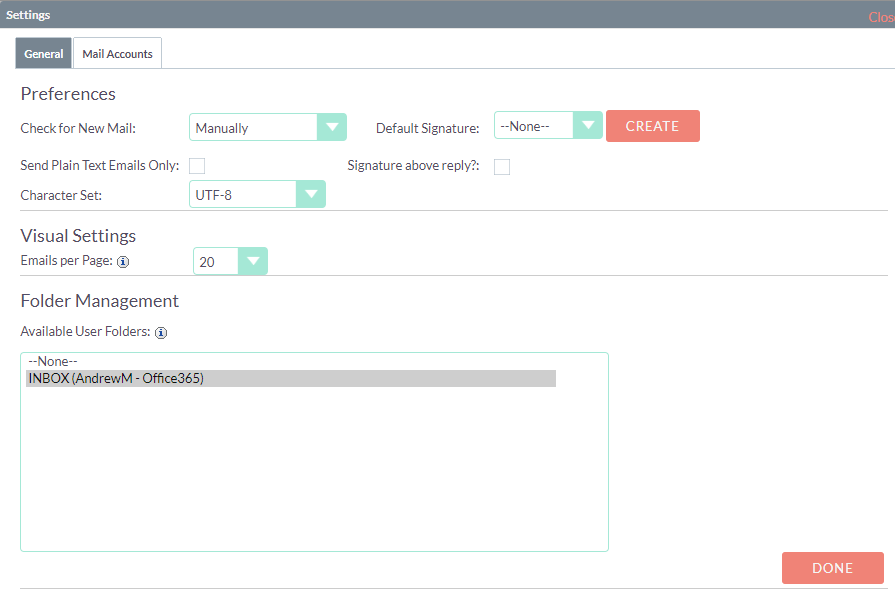
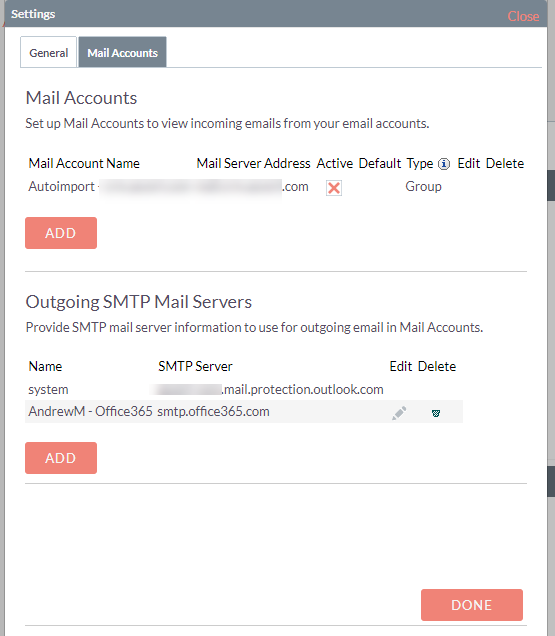
The account also still shows in the Emails module!

Again not strictly the problem being reported, but definitely related.
Context
The above behavior is obviously wrong and leads to uncertainty & lack of trust in the email operation. The Inbound Email operation is unusable for me.
Your Environment
SuiteCRM Version used: 7.10.25
Browser name and version (e.g. Chrome Version 51.0.2704.63 (64-bit)): n/a
Environment name and version (e.g. MySQL, PHP 7): MySQL: 5.7.30-0, PHP: 7.2.24
Operating System and version (e.g Ubuntu 16.04): 18.04
 andrmo
All 3 comments
Hi @andrmo,
Thank you for reporting the issue in such detail :+1: :+1: :+1:
This issue has been confirmed to exist and is replicable in the latest 7.10.x version.
Thanks :+1:
 Mac-Rae
on 1 Jun 2020
Mac-Rae
on 1 Jun 2020
Potential for being raised to critical due to how much of a pain this broken feature can be. Many forum posts has been made requiring explication to those who have struggled to work out themselves this now complicated CRM area.
Mac-Rae
on 1 Jun 2020
I think this ties in or could even be down to long standing issues with CSS that I've flagged in bug reports already.
So, in Google Chrome, there are no tick boxes displayed to subscribe a user (in admin) to a group inbox. It is not possible to select a single inbox. It is not possible to select a random combination of boxes and it is not possible to select none.
The tickboxes appear in Firefox. Although this is gut instinct, if the CSS isn't handling the user interaction properly, there'd be no way of access changes being successfully recorded and saved.
Notably, in Firefox, it is possible to select none along with all other group inboxes. None of them become available to the user however so it still doesn't work.
I have read that there is a new patch available but I presume that this has been rolled out as part of the most recent update.
Is there an assign button being hidden by CSS BTW as the assignment is clearly not being written - when it says it has saved the assignments, if you go and revisit, none are selected again. Thanks.
 greenlanegreb
on 13 Feb 2021
greenlanegreb
on 13 Feb 2021
Related issues
 Mausino
·
3Comments
Mausino
·
3Comments
 pgorod
·
3Comments
Mausino
·
3Comments
pgorod
·
3Comments
pgorod
·
3Comments
Mausino
·
3Comments
pgorod
·
3Comments
 darouca
·
3Comments
darouca
·
3Comments