Suitecrm: bug: Not able to send Email. SuiteCRM takes the wrong SMTP/Outgoing System Account
Issue
I am not able to send an email (as reply to an imported email in a case). Even though the correct Sender is selected in the drop down, SuiteCRM takes the "system" Outgoing Mail Account and then is not able to access this account due to permisson problems (see error log below).
1.) Configuration:

2.) Selecting the configured mailaccount, when sending a mail:
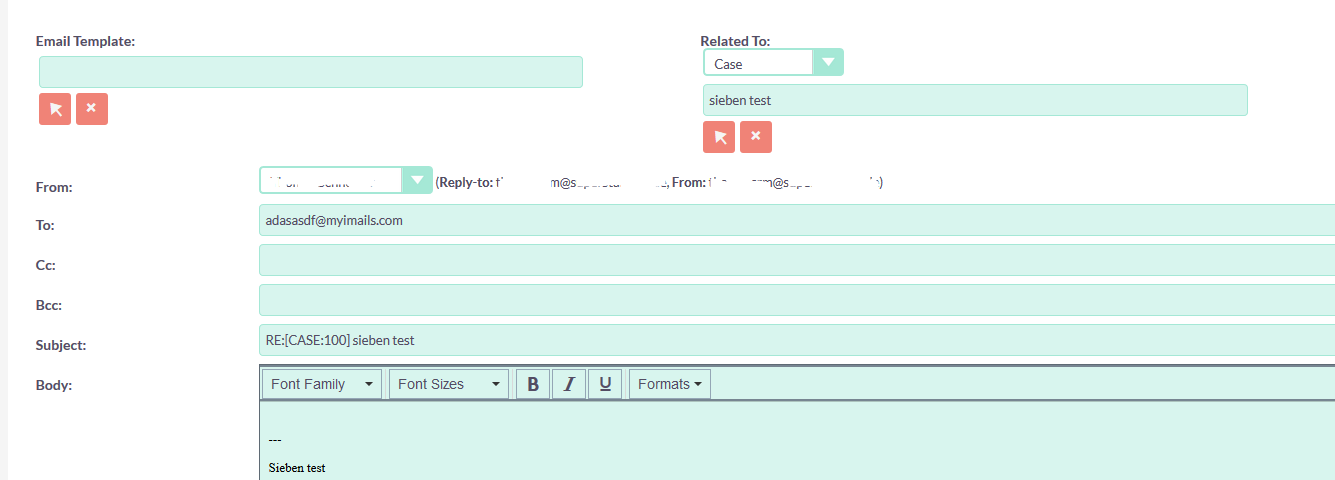
3.) Leads to the Mail not beeing send with the following log message:
Fri Nov 29 23:51:58 2019 [18942][ab24b9ed-5f0d-7b1e-8794-5de06622ec99][SECURITY] Email Error: Not authorized to use Outbound Account "system"
Fri Nov 29 23:51:58 2019 [18942][ab24b9ed-5f0d-7b1e-8794-5de06622ec99][SECURITY] User XXXX XXXX attempted to send an email using incorrect email account settings in which they do not have access to.
4.)
In the Email Creation Page there is this hidden value outputted. This is the system account, that I do not have acces to. But the problem is, this value has precedency over the Drop Down with the Emails. Only if the Drop Down Value is "changed" then the Drop Down Value is taken. If I have only one Email Adress in the DropDown, then no Change is possible and I can NOT sent mails at all. If I configure a second email and then swith to the second Email und then back to the first, it works (then the default value is overridden).
<input type="hidden" name="inbound_email_id" value="3da102c0-a099-9ff6-ce9f-5de066cd4651">
<select name="from_addr" id="from_addr_name"><option value="[email protected]" inboundid="d7c62e47-20f3-f133-1555-5de06e7ee52e" infos="
=>Effectively there are Two Bugs:
1.) This hidden value should not be outputtet there at all (as I can not use this value, I do not have rights to use it)
2.) The preceency of the selct should be higher then the drop down value. I assume as a user that not the hidden value is taken but rather the value of the visible Drop Down Field.
Expected Behavior
1.) If I compose an Email and choose my configured Personal Email Account, then I expect it to use this account's SMTP Settings for outgoing messages. But SuiteCRM uses the system Mailccount. But this lead to an error, as a normal user does not have permission/access to this system account.
2.) Furthermore I am wondering. Why is the system account shown in my personal Account settings at all? I would expect only to be shown here my personal Accounts that I can edit. (As can be seen in the screenshot, I am not able to delete/edit this system account, that is wrongly taken for the outgoing messages and then leads to a permission error)....
Steps to Reproduce
As documented in the three steps in the Screenshots.
Your Environment
- SuiteCRM Version used: Version 7.11.10
- Environment name and version (e.g. MySQL, PHP 7): BITNAMI Docker Container
 ichtestemalwieder
All 6 comments
@ichtestemalwieder thank you for these very complete email bug reports, I think they will be very useful to us.
May I ask, what do you have in Admin / Email Settings / Users may send as this account's identity? and Users may send as themselves?
 pgorod
on 30 Nov 2019
pgorod
on 30 Nov 2019
Hello pgorod. Thanks very much to you! Just wanted to say you helped me very much the last time in the forum with your answer (even on a weekend). And I stubmled upon your github pages with lots of good info. So thanks very much!
Users may send as this account's identity.
1.) Having this set to "Dissallow", then the email screen only outputs a single FROM Email Adresse (my configured personal Email Account) in the Drop Down. Then I am not able to Send emails at all. As described this screen has two bugs. As I have only one Value in the Drop Down for the from name, the system takes the hidden form value (precedenting the selects value) with higher precedence if I submit the page. As this hidden value is invalid, I can not sent mails at all.
2.) Having this set to "Allow", then the screen outputs two Email Adresses I can select as the from address. After rendering the screen if I now try to submit, I get the Error and nothing workings, like in 1.) If I however select the second entry, and then switch to the first entry back again, I can submit the Form as the hidden input value is overriden (my First entry is the Personal EMai Account I configured I want to sent the mail with...). This one of the two bugs: The Value must not be taken from the hidden form field after rendering the page but from the select.
The second bug is, that the value that is written in the hidden form field seems to be and ID of a configured Group INBOUND Email Account ID. This makes no sense at all. Here only outbound Emails make sense...
I do not really think they are related but better be safe than sorry: The Account in the hidden field is also outputted with an error of being duplicated:
Sat Nov 30 03:07:31 2019 [14075][ab24b9ed-5f0d-7b1e-8794-5de06622ec99][ERROR] Duplicated folder detected: 3da102c0-a099-9ff6-ce9f-5de066cd4651
This bug is documented here: https://github.com/salesagility/SuiteCRM/issues/7533
Users may send as themsevles :I think I always kept deactivated, as I think my mail provider does not support this due to security reasons.
ichtestemalwieder
on 30 Nov 2019
I am having the same issue. Is there any resolution or workaround?
 aimran50
on 23 Apr 2020
aimran50
on 23 Apr 2020
Does #8264 solve this for you?
pgorod
on 30 Apr 2020
Just following up from pedro's comment. Does #8264 help @aimran50 and @ichtestemalwieder
 samus-aran
on 28 Jul 2020
samus-aran
on 28 Jul 2020
@samus-aran Unfortunately, someone in the team did something to resolve it. Not sure what they did. If I find out, I will report back.
aimran50
on 8 Jan 2021
Related issues
 Mausino
·
3Comments
pgorod
·
3Comments
Mausino
·
3Comments
pgorod
·
3Comments
 Vhex
·
3Comments
Vhex
·
3Comments
 daschenbrener
·
3Comments
daschenbrener
·
3Comments
 likhobory
·
3Comments
likhobory
·
3Comments
Most helpful comment
Hello pgorod. Thanks very much to you! Just wanted to say you helped me very much the last time in the forum with your answer (even on a weekend). And I stubmled upon your github pages with lots of good info. So thanks very much!
Users may send as this account's identity.1.) Having this set to "Dissallow", then the email screen only outputs a single FROM Email Adresse (my configured personal Email Account) in the Drop Down. Then I am not able to Send emails at all. As described this screen has two bugs. As I have only one Value in the Drop Down for the from name, the system takes the hidden form value (precedenting the selects value) with higher precedence if I submit the page. As this hidden value is invalid, I can not sent mails at all.
2.) Having this set to "Allow", then the screen outputs two Email Adresses I can select as the from address. After rendering the screen if I now try to submit, I get the Error and nothing workings, like in 1.) If I however select the second entry, and then switch to the first entry back again, I can submit the Form as the hidden input value is overriden (my First entry is the Personal EMai Account I configured I want to sent the mail with...). This one of the two bugs: The Value must not be taken from the hidden form field after rendering the page but from the select.
The second bug is, that the value that is written in the hidden form field seems to be and ID of a configured Group INBOUND Email Account ID. This makes no sense at all. Here only outbound Emails make sense...
I do not really think they are related but better be safe than sorry: The Account in the hidden field is also outputted with an error of being duplicated:
Sat Nov 30 03:07:31 2019 [14075][ab24b9ed-5f0d-7b1e-8794-5de06622ec99][ERROR] Duplicated folder detected: 3da102c0-a099-9ff6-ce9f-5de066cd4651This bug is documented here: https://github.com/salesagility/SuiteCRM/issues/7533
Users may send as themsevles:I think I always kept deactivated, as I think my mail provider does not support this due to security reasons.