Suitecrm: error "Invalid email address given" - function populateBeanFromRequest - Cannot send smtp emails for Customers at all
What works in suiteCRM:
- can send Test emails
- can configure IMAP & open email accounts
- can send Assignment notification via email
Issue
cannot send outbound emails due to (parsing) error of (reply-to) email address
error visible in SuiteCRM log varies bit depending on selected email profile
Have created outbound email configurations from scracts in SuiteCRM 7.11
in email Compose dialog, there everything looks OK:

When pressing Send button in Compose dialog, it loops and never ends:
Expected Behavior is that email is sent.

Error is visible in SuiteCRM logs:
Wed Feb 6 08:58:42 2019 [8069][8e55fd63-1162-b0d8-3d65-5c496a6b1cbd][ERROR] Invalid email address given: [Markku Penttila
What hits to eye is that error row is missing some chars, as closing > is missing in the email inside [ ]: [Markku Penttila
When checked in database level using phpmyadmin; database is populated with incorrect format of the email, same as above in the error:

Trying to fix this manually in mysql-phpmyadmin is not successful, as SuiteCRM creates new record with incorrect emails at once.
Possible Fix
It looks that when an Outbound email is configured, email address is incorrectly written to db.
Previous leads to Reply-to parsing error when sending email using that outbound email Profile.
(notice that test emails & Profile - Advanced - Notify on Assignment emails are sent OK)
Steps to Reproduce - SuiteCRM 7.11
Minimum steps should be just to set new email address to your Outbound email to be used as Reply-to address
- Go to user Profile - Email settings - change email address and save it, have Reply-to ticked
- Go to Compose email dialog and select Profile saved in 1.
- If above is not enough, then you need set Email settings - Settings button & create new Outgoing SMTP Mail Servers
Context
Bug is fatal, as I cannot send outbound email to customers at all and I have not been able to find any workaround
Your Environment
SuiteCRM is out-of-the box upgrade SuiteCRM-Upgrade-7.10.x-to-7.11.1.zip.
Ubuntu 18.04, php7.2, mysql 5.7.25-0ubuntu0.18.04.2
 MarkuPe
All 24 comments
@MarkuPe ,
I'm unable to replicate you issue would you be able to give me anymore information to help me replicate your issue?
 jack7anderson7
on 7 Feb 2019
jack7anderson7
on 7 Feb 2019
Hello
I was able to fix it, thanks to Jack showing it is not generic. There were some leftovers of php5, even though phpinfo showed that only php7.2 was used. After removing those (actually mysql part), backing up CRM, reinstalling it & repairing after reinstallation, i was able to restore databases from backups and voila, also outbound email addresses are correctly stored to db.
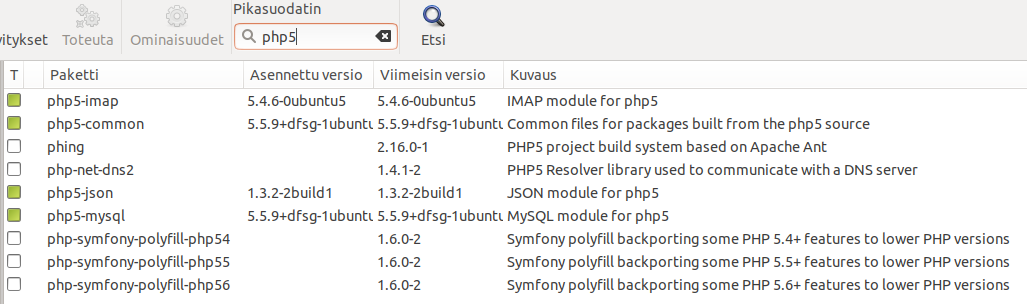
so case closed.
MarkuPe
on 9 Feb 2019
I'm having exact the same problem and I'm not understanding how to fix it :-( can someone help me?
Thanks in advance!
 mirkococco
on 12 Feb 2019
mirkococco
on 12 Feb 2019
Same problem here. Outgoing email has stopped working. I get the loop pop-up but, strangely, no errors in the log. I deleted and re-created outgoing email accounts but that had no effect.
@MarkuPe, I'm confused about your fix. When you say "back up CRM and reinstalling it", above, did you reinstall the back-up? or did you install a new 7.11.1 instance and reinstall the mysql database?
 apexred
on 18 Feb 2019
apexred
on 18 Feb 2019
Hi
I took db back-up, then removed php5 components, enabled re-running 7.11.1 upgrade installer via config.php.
After re-running 7.11.1 installer, I restored db back-up. Then I was able to configure outbound email properly.
MarkuPe
on 19 Feb 2019
That worked. Outgoing email is working again. (BTW, I didn't have PHP5 components).
Thanks Markku
apexred
on 19 Feb 2019
@Dillon-Brown despite this issue being closed, I am concerned by it. I have someone else in the forums with similar problems.
That phpmadmin screenshot that @MarkuPe posted above seems to be from email_addresses table, so it doesn't look like a problem in Accounts configurations, but a problem with destination emails, unless I am not seeing something clearly.
In my test systems I don't see any < characters there whatsoever. Should they be there? Did we change this recently?
 pgorod
on 21 Feb 2019
pgorod
on 21 Feb 2019
@pgorod I think it would be these changes: https://github.com/salesagility/SuiteCRM/issues/5749
 Dillon-Brown
on 21 Feb 2019
Dillon-Brown
on 21 Feb 2019
I didn't see this thread until just now, but overnight I upgraded from 7.11.1 to 7.11.2, hoping it would fix this issue. Nope.
Is there anything you'd like to see in our logs on this that might help?
 cxgl
on 21 Feb 2019
cxgl
on 21 Feb 2019
How is this tread going? Is there a possible solution in an update or do we have to fix this in an other way?
mirkococco
on 23 Feb 2019
I suggest that this be reopened.
pgorod
on 28 Feb 2019
I have been experiencing this same issue also, since I upgraded SuiteCRM to 7.11 and then yesterday upgrading to 7.11.2, still see the issue.
 cholly115
on 1 Mar 2019
cholly115
on 1 Mar 2019
Updated to 7.11.2 and I can't even log in any more! what's going on? happy it was my rest environment, but this is a serious problem!
mirkococco
on 3 Mar 2019
Initially I could not get to the log in screen either after installing upgrade from 7.11 to 7.11.2, due to a fatal error in include/utils/recaptcha_utils.php. Once I commented out the offending code, I was able to get to the login screen. And then confirm that the issue with the FROM email address still exists after the 7.11.2 upgrade.
cholly115
on 4 Mar 2019
@cholly115 the correct fix for that Recaptcha problem is to update your dependencies by running composer update, as you are instructed to do during the upgrade. This might fix other problems so please try that and tell if you notice any changes. Thanks
pgorod
on 6 Mar 2019
@cholly115 the correct fix for that Recaptcha problem is to update your dependencies by running
composer update, as you are instructed to do during the upgrade. This might fix other problems so please try that and tell if you notice any changes. Thanks
Thank you for the reminder about the composer update. I had to make some changes in my server: 1) enable allow_url_fopen, 2) make php 7.1 the server default and 3) increase php memory limit as it was running out of memory while attempting to update composer. I did run the composer update successfully and it does resolve the recaptcha issue after un-commenting that code. But the email FROM address is still an issue, and will not send. Thank you.
cholly115
on 6 Mar 2019
We see the error that happens when SuiteCRM tries to use a malformed email address from a database (Me <[email protected])
Can anybody figure out the moment when the email address gets _stored_ in the database incorrectly? that's where the bug is...
pgorod
on 6 Mar 2019
In modules/Emails/EmailsDataAddressCollector.php
lines 570-577 -- line 576 needs to be this, so the name is not populated twice in FROM/REPLY TO email address: return $email ;
/**
* @param $email
* @return string
*/
protected function addCurrentUserToEmailString($email)
{
return $this->currentUser->full_name . ' <' . $email . '>'; (THIS SHOULD BE: return $email;)
}
This has resolved my issue, at least testing with two different sets of users/email addresses.
The malformed email address was not being added to the table until after the attempted email send with fatal error.
cholly115
on 7 Mar 2019
I don't think that is the way to solve it, since that would make the function do nothing... and it's there for some reason.
But I do believe you have found the place where the problem is coming from; it probably just needs to be fixed one level above, when the function is being called, or when that value is being used to write to the database, instead of the simple email address.
You say
The malformed email address was not being added to the table until after the attempted email send with fatal error.
So the "steps to reproduce" the malformed email address being stored in email_addressestable are just:
- Send an email from normal compose window
- Go look at the database?
Or is there something else?
Thanks!
pgorod
on 7 Mar 2019
return $this->currentUser->full_name . ' <' . $email . '>'; this returns 'User Name < User Name
return $email; this returns User Name
It's working for me now, and maybe SuiteCRM will get it fixed in their next release? Maybe it's something also with my inbound email settings. I don't have any more time to spend digging any deeper presently. I'm just starting out a project migrating from SugarCRM to SuiteCRM that I started this year mid-January, so I'm just analyzing it all at this point, and applying upgrades to try to resolve issues. I really appreciate all the information I'm finding from others documenting their issues and fixes. Thanks!
To reproduce this issue, yes, compose an email from either COMPOSE EMAIL from Email module or from the Activities subpanel, Compose Email action from another module (I used Accounts). The error occurs in both.
I looked in the email_addresses database table BEFORE doing this and made sure the email addresses there were valid.
AFTER sending email with fatal error, I looked in the database again, and the malformed email address had been created there.
cholly115
on 7 Mar 2019
Hi.... running in 7.11.4 now and still having this issue: email address not populated after calling DB.... any fix?
mirkococco
on 20 May 2019
running 7.11.6 and looks like I am having the same issue still, test emails send fine, but try to send emails to contacts and it just hangs once you click send
 angar321
on 5 Jul 2019
angar321
on 5 Jul 2019
This should be fixed by #7518
Dillon-Brown
on 5 Jul 2019
Hi, I´m running Version 7.11.7 and I am having the same issue, I can send test email, configure IMAP, but when i try to send emails to contacts and pressing Send button in Compose dialog, it loops and never ends.
UPDATE: the error occur when I am using signature
 grafikart-ve
on 5 Sep 2019
grafikart-ve
on 5 Sep 2019
Related issues
 project-banana
·
3Comments
project-banana
·
3Comments
 Mausino
·
3Comments
pgorod
·
3Comments
Mausino
·
3Comments
Mausino
·
3Comments
pgorod
·
3Comments
Mausino
·
3Comments
 tech-ch1
·
3Comments
tech-ch1
·
3Comments
Most helpful comment
In modules/Emails/EmailsDataAddressCollector.php
lines 570-577 -- line 576 needs to be this, so the name is not populated twice in FROM/REPLY TO email address: return $email ;
/**
* @param $email
* @return string
*/
protected function addCurrentUserToEmailString($email)
{
return $this->currentUser->full_name . ' <' . $email . '>'; (THIS SHOULD BE: return $email;)
}
This has resolved my issue, at least testing with two different sets of users/email addresses.
The malformed email address was not being added to the table until after the attempted email send with fatal error.