Suitecrm: No submit button while editing imported email
After importing an email, it's impossible to edit the import options (assigned to, related to) because there is no OK button to submit changes.
Issue
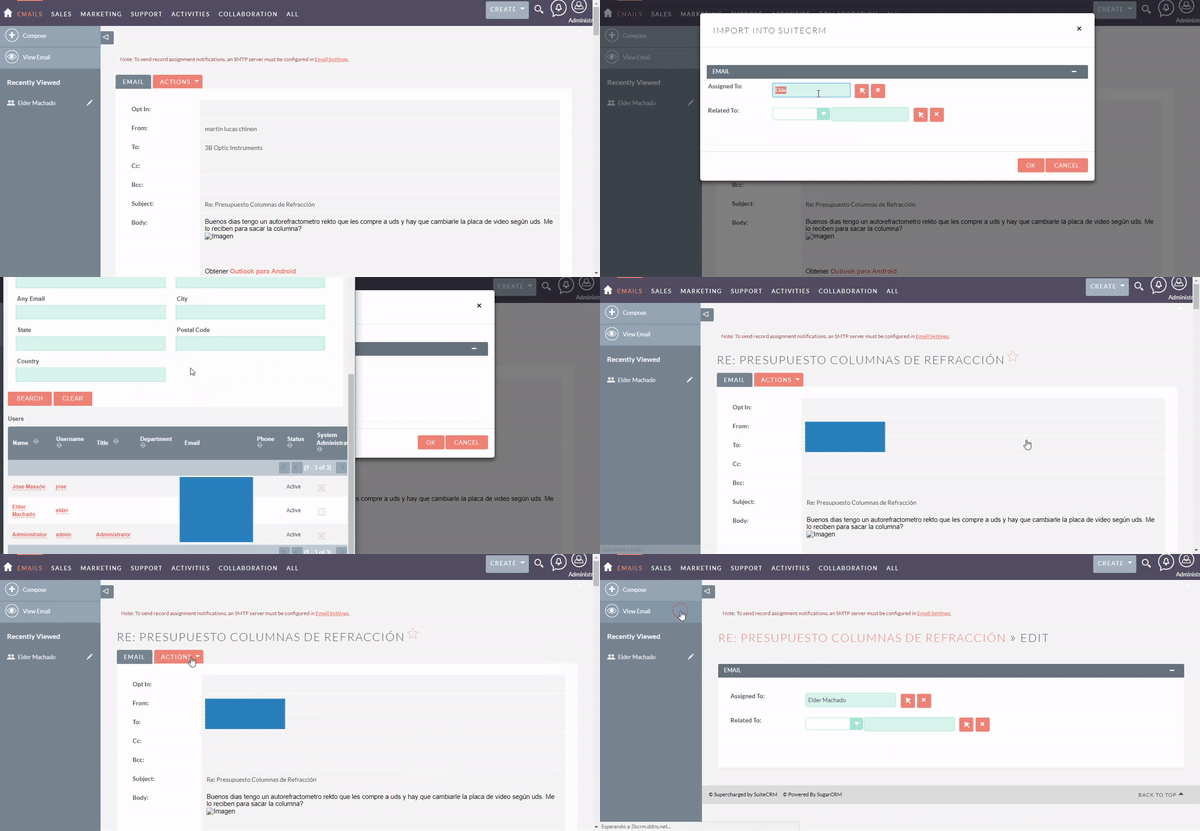
When importing an email, a modal window appears in order to fill up _assigned-to_ and _related-to_ fields. This modal window has an _OK_ and a _Cancel_ button. It works fine!
After importing, the option Edit shows the same form, but not in a modal window and without any OK or Cancel button or any other way to submit changes. Any modification made in this page will not be saved, making it impossible to change the assignment or relation of an email if it was already imported.
Expected Behavior
Show an OK and Cancel button.
Actual Behavior
No OK button. No Cancel button. No any other way to submit changes.
Steps to Reproduce
- Go to Emails module
- Pick an email
- Click Actions -> Import
- Assign or relate to any user/contact/account
- Click Actions -> Edit
Context
In our use case, many times the assignments for a message will change depending on the level of the conversation. Changing the user assigned to an email is fundamental for our way of using the CRM. For us, this is high priority.
Your Environment
- SuiteCRM Version used: 7.10.7
- Browser: Google Chrome Versión 67.0.3396.87 (Build oficial) (64 bits)
- Environment: PHP 7.0 FPM, Percona Server 5.6, Apache 2
- Operating System: Ubuntu 17.10
 labcerouno
All 17 comments
Hello @labcerouno
I'm working on a fix for this issue.
In the meantime here is a workaround:
- Import an email
- Admin -> Repair and Rebuild
- Go to edit the imported Email
- Buttons should appear
- Import other emails, all should be working fine
The issue only appears when the EditView is first built during the import of a non-imported email.
 PedroErnst
on 25 Jun 2018
PedroErnst
on 25 Jun 2018
Thank you, Pedro. This workaround seems to be working for now.
labcerouno
on 25 Jun 2018
Hi folks,
After applying this workaround, I started having some problems I didn't have before, although I'm not sure this was the cause of all.
Sometimes it would appear both OK and Save buttons while importing an email. Then, many imports would fail or import the message without its body and/or its contact related.
Finally, after another rebuild and repair, the Editing page without any submit button started appearing again. With another Repair and Rebuild, it shows correctly in Edit page. But in Import modal, it will show both OK and Save again.
The result is: our employees stopped importing, assigning and relating all mails. They came back to Gmail. Its label functions and the "mark as unread" function are a much faster way to assign messages to users and warn them what they should read and solve (marking as unread).
EDIT: Another frequent error we are having is that the imported mails have no content in its body.
@Dillon-Brown can we give this issue a High Priority?
Thank you very much for you time and will to solve these issues!
labcerouno
on 28 Jun 2018
Update
Besides the problems related above, we are having a new problem that makes impossible to import new messages. After clicking OK on import page, a blank page appears (only with header, sidebar and footer).
Do you think it is related or this is another bug?
Thank you!
Log shows:
Tue Jul  3 14:52:25 2018 [17444][a0102125-1169-9eaa-7b72-5b0c3e24039c][WARN] Pop error level. Try to remove the error_reporting() function from your code.
Tue Jul  3 14:52:26 2018 [17444][a0102125-1169-9eaa-7b72-5b0c3e24039c][ERROR] fromUser: Conversion of   from user format d/m/Y H:i failed
Tue Jul  3 14:52:26 2018 [17444][a0102125-1169-9eaa-7b72-5b0c3e24039c][ERROR] Unable to find relationship emails_email_templates
Tue Jul  3 14:52:26 2018 [17444][a0102125-1169-9eaa-7b72-5b0c3e24039c][WARN] emails_email_templates for emails_email_templates failed to load

Tue Jul  3 14:52:26 2018 [17444][a0102125-1169-9eaa-7b72-5b0c3e24039c][WARN] Failed to load relationship emails_email_templates while saving Emails
Tue Jul  3 14:52:26 2018 [17444][a0102125-1169-9eaa-7b72-5b0c3e24039c][ERROR] Unable to find relationship emails_email_templates
Tue Jul  3 14:52:26 2018 [17444][a0102125-1169-9eaa-7b72-5b0c3e24039c][ERROR] Unable to find relationship emails_email_templates
Tue Jul  3 14:52:26 2018 [17444][a0102125-1169-9eaa-7b72-5b0c3e24039c][DEPRECATED] SugarBean.php: preprocess_fields_on_save() is deprecated
Tue Jul  3 14:52:26 2018 [17444][a0102125-1169-9eaa-7b72-5b0c3e24039c][WARN] CaseUpdatesHook: saveEmailUpdate: Not a create case or wrong parent type
Tue Jul  3 14:52:26 2018 [17444][a0102125-1169-9eaa-7b72-5b0c3e24039c][WARN] Saving error level. Try to remove the error_reporting() function from your code.
It seems related to #3610
labcerouno
on 3 Jul 2018
Thanks @labcerouno for the feedback.
Pretty sure the last one is a different issue, probably best to open a different issue / post in the related issue.
Regarding your feedback about #6076, I'll have a look to see if I can replicate. Any idea of which conditions caused the buttons to disappear again after the RR? Like which view did you navigate to first after the RR?
PedroErnst
on 4 Jul 2018
Thank you, @PedroErnst. The steps to replicate it are:
- Import an email
- Add assignment and relation and click OK
- Go back to Emails List View
- Open the same message
- Edit import details (Actions -> Edit): buttons won't appear
- Go to Admin -> RR
- Go to Emails List View and open the same message
- Edit importing details again (Actions -> Edit): it will work
- Import a new message never imported before: it will not work. It will appear both Save and OK buttons and importing will fail or not save all fields as filled
- Go to Admin -> RR
- Now you can import a new message properly. But when editing import details, button won't appear again!
When Importing works, Editing won't work, and vice-versa. Each time I go to RR, it switches between one of these functionalities.
labcerouno
on 4 Jul 2018
Ok great that's very detailed.
I don't get the same results though, both steps 5 and 9 I see the correct buttons.
The import seems to go through as well every time...
Waiting for some more feedback on this one, maybe someone else can test this and post the results here.
PedroErnst
on 5 Jul 2018
Hi @labcerouno I also wasn't able to replicate that issue. Have you checked that it's not an issue with the cache? if you can still replicate i'd suggest raising a new issue. Thanks.
 Dillon-Brown
on 24 Jul 2018
Dillon-Brown
on 24 Jul 2018
I'll check this out, @Dillon-Brown! I guess I'll need a fresh install... Thank you, bro!
labcerouno
on 24 Jul 2018
Doing a fresh install, the error persists. Should I create a new issue?
labcerouno
on 15 Aug 2018
@labcerouno Shouldn't need a new issue, we won't close this one until the issue is resolved. In my current 7.10.7 installation I see this when I import an email and hit the edit button:
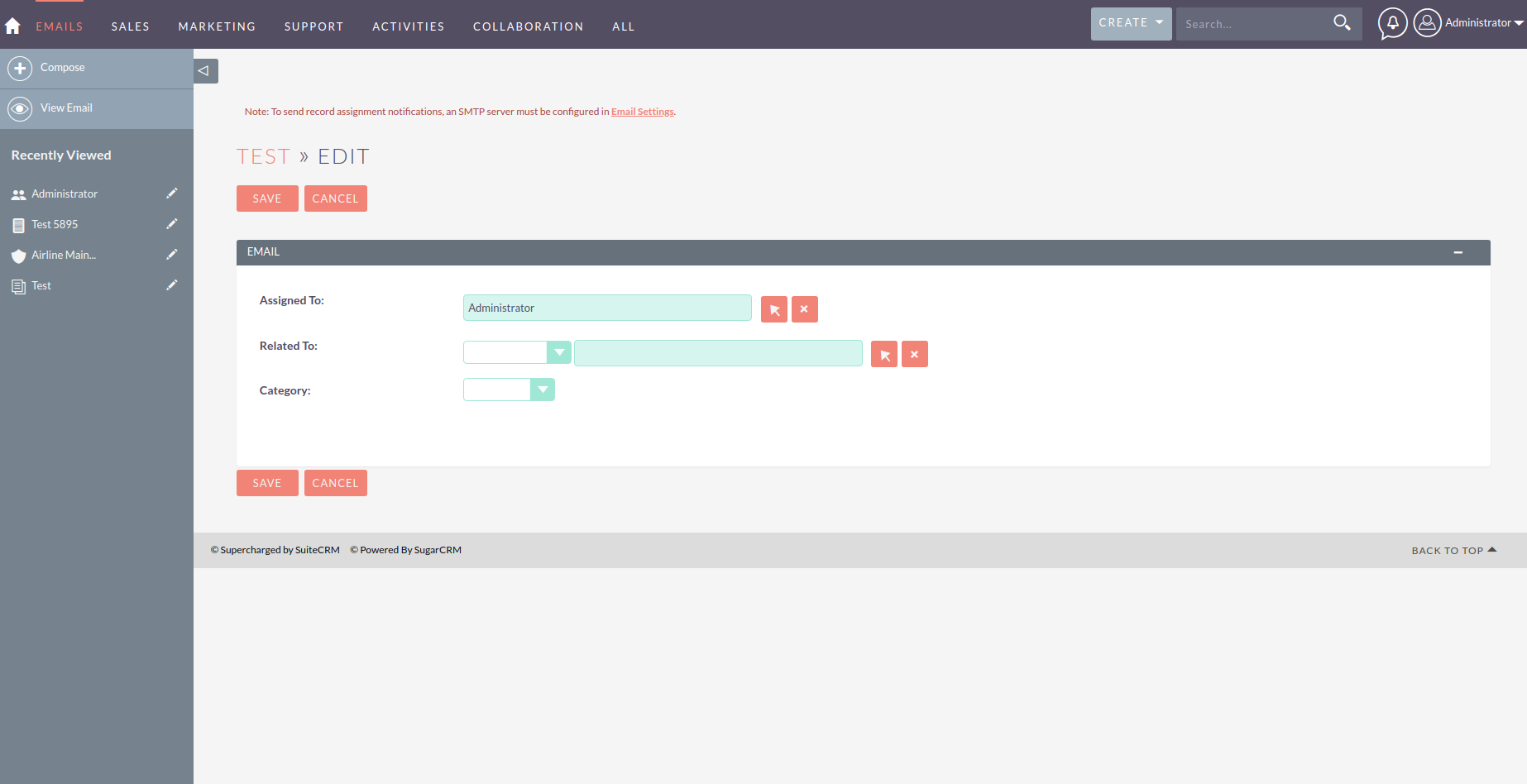
I'll play around a bit and see if I can replicate on a fresh install.
Dillon-Brown
on 15 Aug 2018
Just for the record, this email account is a group account.
labcerouno
on 15 Aug 2018
Hi @labcerouno,
I have now fixed the issue regarding the no submit button, the issue was that the imported email was showing on the wrong folder. I have now updated this so it will only show if you have imported it into the folder your currently looking at.
Could you please test this to establish the fix is wrong correctly.
If you have any issues with the fix please leave a comment.
Thanks,
 code-ph0y
on 14 Dec 2018
code-ph0y
on 14 Dec 2018
Thank you, @code-ph0y . I'll have a look and a post it back!
labcerouno
on 14 Dec 2018
@labcerouno Did you have a chance to test this?
 samus-aran
on 4 Jan 2019
samus-aran
on 4 Jan 2019
Sorry guys, summer vacation on southern hemisphere. I'll test it the next week, @samus-aran. Thank you all for the coding job!
labcerouno
on 9 Feb 2019
Related issues
 Mausino
·
3Comments
Mausino
·
3Comments
 sasha2002
·
3Comments
sasha2002
·
3Comments
 pgorod
·
3Comments
pgorod
·
3Comments
 ArturoBurela
·
3Comments
ArturoBurela
·
3Comments
 criterion9
·
3Comments
criterion9
·
3Comments