Suitecrm: SMTP Server not configured after upgrading to 7.10.5
Issue
After upgrading to 7.10.5 I see this note whenever I enter the crm as admin:
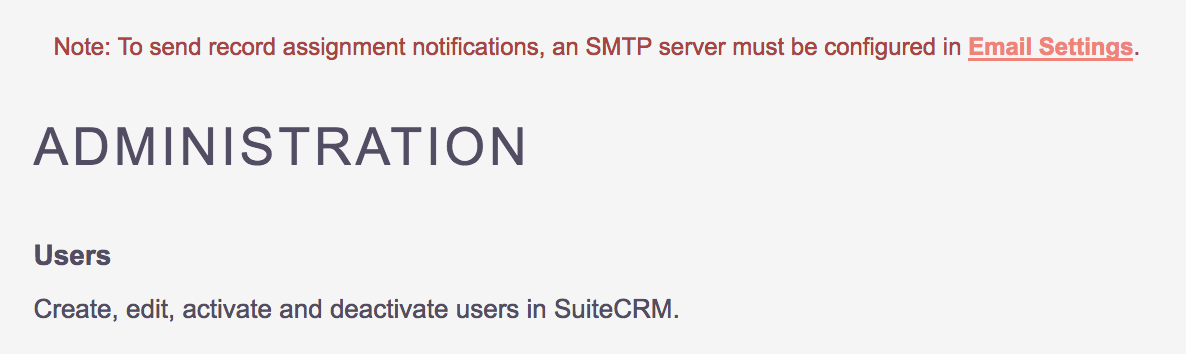
Note: To send record assignment notifications, an SMTP server must be configured in Email Settings.
If I click on the Email Settings link, I find empty SMTP Server fields. After filling data and saving, the Note is still there:
If I click again, the SMTP fields are still empty:
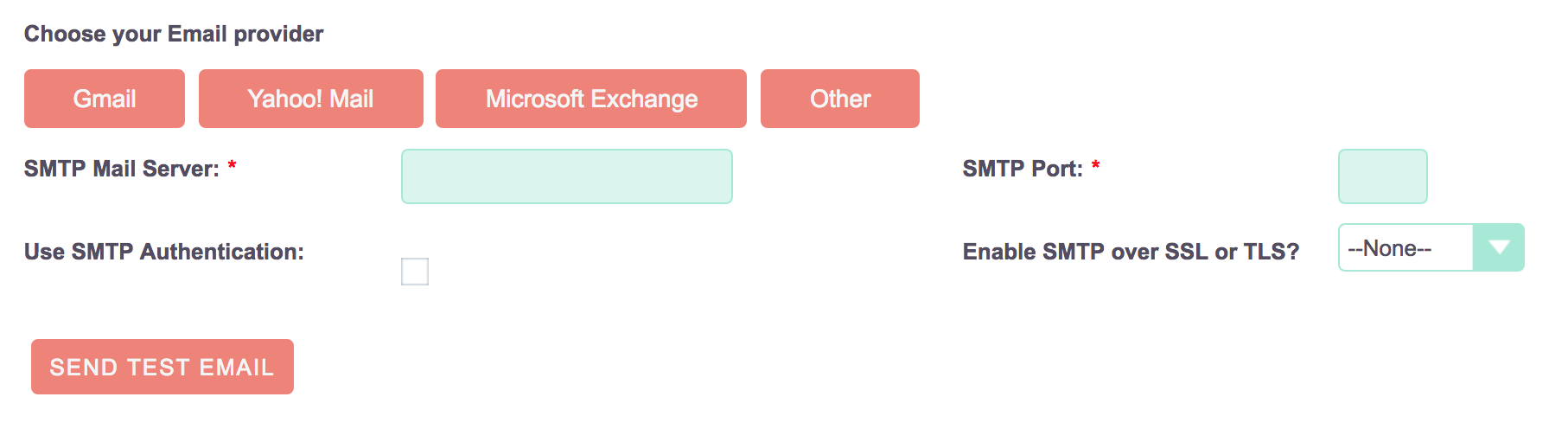
If I try to send an email, it is sent without any error (just like the SMTP Server credentials were there).
I checked the outbound_table with phpMyAdmin, and the record is actually there.
 stefanomarty
All 16 comments
I have a similar issue; however, when clicking on the link I get a blank white page as if it was erroring.
 isleshocky77
on 21 May 2018
isleshocky77
on 21 May 2018
Seems this may be related to #5853 #5899
isleshocky77
on 21 May 2018
The same problem in 7.10.5 I reported here. After saving the fill in the Edge browser, it worked normally. It is not a solution to the problem, but it may indicate the path.
Ps: Sorry, I forgot to mention that I also unchecked the mailbox for sending emails to the assigned one.
 AdrianoABC
on 22 May 2018
AdrianoABC
on 22 May 2018
Same problem after upgrade to 7.10.5. Is this just a bug with the saving of the email settings, or is it elsewhere? I mean is it possible to manually set the settings, in the db or some configuration file??
 Kristianostman
on 22 May 2018
Kristianostman
on 22 May 2018
Well I think it's elsewhere, as stated here.
I checked the database table with phpMyAdmin, and the SMTP data is actually there.
Did you try sending an email from a user account? I tried that, and the email is sent correctly in my system, so the data is saved in the DB, even it it doesn't show up in the CRM page.
stefanomarty
on 22 May 2018
System emails seem to work, so email settings are stored yes. So in the best case this error message does not really affect anything.
Kristianostman
on 22 May 2018
+1
 poynter2
on 22 May 2018
poynter2
on 22 May 2018
I just wanted to chime in that I actually tested the #5899 PR hoping it would solve this issue and it did not.
isleshocky77
on 22 May 2018
Same error. When I click on Email Settings link, the following errors are shown on apache error_log.
[Tue May 22 16:22:09.374301 2018] [fcgid:warn] [pid 19766] [client 127.0.0.1:53702] mod_fcgid: stderr: PHP Notice:  Undefined index: mail_smtptype in modules/EmailMan/views/view.config.php on line 116
[Tue May 22 16:22:09.374388 2018] [fcgid:warn] [pid 19766] [client 127.0.0.1:53702] mod_fcgid: stderr: PHP Notice:  Undefined index: mail_smtpserver in modules/EmailMan/views/view.config.php on line 117
[Tue May 22 16:22:09.374401 2018] [fcgid:warn] [pid 19766] [client 127.0.0.1:53702] mod_fcgid: stderr: PHP Notice:  Undefined index: mail_smtpport in modules/EmailMan/views/view.config.php on line 118
[Tue May 22 16:22:09.374411 2018] [fcgid:warn] [pid 19766] [client 127.0.0.1:53702] mod_fcgid: stderr: PHP Notice:  Undefined index: mail_smtpuser in modules/EmailMan/views/view.config.php on line 119
[Tue May 22 16:22:09.374420 2018] [fcgid:warn] [pid 19766] [client 127.0.0.1:53702] mod_fcgid: stderr: PHP Notice:  Undefined index: mail_smtpauth_req in modules/EmailMan/views/view.config.php on line 120
[Tue May 22 16:22:09.374429 2018] [fcgid:warn] [pid 19766] [client 127.0.0.1:53702] mod_fcgid: stderr: PHP Notice:  Undefined index: mail_smtpssl in modules/EmailMan/views/view.config.php on line 122
[Tue May 22 16:22:09.374437 2018] [fcgid:warn] [pid 19766] [client 127.0.0.1:53702] mod_fcgid: stderr: PHP Notice:  Undefined index: mail_sendtype in modules/EmailMan/views/view.config.php on line 136
 sanchezfauste
on 22 May 2018
sanchezfauste
on 22 May 2018
I tested the solution posted on the forum and it worked for me. #66340
AdrianoABC
on 22 May 2018
@AdrianoABC @pgorod Anyone putting this in a PR? Or adding it to the #5899 as it's kind of in the same vein, especially with him going through all that cleanup for errors and warnings?
isleshocky77
on 22 May 2018
Daniel Samson is looking into this issue, so I expect a fix will come soon. It ties with other issues also (confirmed opt in bugs)
 pgorod
on 22 May 2018
pgorod
on 22 May 2018
PS: (Description) The message requesting the email configuration remained when saved with the opt in boxes checked and disappeared when unchecked, but when accessing the configuration there was no data there. Now after this suggested change in forum is ok. I have not yet tested the opt in features to know the effects
AdrianoABC
on 22 May 2018
Hey @isleshocky77 @pgorod @AdrianoABC
@daniel-samson is aware of the issue and yes he is looking at it, but just to clarify this doesn't tie in with the confirmed opt in bugs - they are a separate issue. Thanks for your cooperation!
 samus-aran
on 23 May 2018
samus-aran
on 23 May 2018
@Dillon-Brown
I think I have a similar issue. I posted my question here https://suitecrm.com/suitecrm/forum/installation-upgrade-help/19250-email-settings-not-being-saved
Here's my error log. I am using version 7.10.5 and php 7.1
Sat May 26 02:47:15 2018 [950327][1][FATAL] ERROR: rmdir_recursive(): argument cache/themes/SuiteP/modules is not a file or a dir.
Sat May 26 02:47:32 2018 [950327][1][FATAL] Mysqli_query failed.
Sat May 26 02:47:32 2018 [950327][1][FATAL]  Query Failed: DESCRIBE versions: MySQL error 1146: Table 'SuiteCRM-db1.versions' doesn't exist
Sat May 26 02:47:32 2018 [950327][1][FATAL] Mysqli_query failed.
Sat May 26 02:47:32 2018 [950327][1][FATAL]  Query Failed: SHOW INDEX FROM versions: MySQL error 1146: Table 'SuiteCRM-db1.versions' doesn't exist
Sat May 26 02:47:32 2018 [950327][1][FATAL] Mysqli_query failed.
Sat May 26 02:47:32 2018 [950327][1][FATAL]  Query Failed: select * from versions: MySQL error 1146: Table 'SuiteCRM-db1.versions' doesn't exist
Sat May 26 02:54:02 2018 [1005862][1][FATAL] ERROR: rmdir_recursive(): argument cache/themes/SuiteP/modules is not a file or a dir.
 benhalverson
on 26 May 2018
benhalverson
on 26 May 2018
@benhalverson you can try the fix that is already proposed: https://github.com/salesagility/SuiteCRM/pull/5933/files
You don't have to change all those 5 files to try it, just make the changes in the first file and ignore the 4 that are in the tests directory.
pgorod
on 26 May 2018
Related issues
 likhobory
·
3Comments
likhobory
·
3Comments
 Mausino
·
3Comments
Mausino
·
3Comments
 jellydonuts
·
3Comments
jellydonuts
·
3Comments
 ajprouty87
·
3Comments
pgorod
·
3Comments
ajprouty87
·
3Comments
pgorod
·
3Comments
Most helpful comment
Hey @isleshocky77 @pgorod @AdrianoABC
@daniel-samson is aware of the issue and yes he is looking at it, but just to clarify this doesn't tie in with the confirmed opt in bugs - they are a separate issue. Thanks for your cooperation!