Suitecrm: In an existing meeting, changing the Accounts to another Company then saving causes SuiteCRM run out of memory.
Issue
If you have a meeting and change the Account it is associated with and save. SuiteCRM stops for a while and eventually comes back with:
Fatal error: Allowed memory size of 134217728 bytes exhausted (tried to allocate 8208 bytes) in /suitecrm/code/website/include/HTMLPurifier/HTMLPurifier.standalone.php on line 15136
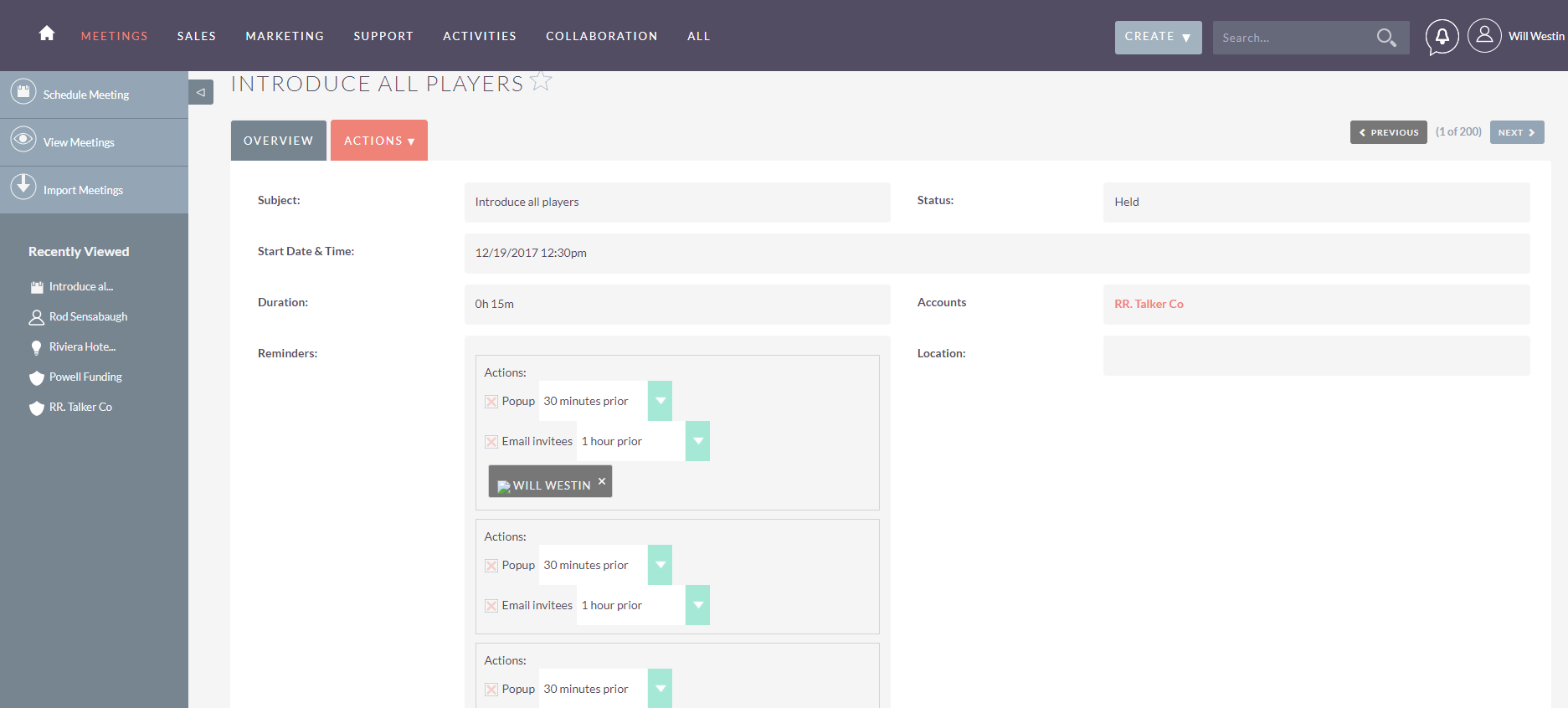
going back to the meeting, the Account is changed. However, there are several Reminder boxes now filling up the meeting.
Expected Behavior
Saves successfully and returns to the DetailView
Actual Behavior
SuiteCRM stops for a while before eventually showing:
Fatal error: Allowed memory size of 134217728 bytes exhausted (tried to allocate 8208 bytes) in /suitecrm/code/website/include/HTMLPurifier/HTMLPurifier.standalone.php on line 15136
nothing appears in SuiteCRM log.
Possible Fix
Steps to Reproduce
- Edit a pre-existing meeting which has an associated Account
- Change the meeting's associated Account to another Account
- Save the Meeting
- SuiteCRM stops responding for a period of time until memory limit is hit.
- Go back to SuiteCRM and view the meeting, several Reminders have appeared.
Context
Customer raised issue. Some Accounts have been changing their name/certain sections of the business splitting into own entity.
Your Environment
- SuiteCRM Version used: Version 7.9.7
This issue appears on https://demo.suiteondemand.com
I've attached a screenshot which shows multiple reminders appearing.
 alasdair333
All 10 comments
You just have to set a proper memory_limit in your php.ini.
It looks like you have 128M or similar, many people use 256M, I normally use 512M.
There's no reason not be generous with memory, it's a cheap resource normally. If you are on shared hosting there might be some enforced limit, but it's probably larger than 128M.
 pgorod
on 16 Dec 2017
pgorod
on 16 Dec 2017
Hi pgorod,
While this is something we should change, I don't think this is the root cause of the bug.
As mentioned, the changes are saved (despite the Out of memory error) but if you go back into the meeting. There are quite a few "Reminders" created. I think the only reason it stops creating Reminders is because it runs out of memory.
alasdair333
on 16 Dec 2017
Can you try increasing the limit and seeing if that, in fact, happens? I mean, if it also fails, perhaps after taking a bit longer?
pgorod
on 16 Dec 2017
I agree with @alasdair333 here. If changing an account leads to an out-of-memory, there is a bug. Increasing may help in analyzing, but should not be necessary.
 gunnicom
on 18 Dec 2017
gunnicom
on 18 Dec 2017
@gunnicom I'm all in favor of treating this as a bug and making sure it's fixed. But we still don't know if it's an account change that gives this error, or _any action_ that happens to go over limit on a system that's working at half the recommended memory limit.
And I would like to see if it's an endless loop kind of problem, where the memory always ends up full, no matter how high the limit; or if it's just something that needs a chunk of memory, and then works well.
@alasdair333 do you have any customizations? Any logic hooks? Any workflows tied to these records?
pgorod
on 18 Dec 2017
I can confirm this happens on my installation as well, there does seem to be an infinite loop. I'm debugging right now.
 PedroErnst
on 18 Dec 2017
PedroErnst
on 18 Dec 2017
This should fix the infinite loop.
PedroErnst
on 18 Dec 2017
@pgorod Sorry for the late reply, I was going to give it a test today at work, but it looks like @PedroErnst has beaten me to it.
Sadly, I'm not feeling to great this morning, so I'm not at work. I'll pass this onto the other engineers and see if they can give the fix a test and confirm.
alasdair333
on 18 Dec 2017
@PedroErnst just had a look at this, and I can confirm this fixes that issue I was seeing.
Thanks!
alasdair333
on 19 Dec 2017
Sorry pressed the Close button by mistake.
alasdair333
on 19 Dec 2017
Related issues
 jellydonuts
·
3Comments
jellydonuts
·
3Comments
 Mausino
·
3Comments
Mausino
·
3Comments
Mausino
·
3Comments
Mausino
·
3Comments
Mausino
·
3Comments
Mausino
·
3Comments
Mausino
·
3Comments
Mausino
·
3Comments