Suitecrm: Accessing calls from home page dashlet - cannot reschedule the call - greyed out.
Issue
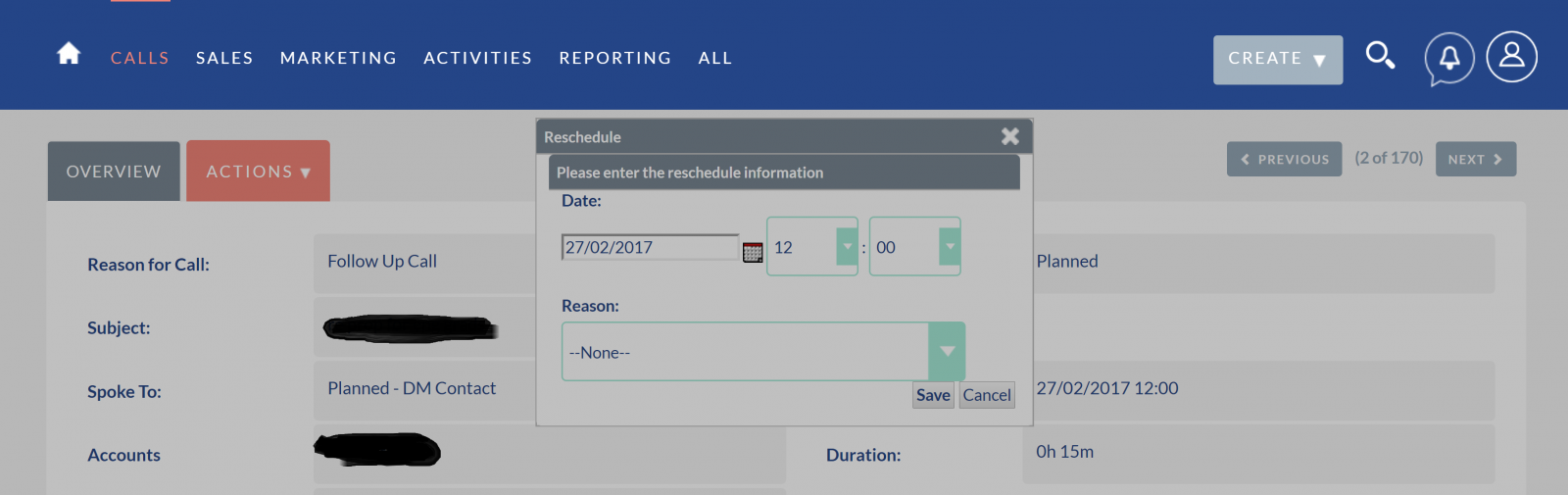
If we select a call from the home page dashlet and then try and reschedule it the reschedule pop up appears but it appears to have a grey overlay and cannot be edited. The page itself can be scrolled up and down. (Please see the attached screen shot)
To clear it, you have to access an alternative page.
If we access the same call directly from the calls page, rescheduling works fine.
We are now running 7.9.3 on a linux server but the error also occurs in 7.9.1. We have checked the file permissions and run rebuild and config, repair roles and dashlets etc..
We have also replicated this error on the suitecrm demo site @ softaculous.com/demos/suitecrm
Expected Behavior
As above. The call should be able to be rescheduled
Actual Behavior
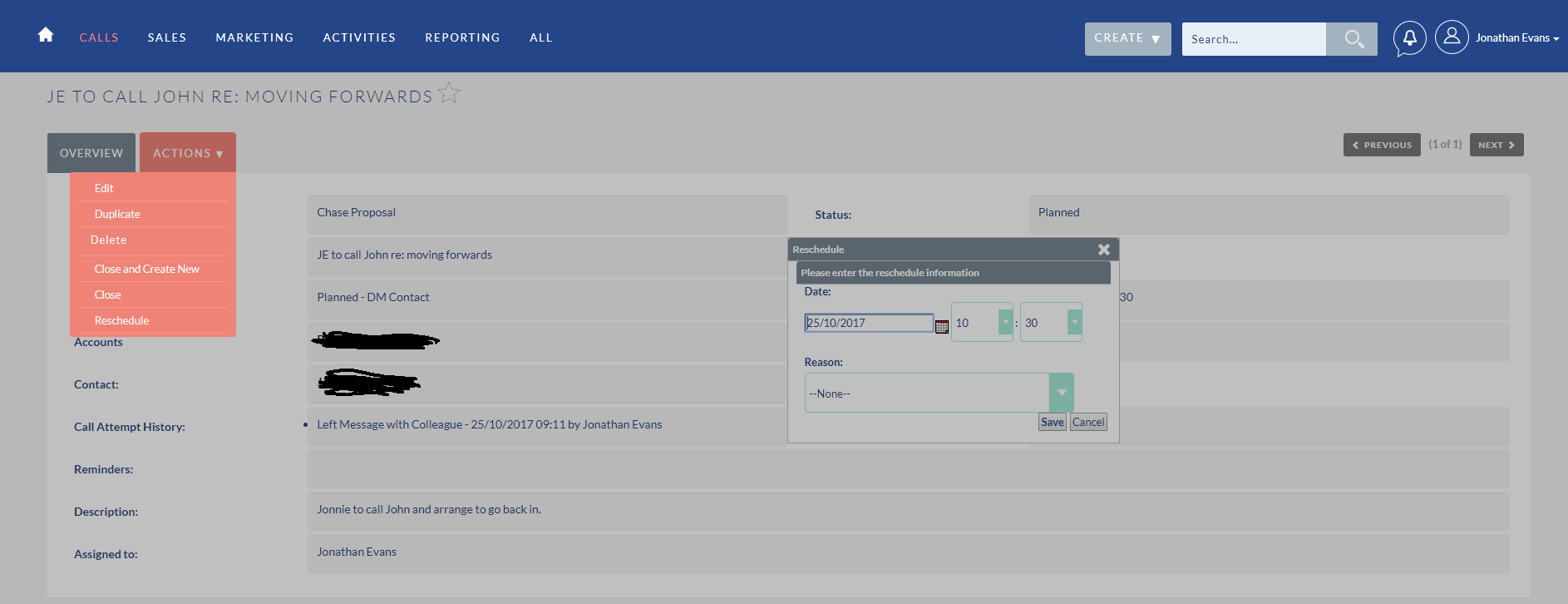
The rescheduled call pop up box is greyed out and no action can clear it. Navigating away to a different page is the only way to clear the error
Possible Fix
Steps to Reproduce
- Create a call.
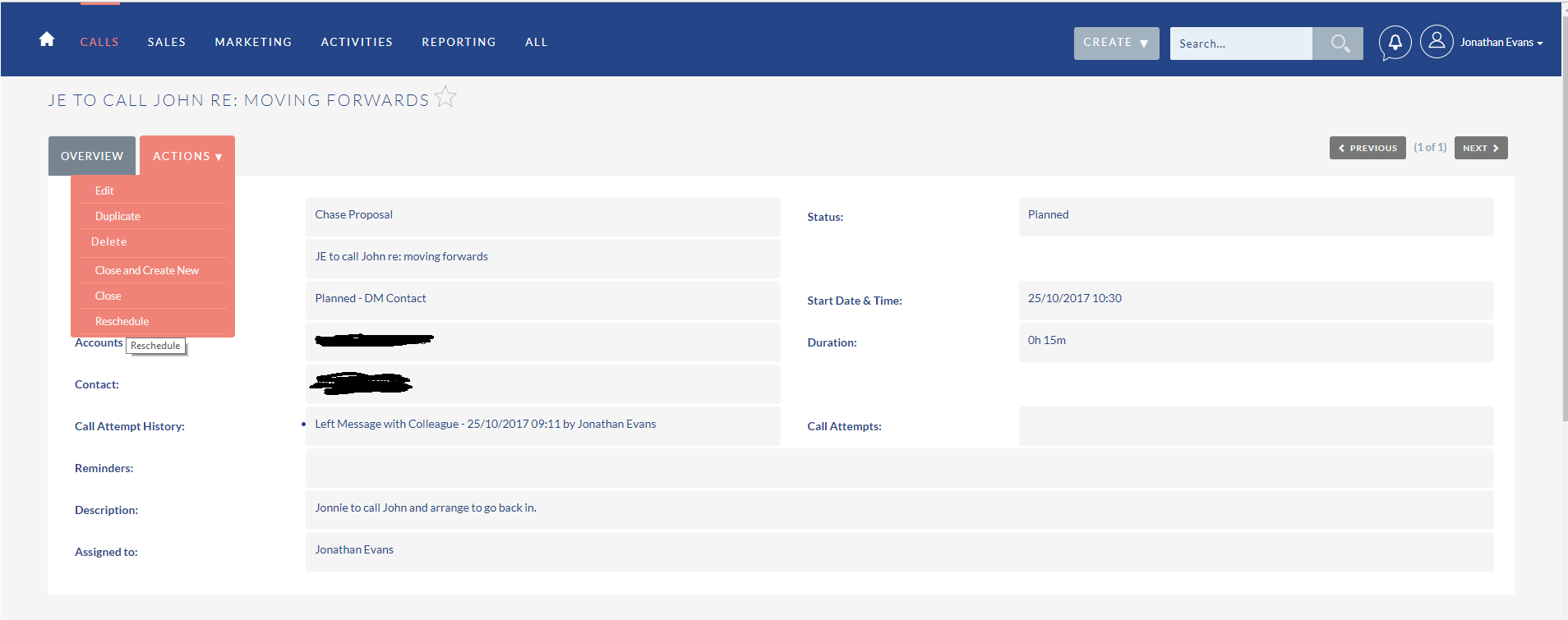
- Access the call via the 'my calls' dashlet from the home page and attempt to reschedule the call.
- The reschedule call box is greyed out and no further action can be taken.
- Accessing the same call directly from the 'calls' page works correctly
Context
high priority
Your Environment
- SuiteCRM Version used: 7.9.3
- Browser name and version (e.g. Chrome Version 51.0.2704.63 (64-bit)): Firefox and Chrome
- Environment name and version (e.g. MySQL, PHP 7):
- Operating System and version (e.g Ubuntu 16.04):
 jonnie00
All 47 comments
I've also been able to reproduce this in my test system. When the call is opened from the Dahslet (and only when this is the case) then the Reschedule button gives that greyed-out effect.
 pgorod
on 18 Jul 2017
pgorod
on 18 Jul 2017
Any update on this issue please?
jonnie00
on 11 Nov 2017
This is now an issue in 7.8.8 on ALL call rescheduling not just when accessed from the home page. Any update / help on this is greatly appreciated.
jonnie00
on 22 Dec 2017
@jonnie00 I think there was a fix for a z-index issue like this one, I'm not sure if it went into the 7.10 Beta3.
If it is easy for you to try a Beta3 upgrade on a clone of your system, then maybe you could try it. But don't do it in your production system, this is really an early Beta!
Another thing would be to try and search for it here on GitHub, among the merged PR's. It doesn't necessarily mention Calls, there are several different issues that cause "greyed out" screens, but they all have the same base problem...
pgorod
on 22 Dec 2017
Not sure if it also works here but maybe look into this: https://github.com/salesagility/SuiteCRM/pull/4397
There is another issue on z-index (but with some ore complex problem) https://github.com/salesagility/SuiteCRM/issues/2106
 horus68
on 22 Dec 2017
horus68
on 22 Dec 2017
@pgorod Thank you for your message. I have upgraded a test version to 7.10 Beta 3 and the problem unfortunately still exists.
I have also made the modification suggested in issue #4244 but this hasn't solved it.
Any further ideas?
jonnie00
on 24 Dec 2017
It's actually a simple z-index issue. If you use your Browser's inspector, you can tweak the CSS rules to either make the grey element go lower, or to make the Dialog window on top go higher in the z-index.
This solves the problem immediately. Now the tough part is to figure out where in the code those rules are coming from. Well - it shouldn't be tough, but I once tried to find it and gave up after a while. I have to admit I suck at this sort of UI thing, I'm not a web front-end programmer.
[My practical workaround (but not one I can pass on to end-users, it's just for me) is to use Firefox's extension called All-in-one Gestures (only compatible up to FF 56), and use the "Hide Object" gesture to get the grey element out of my way when it's blocking things.]
Merry Christmas, by the way! :-)
pgorod
on 24 Dec 2017
Hi, I have also just recreated this issue in my build, I think that you are correct with hinting at the z-index positioning of the popup.
I will take a look into this to see if it can be fixed in a similar way.
 e-reeley
on 29 Dec 2017
e-reeley
on 29 Dec 2017
Hi @e-reeley,
Any input you can provide on this issue is greatly received as I am not proficient enough with the code to understand how to apply the suggested fix.
It appears to be a problem with all versions, even the current beta version. I see this as quite a critical function for user, particularly sales people so I am keen to get this resolved as soon as possible.
If you manage to solve it, please could you post the solution?
Many thanks,
jonnie00
on 29 Dec 2017
@pgorod,
Thanks for your reply and Christmas wishes! I hope you enjoyed the same.
I have tried to modify the z-index as suggested to 1041 but it does not solve the issue. I am at a complete loss I'm afraid. I am not a programmer, (just an avid supporter and user :)).
I'm not sure what else I should be doing. Any further inisght / instructions gratefully received.
Happy new year all.
jonnie00
on 29 Dec 2017
Hi @jonnie00 ,
I took a quick look there, it seems that the popup is also part of another container, increasing the z-index of the popup itself seemed to not help this issue.
However, once I increased the z-index of the outer container the reschedule popup became accesable.
I will finalise the fix and update this thread with what changes I made so that you can replicate it if that helps for the moment?
Thanks.
e-reeley
on 29 Dec 2017
@e-reeley,
That's great, thank you! I really appreciate yours (and everyone's) support.
Regards,
jonnie00
on 29 Dec 2017
Hi @jonnie00 and thread,
I'm sorry for the delay, I have a fix for this issue now.
It seems that we need to override the style with a slighlty higher z-index (I used '5' and that worked, however, you can use higher to be safe!).
Ill make a PR for the fix and link this thread in, but I will also post the fix I made if you would like?
Thanks for your help with this issue.
e-reeley
on 29 Dec 2017
Hi @e-reeley,
Thank you for your help. That certainly works when you access and re-schedule calls from the calls module but it does not work for those calls accessed from the calls dashlet on the home page. Is there a similar fix for this?
Also, whilst you can manually change the date the calendar pop up date picker does not function.
Thanks again,
jonnie00
on 29 Dec 2017
Sorry @jonnie00 ,
There was a risk that using the index would cause other issues or not be a complete fix.
Ill take a look into these other issues, were they of a similar nature?
Thanks!
e-reeley
on 29 Dec 2017
@jonnie00 ,
Sorry to be a pain, but is there any chance that you could show a screen grab of the issue from the dashlet? I can't seem to replicate this issue?
Im also just looking into the calendar popup now.
Thanks for your help so far.
e-reeley
on 29 Dec 2017
Hi @e-reeley,
Screenshots attached. You get the greyed out screen when accessing the call and trying to reschedule from the home page.
jonnie00
on 29 Dec 2017
@jonnie00 ,
Sorry about that, I was working with version 7.10 and the dashlet issue seems to be fixed with the PR made, however trying this on 7.9.8 this issu does not fix the dashlet problem.
I think it may be a similar fix which ill just look into.
e-reeley
on 29 Dec 2017
Thank you @e-reeley
jonnie00
on 29 Dec 2017
Hi @jonnie00 ,
Hope that you had a great New Year!
I am sorry for the slow reply.
Was just looking to see if you managed to fix this issue at all?
I have a possible fix, but was curious to see if there was a way that you had managed to find?
Thanks.
e-reeley
on 2 Jan 2018
Hi @e-reeley
Apologies for the delay in responding. Whilst you can reschedule calls with this fix the calendar pop up does not work and I can't seem to find a solution. Any further ideas?
Many thanks,
jonnie00
on 16 Jan 2018
Hi @jonnie00
Good to hear back, good to hear that we have managed to solve some of the issue. I may be wrong in saying this, but I have a feeling that a seperate PR was made for the issue that you are addressing here.
Ill have a bit of a look round and see if I can possibly link this to you?
Thanks!
e-reeley
on 17 Jan 2018
@jonnie00
Something tells me that this PR:
https://github.com/salesagility/SuiteCRM/pull/4895
could be what you are looking for?
Please feel free to let me know if it is not!
Thanks again!
e-reeley
on 17 Jan 2018
Hi.
I'm very late to this but I finally got frustrated enough today to look for issue here and see if there is a fix coming.
I'm on v7.9.9 but thought this was due to running SCRM on an older php version. Since the issue still exists on my new Debian 9 install with PHP 7, I thought I'd comment.
I have been accessing the reschedule from the Call Detail View. Selecting Reschedule from the Actions menu ends up freezing the full screen.
A work around that might help others is to select the open call from in the left side menu "Recently Viewed". If you select the open call, there is a screen refresh and you are able to use Action:Reschedule. The Reschedule dialog box is available now.
Does this workaround give you some idea where the issue is hiding in the code?
 bunk3m
on 17 Jan 2018
bunk3m
on 17 Jan 2018
Hi @bunk3m
Is the issue that you are facing caused by the grey box being in front of the popup?
Thanks!
e-reeley
on 18 Jan 2018
That is probably what it is. Yes.
All I see is the screen greyed out. It looks like the grey picture submitted by @jonnie00 Somehow the side panel still functions and the menu but everything else I click on doesn't work.
I have a screenshot if it helps but won't be able to upload today.
bunk3m
on 18 Jan 2018
Ah okay, did you manage to look into the z-index fix that was suggested?
It could be a similar fix to help out.
When you suggested the work around, I think the views are created differently which is why that helps! :)
Thanks!
e-reeley
on 18 Jan 2018
@e-reeley I did go into the code and manually added the z-index line. I did notice that the line numbers weren't the same as the diff file. Going from memory, I think the proposed added line was somewhere around line ?5434?. The same code group in 7.9.9 was around ?5418?. So I wasn't sure if something else had changed such that the lines were out of place. The z-index line certainly didn't make sense at ?5435?. Anyway, long post to say the change didn't work for me.
bunk3m
on 18 Jan 2018
@bunk3m
Sorry to hear that it didn't work, just to ask, were you able to rebuild the css using a file watcher, clear the browser cache, repair and rebuild and also hard refresh?
Thanks.
e-reeley
on 19 Jan 2018
@e-reeley thank you for your follow-up. I'm a novice and play a bit dangerously with my software. I figured there had to be something else to do but didn't know what.
I did a browser cache clear.
I didn't think to do a repair & rebuild. I don't know what "hard refresh" or "rebuild the css using a file watcher" means ... so obviously I didn't do that either.
I'm happy to redo the fix and test but I need to have a procedure to do the "hard refresh" and "rebuild the css using a file watcher".
Would this info happen to be in the SuiteCRM Developer book by Jim Mackin? I did buy it some time back but haven't read it yet.
bunk3m
on 19 Jan 2018
@bunk3m
Thats okay! Its a bit of a sneaky one, its really easy to feel that any change made should have reflected quickly, I got used to it because I was in the same position of not seeing any changes! :)
A hard refresh also helps clear the cache, so if you were using chrome, you could press: ctrl + shift + r.
Depending on which IDE you are using to develop, the rebuild may be slighlty different, but it is good practice to alter scss files and avoind going into the css files, especially the minimised ones. These will typically be generated from scss files in our development anyway. So you should be able to set up a 'file watcher' of some description which will notice changes in the scss file and update the css file without you having to do this yourself. Id do this step first, that way when you clear the cache and hard refresh it should use the latest css.
And a repair and rebuild is always a good idea, although not always required, I tend to do it anyway :)
It may be in the book, I couldn't say for sure. But I hope my brief description helps.
Please let me know how you get on!
Thanks.
e-reeley
on 19 Jan 2018
@e-reeley
Don't laugh too hard when you read what I write next.
I just use vim on the server and directly edited the file in place after making a backup copy.
I assumed, incorrectly it would seem, that changes to the file would be reflected in the next time the files was accessed (after cache was cleared out of the browser).
I just learned something about this scss file after doing a google. What you say sounds interesting but I have to do this in baby steps.
Can you recommend something I can read to help me up the learning curve of "alter scss files and avoid going into the css files" and 'file watcher'?
I see that I did alter the "editview.scss" file. I do vaguely remember that it wasn't in the same location as the diff indicated in addition to being at a different line location. In my v7.9.9 it was themes/SuiteP/css/editview.scss rather than themes/SuiteP/css/suitep-base/editview.scss in the patch. I don't have a folder suitep-base.
bunk3m
on 19 Jan 2018
@bunk3m this tutorial I wrote recently explains the basics of installing a SASS compiler and compiling SuiteCRM style.css:
pgorod
on 19 Jan 2018
@bunk3m
Dont worry, we wont laugh at someone for not knowing! There was always a time when someone didn't know the answer, it's only easy when you know!
I'm more than happy do help speak you through some of the technical aspects of this.
Maybe we were working within slightly different versions, causing a bit of confusion, therfore it may be tricky to always specify a line. But should be able to replicate this on different versions.
This fix will be released in the next update though :)
Reading the above comment, that should definitely be good to get you started! And dont feel bad about asking questions, best way to learn!
Let us know how you get on.
Thanks.
e-reeley
on 19 Jan 2018
Thanks. @e-reeley
I've backed up the old file and made the modification in fix #4805.
Just for reference here is the code with the line numbers
5217 @media (min-width: 980px) {
5218   #dialog1_c {
5219     z-index: 5;
5220     margin-top: 100px;
5221     margin-left: 40%;
5222   }
I've cleared the Chrome cache.
Now do I login and go to Admin & do the repair & rebuild there or is there another way from the CLI?
bunk3m
on 19 Jan 2018
@bunk3m
Yeah, looks okay from that.
Did you manage to rebuild the css? If not, ensure that happens first.
Then I would clear cache,
Repair and Rebuild,
Hard refresh.
It may seem like a bit much, but best to ensure it does not try to use any of the previous code!
Thanks.
e-reeley
on 19 Jan 2018
@e-reeley
How does one 'rebuild the css'?
bunk3m
on 19 Jan 2018
@e-reeley Hmm just noticed I missed your post about the compiler. I'll read that now.
bunk3m
on 19 Jan 2018
@bunk3m
This can be done by using the previously described 'file watcher'.
Im not 100% if it is always referred to as this.
But if you have set it up to rebuild css if scss files are changed, then the ide will do the rest :)
Thanks.
e-reeley
on 19 Jan 2018
@e-reeley Thanks for the link. It looks like I need to install a compiler (My Suitecrm is running on a Debian 9 VM).
From what I just read, that means I also need to install Ruby. It looks like it will take a bit of time to figure this out and I have some appointments this afternoon. I'll try to pick it up again over the weekend.
bunk3m
on 19 Jan 2018
@bunk3m
Good to hear, seems like you know what direction to head in!
Sounds good, all the best with that.
I'll try and keep a look out for comments over the weekend if you have any.
Thanks again, and have a good weekend!
e-reeley
on 19 Jan 2018
@e-reeley
Sorry for not reporting back. I've had difficulties getting scss installed. I have a problem with finding header file for ffi and can't find make. Sigh. This is a Debian issues so I'll shut up for bit until I get the environment set up and working. This might take longer than it will take for you guys to issue 7.10 ...
PS Found same greyed out menu in the Studio when I added a few defaults to the drop down for industry in account and lead source in leads.
bunk3m
on 22 Jan 2018
@bunk3m
Thanks for getting back to us!
Yeah, we are currently working on the 7.10 release, so this will be fixed in the newer release!
Ill take a look into this other case of the greyed out area, but I have a feeling that it may all be connected and the same fix.
I'm happy to say that this issue has been solved, maybe we can close this issue?
If you have any further questions/would like to discuss further with me, maybe you could open a discussion on a forum and link me to it?
Thanks again!
e-reeley
on 23 Jan 2018
Hi all.
I installed the 7.9.10 update this afternoon hoping it would fix the issue but it hasn't.
:-(
bunk3m
on 26 Jan 2018
Hi @bunk3m
Im sorry to hear that, is there any chance that you could open a thread on the forum and link me to it, that way I can try to help there :)
This just helps to keep Github clean.
Thanks again!
e-reeley
on 26 Jan 2018
@e-reeley
Sorry to post here again but I can't find a way to send you a DM.
I did a rm -r on cache, from Admin did a Repair & Rebuild, Repair JS, JS Min & one other and it looks like that finally removed the cruft.
The pop-up is working properly. 👍 :-)
I will create a post in the Developer Collaboration for help in setting up the environment properly.
Thanks again for your help.
bunk3m
on 26 Jan 2018
@bunk3m
Thats great news, we think it was some underlying cache causing the persistent issue?
Yeah, that will be great, thank you :D I can try and navigate to it to also help provide support if need be.
Thanks again, happy to hear that the issue is resolved!
e-reeley
on 26 Jan 2018
Related issues
pgorod
·
3Comments
 Mausino
·
3Comments
Mausino
·
3Comments
Mausino
·
3Comments
Mausino
·
3Comments
Mausino
·
3Comments
Mausino
·
3Comments
 likhobory
·
3Comments
likhobory
·
3Comments