Suitecrm: Saving profile deletes SMTP password
Issue
On a system configured to not allow users to use the system's outbound SMTP account:
Saving my user profile, deletes my own SMTP password.
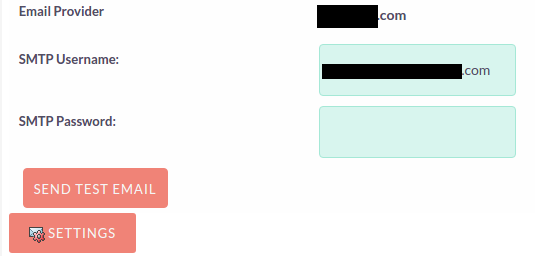
The problem is that when editing the profile, the password field is by default visible, editable and blank.
Even if the field is not touched in any way, when submiting the form, the CRM thinks the password was removed.
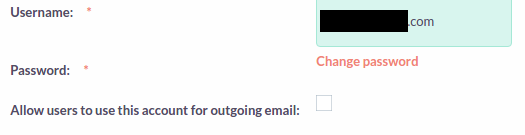
This password should behave like the one in the system outbound email settings: display a change password "link".
Profile:
System settings:
Expected Behavior
Saving my profile, should not reset my SMTP password.
The password field should have a javascript link to enable changing the password, like in the system outbound email settings:
Actual Behavior
Saving my profile, resets my SMTP password even if I didn't touch the password field.
Steps to Reproduce
- In the outbound email settings, use an SMTP account and disable its use by users
- Go to your profile, add a SMTP password and save
- Check that a password exists for your account in the outbound_email mysql table
- Save your profile again
- Check the mysql table again. An empty string is in the
mail_smtppassfield.
Your Environment
- SuiteCRM Version used: 7.9.2
- Browser name and version: Chromium 58
- Environment name and version: MySQL 5.7, PHP 7.0.18, Nginx 1.10
- Operating System and version: Ubuntu 16.04
 sergio91pt
All 26 comments
@sergio91pt i had many times this problem... but many times is too hard know / identify what proced the problem #3771
 Mausino
on 5 Jul 2017
Mausino
on 5 Jul 2017
Yes this happens. With the current instability around the Email module, I believe it is very important to get these things fixed because they compound the diagnostic difficulties.
The equation is
email bugs X mysterious smtp connect errors X broken email settings screens = headaches diagnosing and fixing email
 pgorod
on 6 Jul 2017
pgorod
on 6 Jul 2017
I've been trying to fix the email in my test machine, which I haven't been able to achieve since 7.9.0.
I now installed 7.9.4 and there's definitely progress - regarding this issue here, the Save password button works as expected when configuring an individual user's email from his profile.
However, if I go in Admin / Outbound Email Accounts and configure the account there, I get the same behaviour: test email goes out ok if I type the password and hit "Send test email` immediately; but if I save first, I can't send successfully...
The difference in the debug logs is this: on the email that gets sent correctly, at some point I see this:
[DEBUG] Module:EmailMan using file: testOutboundEmail
[INFO] Query:SELECT id FROM outbound_email WHERE user_id = '1'
on the log of the failed sending, I see this instead, at that exact same spot:
[DEBUG] Module:EmailMan using file: testOutboundEmail
[INFO] Query:SELECT id FROM outbound_email WHERE type = 'system'
and a few lines below, the fatal SMTP failed error, which I'm guessing happens because of a wrong password.
Looking at the contents of testOutboundEmail, I tried printing a few variables out on the logs and I see that the first if is handled differently because in one case $_REQUEST['mail_smtppass'] is empty...
pgorod
on 26 Jul 2017
I am having this issue as well. I can send the test email after entering the password as long as I don't save the system profile. As soon as I save it it fails to send. This is a major issue.
 jcloutz
on 31 Aug 2017
jcloutz
on 31 Aug 2017
@jcloutz which version of SuiteCRM are you running?
pgorod
on 31 Aug 2017
@pgorod 7.9.4, it's a brand new install that we are trying setup
jcloutz
on 31 Aug 2017
Ok, just checking. For some reason this Issue here is already closed (I think there was actually a fix, but it turned out to be partial).
The current issue for this is #4057, make sure you subscribe to updates there and add any information you might think is relevant. For example: is your case exactly the same "steps to reproduce" as described there? Or slightly different?
pgorod
on 31 Aug 2017
@pgorod great, thank you for the quick response!
jcloutz
on 31 Aug 2017
@Dillon-Brown @PedroErnst
After upgrade on 7.9.8 the problem came back... i will test if at weekend on 7.10 b3 version .. after i will add more info
Mausino
on 4 Jan 2018
Hi, i noticed that in:
/modules/OutboundEmailAccounts/OutboundEmailAccounts.php
around row 192
there's:
var adminNotifyFromAddress = document.getElementById('smtp_from_addr').value ? document.getElementById('smtp_from_addr').value :'$adminNotifyFromName';
var adminNotifyFromName = document.getElementById('smtp_from_name').value ? document.getElementById('smtp_from_name').value : '$adminNotifyFromAddress';
...
'outboundtest_from_address=' + adminNotifyFromAddress + '&' +
'mail_from_name=' + adminNotifyFromName;
this is good in:
\modules\Configurator\tpls\adminwizard.tpl
but when you test Outbound Accounts
there are no:
- smtp_from_addr
- smtp_from_name
in the source code
and you'll get fake answers, because the system sends using the system default values not the account's ones you are testing.
What do you think about it?
 mayerelyashiv
on 5 Feb 2018
mayerelyashiv
on 5 Feb 2018
@mayerelyashiv do you mean this Issue here? #4479
Which version are you running?
pgorod
on 5 Feb 2018
Hi @pgorod, thank you very much.
I haven't seen that.
I noticed that on a 7.8.5
mayerelyashiv
on 5 Feb 2018
Still facing this as of Version 7.10.1
 prahladyeri
on 14 Mar 2018
prahladyeri
on 14 Mar 2018
@prahladyeri can you please visit Issue #5376 and tell me exactly in which of the two screens are you facing this issue? Thanks
pgorod
on 14 Mar 2018
@pgorod In my case, the outgoing email isn't sent using the usual compose method, but fails with the message "Error Sending Email. Please contact your administrator for assistance.", though the email setting called "system" is visible in both the screens shown on the referred link:

However, when I click the "SEND TEST MAIL" from the Admin Settings=>Email Settings, the test mail actually works when I reinsert the password, so my suspicion is that the password isn't saved with the rest of the SMTP information at all. Another thing is that when I'm in the compose screen, the reply-to part is undefined as shown below. Is this something that shouldn't be happening:

prahladyeri
on 14 Mar 2018
In Admin / Outbound Email Settings, when you define the system account, did you check the checkbox saying something like "allow other users to send from this account"?
pgorod
on 14 Mar 2018
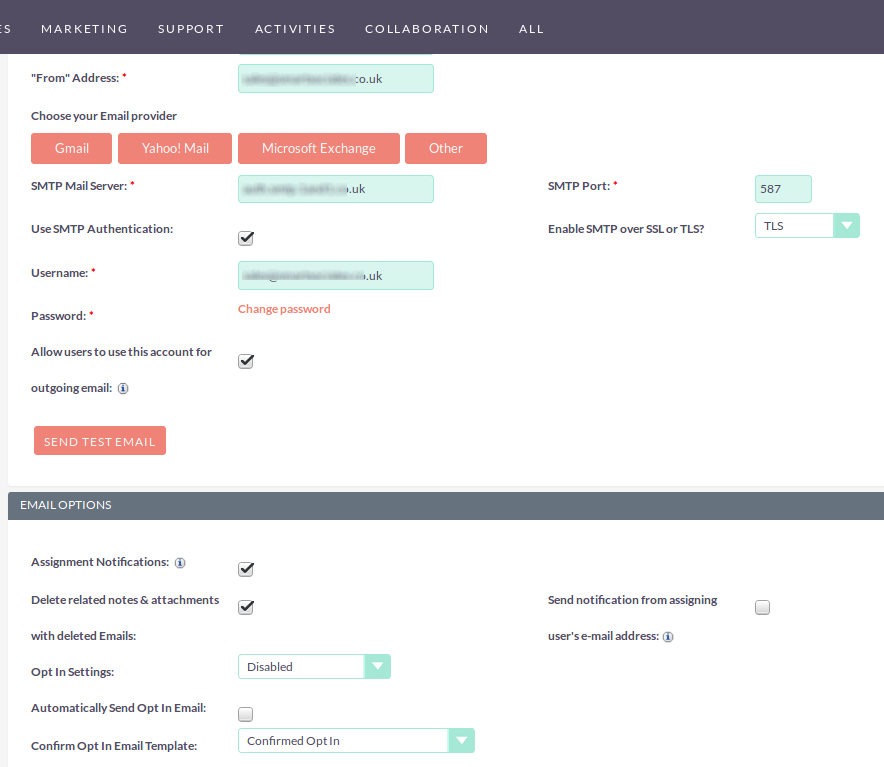
@pgorod Yep, that particular setting is on, these are my complete settings:
prahladyeri
on 15 Mar 2018
Just for a test, can you uncomment this line
https://github.com/salesagility/SuiteCRM/blob/master/include/SugarPHPMailer.php#L446
Make sure your logging is in debug level, or else change in that line debug to fatal to make sure the message is logged.
Now compare those values it prints (from, from name) to your settings, does it look correct? You can also try different settings by uncommenting the previous lines.
pgorod
on 15 Mar 2018
@pgorod Thanks, my issue was resolved after a reinstall, and probably wasn't related to this bug at all.
I didn't mention earlier, but this was a new install and all the suitecrm files were owned by root rather than www-data thus causing permissions errors during the install. I manually started chmoding individual file permissions to 755 as the installer kept asking, but in retrospect this was the wrong approach and had caused many problems including this mail sending issue. After I did another clean install, I just chowned the entire folder to www-data, and everything worked perfectly this time! Thanks again for your support 👍 .
prahladyeri
on 15 Mar 2018
I get exactly the same error. I reinstalled 7.11.0.
As soon as I save the outbound email account, I get the error message and can no longer send emails!
 hilbaONE
on 22 Jan 2019
hilbaONE
on 22 Jan 2019
@hilbaONE I doubt that it is the same issue exactly.
Can you reproduce also the symptoms in the database? Empty string in outbound_email table, mail_smtppass field?
pgorod
on 22 Jan 2019
@pgorod No, there is no "empty string".
hilbaONE
on 22 Jan 2019
@pgorod Not sure if i should be here...
I profile i set email account as primary ([email protected] + set up as default SuiteCRM client. In SMTP setting i set that users can use this SMTP account [email protected]
Now if compose email and FROM dropdown i choose my name where is [email protected] on send action i got error "Error Sending Email. Please contact your administrator for assistance." but if i choose the system email from SMTP [email protected], the email was sent without any issue.
Only for sure. If you set up the SMTP and allow user to sent emails from this you will see in compose email in row FROM the dropdwon with 2 option.... with your primary email of your user account and SMTP default email account. Before upgrade to 7.11 both worked.. now only default SMTP.
Mausino
on 22 Jan 2019
@mausino I think it' better to open a new Issue so it can get some visibility. Can you take care of it please?
pgorod
on 22 Jan 2019
@pgorod do you thing that it's same issue as in #6797 ??? because i don't want create duplicity.
Mausino
on 22 Jan 2019
I think so, but it is hard to be sure.
One way to find out is to keep an eye on that issue, and when it's fixed, try the fix and see if your problem is also solved with the same fix.
pgorod
on 22 Jan 2019
Related issues
 ArturoBurela
·
3Comments
ArturoBurela
·
3Comments
 ajprouty87
·
3Comments
Mausino
·
3Comments
ajprouty87
·
3Comments
Mausino
·
3Comments
 jellydonuts
·
3Comments
jellydonuts
·
3Comments
 daschenbrener
·
3Comments
daschenbrener
·
3Comments