Suitecrm: Email in 7.9.1: can't select Contacts/Leads/etc in From/CC/BCC field using Search
Steps to Reproduce
- Go to Emails, click Compose
- Click one of the fields where addresses are expected: To, CC, BCC
- A hovering toolbar appears to help you fill in the field. Click one of the target Types, for example contact or Leads
- A pop-up appears for you to select a Contact.
- working fine: just click a Contact from the list, and his email will be added to the original field
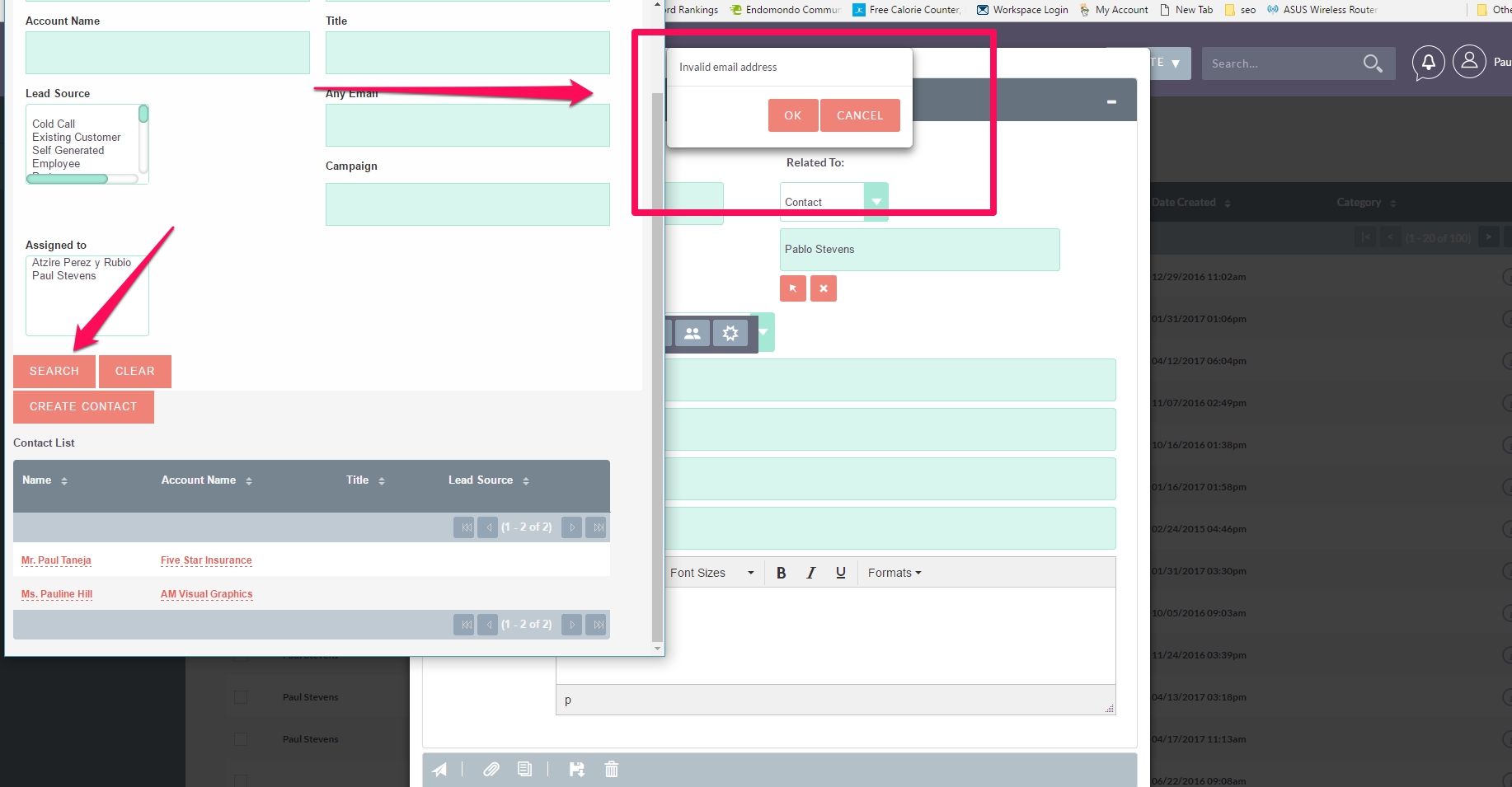
- Instead of doing the step above, you can trigger the bug like this: instead of clicking on the list, search for a name. At that very moment when you search, an error shows on the original window below. Note that you don't even have to select a contact, you just click
Search.
Expected Behavior
Search should go on normally, no error given on the window underneath, and then a selection could be made.
Actual Behavior
Error shows on Compose Window underneath the pop-up, saying Invalid email address.
Context
From this forum thread. Thanks to user pstevens for reporting and for the nice screenshot.
I would say this is High Priority.
Your Environment
- SuiteCRM Version used: both 7.9 and 7.9.1, on my test system and on the online demo
- Browser name and version: Firefox latest
 pgorod
All 9 comments
Hi @pgorod we had same issue, but i did not have any time to report it.. here is message from my developer :)
"this is the description of the bug:
Issue:
When compose email and click an icon to select a contact/user/account from popup, if you just select an item from list it works.
But if you do a search first, then select an item from search results, doesn't works anymore.
Cause:
The problem is that when you click search button, the form is submitted and the page is reloaded. This means that the "beforeunload" event for popupWindow is already triggered, and is trying to process returned data, but is too early because there is no returned data from popup at this step.
Fix:
To fix this I've moved processing of returned data in another callback function.
Files changed:
/jssource/src_files/include/javascript/popup_helper.js
/modules/Emails/include/ComposeView/EmailsComposeView.js"
 Mausino
on 19 Jun 2017
Mausino
on 19 Jun 2017
Can u please explain me solution in detail? I am not getting what exact changes you did.
Thanks in advance.
 dipeshpatel09
on 11 Jul 2017
dipeshpatel09
on 11 Jul 2017
I am still getting the same error even with a repair rebuild. I have verified that the files are exactly the same as the published fixed ones here. I am on 7.9.4
 mruch2
on 19 Aug 2017
mruch2
on 19 Aug 2017
I can verify that this is still an issue on 7.9.6
 pstevens71
on 6 Oct 2017
pstevens71
on 6 Oct 2017
@pstevens71 do you mean with, or without the fix proposed above?
pgorod
on 6 Oct 2017
Without. I just double checked the files in 7.9.6 and they don't contain the fix. I'm updating them now to your proposed fix. I'll post the result. Thanks for getting back.
pstevens71
on 6 Oct 2017
So I applied the proposed fix. It does get rid of the error when selecting a contact to send the email to. However, the contact that is selected doesn't populate the "To:" field.
(I also did a repair and rebuild)
pstevens71
on 6 Oct 2017
This is still or should be an open issue. Still a problem in 7.9.15
There are various threads for the same issue, but I can' t seem to find a solution.
pstevens71
on 14 Mar 2018
You can not also select a Document if you apply a custom search or navigate to next page. This is caused by:
As @Mausino has said.
 sanchezfauste
on 25 Apr 2018
sanchezfauste
on 25 Apr 2018
Related issues
 jellydonuts
·
3Comments
jellydonuts
·
3Comments
 daschenbrener
·
3Comments
daschenbrener
·
3Comments
 Vhex
·
3Comments
Vhex
·
3Comments
 criterion9
·
3Comments
Mausino
·
3Comments
criterion9
·
3Comments
Mausino
·
3Comments
Most helpful comment
Hi @pgorod we had same issue, but i did not have any time to report it.. here is message from my developer :)
"this is the description of the bug:
Issue:
When compose email and click an icon to select a contact/user/account from popup, if you just select an item from list it works.
But if you do a search first, then select an item from search results, doesn't works anymore.
Cause:
The problem is that when you click search button, the form is submitted and the page is reloaded. This means that the "beforeunload" event for popupWindow is already triggered, and is trying to process returned data, but is too early because there is no returned data from popup at this step.
Fix:
To fix this I've moved processing of returned data in another callback function.
Files changed:
/jssource/src_files/include/javascript/popup_helper.js
/modules/Emails/include/ComposeView/EmailsComposeView.js"