Suitecrm: Language Pack in Module Loader - Disabled Buttons
Issue
In module loader, the previous language pack "Uninstall/Disable" buttons are missing as seen below. Thus, it is not possible to delete the previous language pack.

Your Environment
- SuiteCRM Version used: 7.7.4
- Browser name and version (Chrome Version 51.0.2704.63 (64-bit))
- Environment name and version (MySQL, PHP 7.0.8)
- Operating System and version (Ubuntu 16.04.2)
 gokhanerdogdu
All 8 comments
Actually there is only one language pack (and language files) for each language code.
The screen is just showing an extra entry to the old installed one.
When installing a new version you need to uninstall+delete the previous one first (I know it looks strange!)
This is stated in the FAQ https://sites.google.com/site/translatingsuitecrm/faq/updatelanguage
Its not easy to solve but you need to login as english, unpublish+delete the pack and then the other entry will be also deleted.
Rebuild each time!
When cleaned, download a fresh language pack (even if it shows the same version number) and install it
Notes: files are in upload/upgrades/
You can also find (and delete) those old entries on your MysQL database - see table: upgrade_history
 horus68
on 23 Sep 2016
horus68
on 23 Sep 2016
@horus68 what would be the correct way to handle this? Not just the missing buttons, but the need to uninstall the older language pack and rebuild before installing the new one?
 pgorod
on 11 Oct 2016
pgorod
on 11 Oct 2016
@pgorod The correct way would be one the can be considered an update and not an install.
With some other software I use, when a module/plugin is installed over a previous version the previous module infos will be removed and not visible anywhere after the new install.
On the rebuild after install: I assume it will be necessary because the languages are included in JS files.
On the rebuild before install: again for SuiteCRM performance it will be better using it!
I do recommend to uninstall before installing a new one because:
- to make sure all language files are deleted to avoid the case of old files not used anymore in core language (and related JS) (on install no files are deleted, just overwritten)
- to guarantee that the new language pack is really used as there are lots of old installations with different cases for language code (it-IT and it-it are considered different language packs).
horus68
on 12 Oct 2016
We haven’t been able to replicate this issue in any newer version of SuiteCRM such as 7.10.x or 7.11.x.
This issue has been closed as version 7.8.x of SuiteCRM has reached its end of life and therefore will no longer be receiving updates.
If you feel this issue is still present in the supported versions please leave a comment explaining the steps to reproduce and we'll re-open this issue.
For more information about 7.8.x end of life please visit our blog post
 Mac-Rae
on 2 Aug 2019
Mac-Rae
on 2 Aug 2019
@Mac-Rae the issue its valid with new version
Tested with latest version, Windows 10, Wamp local server, PHP 7.2.14, Mysql 5.6.17
Steps:
- install a language pack (german)
- logout
- login (with english)
- change the zip used for the language pack
- install new language pack without installing the former one (note: edit manifest.php and change version and date fields)
- Bug (2 german language pack listed, only one has the uninstall button)!
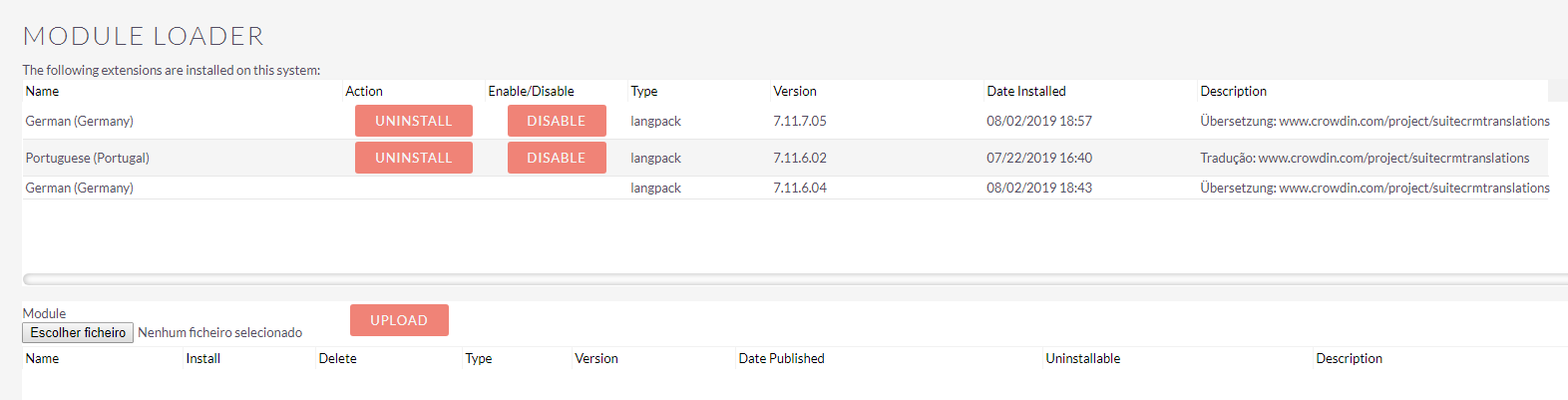
Suitecrm log got this line only:
Fri Aug 2 18:58:03 2019 [11152][1][ERROR] fromUser: Conversion of from user format m/d/Y H:i failed
horus68
on 2 Aug 2019
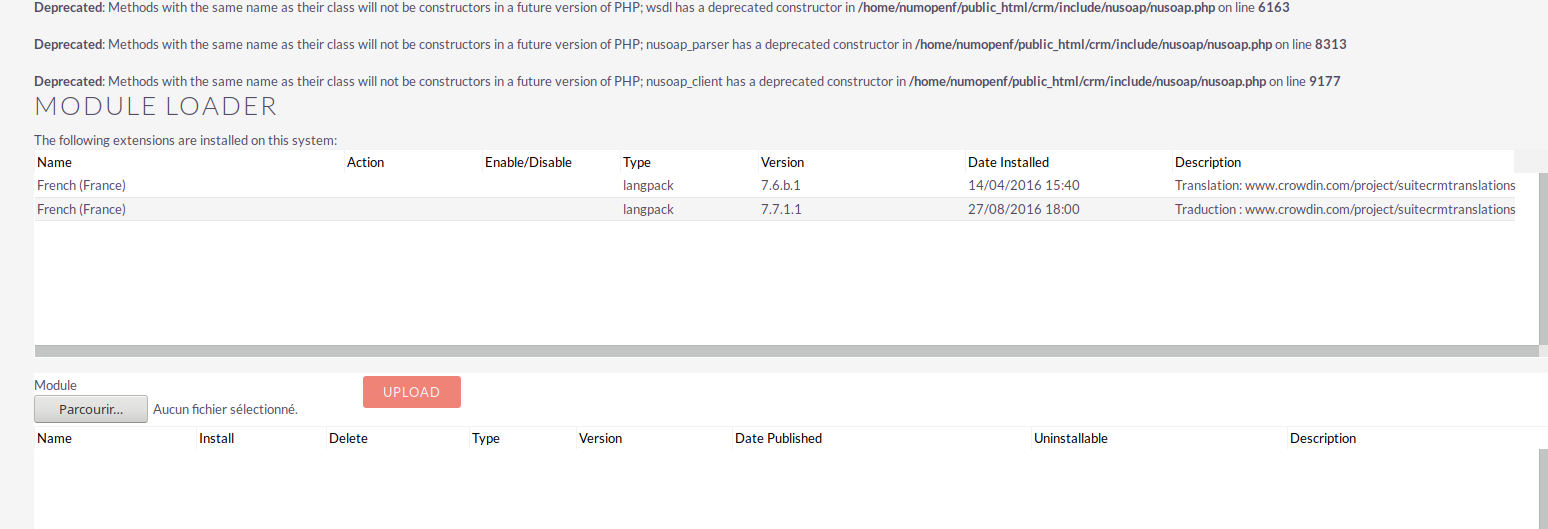
Before installing the last version of the french package, I had already the 2 older versions, without Disable/remove buttons. So, I was not able to remove them and I installed the last version.
Now, I login as english and disabled and removed the last version and the 2 old versions are still here, I can't remove them :
 InfoLibre
on 9 Dec 2019
InfoLibre
on 9 Dec 2019
Having a wee gander at the code here and actually removing the UNINSTALL button is by design.
https://github.com/salesagility/SuiteCRM/blob/7.10.x/ModuleInstall/PackageManager/PackageManager.php#L878
https://github.com/salesagility/SuiteCRM/blob/7.10.x/modules/Administration/UpgradeHistory.php#L184
The PackageManager actually checks previous uploaded packages and compare versions and will state that you can't uninstall an older version whilst the newer version exists.
So if you had a version 7.7.4.4 Then the previous ones 7.7.3.x would be uninstall-able.
Whoops - hit send too quickly... To be Continued...
Continued:
However I have seen a few issues with this...
It appears that this function UninstallAvailable only compares the patch previously so in my case this happens which is incorrect.

However, as expected if I remove my previously installed installation packs then the one that was 'uninstallable' will become actionable again.
I'm not arguing that this is a non issue, but I think the latest OP has a bigger issue than the issue states as in his case he now physically can't remove their previously installed packages.
However I don't believe this issue is the same as the previous posters. This one I suspect is the other conditions of the UninstallAvailable which could be:
1) Package doesn't exist anymore - try checking your upload/upgrades/langpacks and see if all the zip folders are there. If they are not there we have to cross that bridge when we get there.
2) Packages Do exist but MD5 is diff from the upgrade_history entry in the database. It's hard to check this but I'm hoping it's the previous issue potentially.
 samus-aran
on 9 Dec 2019
samus-aran
on 9 Dec 2019
For me, if i'm uploading a new language pack the old one should be removed from the list and never to be shown again!
Maybe on plugins it could be useful to roll back, but not in Language packs
horus68
on 9 Dec 2019
Related issues
 jellydonuts
·
3Comments
jellydonuts
·
3Comments
 daschenbrener
·
3Comments
daschenbrener
·
3Comments
 Mausino
·
3Comments
Mausino
·
3Comments
 darouca
·
3Comments
pgorod
·
3Comments
darouca
·
3Comments
pgorod
·
3Comments